
1. Inleiding
This manual provides instructions for the Ceybo EN2D36H ZDA1221216 Replacement Remote Control. This remote is designed to be fully compatible with various Hisense VIDAA Smart TV models, offering a direct replacement without the need for complex programming. Simply insert batteries, and the remote is ready for use.
The remote features dedicated shortcut buttons for popular streaming services, allowing quick access to your favorite entertainment platforms.
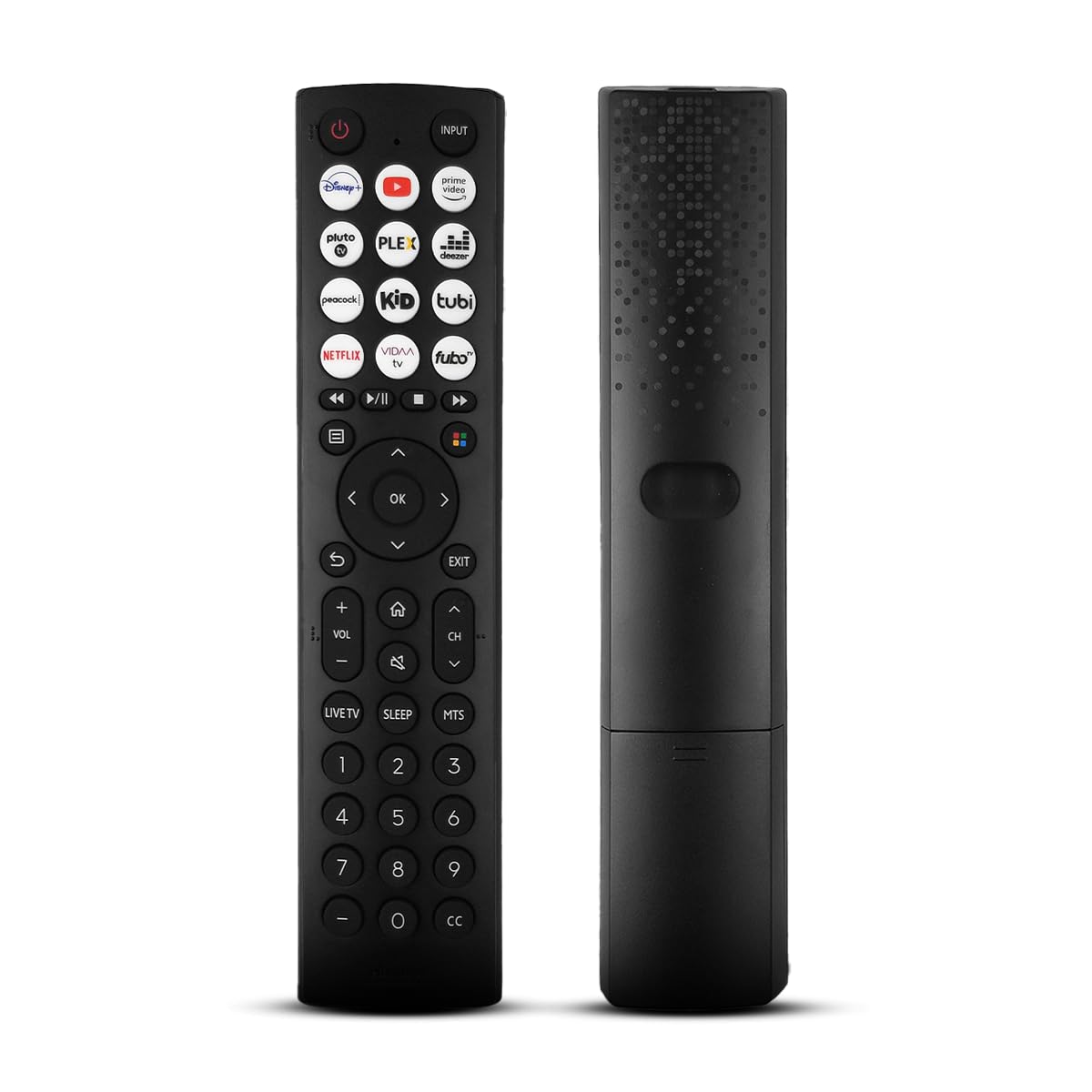
Een voorkant view of the Ceybo EN2D36H ZDA1221216 replacement remote control, designed for Hisense televisions.
2. Kenmerken
- Brede compatibiliteit: Works with Hisense A4 Series UHD TVs and A6 Series UHD Smart TVs, including models such as 32A35HUV, 32A45GV, 40A35HUV, 40A45GV, 43A6GV, 43A35HUV, 43A45GV, 50A6GV, 55A6GV, and 65A6GV.
- Instant Streaming Access: Dedicated shortcut buttons for Disney+, YouTube, Prime Video, Pluto TV, Plex, Deezer, Peacock, Kidoodle, Tubi, Netflix, Vida, and Fubo.
- Plug & Play-functionaliteit: No setup or programming required. The remote is ready to use immediately after battery installation.
- Full TV Control: Provides comprehensive control over TV functions including power, volume, input selection, channel navigation, and menu access.
- Ergonomisch ontwerp: Lichtgewicht en ontworpen voor comfortabel gebruik.

This image displays the Ceybo EN2D36H ZDA1221216 remote control alongside several Hisense televisions, illustrating its compatibility with Hisense A4 and A6 Series UHD Smart TVs.
3. Instellen
The Ceybo EN2D36H ZDA1221216 remote control is designed for immediate use without any programming steps.
3.1 Batterij installatie
- Zoek het batterijcompartiment aan de achterkant van de afstandsbediening.
- Schuif het batterijklepje naar beneden of druk op de vergrendeling en til het omhoog om het te openen.
- Plaats twee (2) AAA-batterijen en zorg ervoor dat de positieve (+) en negatieve (-) polen correct zijn uitgelijnd met de markeringen in het compartiment.
- Plaats het batterijklepje terug door het terug te schuiven totdat het goed vastklikt.
Once batteries are installed, the remote is ready to operate your compatible Hisense TV.

This image illustrates the battery compartment of the remote control, indicating that it is powered by two AAA batteries for lasting performance.

This image emphasizes the effortless setup of the remote control, stating that it requires no pairing and is ready to use immediately after battery insertion.
4. Gebruiksaanwijzing
Point the remote control directly at your Hisense TV's infrared receiver for optimal performance.
4.1 Basisfuncties
- Aanknop (⏻): Druk op om de tv aan of uit te zetten.
- Invoerknop: Press to cycle through available input sources (HDMI, AV, etc.).
- Volume omhoog/omlaag (VOL +/-): Hiermee kunt u het volume van de tv aanpassen.
- Kanaal omhoog/omlaag (CH +/-): Verandert het TV-kanaal.
- Dempknop (🔇): Dempt of heft het geluid van de tv op.
4.2 Navigatie en menu
- Richtingstoetsen (Omhoog, Omlaag, Links, Rechts): Navigates through menus and on-screen options.
- OK-knop: Bevestigt selecties of opent menu's.
- Terug knop (↩): Keert terug naar het vorige scherm of menu.
- Afsluitknop: Sluit het huidige menu of de huidige toepassing.
- Thuis knop (🏠): Geeft toegang tot het hoofdmenu of startscherm van de tv.
4.3 Streaming Shortcut Buttons
Press any of the dedicated shortcut buttons to directly launch the corresponding streaming application:
- Disney+
- YouTube
- Prime-video
- Pluto-tv
- Plex
- Deezer
- Pauw
- Kidoodle
- Buis
- Netflix
- Leven
- Fubo

The remote control is shown with a magnified view of its dedicated shortcut buttons for popular streaming services like Disney+, YouTube, Prime Video, Pluto TV, Plex, Deezer, Peacock, Kidoodle, Tubi, Netflix, Vida, and Fubo.

The remote control is presented to highlight its user-friendly design, featuring large and clearly labeled buttons for intuitive navigation and access to all functions.
5. Onderhoud
5.1 Reinigen
Gebruik een zachte, droge doek om de afstandsbediening schoon te maken. Bij hardnekkig vuil lichtjes afnemen.ampen the cloth with water. Avoid using harsh chemicals, abrasive cleaners, or solvents, as these can damage the remote's surface or internal components.
5.2 Batterij vervangen
Replace batteries when the remote's response becomes sluggish or it stops functioning. Always replace both AAA batteries at the same time with new ones. Do not mix old and new batteries, or different types of batteries, as this can lead to leakage or improper operation. Dispose of used batteries according to local regulations.
6. Probleemoplossing
If you experience issues with your Ceybo EN2D36H ZDA1221216 remote control, refer to the following common solutions:
| Probleem | Mogelijke oorzaak | Oplossing |
|---|---|---|
| De afstandsbediening werkt niet. | Batterijen zijn leeg of verkeerd geplaatst. | Vervang de batterijen door nieuwe AAA-batterijen en let daarbij op de juiste polariteit (+/-). |
| De afstandsbediening reageert niet. | Er zit een obstakel tussen de afstandsbediening en de tv, of de afstandsbediening zit te ver weg. | Zorg voor een vrije zichtlijn naar de IR-ontvanger van de tv. Ga dichter bij de tv staan. |
| Bepaalde knoppen werken niet. | Dirt or debris under the button, or internal malfunction. | Clean the remote. If the issue persists, the remote may require replacement. |
| TV does not respond to remote. | TV's IR receiver is blocked or malfunctioning. | Check the TV's IR receiver for obstructions. Test with another remote if available to confirm TV functionality. |
7. Specificaties
- Merk: Ceybo
- Modelnaam: EN2D36H ZDA1221216
- Connectiviteitstechnologie: Infrarood (IR)
- Type controller: Knopbediening
- Compatibele apparaten: Television (Hisense VIDAA Smart TVs)
- Energiebron: 2 x AAA-batterijen (niet inbegrepen)
- Maximaal bereik: 30 voet (ongeveer 9 meter)
- Speciale kenmerken: Ergonomic, Lightweight, No Programming Required
- Kleur: Zwart
8. Garantie en ondersteuning
For warranty information or technical support, please refer to the product packaging or contact Ceybo customer service through the retailer where the product was purchased. Keep your purchase receipt as proof of purchase.