Invoering
This manual provides comprehensive instructions for the setup, operation, maintenance, and troubleshooting of your Generic BW9 4G Smart Watch. Please read this manual thoroughly before using your device to ensure proper function and longevity.
Inhoud van het pakket
Controleer of alle artikelen in de verpakking van uw product aanwezig zijn:
- Generic BW9 4G Smart Watch (with Orange Band)
- Oplaadkabel
- Gebruikershandleiding (dit document)
- SIM-uitwerptool (indien van toepassing)
Product voorbijview
The BW9 4G Smart Watch is an advanced wearable device featuring 4G cellular connectivity, a built-in camera, and comprehensive fitness tracking capabilities. It operates on an Android system and supports various applications.
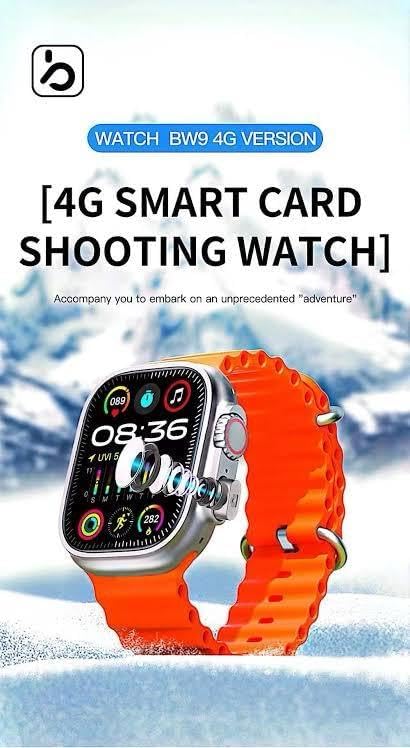
Figure 1: Generic BW9 4G Smart Watch with its distinctive orange silicone band.
Belangrijkste kenmerken zijn:
- 4G-connectiviteit: Built-in SIM card slot for cellular calls, messages, and internet access.
- Touchscreen met hoge resolutie: Vibrant display with customizable watch faces.
- Slimme functies: Fitness tracking, heart rate monitoring, camera control, and social media notifications.
- Duurzaam ontwerp: Metal case with a comfortable orange silicone strap.
- App-compatibiliteit: Supports applications like Chrome, camera functions, and Facebook.

Figuur 2: Overview of BW9 4G Smart Watch features, including SIM card support, camera, and 4G connectivity.
Instellen
1. Het apparaat opladen
Before first use, fully charge your BW9 4G Smart Watch. Connect the charging cable to the watch's charging port and plug the other end into a standard USB power adapter (not included) or a computer's USB port. The watch display will indicate charging status.
2. SIM-kaartinstallatie
The BW9 4G Smart Watch supports a Nano-SIM card for 4G cellular connectivity. Ensure the watch is powered off before inserting or removing the SIM card.
- Zoek het SIM-kaartslot aan de zijkant van het horloge.
- Use the provided SIM ejector tool (if applicable) or a small pin to open the SIM tray.
- Carefully place the Nano-SIM card into the tray with the gold contacts facing down and the cut corner aligned correctly.
- Duw de simkaarthouder voorzichtig terug in de sleuf totdat u een klik hoort.
- Power on the watch. The device will automatically detect the SIM card.
3. Eerste keer inschakelen en koppelen
- Houd de aan/uit-knop (meestal aan de zijkant van het horloge) ingedrukt totdat het scherm oplicht.
- Volg de instructies op het scherm om uw taal en regio te selecteren.
- To pair with your Android smartphone, download the recommended companion app (refer to the watch's on-screen instructions or packaging for the app name) from the Google Play Store.
- Enable Bluetooth on your smartphone and open the companion app.
- Follow the app's instructions to search for and connect to your BW9 4G Smart Watch.
- Grant necessary permissions on both your watch and smartphone for full functionality.
Gebruiksaanwijzing
Basisnavigatie
- Veeg omhoog/omlaag: Toegang tot snelle instellingen of meldingen.
- Veeg naar links/rechts: Navigate between different watch faces, widgets, and app screens.
- Kraan: Selecteer een item of open een applicatie.
- Druk op de zijknop: Return to the home screen or access the app drawer.
- Lang indrukken van de zijknop: Power on/off or access voice assistant (if configured).
Making Calls and Sending Messages (with SIM Card)
With an active SIM card, your watch can make and receive calls and messages independently.
- Oproepen: Open the "Phone" app, dial a number, or select a contact.
- Berichten: Open the "Messages" app to compose new messages or reply to existing ones.
De camera gebruiken
The BW9 4G Smart Watch features a built-in camera.
- Open the "Camera" app from the app drawer.
- Frame your shot using the watch screen as a viewvinder.
- Tik op het sluiterpictogram om een foto te maken of een video-opname te starten/stoppen.
- Access your photos and videos in the "Gallery" app.
Fitness Tracking and Health Monitoring
The watch includes sensors for tracking various health metrics.
- Stappen: The pedometer automatically counts your daily steps.
- Hartslag: Open the "Heart Rate" app to measure your current heart rate. For continuous monitoring, enable the feature in settings.
- Andere modi: Explore various sport modes (e.g., running, walking) within the fitness app to track specific activities.
Notifications and Apps
- Meldingen: Veeg omlaag vanaf de bovenkant van het scherm om view incoming notifications from your paired smartphone or directly from the watch's SIM card.
- Toepassingen: Access pre-installed apps like Chrome, Facebook, and others from the app drawer. Additional apps may be downloadable via the watch's app store (if available) or pushed from your paired smartphone.
Onderhoud
Schoonmaak
- Veeg het scherm en de behuizing van het horloge schoon met een zachte, pluisvrije doek.
- Voor hardnekkige vlekken, lichtjes dampMaak de doek schoon met water. Vermijd agressieve chemicaliën of schurende materialen.
- Maak de laadcontacten regelmatig schoon om efficiënt opladen te garanderen.
Verzorging en opslag
- Avoid exposing the watch to extreme temperatures, direct sunlight for prolonged periods, or high humidity.
- While the watch may have some water resistance, avoid submerging it in water unless explicitly stated in the specifications for your specific model.
- Bewaar het horloge op een koele, droge plaats wanneer u het niet gebruikt.
Probleemoplossing
Horloge gaat niet aan
- Zorg ervoor dat het horloge volledig is opgeladen. Sluit het minstens 30 minuten aan op de oplader.
- Probeer een andere oplaadkabel of stroomadapter.
- Voer een soft reset uit door de aan/uit-knop 10-15 seconden ingedrukt te houden.
SIM Card Not Detected / No Network
- Zorg ervoor dat de simkaart correct in de houder is geplaatst en dat de houder volledig vastzit.
- Verify that the SIM card is active and has a valid data plan from your carrier.
- Start het horloge opnieuw.
- Check network settings on the watch to ensure 4G is enabled.
Problemen met Bluetooth-koppeling
- Zorg ervoor dat Bluetooth is ingeschakeld op zowel het horloge als je smartphone.
- Zorg ervoor dat het horloge zich binnen het bereik van je smartphone bevindt.
- Forget the device from your smartphone's Bluetooth settings and attempt to pair again through the companion app.
- Start zowel het horloge als de smartphone opnieuw op.
Inaccurate Fitness Tracking
- Zorg ervoor dat het horloge goed aansluit op uw pols, maar niet te strak zit.
- Calibrate the fitness tracking features through the companion app if available.
- Ensure your personal information (height, weight, age) is accurately entered in the app.
Specificaties
| Merk | Algemeen |
| Modelnaam | BW9 4G |
| Besturingssysteem | Androïde |
| Weergaveformaat | 1.3 inch |
| Connectiviteit | 4G (SIM Card Slot), Bluetooth |
| Speciale kenmerken | Fitness Tracker, Heart Rate Monitor, Camera, GPS |
| Compatibele apparaten | Android-smartphones |
| Vorm | Rechthoekig |
| Color (Band) | Oranje |
Garantie-informatie
This Generic BW9 4G Smart Watch comes with a manufacturer's warranty of 2 maanden Deze garantie geldt vanaf de aankoopdatum. De garantie dekt fabricagefouten bij normaal gebruik. Schade veroorzaakt door verkeerd gebruik, ongelukken, ongeautoriseerde aanpassingen of normale slijtage valt niet onder de garantie.
Please retain your proof of purchase for warranty claims. For service, refer to the support section.
Steun
For technical assistance, troubleshooting beyond this manual, or warranty inquiries, please contact your retailer or the manufacturer's customer support. Refer to the product packaging or the retailer's website voor specifieke contactgegevens.


