
1. Inleiding
This manual provides comprehensive instructions for the operation and maintenance of your BAOFENG UV-32 Ham Radio. Please read this manual thoroughly before using the device to ensure proper function and safety.

Image: The BAOFENG UV-32 Ham Radio, showcasing its display and robust design.
2. Producteigenschappen
- Dual GPS/BeiDou Tracking: Share and request location coordinates in real-time, essential for off-grid communication.
- Programmeren van de Bluetooth-app: Wirelessly configure up to 1000 channels using a mobile application.
- Instelbaar uitgangsvermogen: Select between 10W, 5W, or 1W to optimize range and battery life.
- One-touch Frequency Scan: Quickly clone channels for efficient setup.
- HD-audio: Equipped with a 40mm speaker for clear communication in noisy environments.
- Multi-band Monitoring: Supports AM/FM/VHF/UHF bands, including 108-136MHz for aviation.
- 1000-Channel Storage: Organize channels across 10 zones for various operational needs.
- Opladen via USB-C: Convenient charging via USB-C ports, power banks, or car adapters.
- Dual Display/Dual Guard: Monitor twee frequenties tegelijk.

Image: Visual representation of the BAOFENG UV-32's key functions and features.
3. Inhoud van het pakket
Controleer of alle artikelen in uw pakket aanwezig zijn:
- BAOFENG UV-32 radio-eenheid
- Antenne
- Batterij (niet-standaard batterij)
- Charger (Desktop Dock and AC Adapter)
- Draagkoord
- Gebruikershandleiding (dit document)
- Back Clip (for "1 Pack Black+Back Clip" variant)

Image: The BAOFENG UV-32 radio with its back clip, demonstrating portability.
4. Installatiehandleiding
4.1 Batterij installatie
- Plaats de batterij in de groeven aan de achterkant van de radio.
- Schuif de batterij omhoog totdat deze vastklikt.
- Om de batterij te verwijderen, drukt u op de batterijvergrendeling (indien aanwezig) en schuift u de batterij naar beneden.
4.2 Antennebevestiging
- Draai de antenne met de klok mee in de connector bovenop de radio tot deze handvast zit. Draai hem niet te vast.
4.3 De batterij opladen
The UV-32 supports two charging methods:
- Bureaulader: Place the radio (with battery installed) into the charging dock. Ensure the charging contacts align. The indicator light will show charging status.
- Direct opladen via USB-C: Connect a USB-C cable to the port on the side of the radio and to a power source (e.g., computer, wall adapter, power bank, car charger).
Charge the battery fully before first use. A full charge typically takes several hours.

Image: Demonstrates the versatility of Type-C charging for the BAOFENG UV-32.
5. Gebruiksaanwijzing
5.1 Aan/uit en volume
- Inschakelen: Draai de VERMOGEN/VOLUME knob clockwise until you hear a click.
- Volume aanpassen: Continue rotating the knob to increase or decrease the volume.
- Uitschakelen: Draai de knop tegen de klok in tot u een klik hoort.
5.2 Kanaalselectie
Gebruik de OMHOOG/OMLAAG arrow keys or the numeric keypad to select a channel. The display will show the current channel number and frequency.
5.3 Verzenden (PTT)
Om te verzenden, houdt u de PTT (push-to-talk) button on the side of the radio. Speak clearly into the microphone. Release the PTT button to receive.
5.4 Dubbel scherm / Dubbele beveiliging
The UV-32 can monitor two frequencies simultaneously. Activate the Dual Guard function through the radio's menu or a dedicated button (refer to the on-screen interface for specific options).

Image: The radio's screen displaying the Dual Watch feature, allowing simultaneous monitoring of two channels.
5.5 APP Programming (Bluetooth)
- Download the "Radio Frequency Programmer" mobile application from your device's app store.
- Enable Bluetooth on your mobile device and the UV-32 radio.
- Open de app en volg de instructies op het scherm om verbinding te maken met je radio.
- You can then wirelessly edit channel information, frequencies, and other settings.

Image: The BAOFENG UV-32 in programming mode, with a smartphone displaying the channel programming application.
5.6 One-touch Frequency Scan / Copy Frequency
This feature allows for quick cloning of frequencies from another radio. Press and hold the designated scan button (e.g., SK1) to initiate the smart scan and copy process. The radio will detect and store the active frequency.

Image: Illustration of the one-key frequency pairing feature between two BAOFENG UV-32 radios.
5.7 Instelbaar vermogen
Access the menu to select your desired power output: 10W (High), 5W (Mid), or 1W (Low). Higher power provides greater range but consumes more battery. Lower power conserves battery for shorter distances.
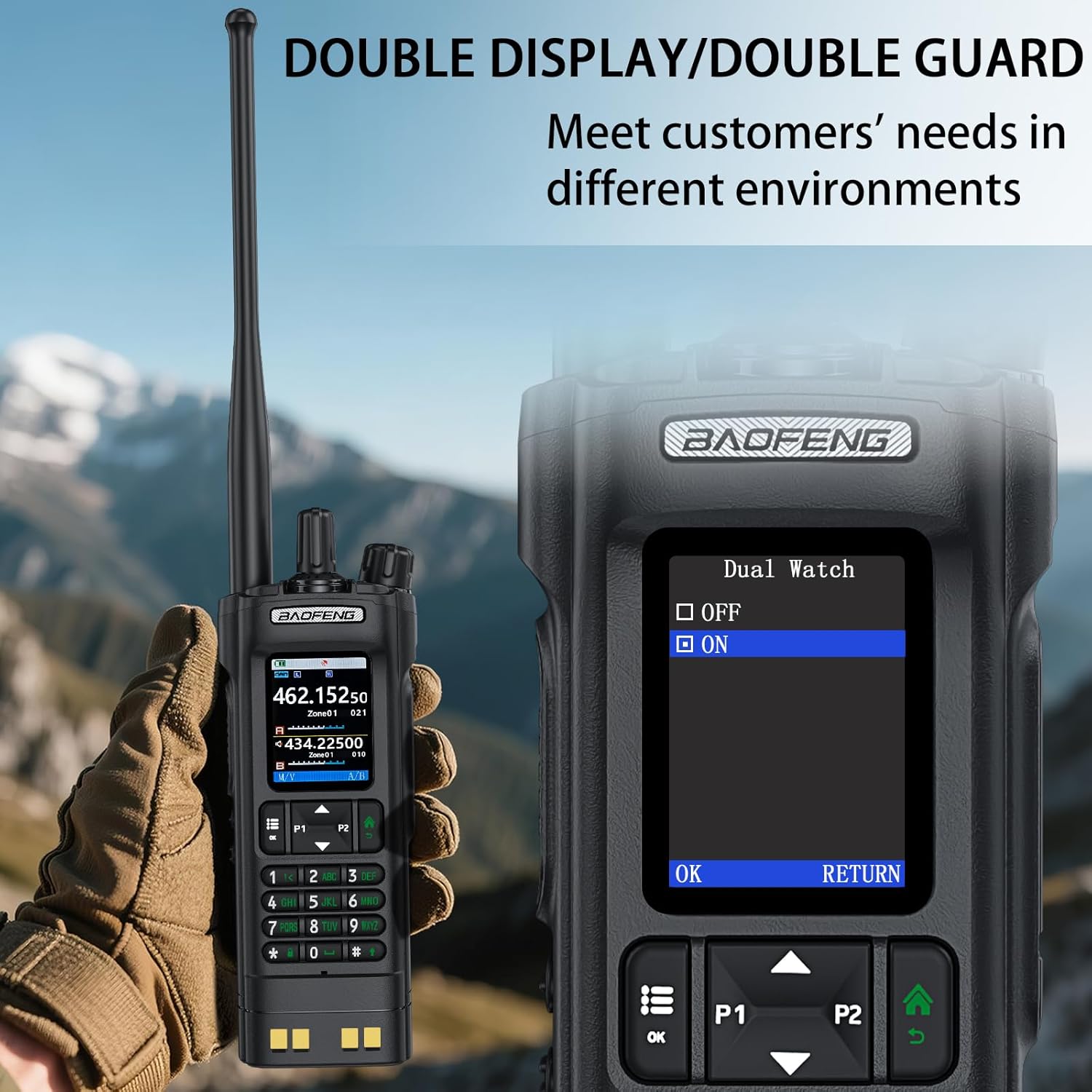
Image: The BAOFENG UV-32's power adjustment menu, showing options for 10W, 5W, and 1W output.
5.8 GPS/BeiDou Tracking
The integrated GPS/BeiDou module allows for real-time location sharing. Refer to the radio's menu for GPS functions, including sending your coordinates and requesting those of other UV-32 users.
6. Onderhoud
- Schoonmaak: Gebruik een zachte, damp doek om de buitenkant van de radio schoon te maken. Gebruik geen agressieve chemicaliën of oplosmiddelen.
- batterij zorg: Vermijd het regelmatig volledig ontladen van de batterij. Bewaar de radio en batterij op een koele, droge plaats wanneer u ze langere tijd niet gebruikt.
- Antenne: Zorg ervoor dat de antenne stevig vastzit, maar niet te strak. Vermijd buigen of belasten van de antenne.
- Waterbestendigheid: Dit apparaat is Niet waterbestendigBescherm het tegen regen, spetters en onderdompeling in water.
7. Probleemoplossing
| Probleem | Mogelijke oorzaak | Oplossing |
|---|---|---|
| De radio gaat niet aan. | De batterij is bijna leeg of niet goed geplaatst. | Laad de batterij op of plaats deze opnieuw op de juiste manier. |
| Kan niet verzenden of ontvangen. | Onjuiste frequentie/kanaal, lage batterijspanning of antenneprobleem. | Verify frequency, charge battery, check antenna connection. Ensure you are within range of other radios. |
| Slechte geluidskwaliteit. | Een zwak signaal, storingen of een onjuiste squelch-instelling. | Move to an area with better signal, adjust squelch level, check for sources of interference. |
| APP programming fails to connect. | Bluetooth not enabled, app not updated, or radio not in programming mode. | Ensure Bluetooth is on for both devices, update the app, and follow app instructions to put the radio in programming mode. |
8. Specificaties
| Merk | BAOFENG |
| Modelnummer | UV-32 |
| Aantal kanalen | 1000 |
| Frequentiebereik | UHF350-390/400-520MHz, VHF136-174MHz/220-260MHz |
| Spreekbereik Maximaal | 10 kilometer (ongeveer 6.2 mijl) |
| Vermogensafgifte | 10W / 5W / 1W (instelbaar) |
| Deeltage | 7.4 Volt (DC) |
| Waterbestendigheidsniveau | Niet waterbestendig |
| Connectiviteitsprotocol | Bluetooth |
| Oplaadtype | USB-C, Desktop Dock |
| Afmetingen (ongeveer) | Hoogte: 6.26 inch, Breedte: 2.28 inch, Diepte: 1.57 inch |
| Gewicht (ongeveer) | 13.58 gram |

Image: Detailed dimensions and weight of the BAOFENG UV-32 radio.
9. Garantie en ondersteuning
Your BAOFENG UV-32 Ham Radio comes with a 1 jaar garantie vanaf de aankoopdatum. Deze garantie dekt fabricagefouten bij normaal gebruik.
For technical support, warranty claims, or service inquiries, please contact BAOFENG customer service through their official webwebsite of de winkel waar het product is gekocht. Bewaar uw aankoopbewijs voor garantievalidatie.