
1. Inleiding
This manual provides detailed instructions for the assembly, operation, maintenance, and troubleshooting of your FLEXISPOT EB2 electric height-adjustable desk frame. Please read this manual thoroughly before installation and use to ensure proper function and safety.
The FLEXISPOT EB2 desk frame features dual motors for smooth and quiet height adjustments, a wide height adjustment range, and a smart control panel with memory functions. It is designed to support various desktop sizes, offering flexibility for your workspace.
2. Veiligheidsinformatie
- Volg altijd zorgvuldig de montage-instructies.
- Ensure the desk frame is securely mounted to the tabletop to prevent tipping.
- Do not exceed the maximum weight recommendation of 100 kg (dynamic load) or 125 kg (static load) to maintain stability and safety.
- Houd kinderen en huisdieren uit de buurt van het bureau tijdens gebruik.
- Zorg ervoor dat er geen obstakels in de weg staan tijdens het verstellen van de hoogte van het bureau.
- Do not open the motor housing or attempt to repair the unit yourself. Contact customer support for assistance.
- Schakel de stroom uit voordat u het apparaat reinigt of onderhoudt.
3. Inhoud van het pakket
Controleer of alle onderdelen aanwezig zijn voordat u met de montage begint. Het pakket bevat doorgaans:
- Desk Legs (2) with integrated motors
- Crossbar/Frame (adjustable width)
- Control Panel with digital display
- Voedingsadapter en kabel
- Alle benodigde schroeven, bouten en gereedschap voor de montage.
- Cable management accessories (e.g., clips, hooks)
4. Opstelling en montage
Voor dit product is montage vereist. Volg de stapsgewijze instructies in de aparte montagehandleiding die bij uw aankoop is meegeleverd. Zorg voor voldoende ruimte en schakel indien nodig hulp in.
Belangrijke overwegingen bij de montage:
- Desktopcompatibiliteit: The frame is designed for tabletops with a width of 120 cm to 180 cm and a depth of 60 cm to 80 cm. The frame width is adjustable from 107 cm to 160 cm.
- Veilige bevestiging: Ensure all screws are tightened securely, especially those connecting the desktop to the frame.
- Kabelbeheer: Utilize the provided cable management solutions to keep wires tidy and prevent interference with desk movement.
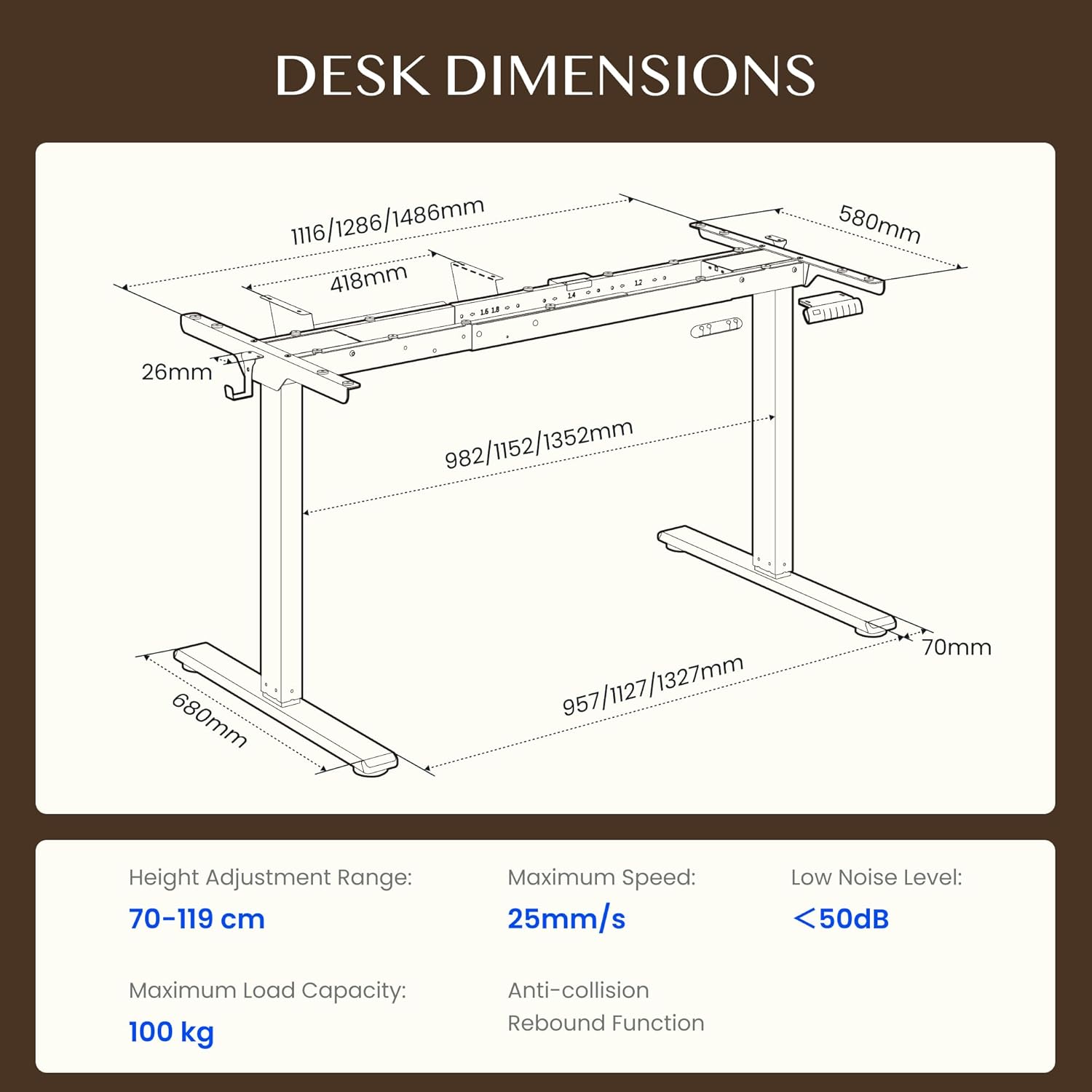
Figure 4.1: Detailed dimensions of the FLEXISPOT EB2 desk frame, showing adjustable width and height ranges, and overall structural measurements.

Figure 4.2: Illustration demonstrating the adaptable desktop size range for the FLEXISPOT EB2 frame, indicating minimum and maximum dimensions for compatible tabletops.
5. Gebruiksaanwijzing
5.1 Inschakelen
Connect the power cable to the desk frame and then to a standard electrical outlet. The digital display on the control panel should illuminate.
5.2 Hoogte aanpassen
Gebruik de Up En Omlaag arrow buttons on the control panel to manually adjust the desk height. The height range is from 70 cm to 119 cm.

Figure 5.1: Visual representation of the desk's height adjustment range, illustrating the minimum and maximum heights achievable with the FLEXISPOT EB2 frame.
5.3 Geheugenpresets
The control panel features 4 memory preset buttons (1, 2, 3, 4) to save and recall your preferred sitting and standing heights.
- Pas de hoogte van het bureau aan met de omhoog-/omlaagknoppen.
- Press and hold one of the memory buttons (1, 2, 3, or 4) until the display flashes or beeps, indicating the height has been saved.
- To recall a saved height, simply press the corresponding memory button. The desk will automatically move to that position.

Figuur 5.2: Close-up view of the smart control panel, highlighting the Up/Down buttons, 4 memory presets, and LED display for effortless height adjustment.
5.4 Sit/Stand Reminder
The control panel may include a sit/stand reminder button. Consult your specific control panel's instructions for activation and customization of reminder intervals.
5.5 Anti-botsingssysteem
The desk frame is equipped with an anti-collision system. If the desk encounters an obstruction during height adjustment, it will automatically stop and reverse slightly to prevent damage.

Figure 5.3: Diagram illustrating the powerful dual motor system of the FLEXISPOT EB2, emphasizing stability, quiet operation, and efficiency.

Afbeelding 5.4: Examples of simple desk helpers, including under-desk cable management, side hooks, and adhesive cable clips, designed to keep your workspace organized.
6. Onderhoud
- Schoonmaak: Veeg het bureauframe af met een droge doek. Vermijd het gebruik van schurende reinigingsmiddelen of agressieve chemicaliën die de afwerking kunnen beschadigen.
- Inspectie: Controleer regelmatig alle schroeven en verbindingen om er zeker van te zijn dat ze nog goed vastzitten. Draai ze indien nodig opnieuw vast.
- Kabelbeheer: Ensure cables are not pinched or tangled, which could impede desk movement or cause damage.
7. Probleemoplossing
If you encounter issues with your FLEXISPOT EB2 desk frame, refer to the following common troubleshooting steps:
- Bureau beweegt niet: Check if the power cable is securely connected to both the desk and the wall outlet. Ensure the outlet is functional.
- Onregelmatige beweging of vreemde geluiden: Ensure the desk is not overloaded. Check for any obstructions under or around the desk. Verify that all assembly screws are tight.
- Foutcodes op het display: Refer to the specific error code in your detailed assembly guide or contact customer support for assistance.
- Het systeem resetten: Some issues can be resolved by performing a system reset. Consult your assembly guide for specific reset procedures, which often involve holding down certain buttons.
If the problem persists after attempting these steps, please contact FLEXISPOT customer support.
8. Specificaties
| Functie | Specificatie |
|---|---|
| Merk | FLEXISPOT |
| Modelnummer | EB2B-EU |
| Hoogteverstellingsbereik | 70 cm tot 119 cm (27.56" tot 46.85") |
| Frame Width (Adjustable) | 107 cm tot 160 cm (42.13" tot 62.99") |
| Aanbevolen breedte van het tafelblad | 120 cm tot 180 cm (47.24" tot 70.87") |
| Recommended Tabletop Depth | 60 cm tot 80 cm (23.62" tot 31.50") |
| Maximale laadcapaciteit | 100 kg (220 lbs) dynamic, 125 kg (275 lbs) static |
| Motortype | Dubbele motoren |
| Aanpassingssnelheid | 2.5 cm/s (1 inch/s) |
| Geluidsniveau | <50dB |
| Stand-by stroomverbruik | <0.5 W |
| Bedieningspaneel | 7-button digital display with 4 memory presets |
| Materiaal | Gelegeerd staal |
| Artikelgewicht | 28 kilogram (61.7 lbs) |
| Speciale kenmerken | Anti-collision system, Sit/Stand reminder |
9. Garantie
The FLEXISPOT EB2 desk frame comes with a limited warranty. Please refer to the warranty card included with your product or visit the official FLEXISPOT website voor gedetailleerde voorwaarden met betrekking tot dekking en duur.
10. Klantenservice
For technical assistance, warranty claims, or any questions regarding your FLEXISPOT EB2 desk frame, please contact FLEXISPOT customer support through their official webwebsite of de contactgegevens die op de verpakking van uw product staan.
Please have your model number (EB2B) and purchase information ready when contacting support.