
1. Inleiding
Thank you for choosing the FLEXISPOT H5 Laptop Support Table. This manual provides essential information for the safe assembly, operation, and maintenance of your new adjustable mobile desk. Please read these instructions carefully before use and retain them for future reference.
The FLEXISPOT H5 is designed for versatile use, offering manual height adjustment and a tilting tabletop to enhance comfort while working, reading, or dining from your sofa, bed, or armchair.
2. Veiligheidsinformatie
WAARSCHUWING:
- Overschrijd het maximale draagvermogen niet 7 kg (15.4 lbs)Overbelasting kan instabiliteit en schade veroorzaken.
- Avoid placing heavy or unstable objects near the edge of the tabletop to prevent them from falling.
- Zorg ervoor dat alle schroeven en bevestigingsmiddelen goed vastzitten vóór gebruik. Controleer regelmatig op losse verbindingen.
- Keep hands and fingers clear of moving parts during height adjustment and tabletop tilting to prevent pinching.
- Do not allow children to play with or climb on the table.
- Gebruik de tafel op een vlakke, stabiele ondergrond om omvallen te voorkomen.
3. Inhoud van het pakket
Controleer of alle onderdelen aanwezig en onbeschadigd zijn voordat u met de montage begint. Neem contact op met de klantenservice als er onderdelen ontbreken of beschadigd zijn.
- Tabletop (Maple + White Frame)
- Hoofdsteunkolom
- Base Feet (2 pieces)
- Safety Bar for Tilting Tabletop
- Montagemateriaal (schroeven, sleutel, enz.)
- Gebruiksaanwijzing
4. Opstelling en montage
The FLEXISPOT H5 table is designed for quick and easy assembly. A screwdriver is recommended, and all necessary tools are included.
- Attach the Base Feet: Securely attach the two base feet to the bottom of the main support column using the provided screws. Ensure they are oriented correctly for stability.
- Connect the Tabletop: Attach the tabletop to the top of the main support column. Align the pre-drilled holes and fasten with the appropriate screws.
- Install the Safety Bar: If desired, install the removable safety bar along the bottom edge of the tabletop. This prevents items from sliding off when the tabletop is tilted.
- Laatste controle: Schud de tafel na de montage voorzichtig om te controleren of alle verbindingen goed vastzitten en de tafel stabiel staat.

Image: FLEXISPOT H5 table showing its dimensions (60 cm x 40 cm) and maximum load capacity (7 kg).
5. Gebruiksaanwijzing
5.1. Hoogteverstelling
The table's height can be manually adjusted between 65 cm and 105 cm to suit various sitting or standing positions.
- Te verhogen: Pull the adjustment lever (handle) upwards. The tabletop will rise. Release the lever at the desired height.
- Verlagen: Pull the adjustment lever (handle) upwards and gently push the tabletop downwards. Release the lever at the desired height.

Image: Demonstrating the height adjustment feature, allowing use while sitting or standing. The table can be adjusted between 65 cm and 105 cm.
5.2. Tabletop Tilting
The tabletop can be tilted to provide an ergonomic angle for reading, writing, or using a laptop.
- Kantelen: Locate the tilting mechanism (often a lever or knob) beneath the tabletop. Engage the mechanism and adjust the tabletop to your preferred angle.
- Om te beveiligen: Release the tilting mechanism to lock the tabletop in place.
- Using the Safety Bar: If you plan to tilt the tabletop, ensure the removable safety bar is installed to prevent items from sliding off.

Image: The tilting tabletop feature, demonstrating how to adjust the angle for ergonomic use. An inset shows the simple lever for angle adjustment.
5.3. Mobiliteit
The C-shaped design and hidden casters allow for easy movement and placement of the table, making it suitable for various locations like beside a sofa, bed, or as a mobile workstation.
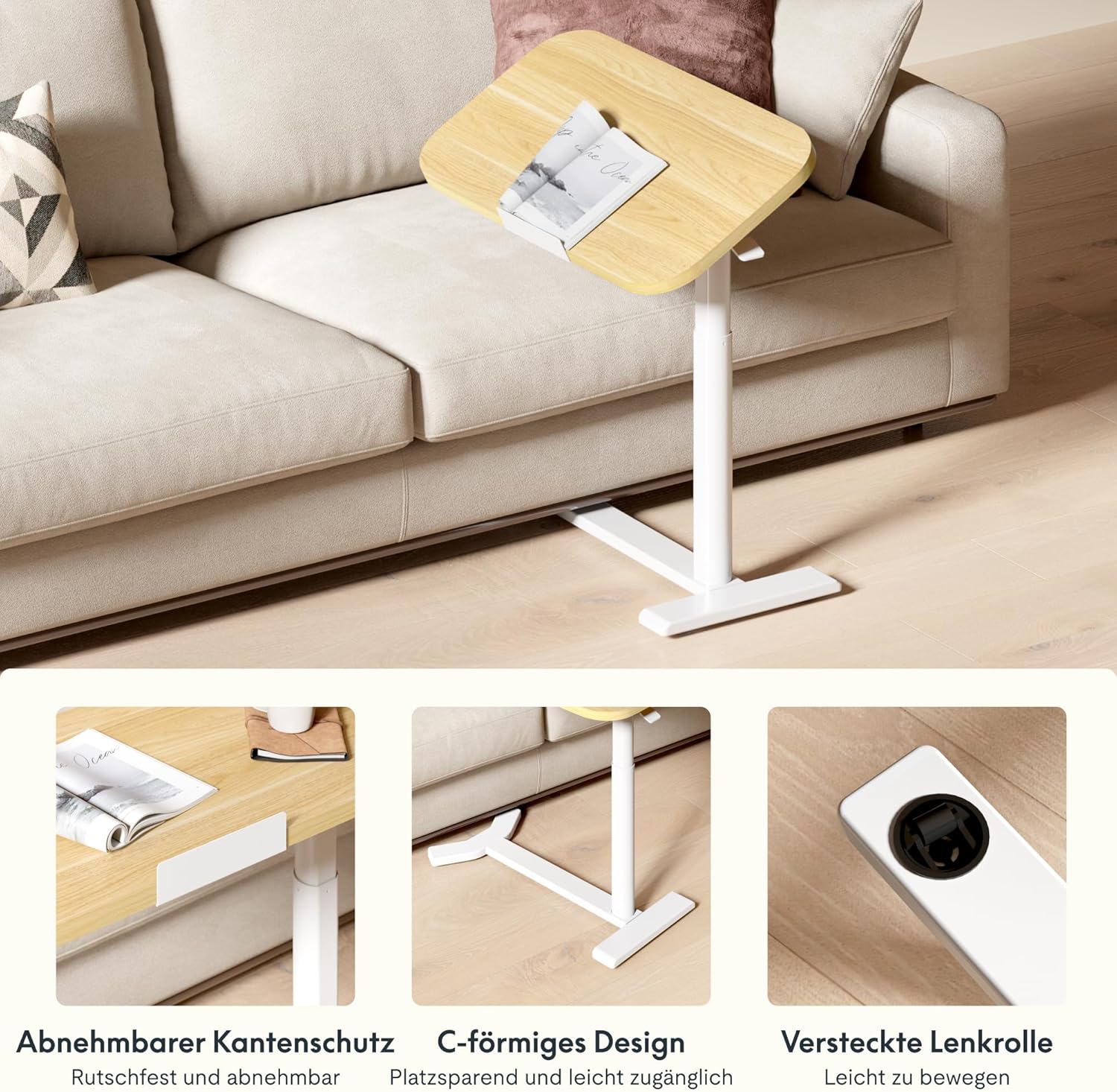
Image: Key design features including removable edge protection, the C-shaped base for easy access, and hidden casters for effortless movement.
6. Onderhoud
- Schoonmaak: Veeg het tafelblad en het frame af met een zachte, droge doek.amp cloth. Avoid abrasive cleaners or harsh chemicals that could damage the finish. The water-repellent surface allows for easy cleaning.
- Inspecties: Controleer regelmatig alle schroeven en verbindingen om er zeker van te zijn dat ze nog goed vastzitten. Draai ze indien nodig opnieuw vast.
- Laadvermogen: Always adhere to the maximum load capacity of 7 kg to prevent structural damage.
- Opslag: When not in use, store the table in a dry environment away from extreme temperatures or direct sunlight.

Image: The tabletop features rounded corners for safety and a water-repellent surface for easy cleaning.
7. Probleemoplossing
| Probleem | Mogelijke oorzaak | Oplossing |
|---|---|---|
| De tafel wiebelt of is instabiel. | Losse montageschroeven; oneffen vloer. | Check and tighten all assembly screws. Move the table to a flat, even surface. |
| De hoogteverstelling is moeilijk of zit vast. | Mechanism obstruction; excessive weight on tabletop. | Ensure no objects are obstructing the lifting mechanism. Reduce weight on the tabletop. If issues persist, contact support. |
| Tabletop does not tilt smoothly. | Tilting mechanism obstruction or damage. | Check for any debris or obstruction in the tilting mechanism. Do not force the tilt. Contact support if damaged. |
| Items slide off tilted tabletop. | Safety bar not installed or improperly installed. | Ensure the removable safety bar is correctly installed along the bottom edge of the tabletop when tilting. |
8. Specificaties
| Modelnummer: | H5-6040 |
| Merk: | FLEXISPOT |
| Afmetingen (L x B x H): | 60 x 40 x 65-105 cm (23.6 x 15.7 x 25.6-41.3 inch) |
| Instelbaar hoogtebereik: | 65 cm - 105 cm (25.6 inch - 41.3 inch) |
| Afmetingen van het tafelblad: | 60 cm x 40 cm (23.6 inch x 15.7 inch) |
| Dikte tafelblad: | 16 mm (0.63 inch) |
| Gewicht: | 9 kg (19.8 lbs) |
| Maximale laadcapaciteit: | 7 kg (15.4 lbs) |
| Materialen: | Engineered Wood (Tabletop), Wood (Frame), Metal (Base) |
| Kleur: | Maple + White Frame |
| Montage vereist: | Ja (inclusief gereedschap) |
| GTIN/UPC: | 840460424028 |
9. Garantie-informatie
FLEXISPOT products typically come with a limited warranty covering manufacturing defects. Please refer to the warranty card included with your product or visit the official FLEXISPOT website voor gedetailleerde garantievoorwaarden die specifiek zijn voor uw regio.
Bewaar uw aankoopbewijs als bewijs voor eventuele garantieclaims.
10. Klantenservice
If you have any questions, require assistance with assembly, or encounter any issues with your FLEXISPOT H5 Laptop Support Table, please contact FLEXISPOT customer service.
- Online hulp: Visit the official FLEXISPOT website voor veelgestelde vragen, ondersteuningsartikelen en contactformulieren.
- E-mailadres: Refer to your product packaging or the FLEXISPOT website voor het juiste e-mailadres voor klantenservice.
- Telefoon: Contact numbers for your region can be found on the FLEXISPOT official webplaats.
When contacting support, please have your model number (H5-6040) and purchase information readily available.