
Invoering
This manual provides comprehensive instructions for the OMAIC EN2Q36H replacement remote control, designed for Hisense Smart TVs. It covers essential information regarding setup, operation, and maintenance to ensure optimal performance and user experience. This remote offers a direct replacement solution without the need for complex programming.
Instellen
The OMAIC EN2Q36H remote control is designed for immediate use with compatible Hisense Smart TVs. No programming or pairing is required.
Batterij installatie
- Zoek het batterijcompartiment aan de achterkant van de afstandsbediening.
- Schuif het batterijklepje naar beneden of in de richting die de pijl aangeeft om het te openen.
- Plaats twee AAA-alkalinebatterijen (niet meegeleverd) en zorg ervoor dat de positieve (+) en negatieve (-) polen correct zijn uitgelijnd met de markeringen in het batterijcompartiment.
- Plaats het batterijklepje terug door het op zijn plaats te schuiven totdat het stevig vastklikt.
Once batteries are installed, the remote is ready to operate your Hisense Smart TV.

Gebruiksaanwijzing
This remote control utilizes infrared (IR) technology for communication with your Hisense Smart TV. Ensure a clear line of sight between the remote and the TV's IR receiver for optimal performance.
Belangrijkste kenmerken
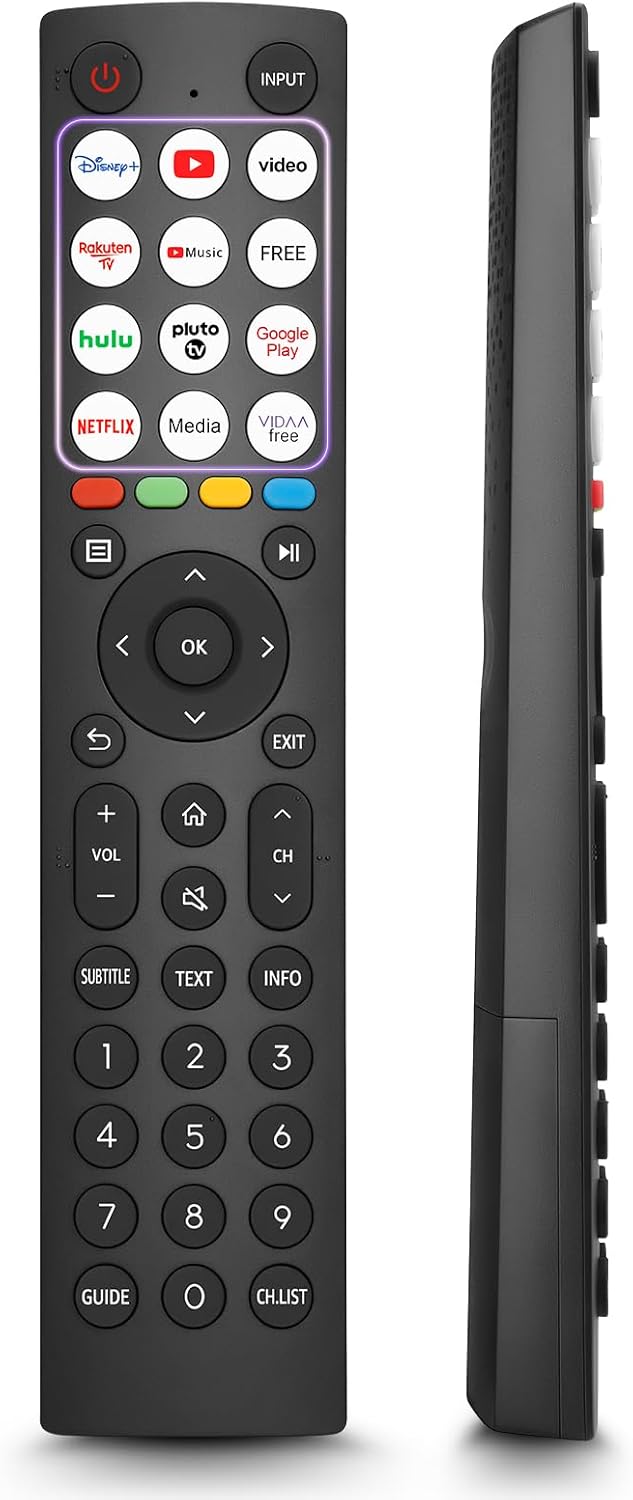
- 12 Shortcut Buttons: Quickly access popular streaming services and applications with dedicated buttons.
- Strong IR Signal: Provides a longer transmission distance and quick response without noticeable delay.
- Duurzame constructie: Made from high-quality ABS and silicone materials for extended lifespan.

Knopfuncties
Familiarize yourself with the functions of each button on your OMAIC EN2Q36H remote control:
| Knop | Functie |
|---|---|
| STROOM | Switches the TV on or into standby mode. |
| INVOER | Selecteert invoerbronnen (HDMI, AV, enz.). |
| APP Buttons | Quick access buttons for specific applications (e.g., Disney+, Netflix, YouTube). |
| MENU | Displays the Quick Setup menu. |
| MEDIA-bediening | Buttons for Play, Pause, Stop, Fast Forward, Rewind. |
| Navigatie (Omhoog/Omlaag/Links/Rechts) | Navigates on-screen menus and adjusts system settings. |
| OK | Confirms selection in on-screen menus. |
| RUG | Keert terug naar het vorige menu. |
| EXIT | Verlaat het huidige menu. |
| VOL +/- | Past het volumeniveau aan. |
| THUIS | Enters the Home screen. |
| MUTE | Dempt of herstelt het tv-geluid. |
| CH ^/v | Switches channels. |
| SUBTITLE | Activates or deactivates subtitle mode. |
| TEKST | Turns teletext function on and off. |
| INFORMATIE | Toont actuele programma-informatie. |
| NUMBER Buttons (0-9) | Direct channel selection or number input. |
| GIDS | Displays the Electronic Programme Guide (DTV input). |
| CH.LIJST | Displays the Channel List on the screen. |

Compatible Hisense TV Models
The OMAIC EN2Q36H replacement remote control is compatible with the following Hisense VIDAA 4K HDTV Smart TV series:
- 32A4K, 40A4K, 43A4K
- 32A5KQ, 40A5KQ
- 43A6K, 50A6K, 55A6K, 58A6K, 65A6K, 70A6K, 75A6K, 85A6K
- 55U6KQ, 65U6KQ
- 43A7KQ, 50A7KQ, 55A7KQ, 65A7KQ, 75A7KQ
- 43E7KQ, 50E7KQ, 55E7KQ, 65E7KQ, 75E7KQ
Onderhoud
Volg deze onderhoudsrichtlijnen om de levensduur en goede werking van uw afstandsbediening te garanderen:
- Schoonmaak: Use a soft, dry cloth to clean the remote. Avoid using liquid cleaners or abrasive materials, as they may damage the surface or internal components.
- Batterij vervangen: Replace batteries when the remote's response becomes sluggish or stops working. Always replace both batteries at the same time with new ones of the same type (AAA alkaline).
- Opslag: Bewaar de afstandsbediening op een koele, droge plaats, uit de buurt van direct zonlicht, extreme temperaturen en hoge luchtvochtigheid.
- Vermijd druppels: Bescherm de afstandsbediening tegen fysieke stoten, aangezien vallen de interne elektronica kan beschadigen.
Probleemoplossing
If you encounter issues with your remote control, refer to the following troubleshooting steps:
| Probleem | Mogelijke oorzaak | Oplossing |
|---|---|---|
| Afstandsbediening reageert niet | Batterijen zijn leeg of verkeerd geplaatst. | Vervang de batterijen door nieuwe AAA-alkalinebatterijen en let daarbij op de juiste polariteit. |
| Afstandsbediening reageert niet | Obstructie tussen afstandsbediening en tv. | Ensure a clear line of sight to the TV's IR receiver. Remove any objects blocking the path. |
| Afstandsbediening reageert niet | De afstandsbediening staat te ver van de tv. | Move closer to the TV. The remote has an extended range, but extreme distances may affect performance. |
| Knoppen zijn plakkerig of reageren niet | Vuil of gruis onder de knoppen. | Gently clean around the buttons with a soft, dry cloth. Avoid liquids. |
| Specific functions not working | TV model incompatibility (rare). | Verify your Hisense TV model is listed in the 'Compatible Hisense TV Models' section. |
Specificaties
| Functie | Detail |
|---|---|
| Modelnaam | EN2Q36H |
| Merk | OMAIC |
| Compatibele apparaten | Hisense Smart TVs |
| Connectiviteitstechnologie | Infrarood (IR) |
| Aantal knoppen | 48 |
| Controletype | Knopbediening |
| Speciale kenmerken | Universal, Comfortable |
| Kleur | Zwart |
| Batterijbeschrijving | AAA (Alkaline) |
| Supported Devices (Max) | 1 |
| Productafmetingen (ongeveer) | 34.7x24.7x2.2cm |
| Productgewicht (circa) | 80 gram |

Garantie en ondersteuning
OMAIC is committed to the quality and compatibility of its replacement remote controls. We provide professional after-sales support to ensure customer satisfaction.
If you have any questions or concerns regarding your OMAIC EN2Q36H remote control or your order, please contact us directly. Our support team aims to respond to inquiries within 12 working hours.