
Invoering
This manual provides essential information for the proper use and maintenance of your Kruger&Matz EDGE 1089 2-in-1 Tablet. Please read this manual thoroughly before operating the device to ensure optimal performance and longevity. This device combines the functionality of a laptop with the portability of a tablet, running on Windows 11 Pro.
Veiligheidsinformatie
- Stel het apparaat niet bloot aan extreme temperaturen, direct zonlicht of hoge luchtvochtigheid.
- Zorg ervoor dat u het apparaat niet laat vallen en blootstelt aan sterke schokken.
- Gebruik uitsluitend de originele oplader en accessoires die bij het apparaat zijn geleverd.
- Houd het apparaat uit de buurt van water en andere vloeistoffen.
- Probeer het apparaat niet zelf te demonteren of te repareren. Neem contact op met gekwalificeerd servicepersoneel voor hulp.
- Zorg voor voldoende ventilatie wanneer u het apparaat gebruikt om oververhitting te voorkomen.
Product voorbijview
The Kruger&Matz EDGE 1089 is a versatile 2-in-1 device designed for both productivity and entertainment. It features a detachable keyboard, allowing seamless transition between tablet and laptop modes.
Apparaatcomponenten
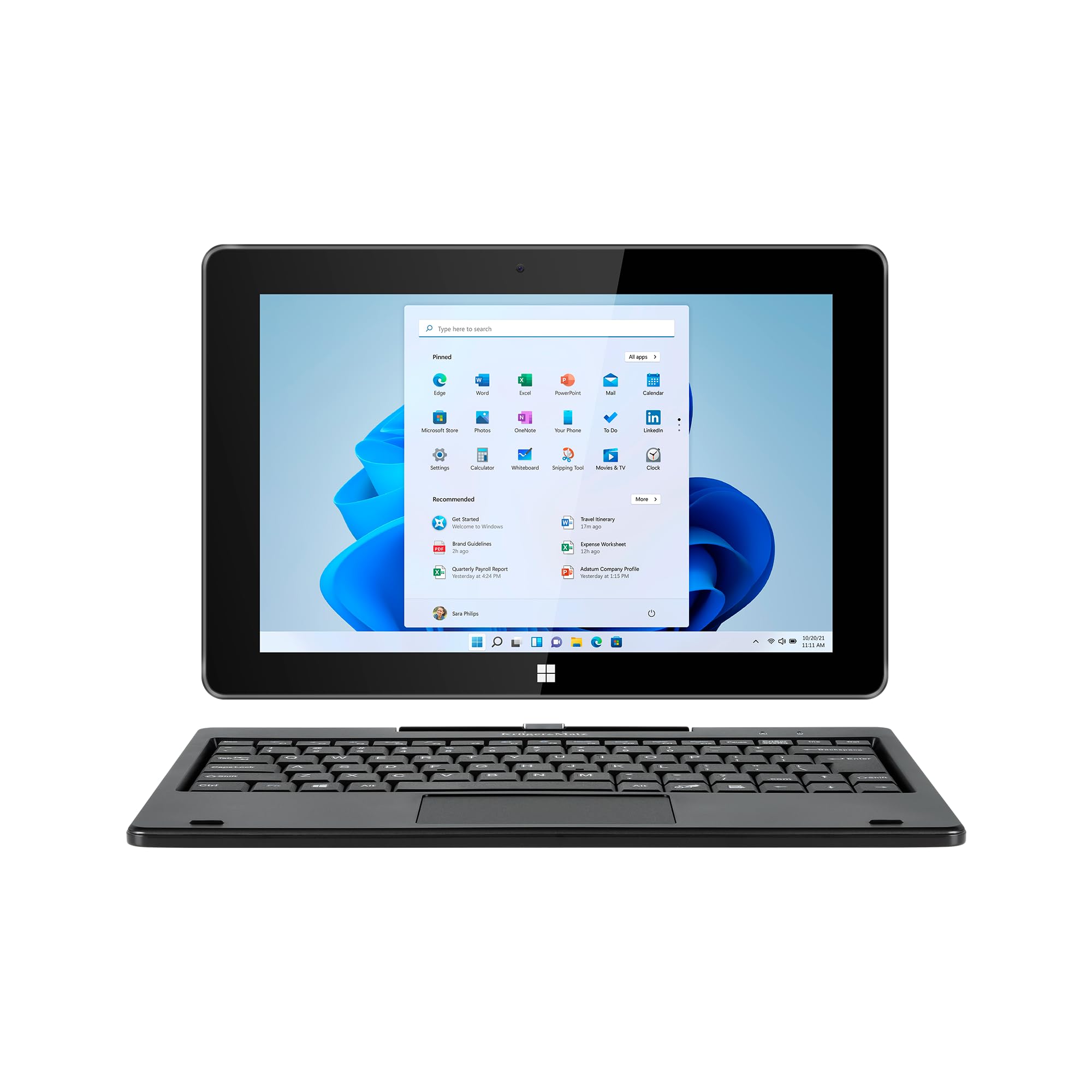
The Kruger&Matz EDGE 1089 2-in-1 Tablet in laptop mode, showcasing the Windows 11 operating system interface.

Voor- en achterkant views of the tablet, emphasizing its design and the Windows 11 operating system.
Poorten en connectoren
The tablet and keyboard are equipped with various ports for connectivity and expansion:

Gedetailleerd view of the tablet's ports, including the 3.5mm audio jack, USB-C port, mini HDMI output, USB 3.0 port, charging port, and microSD card slot.
- USB Type-C: Voor gegevensoverdracht.
- Mini-HDMI: Voor aansluiting op externe beeldschermen.
- USB 3.0: Snelle gegevensoverdracht.
- USB 2.0 (on keyboard): Voor het aansluiten van randapparatuur.
- 3.5 mm koptelefoonaansluiting: Voor audio-uitgang.
- MicroSD-kaartlezer: Supports up to 128 GB for expanded storage.
- Oplaadpoort: Voor stroomtoevoer.
Toetsenbord
The full-size QWERTY keyboard attaches magnetically to the tablet, providing a traditional typing experience and a touchpad for navigation.

The detachable QWERTY keyboard, featuring a standard layout and integrated touchpad.

Kant view of the keyboard, illustrating the additional USB 2.0 port for connecting accessories.
Instellen
Uitpakken
Haal alle onderdelen voorzichtig uit de verpakking. Controleer of de volgende onderdelen aanwezig zijn:
- Kruger&Matz EDGE 1089 Tablet
- Detachable Keyboard (Model KM1089.1 only)
- Voedingsadapter (oplader)
- USB-kabel
- Gebruikershandleiding (dit document)
Het toetsenbord bevestigen
Align the magnetic connector on the tablet with the corresponding connector on the keyboard. The keyboard will snap into place securely. To detach, gently pull the tablet away from the keyboard.
Initial Power On and Windows 11 Pro Setup
- Press and hold the power button located on the side of the tablet until the screen turns on.
- Volg de instructies op het scherm om de eerste installatie van Windows 11 Pro te voltooien. Dit omvat het selecteren van uw taal en regio, het verbinden met een wifi-netwerk en het aanmaken van een gebruikersaccount.
- Het wordt aanbevolen om tijdens de installatie verbinding te maken met internet om ervoor te zorgen dat de nieuwste updates worden geïnstalleerd.
Het apparaat opladen
Connect the provided power adapter to the charging port on the tablet and then plug it into a power outlet. The battery indicator on the screen will show the charging status. For first use, it is recommended to fully charge the device.
Gebruiksaanwijzing
Basic Tablet Functions
- Touchscreen-navigatie: Use your fingers to tap, swipe, pinch-to-zoom, and scroll on the IPS multi-touch display.
- Aan/uit-knop: Press briefly to put the tablet to sleep or wake it up. Press and hold to access power options (Shut down, Restart).
- Volumeknoppen: Pas het audio-uitgangsniveau aan.
Het toetsenbord en touchpad gebruiken
When the keyboard is attached, the tablet functions like a traditional laptop. Use the QWERTY keys for typing and the touchpad for cursor control.

A hand interacting with the integrated touchpad on the detachable keyboard.
- Typen: Use the physical keys for faster and more accurate text input.
- Aanraakscherm: Functions like a mouse. Tap to click, two-finger scroll, and other Windows gestures may be supported.
Randapparatuur aansluiten
- Wifi: Go to Windows Settings > Network & Internet > Wi-Fi to connect to available wireless networks. Supports 802.11 b/g/n/ac (2.4 GHz / 5 GHz).
- Bluetooth: Go to Windows Settings > Bluetooth & devices to pair with Bluetooth accessories like headphones or mice. Supports Bluetooth 4.2.
- External Display (HDMI): Connect a mini HDMI cable from the tablet to an external monitor or TV. Adjust display settings in Windows.
- USB-apparaten: Plug USB drives, mice, or other peripherals into the USB 3.0 port on the tablet or the USB 2.0 port on the keyboard.
Energiebeheer
- Slaapstand: Druk kort op de aan/uit-knop.
- Uitschakelen: Klik op de Startknop, vervolgens op Energie > Afsluiten.
- Opnieuw opstarten: Klik op de Startknop, vervolgens op Aan/uit > Opnieuw opstarten.
Onderhoud
Het apparaat schoonmaken
- Gebruik een zachte, pluisvrije doek om het scherm en de buitenkant schoon te maken.
- Voor hardnekkige vlekken, lichtjes dampReinig de doek met water of een speciaal reinigingsmiddel voor elektronische beeldschermen.
- Gebruik geen agressieve chemicaliën, schurende reinigingsmiddelen of spuitbussen.
- Zorg ervoor dat het apparaat is uitgeschakeld en de stekker uit het stopcontact is gehaald voordat u het schoonmaakt.
Batterijverzorging
- Om de levensduur van de batterij te verlengen, moet u voorkomen dat u de batterij te vaak volledig ontlaadt.
- Bewaar het apparaat op een koele, droge plaats als u het gedurende langere tijd niet gebruikt.
- Stel de batterij niet bloot aan hoge temperaturen.
Software-updates
Controleer regelmatig op Windows-updates en installeer deze om ervoor te zorgen dat uw systeem over de nieuwste beveiligingspatches en prestatieverbeteringen beschikt. Ga naar Windows-instellingen > Windows Update.
Probleemoplossing
| Probleem | Mogelijke oplossing |
|---|---|
| Apparaat gaat niet aan. | Ensure the device is charged. Connect the charger and wait a few minutes before attempting to power on again. |
| Problemen met de wifi-verbinding. | Check if Wi-Fi is enabled in Windows settings. Restart your router and the tablet. Ensure you are within range of the Wi-Fi signal. |
| Toetsenbord of touchpad reageert niet. | Ensure the keyboard is securely attached to the tablet. Detach and reattach the keyboard. Restart the tablet. |
| Het scherm reageert niet. | Start de tablet opnieuw op. Als het probleem aanhoudt, controleer dan of het scherm schoon en vrij van vuil is. |
| Trage prestaties. | Close unnecessary applications. Check for and install Windows updates. Consider running a disk cleanup. |
Fabrieksinstellingen herstellen
If you encounter persistent software issues, a factory reset may resolve them. This will erase all data on the device. To perform a factory reset, go to Windows Settings > System > Recovery > Reset this PC. Follow the on-screen prompts carefully.
Specificaties
| Functie | Detail |
|---|---|
| Modelnaam | KM1089.1 |
| Besturingssysteem | Windows 11 Pro |
| Verwerker | Intel® Celeron® N4020, Dual Core (1.1 GHz, max. 2.8 GHz) |
| Grafisch | Intel® UHD Graphics 600 (Integrated) |
| RAM | 8GB DDR3 |
| Interne opslag | 256 GB SSD |
| Weergave | 10.1-inch IPS Capacitive Multi-touch Panel |
| Oplossing | 1280 x 800 pixels (beeldverhouding 16:9) |
| Camera's | Rear: 2 Mpx, Front: 2 Mpx |
| Geluid | 2x 1W Speakers, Microphone |
| Connectiviteit | Wi-Fi: 802.11 b/g/n/ac (2.4 GHz / 5 GHz), Bluetooth: 4.2 |
| Havens | USB Type-C (data), Mini HDMI, USB 3.0, USB 2.0 (on keyboard), 3.5mm Headphone Jack, MicroSD Card Reader (max 128 GB), Charging Port |
| Batterij | 3000 mAh (7.4V) |
| Oplader | 12V, 2A |
| Tabletafmetingen | 258 x 173 x 10 mm (L x B x H) |
| Tablet with Keyboard Dimensions | 258 x 182 x 22 mm (L x B x H) |
| Tabletgewicht | 635 gram |
| Tablet with Keyboard Weight | 1100 gram |
| Kleur | Zwart |
Garantie en ondersteuning
For warranty information and technical support, please refer to the warranty card included with your product or visit the official Krüger&Matz webwebsite. Bewaar uw aankoopbewijs voor garantieclaims.