
1. Inleiding
This manual provides essential information for the safe and efficient installation, operation, and maintenance of your Tbest 63A 4P Automatic Transfer Switch (ATS). This device is designed to automatically switch between a normal power source and a backup power source, ensuring continuous power supply to critical loads. Please read this manual thoroughly before installation and use.
2. Veiligheidsinformatie
WARNING: Risk of Electric Shock. Installation and servicing must be performed by qualified personnel only.
- Always disconnect all power sources before installing or servicing the switch.
- Zorg voor een goede aarding om elektrische gevaren te voorkomen.
- Controleer of alle aansluitingen goed vastzitten en correct zijn aangesloten volgens de plaatselijke elektriciteitsvoorschriften.
- Gebruik de schakelaar niet als deze beschadigd of defect lijkt.
- Draag tijdens installatie en onderhoud de juiste persoonlijke beschermingsmiddelen (PBM).
3. Product voorbijview
The Tbest 63A 4P Automatic Transfer Switch is a robust device designed for reliable power management. Key features include:
- Single Motor Drive: Ensures simple structure and stable conversion with minimal noise and impact.
- Enhanced Mechanism: Features an improved inhibition mechanism for quick closing and breaking, extending mechanical life.
- Duurzame constructie: Made from flame-retardant plastic, offering good insulation, high-temperature resistance, and protection against overload, undervoltage, short circuit, and phase failure.
- Electrical Interlock Protection: Guarantees reliable and non-interfering automatic switching.
- Brede toepassing: Suitable for critical power supply needs in fire protection systems, ports, hospitals, shopping malls, banks, and industrial facilities.
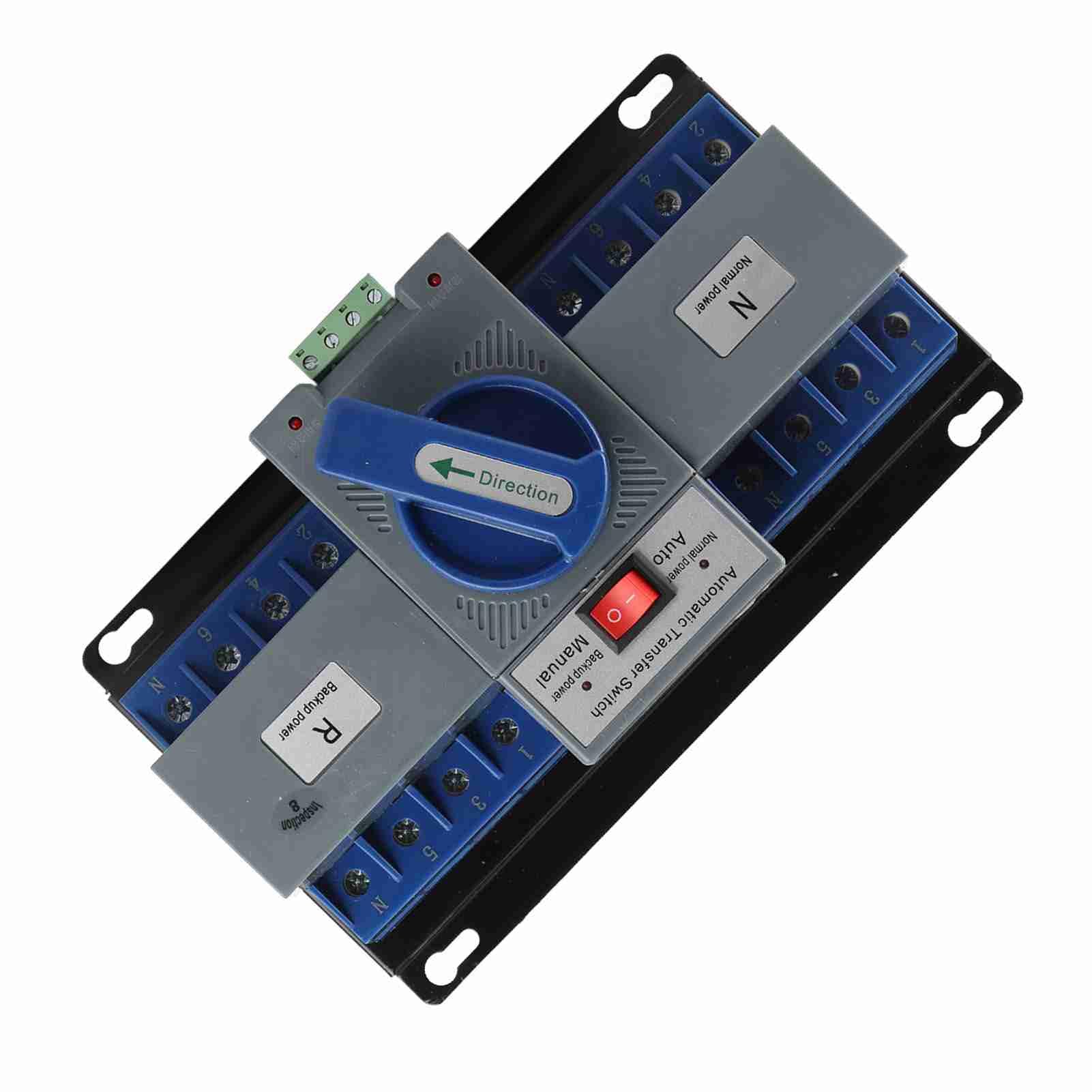
Figuur 1: Voorzijde view of the Tbest 63A 4P Automatic Transfer Switch, showing the main controls and terminal blocks.
4. Installatie en installatie
Follow these general steps for installing the automatic transfer switch. Consult a qualified electrician for specific wiring diagrams and local code compliance.
- Montage: Securely mount the ATS in a suitable enclosure or panel, ensuring adequate ventilation and clearance for wiring.
- Stroomonderbreking: Ensure all power sources (normal and backup) are completely disconnected and locked out before proceeding with wiring.
- Normal Power Connection: Connect the normal power source (utility) to the designated 'Normal Power' terminals (labeled 'N' on the device). Ensure correct phase and neutral connections.
- Backup Power Connection: Connect the backup power source (e.g., generator) to the designated 'Backup Power' terminals (labeled 'R' on the device). Ensure correct phase and neutral connections.
- Belastingsaansluiting: Connect the electrical load (circuits to be powered) to the 'Load' terminals of the ATS.
- Besturingsbedrading: Connect any necessary control wiring for automatic operation, if applicable.
- Verificatie: Controleer alle bedradingsverbindingen nogmaals op vastheid en correctheid.

Figuur 2: Schuin view of the ATS, highlighting the 'Normal Power' and 'Backup Power' terminal blocks for wiring connections.
5. Gebruiksaanwijzing
The Tbest Automatic Transfer Switch offers both automatic and manual operation modes.
5.1 Modusselectie
The switch features a selector for operating mode:
- Automatische modus: When the selector is set to 'Auto', the switch will automatically transfer the load between the normal and backup power sources based on power availability. If normal power fails, it will switch to backup. When normal power returns, it will switch back.
- Handmatige modus: When the selector is set to 'Manual', the transfer switch will remain in its current position until manually operated.
5.2 Manual Transfer
In 'Manual' mode, or for testing purposes, the large blue 'Direction' handle can be used to manually switch between power sources:
- Rotate the handle towards 'N' (Normal power) to connect the load to the normal power source.
- Rotate the handle towards 'R' (Backup power) to connect the load to the backup power source.

Figuur 3: Close-up view of the 'Automatic Transfer Switch' selector (Auto/Manual) and the 'Direction' handle for manual operation.
6. Onderhoud
Regelmatig onderhoud garandeert de lange levensduur en betrouwbare werking van uw ATS.
- Visuele inspectie: Periodically inspect the switch for any signs of damage, loose connections, or overheating.
- Schoonmaak: Keep the switch free from dust and debris. Use a dry, non-conductive cloth for cleaning.
- Verbindingscontrole: Annually, or as needed, verify that all electrical connections are tight and secure.
- Functionele test: Periodically test the automatic transfer function by simulating a normal power outage (if safe to do so) to ensure it switches correctly to backup power and back.
7. Probleemoplossing
If you encounter issues with your ATS, refer to the following common troubleshooting steps:
| Probleem | Mogelijke oorzaak | Oplossing |
|---|---|---|
| Switch does not transfer automatically. | Selector in 'Manual' mode; no power from backup source; control wiring issue. | Set selector to 'Auto'. Check backup power source. Inspect control wiring. |
| No power to load. | No power from normal or backup source; tripped breaker; loose connections. | Check both power sources. Reset breakers. Verify all wiring connections. |
| Overheating or unusual noises. | Overload; loose connections; internal fault. | Reduce load. Tighten connections. Disconnect power and contact qualified personnel. |
If the problem persists after attempting these solutions, contact a qualified electrician or Tbest customer support.
8. Specificaties
| Functie | Specificatie |
|---|---|
| Modelnummer | Tbest946gkyex3c |
| ASIN | B0F1D97DQB |
| Fabrikant | Tbeste |
| Pakket afmetingen | 9.06 x 5.91 x 5.12 inch |
| Artikelgewicht | 3.67 pond |
9. Garantie en ondersteuning
For warranty information or technical support, please contact Tbest customer service through their official channels. Keep your purchase receipt and model number (Tbest946gkyex3c) handy for faster service.
De contactgegevens voor ondersteuning vindt u vaak op de website van de fabrikant. webwebsite of via de verkoper waar het product is gekocht.