
1. Inleiding
This manual provides detailed instructions for the installation, operation, and maintenance of your NKPU 48-inch White Low Profile Ceiling Fan with Light. Please read this manual thoroughly before installation and use to ensure proper function and safety. Keep this manual for future reference.

Afbeelding 1.1: voorbijview of the NKPU 48-inch White Low Profile Ceiling Fan, including the remote control and mobile app interface.
2. Belangrijke veiligheidsinformatie
Volg altijd de basisveiligheidsmaatregelen bij het installeren en bedienen van dit apparaat om het risico op brand, elektrische schokken en persoonlijk letsel te beperken.
- Lees alle instructies zorgvuldig door voordat u met de installatie begint.
- Zorg ervoor dat de stroom bij de stroomonderbreker is uitgeschakeld voordat u met de installatie of het onderhoud begint.
- Alle bedrading moet voldoen aan de nationale en lokale elektrische voorschriften. Raadpleeg een gekwalificeerde elektricien als u niet bekend bent met bedrading.
- The fan must be mounted with a minimum of 7 feet (2.1 meters) clearance from the floor to the blade trailing edge.
- Do not connect the fan to a dimmer switch or a fan's gear switch. Use only conventional wall switches for ON/OFF control.
- Steek geen voorwerpen in de baan van de ventilatorbladen.
- Ensure the mounting structure can support the weight of the fan.
3. Inhoud van het pakket
Controleer of alle onderdelen aanwezig en onbeschadigd zijn voordat u met de installatie begint.
- 1 x Plafondventilator met verlichtingsset
- 1 x Gebruikershandleiding
- 1 x Afstandsbediening

Image 3.1: The NKPU ceiling fan with its remote control and a smartphone displaying the control app, illustrating the various features like dimmable light, app control, remote control, 6 fan speeds, reversible motor, low profile, weinig ruis en 3 kleurtemperaturen.
4. Instellen en installeren
Detailed installation instructions and videos are available on the product page. This section provides an overview of key installation considerations.
4.1 Montageopties
This ceiling fan is designed for Inbouw installation, suitable for average to large rooms (110 sq.ft - 170 sq.ft). Angle mount is not supported.
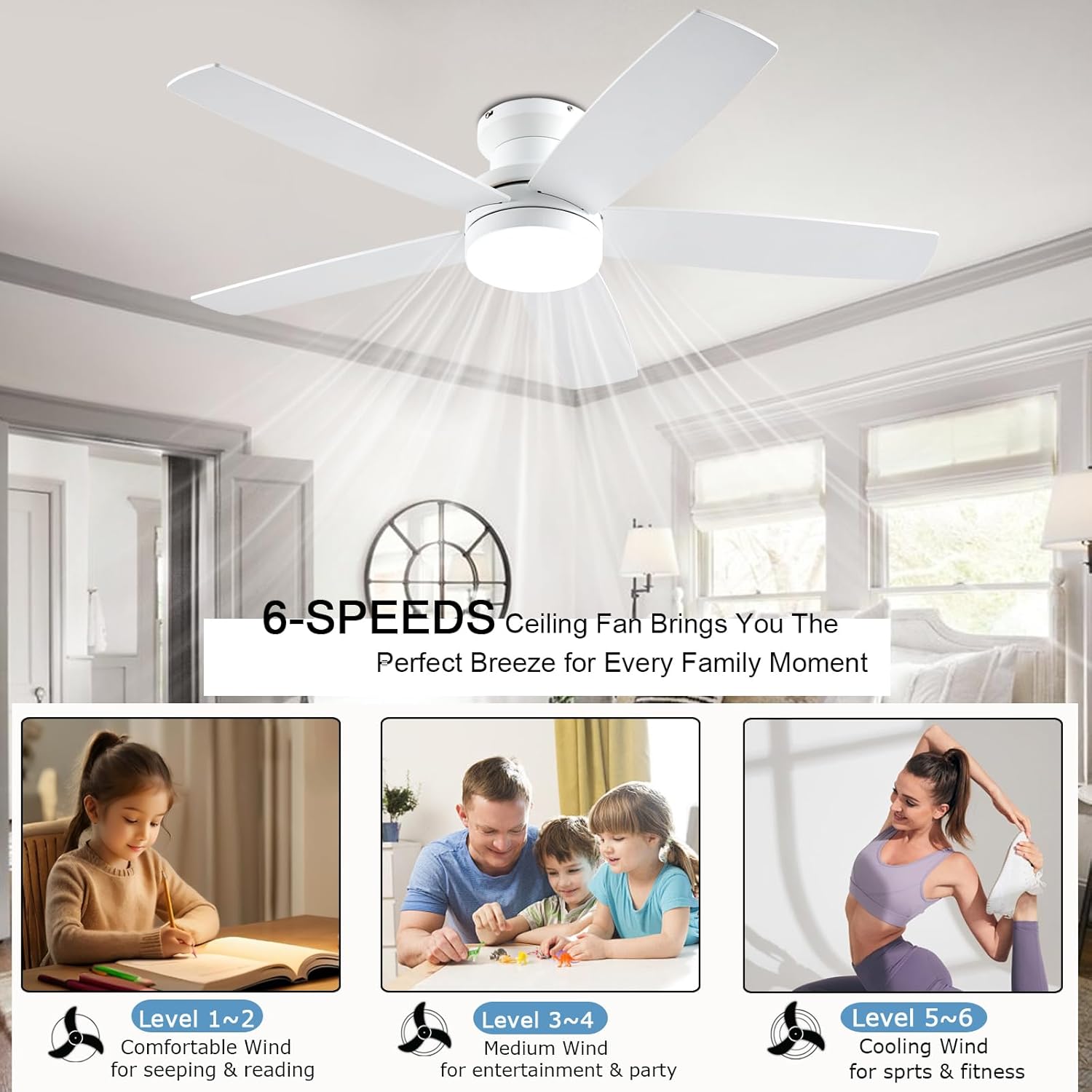
Image 4.1: Diagram showing the 48-inch ceiling fan dimensions (48"D x 48"W x 12.9"H) and illustrating the flush mount option as suitable, while an angle mount is not. Recommended room size is 110-170 sq.ft.
4.2 Installatie van het mes
The fan comes with dual-sided blades, offering two aesthetic options: one side in white and the other in wood grain. Choose the side that best matches your interior decor during installation.

Afbeelding 4.2: Close-up view of the dual-sided fan blades, showing one side in white (A-side) and the other in white wood grain (B-side), allowing for customizable aesthetics.
4.3 Wall Switch Compatibility
The fan is suitable for conventional wall switches to control the fan and light ON/OFF functions. Do not connect the fan to a dimmer switch or a fan's gear switch, as this can damage the unit.

Image 4.3: Illustration demonstrating that the fan is compatible with conventional wall switches for ON/OFF control, but explicitly warns against connecting it to dimmer switches or fan gear switches.
5. Gebruiksaanwijzing
Your NKPU ceiling fan can be controlled via the included remote control or a dedicated mobile application.
5.1 Functies afstandsbediening
The remote control allows for comprehensive management of the fan and light settings.
- Algemeen AAN/UIT: Powers the entire unit on or off.
- Licht AAN/UIT: Controls the light independently.
- Lichtmodusschakelaar: Schakelt tussen 3 kleurtemperaturen (3000K warm wit, 4000K natuurlijk wit, 6000K koel wit).
- Light Brightness Increase/Decrease: Adjusts light intensity from 10% to 100%.
- Fan Gear (Speed): Selects one of 6 fan speeds.
- Fan Timing: Sets a timer for 1, 2, or 4 hours.
- Fan Forward and Reverse: Changes the direction of blade rotation for summer or winter modes.
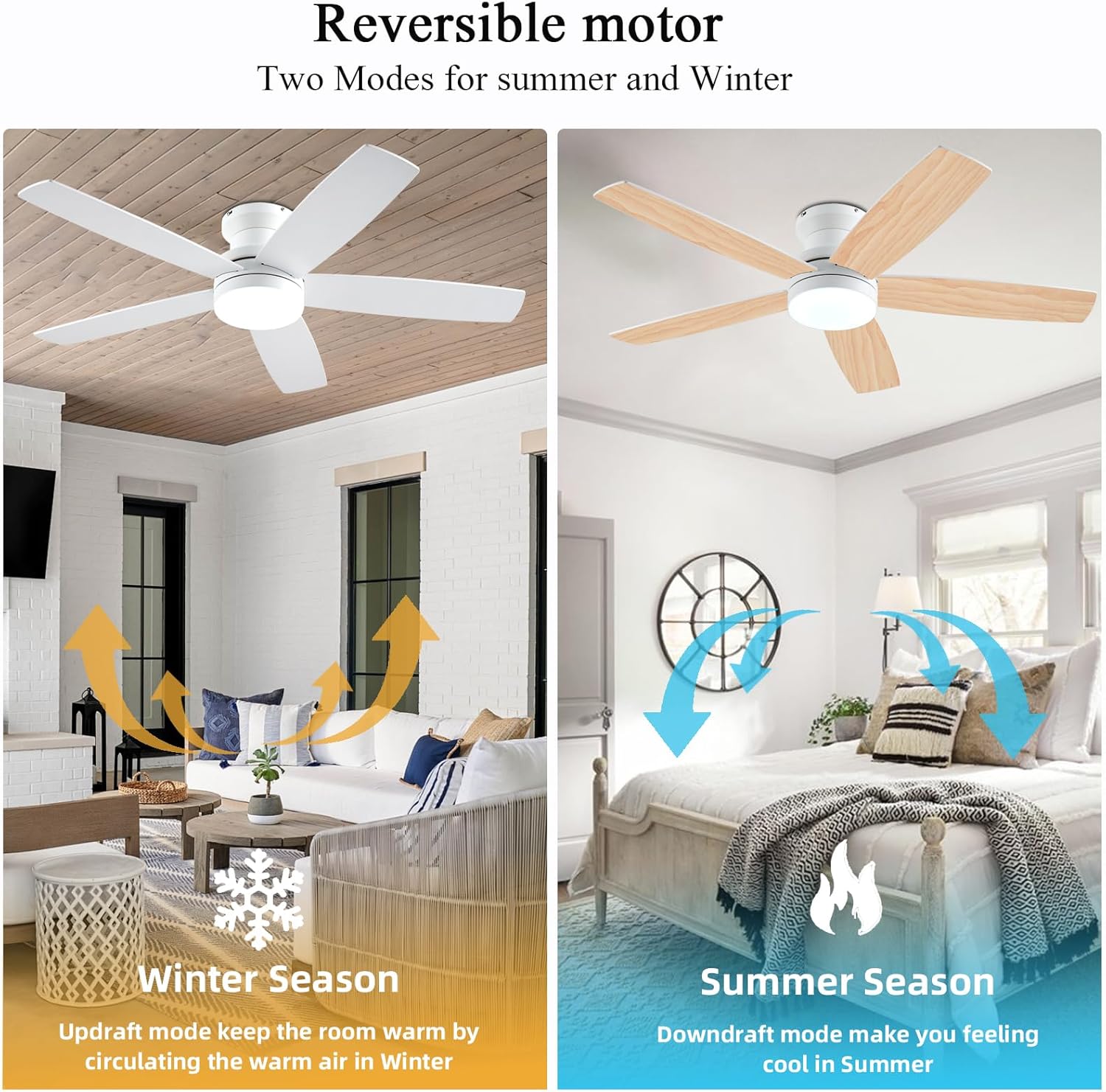
Image 5.1: The remote control and a smartphone displaying the 'Fan Lamp Pro' app, illustrating the various control options for the fan and light, including speed, brightness, color temperature, and timer settings.

Image 5.2: Detailed diagram of the remote control buttons and their functions, alongside visual representations of the three adjustable color temperatures (6000K Cool Light, 4500K Natural Light, 3000K Warm Light) and the 10-100% dimmable range.
5.2 Mobiele app-bediening
Voor betere controle kunt u de "Fan L"-software downloaden.amp Pro" app. Scan the QR code provided in the image below or visit http://www.jasonghost.com/fanlamppro/ om de app te downloaden.
- Scan de QR-code om de "Fan L" te downloaden.amp "Pro" app.
- Apparaat toevoegen.
- Kies een ventilator met lichte verlichting.
- Click to Pair: Click the "+" button to set the name of your fan light. Then, click the pair button 1-2 times within 3 seconds after the fan is powered on.

Image 5.3: Instructions for setting up app control, including a QR code to download the "Fan Lamp Pro" app, steps for adding a device, and pairing the fan with the app.
5.3 Omkeerbare gelijkstroommotor
The fan features a reversible DC motor, allowing for two modes of operation to suit different seasons:
- Zomerseizoen (Downdraft-modus): Blades rotate counter-clockwise, creating a direct breeze to make you feel cool.
- Winterseizoen (Updraftmodus): Blades rotate clockwise, circulating warm air trapped near the ceiling downwards, helping to keep the room warm.

Image 5.4: Visual representation of the reversible motor's two modes: updraft for winter to circulate warm air, and downdraft for summer to create a cooling breeze.
5.4 3CCT Dimmable LED Light
The integrated LED light offers three color temperatures and dimming capabilities from 10% to 100%.
- 3000K Warm Wit: Ideal for a cozy and relaxing ambiance.
- 4000K natuurlijk wit: Geschikt voor algemene verlichting en dagelijkse activiteiten.
- 6000K koel wit: Provides bright, crisp lighting for tasks or a modern feel.

Image 5.5: Display of the three color temperature options for the LED light: 3000K Warm White, 4500K Natural Light, and 6000K Cool Light, along with a dimming scale from 10% to 100%.
5.5 6-Speed Settings
The fan offers 6 distinct speed settings to provide the desired airflow for any occasion.
- Niveau 1-2 (laag): Een aangename bries om te slapen of te lezen.
- Level 3-4 (Medium): Natuurlijke wind voor vermaak of feesten.
- Niveau 5-6 (hoog): Verkoelende wind voor sport- of fitnessactiviteiten.

Image 5.6: Illustration of the 6-speed settings, categorized into Low (1-2 for comfort), Medium (3-4 for natural wind), and High (5-6 for cooling), with suggested activities for each level.
5.6 Stille werking
The fan is equipped with a silent DC motor, ensuring a peaceful environment with a noise level below 30 dB, comparable to a library whisper.

Image 5.7: A graph comparing the fan's noise level (30 dB) to common sounds like normal conversation (50 dB), library whisper (35 dB), and feather drops (20 dB), highlighting its quiet operation.
6. Onderhoud
Regelmatig onderhoud zorgt ervoor dat uw plafondventilator lang meegaat en optimaal presteert.
- Schoonmaak: Om de ventilator schoon te maken, veegt u hem af met een zachte, vochtige doek.amp Gebruik een doek. Gebruik geen schurende reinigingsmiddelen of oplosmiddelen. Zorg ervoor dat de stroom is uitgeschakeld voordat u begint met schoonmaken.
- Bladinspectie: Periodically check the fan blades for any dust buildup and clean them to maintain efficient airflow.
- Dichtheid: Controleer regelmatig alle schroeven en verbindingen om er zeker van te zijn dat ze goed vastzitten.

Image 6.1: Close-up of the fan blades, emphasizing their durable and stylish solid wood construction, which is UV resistant, damp resistant, and features premium textures.
7. Probleemoplossing
Als u problemen ondervindt met uw plafondventilator, raadpleeg dan de volgende veelvoorkomende problemen en oplossingen.
| Probleem | Mogelijke oorzaak | Oplossing |
|---|---|---|
| Ventilator start niet | Er gaat geen stroom naar de ventilator. Losse draadverbindingen. Batterij van de afstandsbediening bijna leeg. | Check circuit breaker; Ensure all connections are secure; Replace remote control batteries. |
| Het licht werkt niet | Losse draadverbinding; probleem met de LED-driver. | Check light wiring; Contact customer support if LED driver is suspected. |
| Afstandsbediening reageert niet | Batteries are dead; Remote not paired; Obstruction between remote and receiver. | Replace batteries; Re-pair the remote control (refer to app pairing instructions); Remove obstructions. |
| Overmatig lawaai | Losse bevestigingsschroeven; ongelijkmatige bladen. | Tighten all mounting screws; Ensure blades are properly installed and balanced. |
Als het probleem blijft bestaan nadat u deze oplossingen hebt geprobeerd, neem dan contact op met de klantenservice.
8. Productspecificaties
| Functie | Detail |
|---|---|
| Merk | NKPU |
| Modelnaam | BR-SY69 / SY69-WHITE |
| Kleur | Wit |
| Productafmetingen | 48"D x 48"B x 12.9"H |
| Artikelgewicht | 10.27 pond |
| Ontwerp van elektrische ventilator | Plafondventilator |
| Energiebron | DC |
| Stijl | Modern |
| Kamertype | Slaapkamer, kinderkamer, woonkamer, kinderkamer, speelkamer |
| Speciale functie | Verstelbare hoogte, verstelbare kantelhoek, bedienbaar via app, ledverlichting, afstandsbediening |
| Aanbevolen toepassingen | Luchtcirculatie, koeling, verlichting |
| Geluidsniveau | 30dB |
| Wattage | 60 watt |
| Afwerkingstype | Wit |
| Aantal bladen | 5 |
| Snelheid | 6 RPM (6 Power Levels) |
| Deeltage | 110 Volt |
| Schakeltype | Drukknop |
| Meegeleverde componenten | 1 x Ceiling Fan with Lights Kits, 1 x User Manual, Remote |
| Binnen-/buitengebruik | Binnen, Buiten |
| Controlemethode | App, op afstand |
| Efficiëntie | High Efficiency (up to 80% reduction in power loss compared to traditional fans) |
| Zijn batterijen nodig? | Ja (voor afstandsbediening) |
9. Garantie en ondersteuning
Your NKPU ceiling fan comes with a 24 maanden zorgeloze garantie. We are committed to providing excellent customer service.
If you encounter any issues during the installation or use of the fan, please do not hesitate to contact us. Our 24-uurs klantenservice team is available to assist you.
For warranty claims or technical assistance, please refer to the contact information provided with your purchase or on the official NKPU webplaats.