
1. Inleiding
This manual provides comprehensive instructions for the safe and effective use of your Flashpoint Zoom Li-on X PRO R2 TTL On-Camera Round Flash Speedlight for Sony and the Glow PS-B24K ParaSnap Octagonal Softbox. Please read this manual thoroughly before operating the equipment and retain it for future reference. Proper understanding of these instructions will ensure optimal performance and longevity of your product.
2. Veiligheidsinformatie
- Do not disassemble or modify the product. Unauthorized repairs can cause damage and void the warranty.
- Houd het product droog. Niet met natte handen aanraken of in water onderdompelen.
- Vermijd direct oogcontact met de flitslamp.
- Buiten bereik van kinderen houden.
- Gebruik uitsluitend de voorgeschreven batterij en oplader.
- Zorg tijdens het gebruik voor voldoende ventilatie om oververhitting te voorkomen.
3. Inhoud van het pakket
Controleer of alle artikelen in uw pakket aanwezig zijn:
- Flashpoint Zoom Li-on X PRO R2 TTL On-Camera Round Flash Speedlight
- Lithium-ionbatterij
- Batterijlader
- USB-oplaadkabel
- Mini-standaard
- Beschermhoes
- Glow PS-B24K ParaSnap Octagonal Softbox (24")
- Flashpoint C-adapter for Round Head Flashes
- Softbox Carrying Bag
4. Product voorbijview
The Flashpoint Zoom Li-on X PRO R2 TTL Flash is a versatile on-camera speedlight designed for Sony cameras, offering a round flash head for natural light distribution. It integrates with the R2 wireless system for advanced control. The Glow PS-B24K ParaSnap Octagonal Softbox is a portable light modifier that attaches to the flash via the C-adapter, providing soft, even illumination.
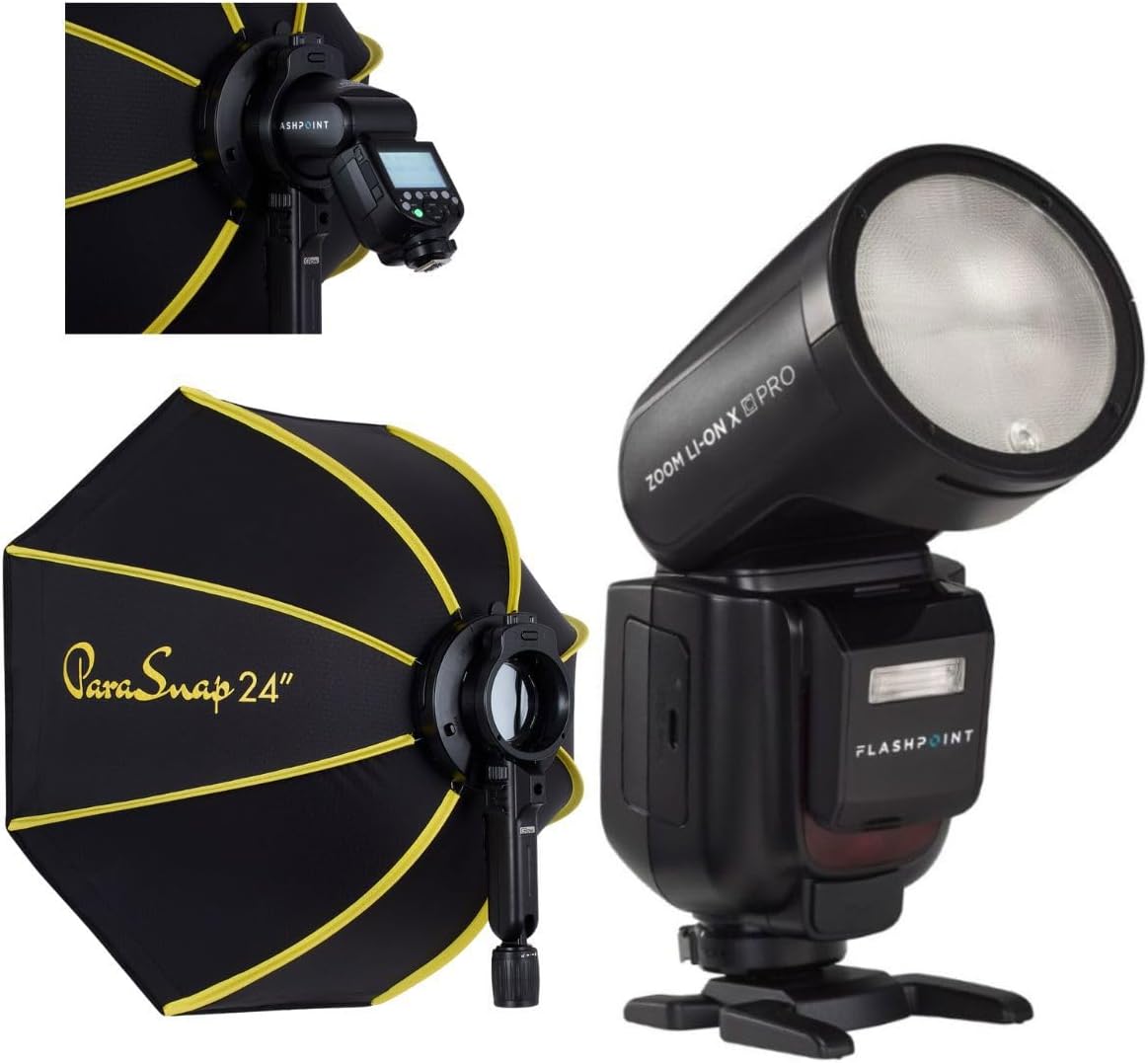
Image 1: The Flashpoint Zoom Li-on X PRO R2 TTL Flash shown alongside the Glow PS-B24K ParaSnap Octagonal Softbox, illustrating the complete kit.
4.1 Flash Unit (Zoom Li-on X PRO R2 TTL)
This unit features a round flash head, an LCD display for settings, control buttons, a hot shoe mount, and a battery compartment.

Afbeelding 2: Een close-up view of the Flashpoint Zoom Li-on X PRO R2 TTL Flash unit, highlighting its round head and control panel.
4.2 Glow PS-B24K ParaSnap Octagonale softbox
The softbox is designed for quick setup and breakdown, featuring an octagonal shape for pleasing catchlights and soft light. It includes a mounting bracket for the C-adapter.

Image 3: The Glow PS-B24K ParaSnap Octagonal Softbox in its open configuration, ready for use.
4.3 Flashpoint C-adapter
This adapter facilitates the connection of the round head flash to the softbox, ensuring a secure and stable mount.

Afbeelding 4: A view of the Flashpoint C-adapter, which connects the round flash head to light modifiers.
5. Instellen
5.1 Batterij installeren en opladen
- Open the battery compartment on the flash unit.
- Plaats de lithium-ionbatterij en let daarbij op de juiste polariteit.
- Sluit het batterijvak goed af.
- To charge, connect the battery to the charger, then plug the charger into a power source. The indicator light will show charging status.
5.2 Attaching the Flash to Your Camera
- Schuif de flitsschoenbevestiging in de flitsschoen van je camera.
- Tighten the locking ring or lever on the flash to secure it to the camera.
5.3 Assembling and Attaching the Softbox
- Unfold the Glow PS-B24K ParaSnap Octagonal Softbox. The internal rods will snap into place.
- Attach the Flashpoint C-adapter to the mounting bracket on the softbox.
- Insert the round head of the Flashpoint Zoom Li-on X PRO R2 TTL Flash into the C-adapter, ensuring it is securely seated.
- Optionally, attach the inner and outer diffusers to the softbox for softer light.

Image 5: The Flashpoint Zoom Li-on X PRO R2 TTL Flash integrated with the Glow PS-B24K ParaSnap Octagonal Softbox, demonstrating the assembled unit.

Afbeelding 6: Een overview of the Glow PS-B24K ParaSnap Octagonal Softbox components, including the softbox, C-adapter, and carrying bag.

Afbeelding 7: Een zijprofile of the Flashpoint C-adapter, showing its design for connecting the flash to the softbox.
6. Gebruiksaanwijzing
6.1 In-/uitschakelen
Press and hold the power button on the flash unit for approximately 2 seconds to turn it on or off.
6.2 flitsstanden
- TTL-modus: De flitser past zijn vermogen automatisch aan op basis van het meetsysteem van de camera voor een evenwichtige belichting.
- Handmatige (M) modus: Allows you to manually set the flash power from 1/1 (full power) down to 1/256 in precise steps.
- Multi (stroboscopische) modus: Het apparaat geeft een reeks snelle flitsen af tijdens één enkele opname om meerdere beelden van een bewegend onderwerp vast te leggen.
Use the mode button to cycle through available flash modes and the dial/buttons to adjust settings within each mode.
6.3 R2 Wireless System Operation
The Flashpoint Zoom Li-on X PRO R2 TTL Flash can operate as a master or slave unit within the Flashpoint R2 wireless system. Refer to the flash unit's display and controls to set the wireless mode, channel, and group. This allows for remote control of multiple R2-compatible flashes.
6.4 Using the Softbox
The Glow PS-B24K ParaSnap Octagonal Softbox diffuses the flash light, creating a softer, more even illumination with reduced harsh shadows. Position the softbox and flash unit to achieve the desired lighting effect on your subject.
7. Onderhoud
- Reinig de flitskop en de behuizing met een zachte, droge doek. Gebruik geen oplosmiddelen of schurende reinigingsmiddelen.
- Zorg ervoor dat de batterijcontacten schoon zijn.
- When not in use for extended periods, remove the battery and store the flash and softbox in their protective cases in a cool, dry place.
8. Probleemoplossing
| Probleem | Mogelijke oorzaak | Oplossing |
|---|---|---|
| De flitser gaat niet af. | Low battery; incorrect camera/flash settings; flash not securely mounted. | Charge battery; check flash and camera settings (e.g., flash enabled, correct mode); re-mount flash securely. |
| De flitsuitvoer is inconsistent. | Battery low; environmental factors; incorrect TTL compensation. | Ensure battery is fully charged; adjust flash exposure compensation; check for obstructions. |
| Softbox does not open/close smoothly. | Mechanism obstruction; bent rods. | Check for any fabric or debris obstructing the mechanism; gently straighten any bent rods if possible. |
9. Specificaties
| Functie | Detail |
|---|---|
| Productafmetingen | 24.5 x 8.2 x 2.78 inch |
| Artikelgewicht | 4.52 pond |
| ASIN | B0DT4TGDN7 |
| Datum eerste beschikbaarheid | 15 januari 2025 |
| Fabrikant | Vlampunt |
| Merk | Vlampunt |
| UPC | 192223270701 |
| Vermogensafgifte | 1/1 to 1/256 in 81 steps |
| Recycle Time | Ongeveer 1.5 seconde (vol vermogen) |
| Flash Duur | 1/300 tot 1/20000 seconden |
| Batterij | 7.2V/2980mAh Lithium-Ion |
| draadloos systeem | Flashpoint R2 (2.4GHz) |
10. Garantie en ondersteuning
Flashpoint products are designed for reliability and performance. For warranty information, technical support, or service inquiries, please refer to the official Flashpoint webwebsite of neem contact op met uw erkende dealer. Bewaar uw aankoopbewijs als aankoopbewijs.
Bezoek de Flashpoint Store voor aanvullende producten en ondersteuningsbronnen.