
1. Inleiding
Thank you for choosing the Bennett Read Alphabot Ultra Robotic Vacuum. This cutting-edge cleaning solution combines powerful performance with smart functionality, designed to handle sweeping, vacuuming, and wet-mopping. Equipped with advanced laser navigation and anti-fall sensors, it ensures precise tracking and smooth obstacle avoidance. This manual provides essential information for the safe and efficient operation, maintenance, and troubleshooting of your device.
Lees deze handleiding aandachtig door voordat u het product gebruikt en bewaar hem voor toekomstig gebruik.
2. Veiligheidsinstructies
Om het risico op letsel of schade te verminderen, dient u de volgende veiligheidsmaatregelen in acht te nemen:
- Dit apparaat kan worden gebruikt door kinderen van 8 jaar en ouder en door personen met beperkte fysieke, sensorische of mentale vermogens of met een gebrek aan ervaring en kennis, mits zij onder toezicht staan of instructies hebben gekregen over het veilige gebruik van het apparaat en zij de gevaren begrijpen die ermee gepaard gaan.
- Kinderen mogen niet met het apparaat spelen. Reiniging en gebruikersonderhoud mogen niet door kinderen worden uitgevoerd zonder toezicht.
- Gebruik uitsluitend de originele stroomadapter van de fabrikant.
- Do not use the product in environments with open flames or fragile objects.
- Do not use the product to clean liquids, burning objects, or sharp objects.
- Zorg ervoor dat het laadstation op een vlakke ondergrond tegen een muur staat, met voldoende vrije ruimte eromheen.
- Houd haar, losse kleding, vingers en alle lichaamsdelen uit de buurt van openingen en bewegende delen.
- Haal de stekker van het apparaat uit het stopcontact voordat u het schoonmaakt of onderhoud uitvoert.
3. Inhoud van het pakket
Controleer of alle componenten in het pakket aanwezig zijn:
- 1 x Bennett Read Alphabot Ultra Robotic Vacuum with Sweep and Wet-Mop
- Oplaadstation
- Stroomadapter
- Zijborstels
- Reinigingsgereedschap
- Gebruiksaanwijzing
4. Product voorbijview
Familiarize yourself with the main components of your Alphabot Ultra Robotic Vacuum.

Afbeelding 4.1: Bovenkant view of the Bennett Read Alphabot Ultra Robotic Vacuum, showing its sleek black design and control indicators.
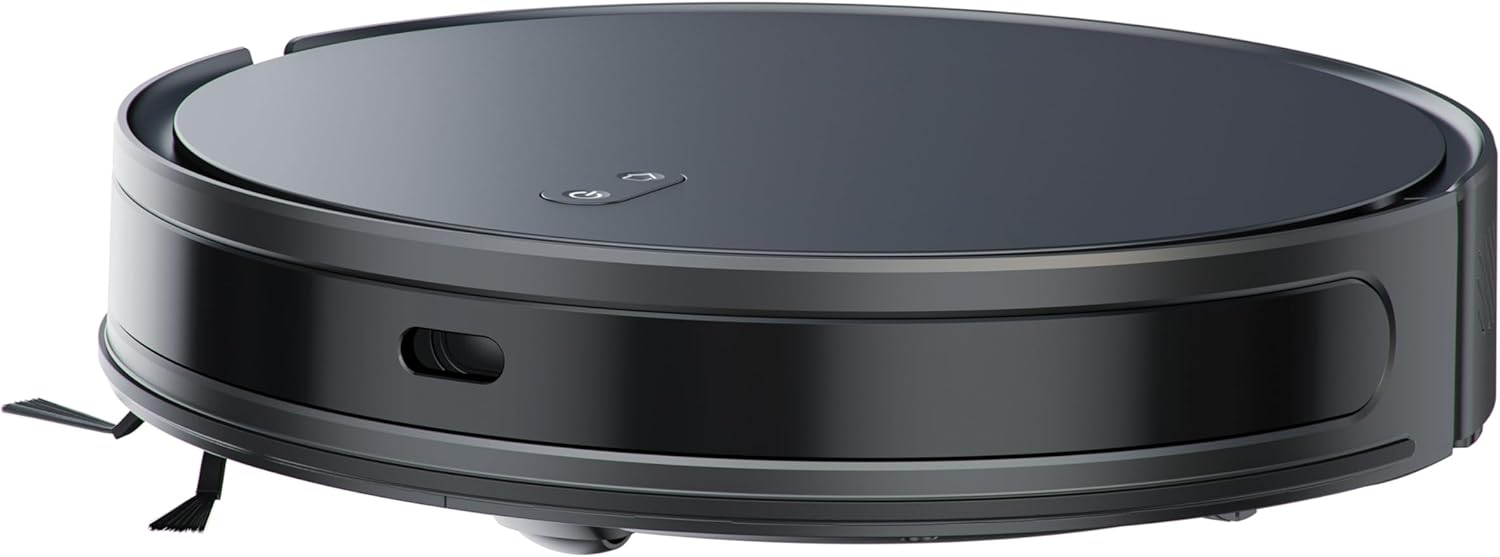
Afbeelding 4.2: Kant view of the Alphabot Ultra, highlighting its low profile and side brushes.

Afbeelding 4.3: Diagram illustrating the powerful suction path and internal components of the Alphabot Ultra.

Afbeelding 4.4: Onderkant view of the Alphabot Ultra, showing the main brush, side brushes, and mopping pad attachment.
5. Instellen
5.1 Uitpakken
- Remove the robotic vacuum and all accessories from the packaging.
- Remove any protective films or stickers from the device and charging dock.
5.2 Plaatsing van het oplaadstation
- Place the charging dock on a hard, level surface against a wall.
- Ensure there is at least 1 meter (3 feet) of clear space on both sides of the dock and 2 meters (6 feet) in front of it for optimal navigation.
- Sluit de stroomadapter aan op het oplaadstation en steek de stekker in een stopcontact.

Afbeelding 5.1: The Alphabot Ultra robotic vacuum docked at its self-charging station, illustrating the automatic charging feature.
5.3 Initiële kosten
- Place the robotic vacuum onto the charging dock, ensuring the charging contacts align.
- Allow the vacuum to charge completely before its first use. The indicator lights will show charging status. A full charge can take several hours.
5.4 App-verbinding (Smart Life-app)
- Download the 'Smart Life' app from your mobile device's app store.
- Registreer u of log in op uw Smart Life-account.
- Follow the in-app instructions to add your Bennett Read Alphabot Ultra. Ensure your Wi-Fi network is 2.4GHz, as 5GHz networks are not supported.
- The app allows for scheduling, mapping, and customization of cleaning preferences.

Afbeelding 5.2: Screenshot of the Smart Life app interface, demonstrating cleaning preference settings for water volume and suction.
6. Gebruiksaanwijzing
6.1 In-/uitschakelen
- To power on, press and hold the power button on the vacuum or use the app.
- To power off, press and hold the power button until the indicators turn off, or use the app.
6.2 Reinigingsmodi
The Alphabot Ultra supports multiple cleaning modes:
- Sweep & Vacuum: Utilizes the side brushes, main brush, and 5000Pa suction power for dry debris removal.
- Wet-Mop: For light wet cleaning of hard floors. Ensure the water tank is filled and the mopping pad is attached.
- Gecombineerde modus: Sweeps, vacuums, and mops simultaneously for comprehensive cleaning.
6.3 Planning
Use the Smart Life app to set up cleaning schedules. You can customize cleaning times, days, and specific areas for the vacuum to clean automatically.
6.4 Navigatie en sensoren
The Alphabot Ultra uses advanced laser navigation for precise mapping and efficient cleaning paths. Anti-fall sensors prevent the vacuum from falling down stairs or ledges, while anti-collision sensors help it avoid obstacles.

Afbeelding 6.1: The Alphabot Ultra demonstrating its anti-fall sensors, preventing it from falling down stairs or ledges.
7. Onderhoud
Regular maintenance ensures optimal performance and extends the lifespan of your robotic vacuum.
7.1 Reiniging van de stofbak en het filter
- Druk op de ontgrendelknop van de stofbak en verwijder de stofbak.
- Open het deksel van de vuilnisbak en leeg de inhoud in een afvalbak.
- Remove the filter assembly and tap it gently to dislodge dust. Do not wash the HEPA filter with water.
- Spoel de vuilnisbak indien nodig af met water en zorg ervoor dat deze volledig droog is voordat u hem terugplaatst.
- Reassemble the filter and dustbin, then reinsert into the vacuum.
7.2 Borstelreiniging
- Hoofdborstel: Remove the main brush cover and lift out the brush. Use the provided cleaning tool to cut and remove any tangled hair or debris.
- Zijborstels: Gently pull the side brushes to remove them. Clean off any hair or debris. If brushes are damaged, replace them.
7.3 Onderhoud van de dweilpad
- After each mopping session, remove the mopping pad from the water tank.
- Wash the mopping pad with water and mild detergent.
- Allow the mopping pad to air dry completely before reattaching or storing.

Afbeelding 7.1: The Alphabot Ultra with its 2-in-1 tank, designed for both sweeping/vacuuming and wet-mopping functionalities.
7.4 Sensorreiniging
- Periodically wipe the cliff sensors, wall sensors, and charging contacts with a clean, dry cloth to ensure proper function.
8. Probleemoplossing
If you encounter issues with your Alphabot Ultra, refer to the following common problems and solutions:
| Probleem | Mogelijke oorzaak | Oplossing |
|---|---|---|
| De stofzuiger gaat niet aan | Lage batterij; Aan/uit-knop niet goed ingedrukt | Charge the vacuum; Press and hold the power button for a few seconds. |
| Stofzuiger laadt niet op | Laadcontacten vuil; Laadstation niet van stroom voorzien | Clean charging contacts on both vacuum and dock; Ensure dock is plugged in and powered. |
| Slechte zuigprestaties | Vuilnisbak vol; Filter verstopt; Hoofdborstel verstrikt | Leeg het stofreservoir. Reinig of vervang het filter. Reinig de hoofdborstel. |
| De stofzuiger loopt vaak vast. | Obstakels op de vloer; klifsensoren vuil | Verwijder kabels, tapijten en kleine voorwerpen; maak de klifsensoren schoon. |
| Problemen met app-verbinding | Onjuiste wifi-band; router te ver weg | Ensure 2.4GHz Wi-Fi; Move vacuum closer to router; Restart router and vacuum. |
Als het probleem zich blijft voordoen, neem dan contact op met de klantenservice.
9. Specificaties
| Functie | Specificatie |
|---|---|
| Merk | Bennet gelezen |
| Modelnaam | Alphabot Ultra |
| Modelnummer | HVC403 |
| Kleur | Zwart |
| Productafmetingen | 30L x 8B x 35H centimeter |
| Artikelgewicht | 1.8 kg |
| Zuigkracht | 5000Pa |
| Batterijtype | 3200mAh lithium-ion |
| Looptijd | Tot 180 minuten |
| Navigatie | Advanced Laser Navigation |
| Connectiviteit | Wi-Fi (alleen 2.4 GHz) |
| Motortype | Duurzame borstelloze motor |
| Reinigingsfuncties | Sweep, Vacuum, Wet-Mop |
| Energiebron | Met snoer (voor het laadstation) |
10. Garantie en ondersteuning
Your Bennett Read Alphabot Ultra Robotic Vacuum is covered by a manufacturer's warranty. Please refer to the warranty card included in your package for specific terms and conditions.
For technical support, troubleshooting assistance beyond this manual, or to inquire about spare parts, please contact Bennett Read customer service. Contact details can typically be found on the official Bennett Read webwebsite of op de verpakking van uw product.