
1. Inleiding
Bedankt voor uw aankoopasing the LONPOO LP-816 Compact Micro HiFi System. This manual provides essential information for the safe and efficient operation of your new audio system. Please read this manual thoroughly before use and retain it for future reference.
2. Veiligheidsinstructies
- Energiebron: Zorg ervoor dat de voeding voltage komt overeen met de classificatie die op het apparaat staat aangegeven.
- Ventilatie: Blokkeer geen ventilatieopeningen. Zorg voor voldoende ruimte rondom het apparaat voor een goede luchtcirculatie.
- Water en vocht: Stel het apparaat niet bloot aan regen, vocht of druppelende/spattende vloeistoffen. Plaats geen met vloeistof gevulde voorwerpen, zoals vazen, op het apparaat.
- Warmte: Houd het apparaat uit de buurt van warmtebronnen zoals radiatoren, warmteroosters, kachels of andere apparaten (inclusief ampwarmtebronnen) die warmte produceren.
- Schoonmaak: Haal de stekker van het apparaat uit het stopcontact voordat u het schoonmaakt. Gebruik alleen een zachte, droge doek. Gebruik geen vloeibare reinigingsmiddelen of spuitbussen.
- Onderhoud: Probeer dit product niet zelf te onderhouden. Laat al het onderhoud over aan gekwalificeerd onderhoudspersoneel.
- Plaatsing: Plaats het apparaat op een stabiele, vlakke ondergrond om te voorkomen dat het valt.
3. Inhoud van het pakket
Controleer of alle hieronder vermelde artikelen in uw pakket zitten:
- LONPOO LP-816 Micro HiFi System Unit
- Afstandsbediening
- Stroomadapter
- FM-antenne
- Gebruikershandleiding (dit document)
4. Product voorbijview
4.1 Front and Rear Panel Controls
Familiarize yourself with the various buttons, ports, and indicators on your LP-816 system.
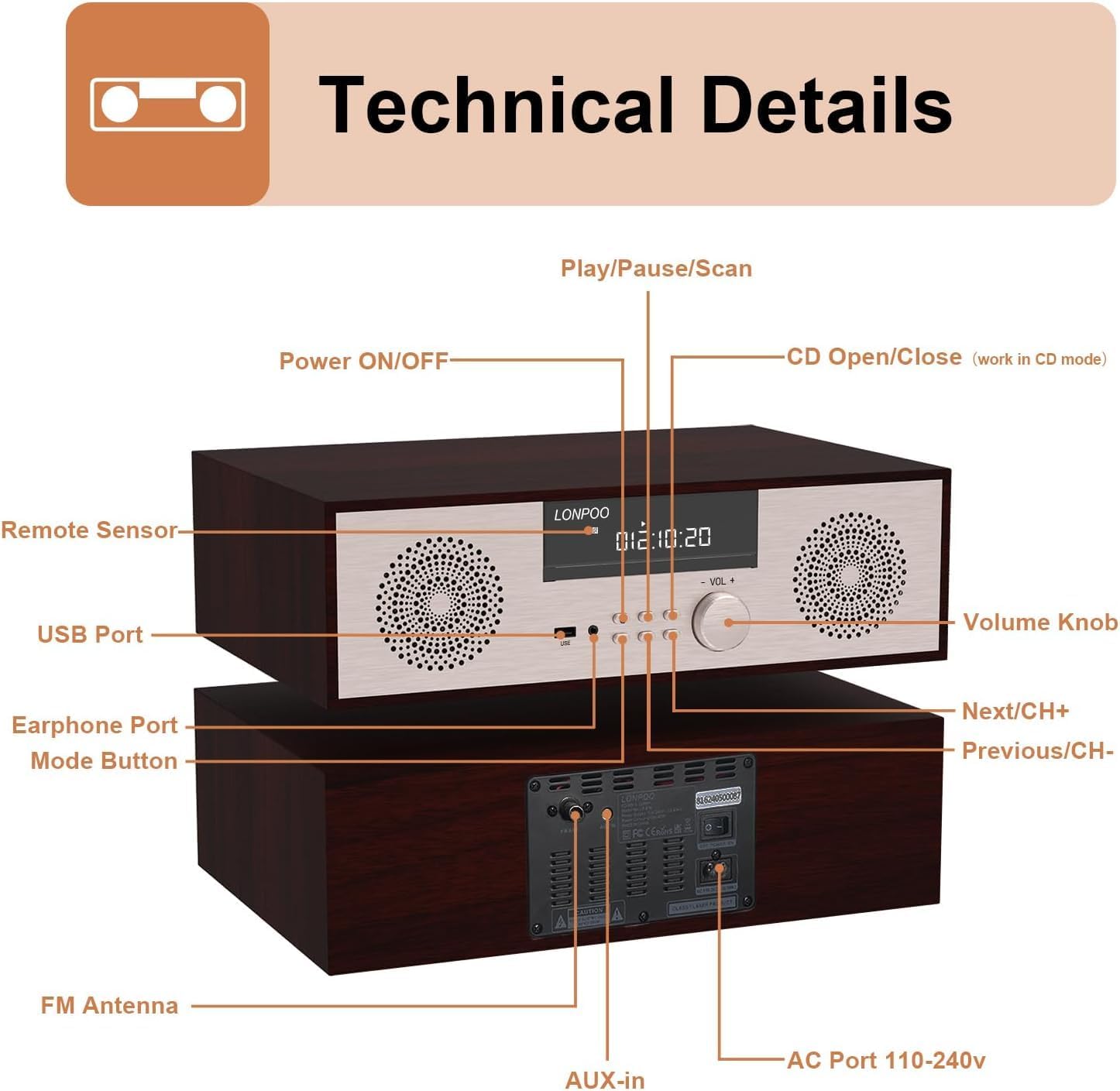
Afbeelding: Voor- en achterkant view of the LONPOO LP-816 system, highlighting the LCD display, control buttons, volume knob, USB port, earphone port, mode button, remote sensor, CD compartment, AUX-in, FM antenna port, and AC power port.
- Aan/uit: Hiermee schakelt u het apparaat in of uit.
- LCD-scherm: Toont de huidige modus, trackinformatie, frequentie en tijd.
- CD-compartiment: Voor het plaatsen van audio-cd's.
- USB-poort: Connect USB flash drives for audio playback.
- Oortelefoon poort: 3.5 mm jack voor het aansluiten van een koptelefoon.
- Modusknop: Switches between CD, FM, Bluetooth, AUX, and USB modes.
- Afspeel-/pauze-/scan-knop: Regelt de weergave en start de FM-scan.
- Volgende/CH+ knop: Gaat direct naar het volgende nummer of de volgende FM-voorkeurzender.
- Vorige/CH-knop: Springt naar het vorige nummer of de vorige FM-voorkeurzender.
- Volumeknop: Past het audiovolume aan.
- Infraroodsensor: Ontvangt signalen van de afstandsbediening.
- AUX-ingang: 3.5 mm-aansluiting voor het aansluiten van externe audioapparaten.
- FM-antenne: Hiermee sluit je de meegeleverde FM-antenne aan voor radio-ontvangst.
- AC Port 110-240V: Sluit de voedingsadapter aan.
4.2 afstandsbediening
The remote control provides convenient access to all functions of the LP-816 system.

Image: Close-up of the LONPOO LP-816 remote control, showing various buttons for power, mode selection, volume, track control, EQ, and numeric input.
Insert two AAA batteries (not included) into the remote control, observing the correct polarity.
5. Instellen
5.1 Plaatsing
Place the LP-816 system on a flat, stable surface. Ensure there is adequate space around the unit for proper ventilation. Avoid placing it near strong magnetic fields or direct sunlight.
5.2 De FM-antenne aansluiten
Connect the supplied FM antenna to the 'FM Antenna' port on the rear of the unit. Extend the antenna fully for optimal FM reception.
5.3 Stroomaansluiting
Connect the power adapter to the 'AC Port 110-240V' on the rear of the unit, then plug the adapter into a wall outlet.
6. Gebruiksaanwijzing
6.1 In-/uitschakelen
Press the 'Power ON/OFF' button on the front panel or the remote control to turn the unit on or off.
6.2 CD-weergave
To play an audio CD:
- Press the 'Mode' button until 'CD' mode is selected on the display.
- Press the 'CD Open/Close' button (if available on the unit or remote) or gently insert the CD into the slot. The unit will automatically load the CD.
- The CD will begin playing automatically. If not, press the 'Play/Pause' button.
- Use the 'Next/CH+' and 'Previous/CH-' buttons to skip tracks.
- Druk op 'Afspelen/Pauze' om het afspelen te pauzeren of te hervatten.

Image: The LONPOO LP-816 system with its CD player compartment open, ready to accept a disc.
6.3 FM-radio
Om naar FM-radio te luisteren:
- Press the 'Mode' button until 'FM' mode is selected.
- Automatisch scannen: Press and hold the 'Play/Pause/Scan' button to automatically scan and save available FM stations.
- Handmatig afstemmen: Use the 'Next/CH+' and 'Previous/CH-' buttons to manually tune to a specific frequency.
- Voorinstellingen selecteren: Use the 'Next/CH+' and 'Previous/CH-' buttons (short press) to cycle through saved preset stations.

Image: The LONPOO LP-816 system displaying an FM radio frequency (87.50 MHz) on its screen, with a visual representation of the FM band.
6.4 Bluetooth-verbinding
Een Bluetooth-apparaat verbinden:
- Press the 'Mode' button until 'BT' (Bluetooth) mode is selected. The display will show 'BT' and the unit will enter pairing mode.
- Schakel Bluetooth in op uw apparaat met Bluetooth (bijvoorbeeld uw smartphone) en zoek naar beschikbare apparaten.
- Select 'LP-816' from the list of devices.
- Once paired, the unit will indicate a successful connection, and you can play audio from your device through the LP-816.

Image: The LONPOO LP-816 system displaying 'BT' on its screen, with a smartphone nearby showing a successful Bluetooth connection to 'LP-816'.
6.5 AUX-in-aansluiting
To play audio from an external device via AUX-in:
- Connect a 3.5mm audio cable (not included) from the headphone jack or line-out of your external device to the 'AUX-in' port on the rear of the LP-816.
- Druk op de 'Modus'-knop totdat de 'AUX'-modus is geselecteerd.
- Play audio from your external device. The sound will be output through the LP-816 speakers.
6.6 USB-weergave
Audio afspelen filevanaf een USB-flashstation:
- Insert a USB flash drive into the 'USB Port' on the front panel.
- Press the 'Mode' button until 'USB' mode is selected.
- Het apparaat detecteert automatisch compatibele audio en begint deze af te spelen. files van de USB-stick.
- Use the 'Next/CH+' and 'Previous/CH-' buttons to skip tracks.

Image: A close-up of the LONPOO LP-816 system's front panel, showing a USB flash drive inserted into the USB port.
6.7 Koptelefoonuitgang
Connect standard 3.5mm headphones to the 'Earphone Port' on the front panel for private listening. When headphones are connected, sound will no longer be output from the main speakers.
7. Onderhoud
7.1 Reinigen
To clean the unit, first unplug it from the power outlet. Use a soft, dry, lint-free cloth to wipe the exterior surfaces. Do not use abrasive cleaners, waxes, or solvents as they may damage the finish.
7.2 Onderhoud van de cd-speler
Handle CDs by their edges to avoid fingerprints and scratches. If a CD is dirty, wipe it gently with a soft, dry cloth from the center outwards. Do not use solvents or abrasive cleaners on CDs.
8. Probleemoplossing
| Probleem | Mogelijke oorzaak | Oplossing |
|---|---|---|
| Geen stroom | Stroomkabel niet aangesloten; Stopcontact niet actief | Controleer of de stroomkabel goed is aangesloten. Probeer een ander stopcontact. |
| Geen geluid | Volume too low; Mute function active; Incorrect mode selected; Headphones connected | Increase volume. Deactivate mute. Select correct input mode. Disconnect headphones. |
| CD speelt niet af | CD inserted incorrectly; CD is dirty or scratched; CD format not supported | Reinsert CD correctly. Clean or replace CD. Ensure CD is an audio CD. |
| Bluetooth maakt geen verbinding | Bluetooth not in pairing mode; Device too far; Device already connected to another unit | Ensure unit is in BT pairing mode. Move device closer. Disconnect from other devices. |
| Slechte FM-ontvangst | Antenne niet uitgeschoven; Zwak signaal; Interferentie | Extend and adjust FM antenna. Relocate unit for better signal. |
9. Specificaties
- Model: LP-816
- Productafmetingen (L x B x H): 15.8 x 10.5 x 4.5 inch
- Artikelgewicht: 11.57 pond
- Connectiviteitstechnologie: Hulp, Bluetooth, USB
- Luidsprekertype: Stereo
- Audio-uitvoer: 40 watt RMS
- Functies: CD Player, FM Radio, Bluetooth, AUX-in, Headphone Output, DSP Technology
10. Garantie en ondersteuning
LONPOO products are designed and manufactured to the highest quality standards. For warranty information and technical support, please refer to the warranty card included with your product or visit the official LONPOO webwebsite. Bewaar uw aankoopbewijs als bewijs van aankoop.