
1. Product voorbijview
The MOBAPAD N1 HD is a versatile wireless controller designed for an enhanced gaming experience across multiple platforms. It features advanced technologies such as Hall Effect Joysticks for precise control, ALPS Dual-Axis Motors for immersive HD vibration, and six-axis motion control. This controller is compatible with Nintendo Switch, PC, iOS, and Android devices, offering seamless connectivity and responsive performance.

Afbeelding: Voorzijde view of the MOBAPAD N1 HD Wireless Controller, showcasing het ergonomische ontwerp en de knopindeling.
2. Belangrijkste kenmerken
- Compatibiliteit met meerdere platforms: Fully compatible with Nintendo Switch, PC, iOS, and Android devices, ensuring broad usability.
- Hall-effect joysticks: Provides smooth, precise, and durable control with minimal wear, ideal for accurate gaming.
- ALPS Dual-Axis Motors with HD Vibration: Delivers realistic and immersive haptic feedback for enhanced gameplay.
- Zes-assige bewegingsbesturing: Built-in gyroscope enables enhanced motion control for compatible games.
- NFC for Amiibo Scanning: Supports NFC technology for scanning Amiibo figures on Nintendo Switch.

Image: The controller illustrating its immersive motion control capabilities with swirling lines around it.

Image: The controller positioned in front of a collection of Amiibo figures, highlighting its NFC scanning function.

Image: The controller shown alongside icons for Switch, Android/iOS, and PC, demonstrating its multi-device compatibility.
3. Installatie en verbinding
Follow these steps to connect your MOBAPAD N1 HD controller to your desired device.
3.1. Verbinding maken met Nintendo Switch
- Selecteer in het HOME-menu Beheerders, Dan Grip/volgorde wijzigen.
- While the screen is displaying "Press L + R on the controller", press and hold the Home-knop on the MOBAPAD N1 HD controller for 3-5 seconds until the player LEDs begin to flash.
- Zodra de verbinding tot stand is gebracht, blijven de speler-LED(s) die overeenkomen met het controllernummer branden.
3.2. Connecting to PC (Windows)
- Connect the controller to your PC using a USB-C cable. The controller will be recognized as a wired controller.
- For wireless connection, ensure your PC has Bluetooth enabled. Go to Bluetooth & other devices settings.
- Select "Add Bluetooth or other device" and choose "Bluetooth".
- Houd de Home-knop on the controller until the LEDs flash rapidly, indicating pairing mode.
- Select "MOBAPAD N1 HD" from the list of available devices.
3.3. Connecting to iOS/Android Devices
- Schakel Bluetooth in op uw iOS- of Android-apparaat.
- Ga naar de Bluetooth-instellingen en zoek naar nieuwe apparaten.
- Houd de Home-knop on the controller until the LEDs flash rapidly.
- Select "MOBAPAD N1 HD" from the list of available devices to pair.
4. De controller bedienen
Familiarize yourself with the controller's layout and functions for optimal gameplay.
4.1. Knopindeling
- Linker analoge stick: For movement and camera control. Features Hall Effect technology.
- Rechter analoge stick: For camera control and aiming. Features Hall Effect technology.
- D-pad: Directional input for menu navigation and specific game actions.
- A/B/X/Y-knoppen: Standaard actieknoppen.
- L/R-knoppen: Schouderknopen.
- ZL/ZR-knoppen: Triggerknoppen.
- Min (-) knop: Typically for opening in-game menus or specific functions.
- Plus (+) knop: Typically for opening in-game menus or specific functions.
- Thuis knop: Returns to the system's home screen. Also used for pairing and NFC scanning.
- Opnameknop: Takes screenshots or video clips (Nintendo Switch).
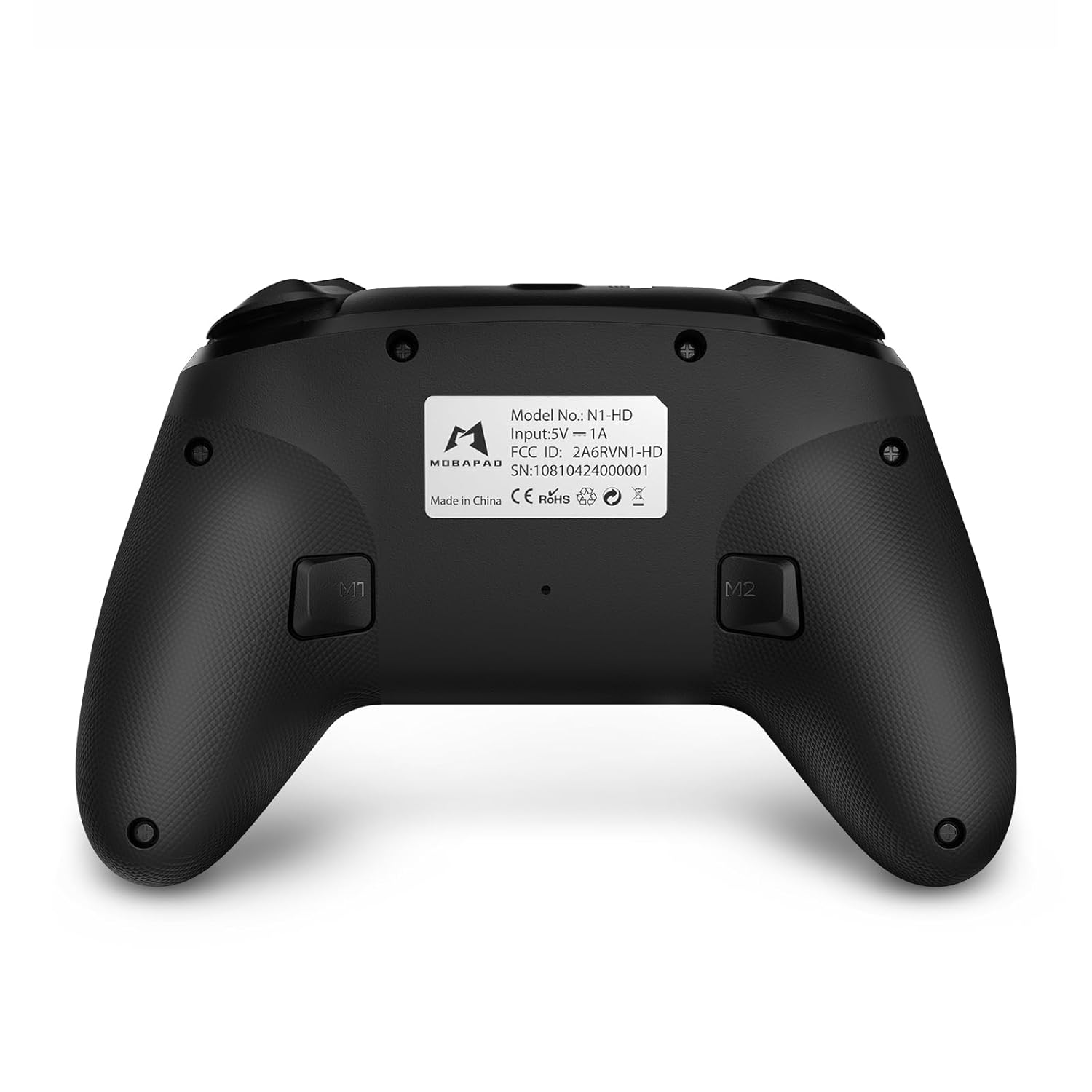
- M1/M2-knoppen: Programmable back buttons for custom macros or remapping.
Afbeelding: Gedetailleerde voorkant view of the MOBAPAD N1 HD controller, showing all buttons and joysticks.

Afbeelding: Achterkant view of the MOBAPAD N1 HD controller, highlighting the M1 and M2 programmable buttons and product label.
4.2. NFC Functionality (Amiibo Scanning)
To use the NFC function for Amiibo scanning on Nintendo Switch:
- Ensure your controller is connected to the Nintendo Switch.
- In a compatible game, when prompted to scan an Amiibo, place the Amiibo figure directly over the Home-knop area on the controller.
- Hold the Amiibo in place until the game registers the scan.
5. Onderhoud en verzorging
Goed onderhoud garandeert de lange levensduur en optimale prestaties van uw controller.
- Schoonmaak: Gebruik een zachte, droge doek om de controller af te vegen. Voor hardnekkig vuil, lichtjesampMaak de doek schoon met water. Vermijd agressieve chemicaliën of schurende materialen.
- Opslag: Bewaar de controller op een koele, droge plaats, uit de buurt van direct zonlicht en extreme temperaturen.
- batterij zorg: The controller contains a Lithium Ion battery. Avoid fully discharging the battery frequently. If storing for extended periods, charge the battery to about 50% to prolong its lifespan. Do not expose the battery to fire or extreme heat.
- Behandeling: Laat de controller niet vallen en stel hem niet bloot aan harde stoten, aangezien dit interne componenten kan beschadigen.
6. Probleemoplossing
If you encounter issues with your MOBAPAD N1 HD controller, refer to the following common solutions.
| Probleem | Mogelijke oorzaak | Oplossing |
|---|---|---|
| De controller maakt geen verbinding. | Low battery, out of range, incorrect pairing mode, interference. | Charge the controller fully. Ensure it is within range of the device. Re-enter pairing mode (hold Home button). Move closer to the device or away from other wireless devices. |
| Knoppen of joysticks reageren niet. | Software glitch, physical obstruction, damage. | Restart the controller and the connected device. Check for any debris around the buttons/joysticks. If issues persist, contact customer support. |
| De trilling is zwak of afwezig. | Vibration setting off, game does not support vibration, motor issue. | Check in-game settings and system settings to ensure vibration is enabled. Verify if the game supports vibration feedback. |
| NFC scanning fails. | Incorrect placement, game not prompting scan, controller not connected. | Ensure the Amiibo is placed directly over the Home button area. Confirm the game is prompting for an Amiibo scan. Verify controller is properly connected to the Switch. |
7. Specificaties
| Functie | Detail |
|---|---|
| Modelnummer | Mobapad N1 HD Black |
| Afmetingen (L x B x H) | 5.91 x 2.36 x 3.94 inch |
| Gewicht | 7.05 ons |
| Batterijtype | 1 lithium-ionbatterij (meegeleverd) |
| Connectiviteit | Wireless (Bluetooth), USB-C (wired) |
| Verenigbaarheid | Nintendo Switch, PC, iOS, Android |
| Speciale kenmerken | Hall Effect Joysticks, ALPS Dual-Axis Motors, HD Vibration, Six-Axis Gyroscope, NFC |
8. Garantie en ondersteuning
For warranty information or technical support, please contact MOBAPAD customer service. Refer to the official MOBAPAD webRaadpleeg de website of uw aankoopdocumentatie voor specifieke garantievoorwaarden en contactgegevens.
You can visit the official MOBAPAD store on Amazon for more information: MOBAPAD Store