
1. Product voorbijview
The Machenike Machcreator Mini Desktop, Model 4762H, is a compact and powerful computing solution designed for various applications, from business to everyday use. It features a 13th Gen Intel Core i7-13620H processor, 16GB DDR5 RAM, and a 512GB PCIe M.2 SSD, providing high-speed performance and efficient multitasking capabilities. This mini PC supports 4K dual monitor output and comes pre-installed with Windows 11 Pro.
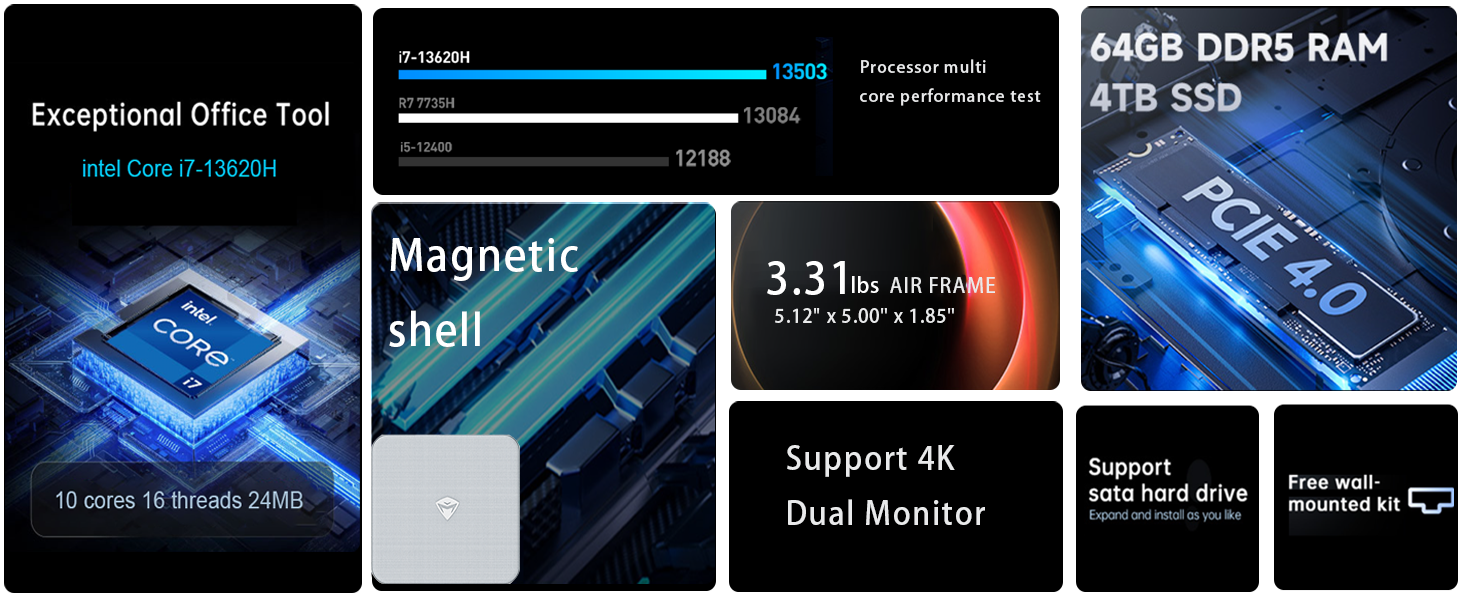
Afbeelding: Overview of the Intel Core i7 processor, highlighting 10 Cores, 16 Threads, 4.90 GHz Max Turbo Frequency, and 24 MB L3 Cache.
Belangrijkste kenmerken:
- Verwerker: Intel Core i7-13620H (10 kernen, 16 threads, tot 4.9 GHz)
- Geheugen: 16GB DDR5 SODIMM RAM (expandable up to 64GB)
- Opslag: 512GB PCIe M.2 Solid State Drive (supports dual M.2 expansion)
- Besturingssysteem: Windows 11 Pro
- Grafisch: Integrated Intel UHD Graphics, supporting 4K dual monitor output via HDMI 2.0 and DisplayPort 1.4
- Connectiviteit: Wi-Fi 6, Bluetooth, 2 x RJ45 Ethernet, USB 3.2 Gen2 Type-A, USB Type-C
- Koelsysteem: Twin turbine cooling fan with deluxe all-copper radiator
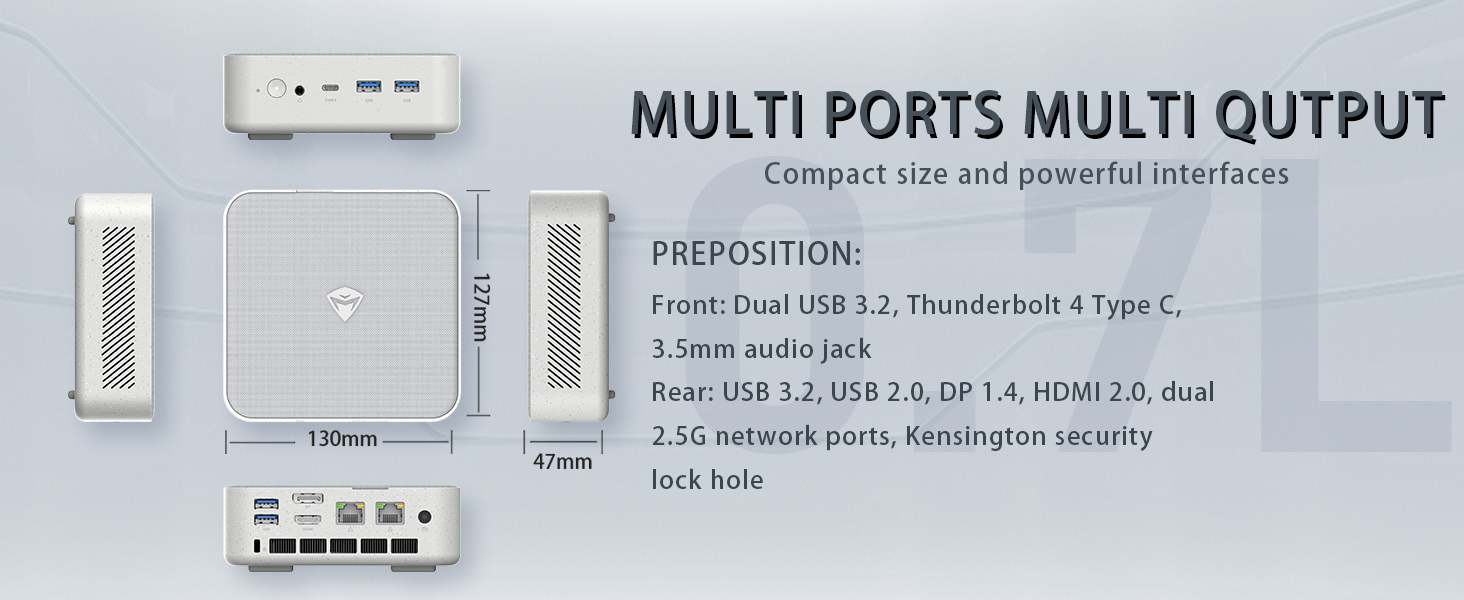
Image: Illustration of PCIe 4.0 SSD and memory slots, indicating support for up to 64GB DDR5 RAM and up to 4TB PCIe SSD expansion.
2. Installatiehandleiding
2.1 Het apparaat uitpakken
Haal alle onderdelen voorzichtig uit de verpakking. Controleer of de volgende onderdelen aanwezig zijn:
- Machenike Machcreator Mini Desktop (Model 4762H)
- Stroomadapter
- Gebruikershandleiding (dit document)
- (Optioneel) VESA-montageset
2.2 Randapparatuur aansluiten
Sluit vóór het inschakelen de benodigde randapparatuur aan:
- Weergave: Connect your monitor(s) to the HDMI 2.0 or DisplayPort 1.4 ports on the rear of the mini PC. The USB Type-C port also supports video output.
- Toetsenbord en muis: Connect your USB keyboard and mouse to any of the available USB 3.2 Gen2 Type-A ports.
- Netwerk: For a wired connection, connect an Ethernet cable to one of the RJ45 ports. For wireless, ensure your Wi-Fi network is available.
- Stroom: Connect the power adapter to the DC-in port on the mini PC, then plug the adapter into a power outlet.
Afbeelding: Gedetailleerd view of the mini PC's front and rear ports, including USB 3.2 Gen2 Type-A, USB Type-C, 3.5mm Audio Jack, HDMI 2.0, DisplayPort 1.4, and RJ45 Ethernet ports. Dimensions are also shown.
2.3 Eerste opstart en installatie van Windows 11 Pro
- Druk op de aan/uit-knop aan de voorkant van de mini-pc.
- The system will boot into the Windows 11 Pro setup wizard. Follow the on-screen instructions to configure your language, region, network, and user account.
- Once setup is complete, your mini PC is ready for use.
3. Gebruiksaanwijzing
3.1 In-/uitschakelen
- Inschakelen: Druk eenmaal op de aan/uit-knop.
- Uitschakelen: Klik op de Startknop in Windows en selecteer vervolgens Energie > Afsluiten.
- Opnieuw opstarten: Klik op de Startknop in Windows en selecteer vervolgens Aan/uit > Opnieuw opstarten.
- Slaap: Klik op de Startknop in Windows en selecteer Energie > Slaapstand.
3.2 Weergaveconfiguratie
The mini PC supports up to two 4K displays simultaneously. To configure display settings:
- Klik met de rechtermuisknop op het bureaublad en selecteer 'Beeldscherminstellingen'.
- Here you can detect multiple displays, arrange them, change resolution, and adjust scaling.
3.3 Netwerkconnectiviteit
- Wifi: Click the network icon in the taskbar, select your Wi-Fi network, enter the password, and connect.
- Ethernet: Als er een Ethernetkabel is aangesloten, zou het systeem automatisch een bekabelde netwerkverbinding tot stand moeten brengen.
3.4 Cooling System Modes
The mini PC features an advanced cooling system with adjustable modes via the BIOS to optimize performance and noise levels. These modes include:
- Stilte modus: Prioritizes quiet operation, suitable for light tasks.
- Balansmodus: Offers a good balance between performance and noise.
- Prestatiemodus: Maximizes performance (up to 65W power release), ideal for demanding applications.
To change these settings, access the BIOS during startup (typically by pressing Verdelen or F2 repeatedly after powering on) and navigate to the relevant power or performance settings.
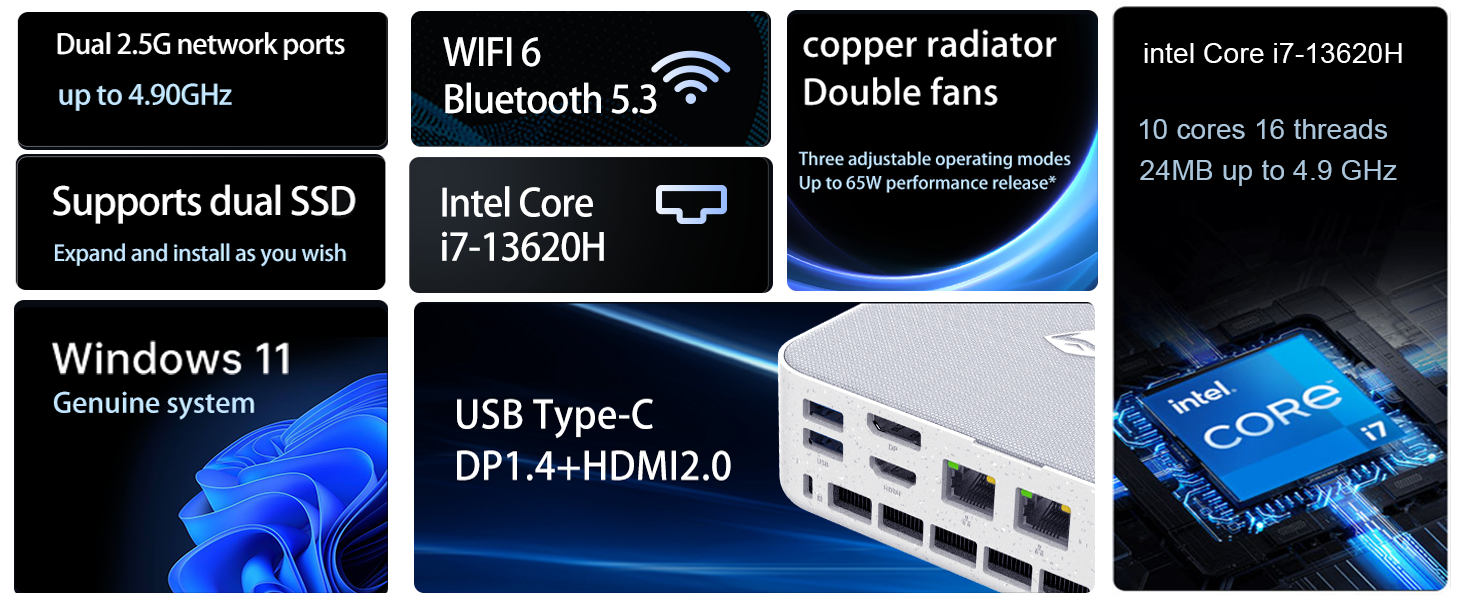
Image: Illustration of the twin turbine cooling fan and deluxe all-copper radiator, explaining how it prevents slowdowns due to overheating and offers silence, balance, and performance modes.
4. Onderhoud
4.1 Het apparaat reinigen
To ensure optimal performance and longevity, regularly clean your mini PC:
- Power off the device and disconnect it from the power outlet.
- Gebruik een zachte, droge doek om de buitenkant af te vegen.
- Use compressed air to gently clear dust from ventilation openings. Do not insert any objects into the vents.
4.2 Software-updates
Keep your Windows 11 Pro operating system and drivers updated to ensure security and performance:
- Windows-updates: Go to Start > Settings > Windows Update and check for updates.
- Stuurprogramma-updates: Visit the Machenike official webGa naar deze site voor de nieuwste stuurprogramma's voor uw specifieke model.
4.3 Opslag- en geheugenuitbreiding
The Machenike Machcreator Mini Desktop supports upgrades for both RAM and storage:
- RAM: The device has 2 SODIMM slots and supports up to 64GB DDR5 RAM.
- Opslag: It supports dual PCIe M.2 SSDs, allowing for significant storage expansion up to 4TB.
Opmerking: Opening the device for upgrades may void your warranty. Consult a qualified technician or refer to specific upgrade guides from Machenike if available.
5. Probleemoplossing
In dit gedeelte worden veelvoorkomende problemen behandeld. Voor complexere problemen kunt u contact opnemen met de klantenservice.
5.1 Geen stroom
- Zorg ervoor dat de stroomadapter goed is aangesloten op zowel de mini-pc als een werkend stopcontact.
- Controleer of het stopcontact werkt door er een ander apparaat op aan te sluiten.
- Controleer de voedingsadapter op zichtbare beschadigingen.
5.2 Geen weergave-uitvoer
- Controleer of de monitor is ingeschakeld en of de juiste ingangsbron is geselecteerd.
- Ensure the HDMI or DisplayPort cable is securely connected to both the mini PC and the monitor.
- Probeer een andere beeldschermkabel of monitor, indien beschikbaar.
- Als u meerdere beeldschermen gebruikt, probeer dan slechts één beeldscherm tegelijk aan te sluiten.
5.3 Problemen met netwerkconnectiviteit
- Bekabeld (Ethernet): Check if the Ethernet cable is properly connected to both the mini PC and the router/modem. Verify router/modem status.
- Draadloos (Wi-Fi): Ensure Wi-Fi is enabled in Windows settings. Restart your router/modem. Check if other devices can connect to the Wi-Fi network.
- Run Windows Network Troubleshooter (Start > Settings > Network & internet > Advanced network settings > Network troubleshooter).
6. Specificaties
Detailed technical specifications for the Machenike Machcreator Mini Desktop, Model 4762H:
| Functie | Specificatie |
|---|---|
| Merk | Machinaal |
| Modelnummer | 4762H |
| Besturingssysteem | Windows 11 Pro |
| CPU-model | Intel Core i7-13620H |
| CPU-snelheid | Up to 4.9 GHz (Max Turbo Frequency) |
| Geïnstalleerde RAM-geheugengrootte | 16 GB DDR5 (uitbreidbaar tot 64 GB) |
| Geheugenkloksnelheid | 4800 MHz |
| Beschikbare geheugenslots | 2 |
| Geheugenopslagcapaciteit | 512 GB PCIe M.2 SSD (Supports dual M.2, up to 4TB) |
| Grafische coprocessor | Intel UHD Graphics (geïntegreerd) |
| Video-uitgangsinterface | HDMI 2.0, DisplayPort 1.4, USB Type-C |
| Weergaveresolutie Maximaal | 3840x2160 (4K) |
| hardware Interface | 3.5mm Audio, Bluetooth, DisplayPort, Ethernet (2x RJ45), HDMI, USB, USB Type C |
| Draadloze connectiviteit | Wi-Fi 6 (802.11ax), Bluetooth |
| Artikelafmetingen (LxBxH) | 5.12 x 5 x 1.85 inch |
| Artikelgewicht | 49.8 pond (Note: This weight may be a data entry error; actual weight for a mini PC is typically much less.) |
| UPC | 193200587317 |
7. Garantie en ondersteuning
7.1 Garantie-informatie
Machenike products typically come with a limited manufacturer's warranty. Please refer to the warranty card included with your purchase or visit the official Machenike website for detailed warranty terms and conditions specific to your region and product model. Keep your proof of purchase for warranty claims.
7.2 Klantenservice
For technical assistance, troubleshooting beyond this manual, or warranty inquiries, please contact Machenike customer support:
- Online hulp: Visit the official Machenike website (www.machenike.com - exampde link, de daadwerkelijke link kan variëren) en ga naar het ondersteuningsgedeelte.
- E-mailondersteuning: Raadpleeg de productdocumentatie voor het specifieke e-mailadres voor ondersteuning.
- Telefonische ondersteuning: Check the Machenike webWebsite met regionale telefoonnummers voor ondersteuning.
When contacting support, please have your product model number (4762H) and serial number ready.