
1. Inleiding
Thank you for choosing the Quntis LED Cabinet Light. This manual provides essential information for the safe and efficient use of your new product. Please read these instructions carefully before installation and operation, and retain them for future reference.
2. Producteigenschappen
- Zeer gevoelige PIR-bewegingssensor: Detects motion within a 120° range and up to 10-16 feet (approx. 3-5 meters), automatically illuminating when movement is detected.
- Drie verlichtingsmodi: Choose between Always On Mode, Night Sensing Mode (activates only in dark environments), and All-day Sensing Mode (activates anytime motion is detected).
- USB-C Fast Charging & Long Battery Life: Equipped with a built-in 2200mAh rechargeable battery, fully charged in approximately 3 hours via the included 50cm USB-C cable. Provides 40-50 days of use in motion sensor mode or up to 13 hours in always-on mode.
- Eenvoudige installatie: Features strong internal magnets for direct attachment to metal surfaces, or use the included adhesive metal plates for non-metal surfaces. Tool-free setup allows for quick and versatile placement.
- Instelbare kleurtemperatuur en traploos dimmen: Fingerprint touch control allows switching between 3000K (Warm White), 4500K (Neutral White), and 6000K (Cool White). Long press for stepless brightness adjustment from 10% to 100%.
- Ultra-Thin Design & Durable Material: Slim 1cm thick aluminum alloy body ensures durability and a modern aesthetic, suitable for various interior spaces.
3. Inhoud van het pakket
- Quntis LED Cabinet Light (2 pieces)
- USB-C-oplaadkabel (50 cm)
- Zelfklevende metalen platen
- Gebruiksaanwijzing
4. Veiligheidsinformatie
- Het product niet demonteren of wijzigen.
- Verwijderd houden van water en omgevingen met een hoge luchtvochtigheid.
- Gebruik voor het opladen alleen de meegeleverde USB-C-kabel of een gecertificeerd equivalent daarvan.
- Vermijd blootstelling van het product aan extreme temperaturen of direct zonlicht.
- Ensure the installation surface is clean and dry before applying adhesive plates.
5. Instellen
5.1 Het licht opladen
Before first use, fully charge the LED cabinet light. Connect the supplied USB-C cable to the charging port on the light and to a standard USB power adapter (not included). The indicator light will show charging status.

Image: The Quntis LED Cabinet Light connected via USB-C for charging, highlighting its 2200mAh battery and estimated usage times.
5.2 Installatie
The Quntis LED Cabinet Light offers two convenient installation methods:
- Magnetische bevestiging: For metal surfaces, simply place the light directly onto the surface. The built-in magnets will hold it securely.
- Adhesive Plate Attachment: For non-metal surfaces (wood, plastic, etc.), use the included adhesive metal plates.
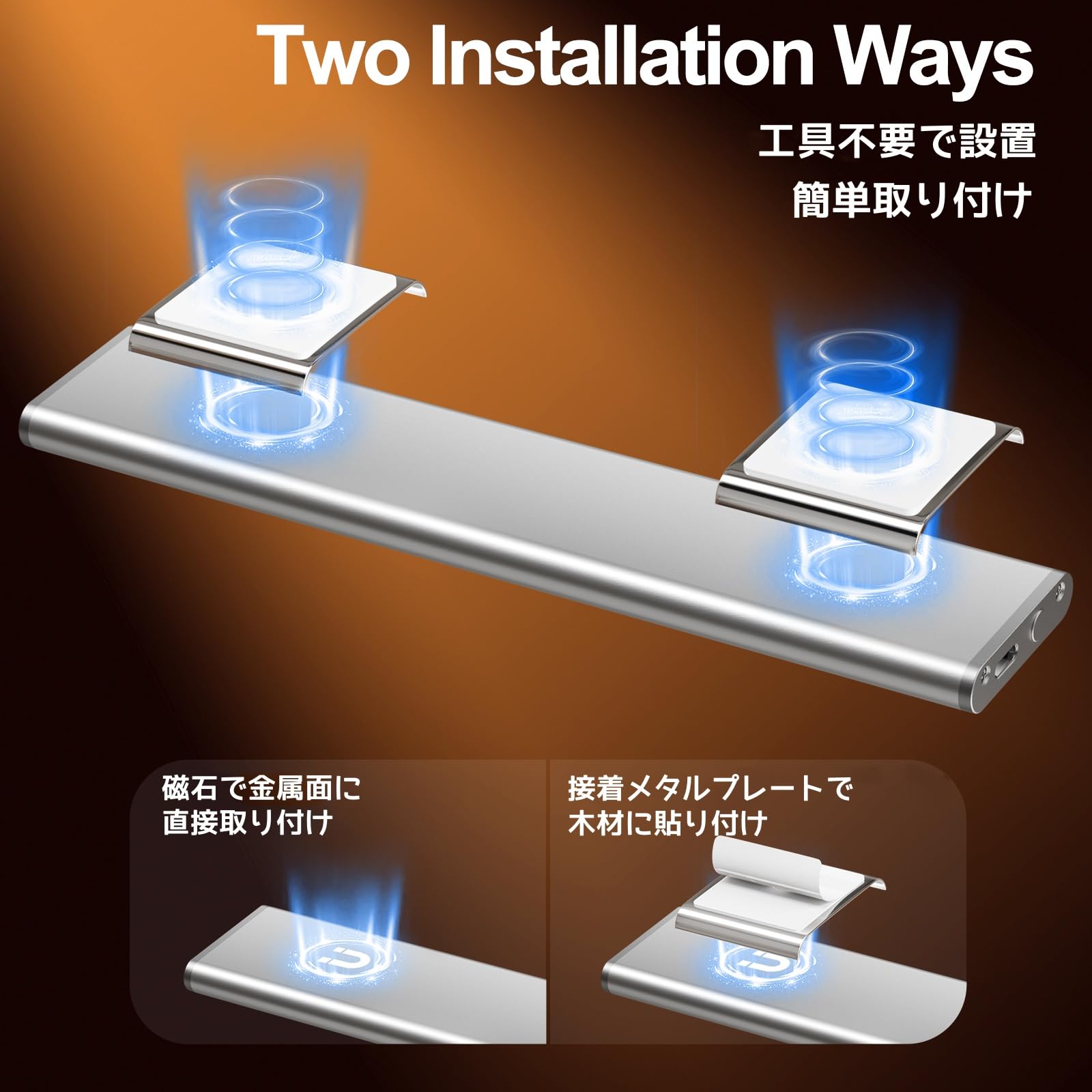
Image: Visual representation of the two installation methods: magnetic for metal surfaces and adhesive plates for other materials.
Steps for Adhesive Plate Installation:
- Clean the surface where you intend to install the light to ensure it is free of dust and grease.
- Peel off the protective film from the adhesive metal plate.
- Press the adhesive plate firmly onto the desired surface for a few seconds to ensure a strong bond.
- Attach the LED cabinet light to the metal plate using its built-in magnets.

Image: Step-by-step guide for installing the light using adhesive metal plates.
6. Gebruiksaanwijzing
The Quntis LED Cabinet Light features a multi-functional touch control button and a PIR motion sensor for versatile operation.
6.1 In-/uitschakelen en modusselectie
Use the fingerprint touch control button to cycle through the operating modes:
- Enkele klik: Activeert Altijd aan-modus. The light remains continuously on.
- Dubbelklik: Activeert Night Sensing Mode. The light will only turn on when motion is detected in a dark environment.
- Drievoudige klik: Activeert All-day Sensing Mode. The light will turn on whenever motion is detected, regardless of ambient light conditions.
- Viervoudige klik: Turns the light Uit.

Image: Illustration of how to use the touch control for different lighting modes.
6.2 Werking van de bewegingssensor
In Night Sensing Mode or All-day Sensing Mode, the built-in PIR sensor detects movement. The light will automatically turn on when motion is detected within its 120° range and up to 10-16 feet. If no further motion is detected for approximately 20 seconds, the light will automatically turn off to conserve battery.
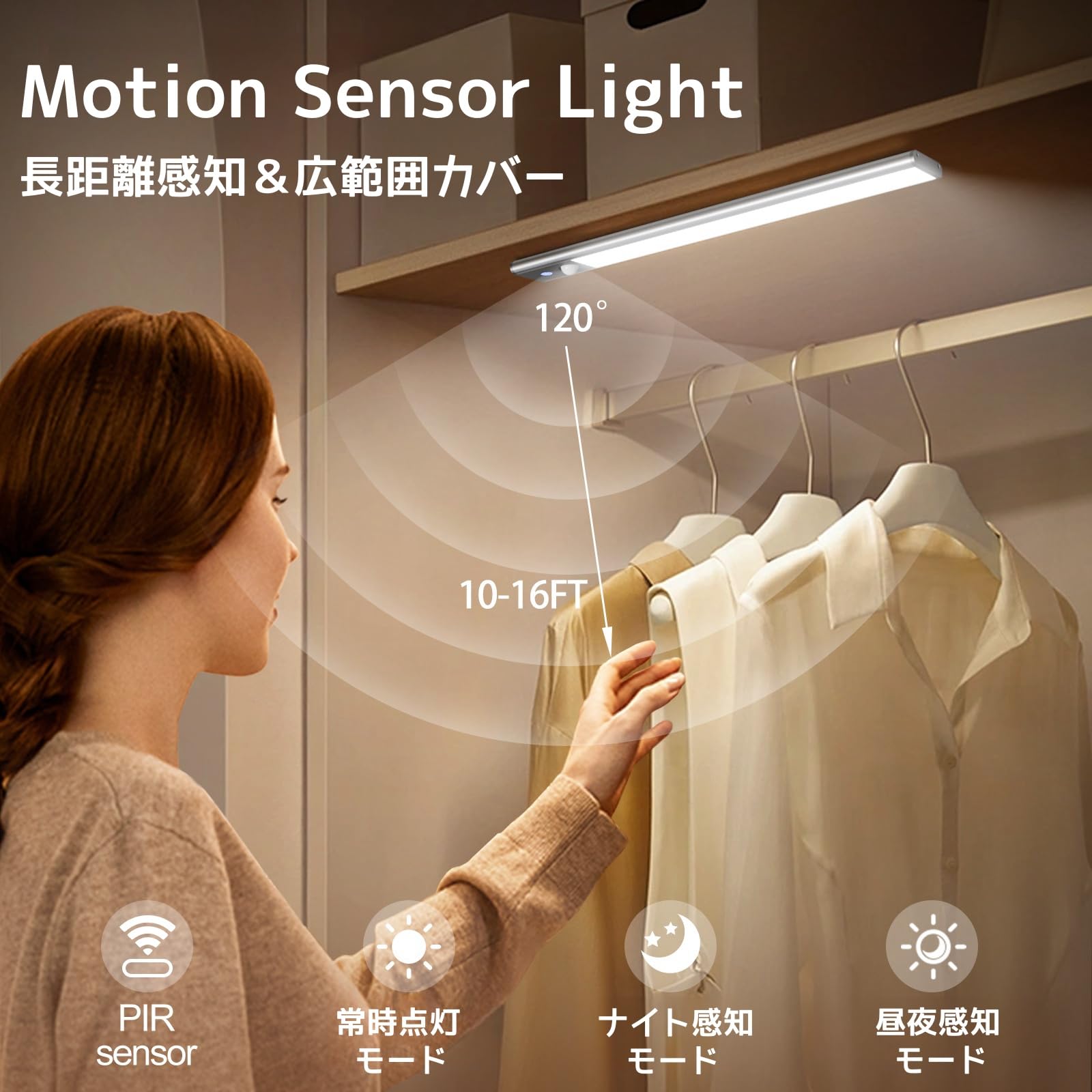
Image: The motion sensor light activating in a closet, demonstrating its detection capabilities.
Video: A demonstration of the Quntis LED Motion Sensor Light's automatic activation and shut-off feature when motion is detected and then ceases.
6.3 Aanpassing kleurtemperatuur
While the light is on, short press the fingerprint touch control button to cycle through the three available color temperatures: 3000K (Warm White), 4500K (Neutral White), and 6000K (Cool White).
6.4 Helderheidsaanpassing (traploos dimmen)
While the light is on, long press the fingerprint touch control button to adjust the brightness. The brightness will cycle between 10% and 100%. Release the button when the desired brightness level is reached.

Image: Visual guide for adjusting color temperature with a short press and brightness with a long press.
7. Onderhoud
7.1 Reinigen
To clean the light, gently wipe it with a soft, dry cloth. Do not use abrasive cleaners, solvents, or immerse the light in water.
7.2 Batterijonderhoud
To prolong battery life, avoid fully discharging the light frequently. Charge the light regularly, especially if it has not been used for an extended period. Store the light in a cool, dry place when not in use.
8. Probleemoplossing
| Probleem | Mogelijke oorzaak | Oplossing |
|---|---|---|
| Licht gaat niet aan. | Battery is low or depleted. Incorrect mode selected. | Charge the light fully. Ensure the correct operating mode (Always On, Night Sensing, or All-day Sensing) is selected. |
| Bewegingssensor werkt niet. | Light is in Always On Mode or Off. Ambient light is too bright (for Night Sensing Mode). Sensor is obstructed. | Switch to Night Sensing Mode or All-day Sensing Mode. Ensure the environment is dark enough for Night Sensing Mode. Clear any obstructions from the sensor. |
| Light falls off the surface. | Magnets not strong enough for the weight/surface. Adhesive plate not properly secured or surface was dirty. | Ensure the light is properly attached to the magnetic surface. If using adhesive plates, clean the surface thoroughly before re-applying new adhesive plates. Consider a more secure mounting method if the surface is unsuitable. |
| Helderheid en kleurtemperatuur kunnen niet worden aangepast. | Verkeerde bediening. | Ensure the light is on. Short press for color temperature change. Long press for stepless dimming. |
9. Specificaties
- Merk: Hoeveelheid
- Model: LI-HL-0033-SR-SWE
- Kleur: Zilver
- Afmetingen (L x B x H): 30 cm x 3 cm x 0.3 cm (ongeveer 12 x 1.2 x 0.12 inch)
- Batterij: 2200 mAh oplaadbaar
- Oplaadpoort: USB-C
- Oplaadtijd: Ongeveer 3 uur
- Bedrijfstijd: 40-50 days (Motion Sensor Mode), up to 13 hours (Always On Mode)
- Kleurtemperaturen: 3000K (warm wit), 4500K (neutraal wit), 6000K (koel wit)
- dimmen: 10%-100% Stepless
- Bewegingssensor Bereik: 120°, 10-16 ft (approx. 3-5 meters)
- Automatisch afsluiten: 20 seconds (in sensor modes)
- Materiaal: Aluminiumlegering
10. Garantie en ondersteuning
Quntis provides the following support for this product:
- 1 jaar garantie: Product replacement for defects, no repair needed.
- Reactie binnen 24 uur: Customer support inquiries will receive a response within 24 hours.
- 30 dagen gratis retourneren en ruilen: Probleemloos retourneren en ruilen binnen 30 dagen na aankoop.
For further assistance or technical support, please contact Quntis customer service through your purchase platform or visit our official webplaats.


