
1. Installatie en installatie
The DYONDER Wired PC Game Controller is designed for easy setup across multiple platforms. Follow these steps to get started:
1.1 Brede compatibiliteit
This controller is compatible with a variety of systems, including:
- Windows (Vista, 7, 8, 10, 11)
- PlayStation 3 (PS3)
- Android TV Box (Android 4.0 or higher with OTG function)
- Tesla
1.2 Plug & Play System
The controller features a simple Plug & Play system. No drivers are typically required for most compatible devices. Simply connect the controller to your device's USB port.
The integrated USB cable is 2 meters long, allowing for comfortable gaming from a distance.

Image: The controller supports multiple platforms, including Android and Windows 10/8/7.
2. Gebruiksaanwijzing
Familiarize yourself with the controller's features and functions for an optimal gaming experience.
2.1 Controllerindeling
The DYONDER controller features a standard layout with clearly labeled buttons and joysticks.
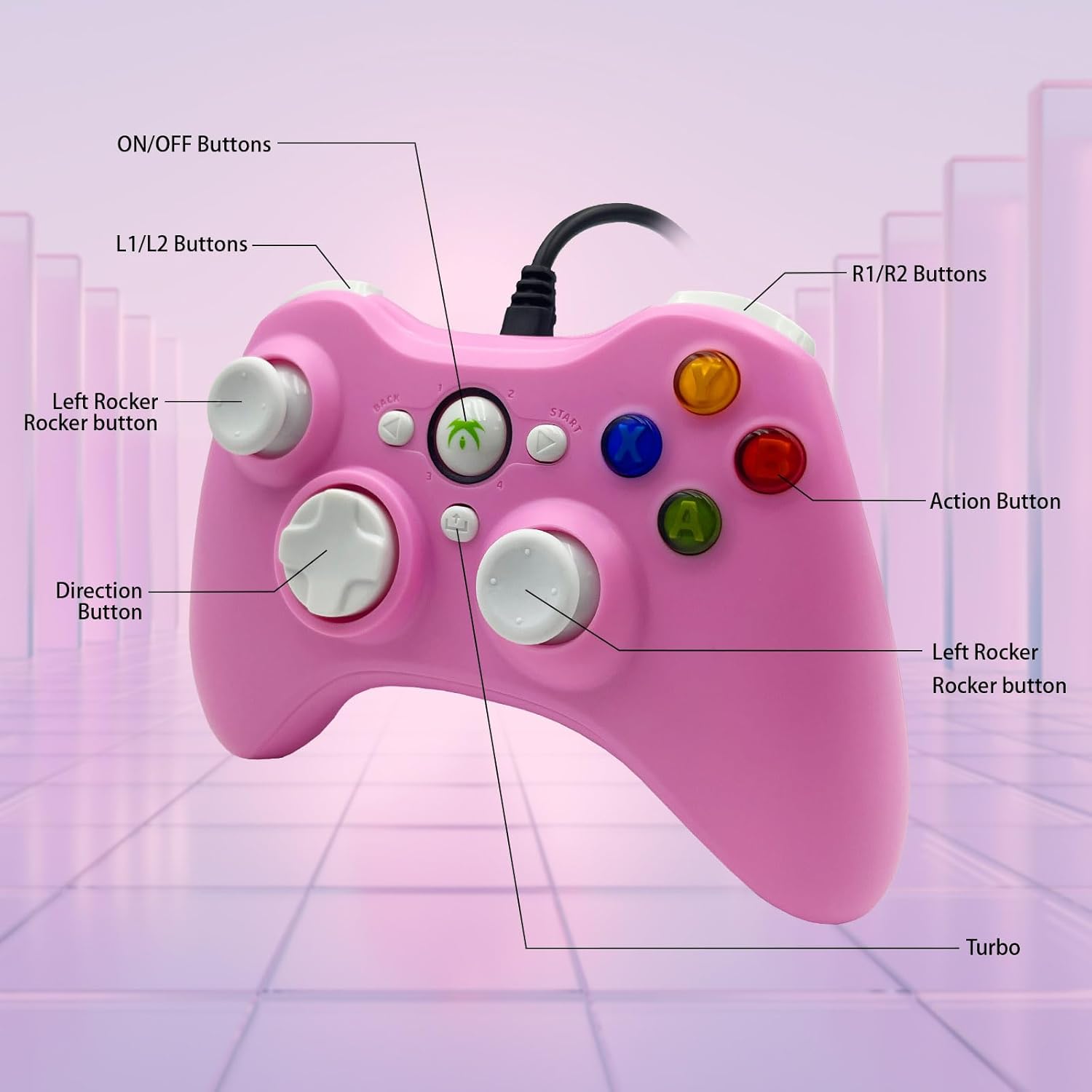
Image: Detailed diagram illustrating the various buttons and their labels on the controller, including ON/OFF, L1/L2, R1/R2, Left Rocker, Direction Button, Action Buttons, and Turbo button.
2.2 Turbofunctie
The Turbo function allows for rapid-fire input of a designated button, reducing repetitive presses and giving you an advantage in snelle games.
- Om Turbo te activeren: Houd de knop ingedrukt Turbo button, then press the desired action button (e.g., A, B, X, Y). The button will now rapidly fire when held.
- Om Turbo uit te schakelen: Houd de knop ingedrukt Turbo Druk nogmaals op de knop en druk vervolgens op dezelfde actieknop.

Image: The Turbo button is highlighted, indicating its function for rapid-fire input.
2.3 Immersive Vibration Feedback
The controller is equipped with two vibrating motors located in the side grips. These motors provide clear feedback, enhancing the immersion and realism of your gaming experience by reacting to in-game events.
2.4 Ergonomic Design and Joysticks
The asymmetrical joystick design is ergonomically crafted for the most comfortable thumb position, ensuring an optimal feel during extended gaming sessions.
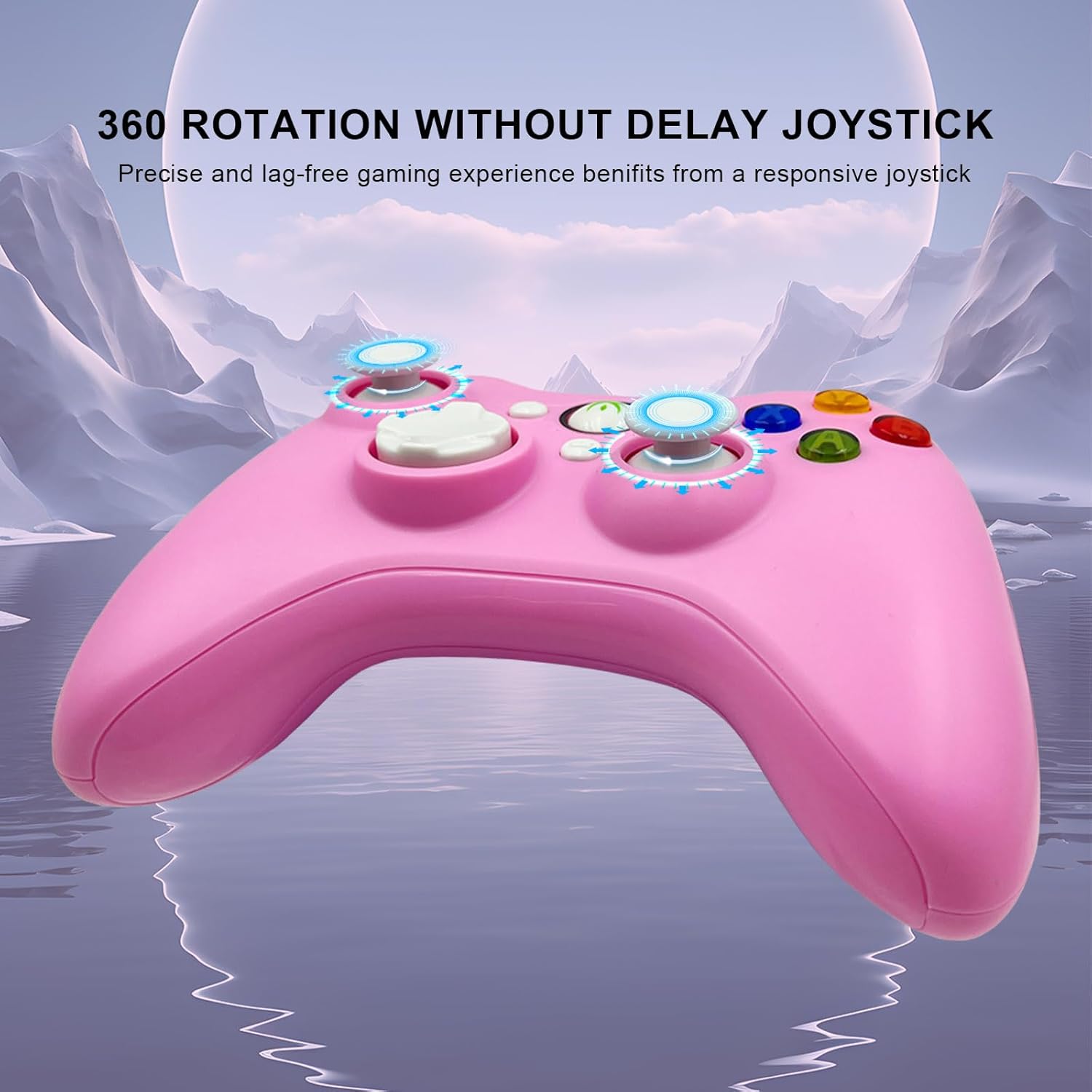
Image: The joysticks are designed for 360-degree rotation without delay, providing precise and lag-free gaming.
2.5 Hall Linear Triggers
The Hall linear triggers provide precise and responsive input, particularly beneficial for racing games where nuanced acceleration and braking are crucial.

Image: The Hall linear triggers are shown, emphasizing their benefit for racing games.
3. Onderhoud
Proper care and maintenance will extend the lifespan of your DYONDER Wired PC Game Controller.
- Schoonmaak: Gebruik een zachte, droge doek om de controller af te vegen. Voor hardnekkig vuil, lichtjesampMaak de doek schoon met water. Vermijd het gebruik van agressieve chemicaliën of schurende reinigingsmiddelen.
- Opslag: Store the controller in a cool, dry place away from direct sunlight and extreme temperatures. Avoid wrapping the cable too tightly to prevent damage.
- Behandeling: Do not drop the controller or expose it to excessive force, as this can damage internal components.
4. Probleemoplossing
Als u problemen ondervindt met uw controller, raadpleeg dan de volgende veelvoorkomende oplossingen:
- Controller niet herkend:
- Ensure the USB cable is securely plugged into both the controller and the device.
- Try plugging the controller into a different USB port on your device.
- Start uw computer of gameconsole opnieuw op.
- For Android devices, ensure OTG functionality is enabled and your device supports it.
- Knoppen of joysticks reageren niet:
- Test the controller on a different game or application to rule out software-specific issues.
- Zorg ervoor dat er geen vuil rond de knoppen of joysticks vastzit.
- If using on PC, check your game's controller settings to ensure it's properly configured.
- Trilling werkt niet:
- Controleer of het spel dat je speelt trilfeedback ondersteunt.
- Controleer de instellingen in het spel om er zeker van te zijn dat trillen is ingeschakeld.
- Some older systems or emulators may not fully support vibration features.
Belangrijk: If you encounter any persistent problems, please contact the seller for assistance before attempting to return the item.
5. Specificaties
| Functie | Detail |
|---|---|
| Modelnummer | B0DD613G32 |
| Connectiviteit | Bekabelde USB |
| Kabellengte | 2 meter |
| Vibration Feedback | Dual motors |
| Speciale kenmerken | Turbo Function, Hall Linear Triggers, Ergonomic Design |
| Verenigbaarheid | Windows, PS3, Android TV Box (OTG), Tesla |
| Datum waarop het product voor het eerst beschikbaar is op Amazon.com.be | 8 april 2024 |
| Beschikbaarheid reserveonderdelen | Informatie niet beschikbaar |
6. Ondersteuning
For any questions, technical support, or issues not covered in this manual, please contact DYONDER customer support or the seller directly through your purchase platform. Providing your model number (B0DD613G32) will help expedite the support process.