
Belangrijke veiligheidsinformatie
Lees alle instructies zorgvuldig door vóór montage en gebruik. Bewaar deze handleiding voor toekomstig gebruik.
- Dit product heeft een maximaal aanbevolen gewicht van 350 pond (158 kg). Do not exceed this weight limit.
- Improper assembly or use may lead to instability or malfunction, potentially causing injury.
- To avoid health issues associated with prolonged sitting, take regular breaks and adjust your posture during extended use.
- Ensure all screws and connections are tightened securely before use and periodically check for looseness.
Inhoud van het pakket
Controleer of alle onderdelen aanwezig zijn voordat u met de montage begint. Als er onderdelen ontbreken of beschadigd zijn, neem dan contact op met de klantenservice.
- Armleuningen (2)
- Wielen (5)
- Gaslift (1)
- Hoofdsteun (1)
- Gebruikershandleiding (1)
- Assembly Tools (1 set)
- Stoelonderstel (1)
- Zitkussen (1)
- Rugleuning (1)

Figuur 1: Example of a caster wheel, part of the chair's base assembly.
Opstelling en montage
The FLEXISPOT OC4 Lite chair is designed for straightforward assembly. A detailed user manual with step-by-step instructions and all necessary tools are included in the package. Assembly can typically be completed in approximately 30 minutes.
- Componenten uitpakken: Haal alle onderdelen voorzichtig uit de verpakking en leg ze op een schoon, vlak oppervlak.
- Bevestig de wielen aan de basis: Insert the five caster wheels into the holes on the chair base until they click securely into place.
- Gaslift invoegen: Plaats de gasliftcilinder in het middelste gat van het onderstel van de stoel.
- Monteer de zitting en rugleuning: Follow the specific instructions in the included user guide to attach the backrest to the seat cushion and then to the chair mechanism.
- Bevestig de hoofdsteun: Secure the headrest to the top of the backrest.
- Connect to Gas Lift: Plaats de gemonteerde zitting en rugleuning voorzichtig op de gasliftcilinder.
- Laatste controles: Ensure all connections are tight and the chair is stable before use.
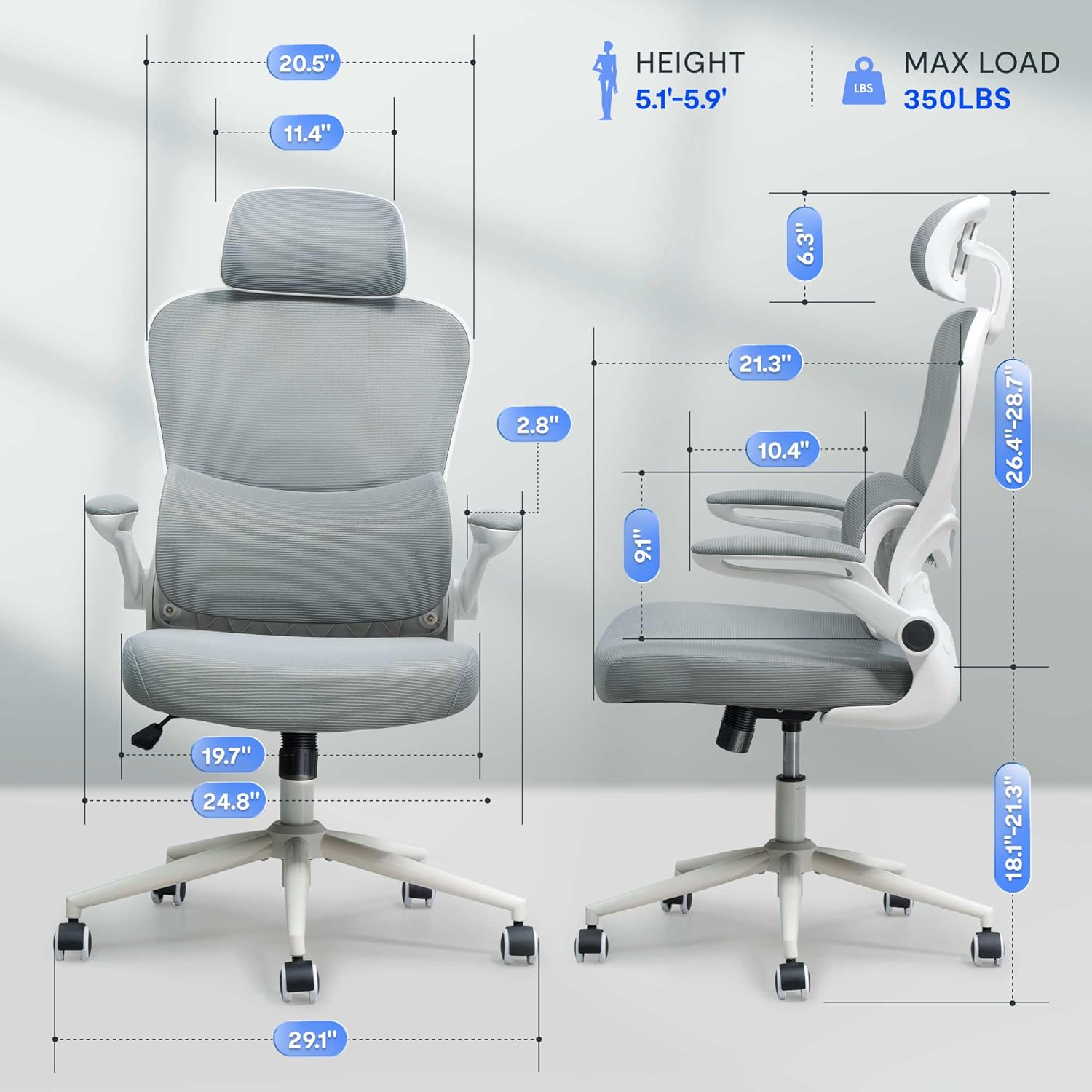
Figuur 2: Assembled chair with key dimensions for reference.
Gebruiksaanwijzing
The FLEXISPOT OC4 Lite chair offers multiple adjustment points to customize your seating experience for optimal comfort and support.
1. Zithoogteverstelling
Om de zithoogte aan te passen, zoekt u de hendel aan de rechterkant onder de zitting. Trek de hendel omhoog terwijl u zit om de zitting te verlagen, of trek hem omhoog terwijl u staat om de zitting te verhogen. Laat de hendel los wanneer de gewenste hoogte is bereikt.
2. Tilt Function and Tension Control
The chair features a tilt function allowing the backrest and seat to recline together. Use the lever on the left side beneath the seat to lock or unlock the tilt. The tilt tension knob, located at the front center beneath the seat, can be rotated to adjust the resistance of the tilt mechanism.

Figuur 3: Adjusting the chair's tilt angle and tension.
3. Verstelbare lendensteun
The chair includes adjustable lumbar support that adapts to your waist movement, providing dynamic support. The lumbar support can be adjusted vertically by sliding it up or down along the backrest frame to align with the natural curve of your spine.
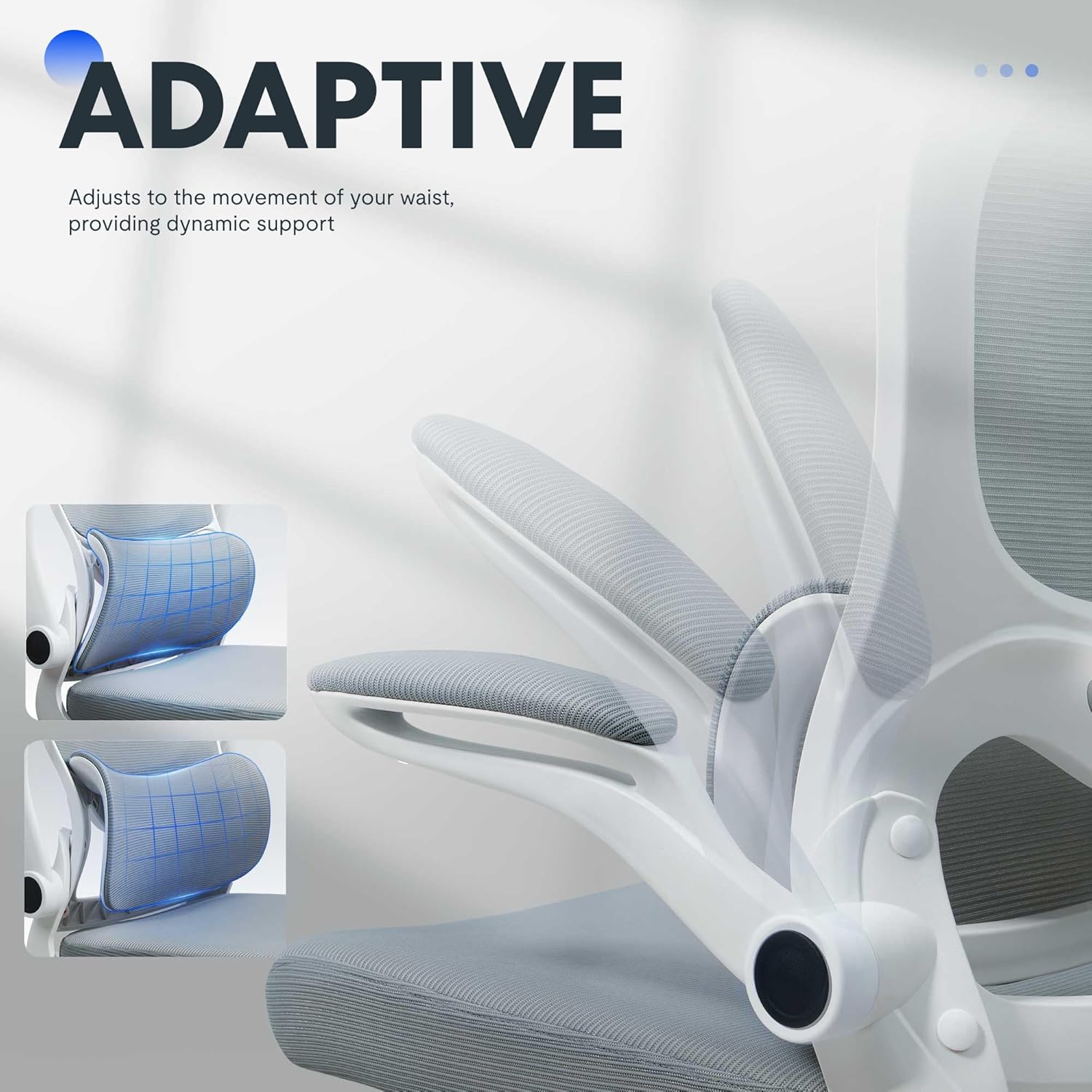
Figuur 4: Adaptive lumbar support for personalized comfort.
4. Verstelbare hoofdsteun
The headrest can be adjusted for height and angle to provide optimal neck and head support. Gently push or pull the headrest to move it to your preferred position.
5. Opklapbare armleuningen
The armrests can be flipped up to allow the chair to be pushed closer to a desk, saving space. To flip them up, lift the armrests until they lock into the vertical position. To return them, gently pull them down.

Figuur 5: Chair with armrests flipped up for space-saving storage.
Onderhoud
Goed onderhoud verlengt de levensduur en het uiterlijk van uw bureaustoel.
- Schoonmaak: Voor algemene reiniging kunt u oppervlakken afvegen met eenamp cloth. For fabric areas, dry clean or wipe clean as needed. Avoid harsh chemical cleaners that may damage the material.
- Inspectie: Controleer regelmatig alle bouten en schroeven om er zeker van te zijn dat ze goed vastzitten. Draai ze indien nodig opnieuw aan om de stabiliteit en veiligheid te waarborgen.
- Casterverzorging: Zorg ervoor dat er geen haar of vuil op de wielen ligt, zodat de machine soepel kan bewegen.
Probleemoplossing
If you encounter any issues with your chair, refer to the common problems and solutions below.
| Probleem | Mogelijke oorzaak | Oplossing |
|---|---|---|
| Stoel is niet in hoogte verstelbaar | Gaslift defect of hendel niet ingeschakeld. | Ensure the height adjustment lever is fully engaged. If the issue persists, the gas lift may need replacement. Contact customer service. |
| Stoel wiebelt of voelt onstabiel aan | Losse schroeven of oneffen vloer. | Controleer en draai alle montageschroeven vast. Zorg ervoor dat de stoel op een vlakke, egale ondergrond staat. |
| Wielen rollen niet soepel | Vuil in de wielen of beschadigde wielen. | Verwijder haar en vuil van de zwenkwielen. Als de wielen beschadigd zijn, moeten ze mogelijk worden vervangen. |
| Backrest does not tilt or lock | Kantelmechanisme geblokkeerd of spanning te hoog. | Ensure the tilt lock lever is disengaged. Adjust the tilt tension knob to a lower setting. |
Productspecificaties
| Merk | FLEXISPOT |
| Modelnaam | OC4-V2 |
| Kleur | Wit |
| Materiaal | Alloy Steel, Mesh, Nylon |
| Productafmetingen (D x B x H) | 73.9 cm x 73.9 cm x 127 cm (29.1" x 29.1" x 50") |
| Artikelgewicht | 32 pond (14.5 kg) |
| Maximaal gewichtsadvies | 350 pond (158 kg) |
| Zitdiepte | 21.3 cm (54.1 inch) |
| Breedte rugleuning stoel | 20.5 inch (52.1 cm) |
| Achterkant Stijl | Mesh-rug |
| Arm stijl | Flip-up arms |
| Meubelbasis Beweging | Draaibaar |
| Vereiste montage | Ja |
| Certificeringen | BIFMA, SGS |
Garantie en ondersteuning
The FLEXISPOT OC4 Lite Ergonomic Office Chair is rigorously tested and certified by BIFMA and SGS, ensuring durability and safety. The reinforced nylon base is capable of supporting significant weight, and the resilient mesh fabric is designed to maintain its shape over time.
For any questions, concerns, or assistance with assembly, operation, or troubleshooting, please contact our professional customer service team. Refer to the contact information provided with your purchase or visit the official FLEXISPOT webwebsite voor ondersteuningsdetails.