
Invoering
This manual provides comprehensive instructions for the Generic GB289WJSA replacement remote control. Designed to function as a direct replacement for your original Aquos TV remote, it offers full access to all standard television functions. Please read this manual carefully before use to ensure proper operation and longevity of your device.

Image: The GB289WJSA remote control being held, with a television screen visible in the background, illustrating its intended use.
Producteigenschappen
- Volledige functionaliteit: This replacement remote covers all functions of the original remote control, providing complete access to all buttons and features.
- Directe vervanging: Ideal for replacing lost or damaged original TV remote controls.
- Premium materiaal: Constructed from high-quality ABS material, ensuring durability, abrasion resistance, and a comfortable grip.
- Logical Button Layout: All buttons are arranged in an intuitive and user-friendly layout for easy navigation and operation.
Instellen
1. Batterijen plaatsen
De afstandsbediening heeft twee AAA-batterijen nodig (niet meegeleverd). Volg deze stappen om ze te installeren:
- Zoek het deksel van het batterijcompartiment aan de achterkant van de afstandsbediening.
- Druk op het lipje en schuif het deksel naar beneden om het vak te openen.
- Plaats twee AAA-batterijen en zorg ervoor dat de positieve (+) en negatieve (-) polen correct zijn uitgelijnd met de markeringen in het batterijvak.
- Schuif het batterijklepje terug totdat het goed vastklikt.

Afbeelding: Een close-up view of the remote control's open battery compartment, showing the correct orientation for inserting two AAA batteries.
Note: Batteries are not included with the remote control. Always use new batteries for optimal performance.
Gebruiksaanwijzing
Once batteries are installed, the remote control is ready for immediate use with compatible Aquos TV models. No programming is required.
Basisfuncties:
- Aanknop (STROOM): Druk op om de tv aan of uit te zetten.
- Volumeregeling (VOL +/-): Druk op '+' om het volume te verhogen, op '-' om het volume te verlagen.
- Kanaalbesturing (CH ^/v): Press '^' to go to the next channel, 'v' to go to the previous channel.
- Dempknop (Icoon dempen): Press to mute or unmute the TV sound.
- Navigatie knoppen (Arrows, ENTER): Use the arrow keys to navigate menus and the 'ENTER' button to confirm selections.
- Cijfertoetsen (0-9): Use to directly input channel numbers or other numerical selections.
- AV MODE: Switches between different input sources (e.g., HDMI, AV).
- SUPER ECO: Activates or deactivates the TV's super eco mode for power saving.

Afbeelding: Een gedetailleerde view of the top portion of the remote control, highlighting the power button, numerical keypad, and input/eco mode buttons.
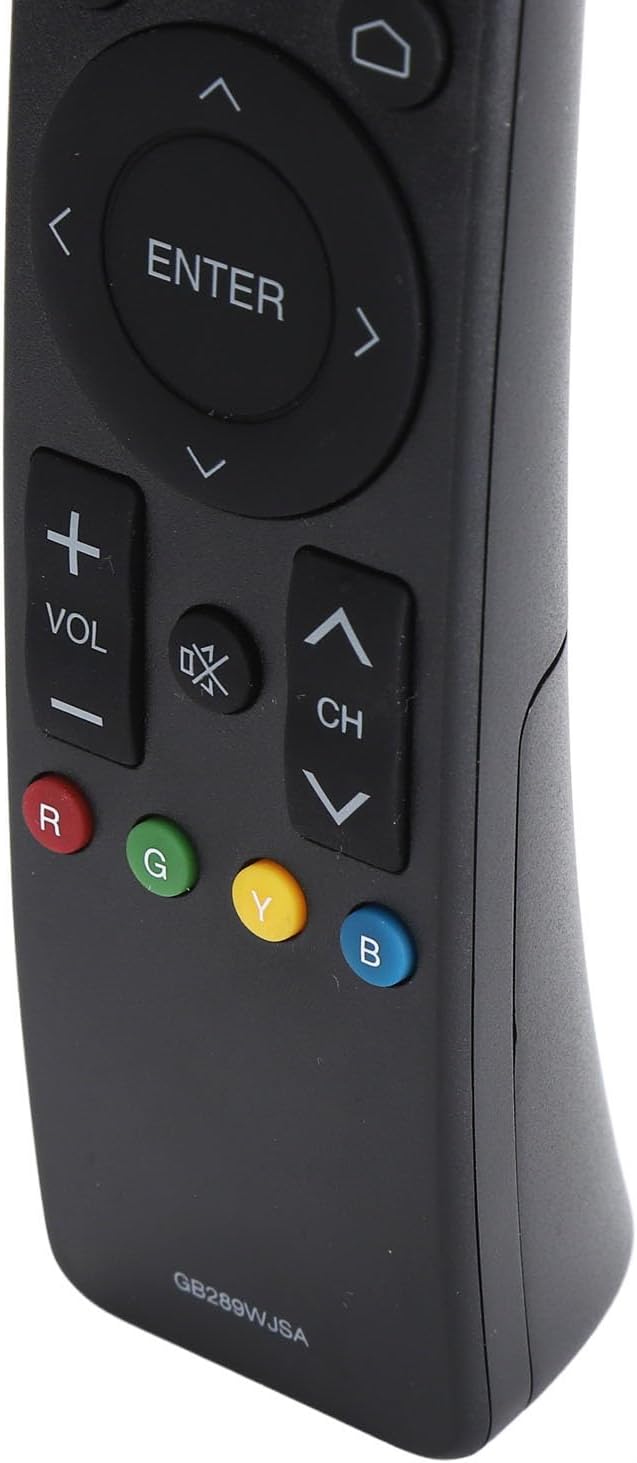
Afbeelding: Een gedetailleerde view of the bottom portion of the remote control, showing the volume and channel controls, along with the colored function buttons (Red, Green, Yellow, Blue).
Compatibele tv-modellen
This remote control is compatible with the following Aquos TV models:
- 2T C40AE1X
- 2T C45AE1X
- 2T C50AE1X
- LC60UA6500X
- LC40SA5500X
- LC50UA6500X
- LC40LE380X
- LC32SA4500X
- LC50UA440X
- 4T C42AH1X
- 4T C50AH1X
- 4T C50AH8X
- 4T C50AH
If your TV model is not listed, please verify compatibility with the product description or contact customer support.
Onderhoud
Schoonmaak:
Gebruik een zachte, droge doek om de afstandsbediening schoon te maken. Bij hardnekkig vuil lichtjes afnemen.ampReinig de doek met water of een milde, niet-schurende reiniger. Vermijd het gebruik van agressieve chemicaliën of schurende materialen, aangezien deze het oppervlak of de interne componenten van de afstandsbediening kunnen beschadigen.
Batterij vervangen:
Vervang de batterijen wanneer de afstandsbediening traag reageert of helemaal niet meer werkt. Vervang altijd beide batterijen tegelijk door nieuwe AAA-batterijen. Gebruik geen oude en nieuwe batterijen door elkaar, en ook geen verschillende soorten batterijen.
Opslag:
Verwijder de batterijen wanneer u de afstandsbediening langere tijd niet gebruikt om lekkage te voorkomen, aangezien dit de afstandsbediening kan beschadigen. Bewaar de afstandsbediening op een koele, droge plaats, uit de buurt van direct zonlicht en extreme temperaturen.
Probleemoplossing
- Afstandsbediening reageert niet:
- Controleer of de batterijen correct zijn geplaatst, met de juiste polariteit (+/-).
- Vervang de batterijen door nieuwe.
- Zorg ervoor dat er zich geen obstakels bevinden tussen de afstandsbediening en de infraroodontvanger van de tv.
- Make sure you are within the effective operating range of the TV.
- Bepaalde knoppen werken niet:
- This could indicate a faulty button or internal issue. Try cleaning around the button in case of debris.
- If the issue persists after replacing batteries, the remote may need to be replaced.
- De tv reageert niet op de afstandsbediening:
- Ensure the TV is powered on and not in standby mode.
- Check the TV's own power button.
- If the TV is unresponsive to both the original and replacement remote, there might be an issue with the TV's IR receiver.
Specificaties
| Functie | Detail |
|---|---|
| Producttype | TV-afstandsbediening |
| Model | GB289WJSA |
| Materiaal | ABS |
| Energiebron | 2 x AAA-batterijen (niet inbegrepen) |
| Verenigbaarheid | Aquos TV models (e.g., 2T C40AE1X, LC60UA6500X, 4T C50AH) |
| Pakket omvat | 1 x TV Remote Control |