
HOBOLITE HB110029
HOBOLITE Iris Portable LED Photography Light Standard Kit
Model: HB110029
Brand: HOBOLITE
1. Inleiding
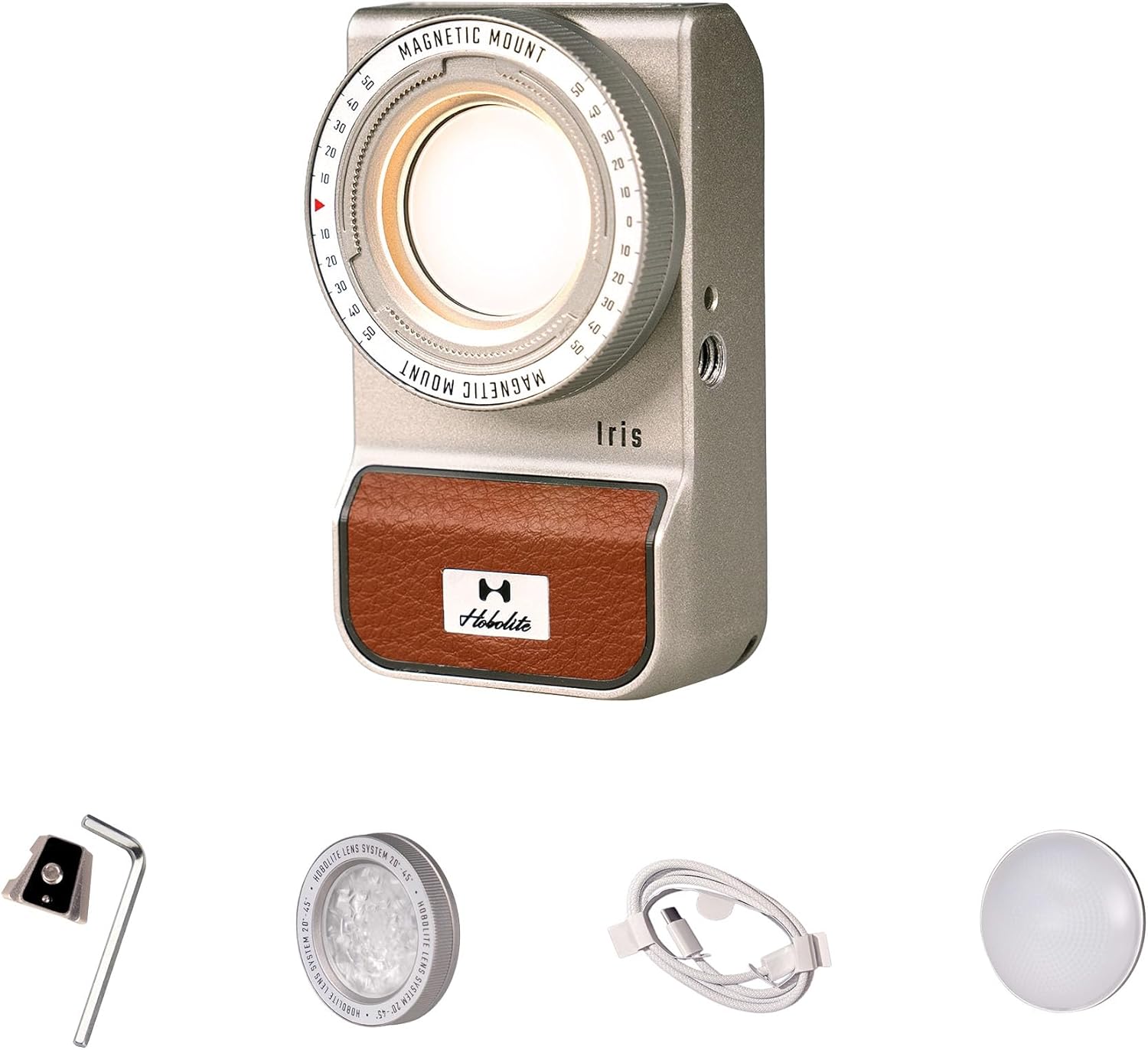
The HOBOLITE Iris is a compact and versatile 5W portable continuous LED lighting kit designed for content creators, photographers, and videographers. Its robust IP54-rated aluminum body ensures durability and resistance to dust and water, making it suitable for various indoor and outdoor environments. Featuring a high-contrast LCD display, precise control knob, and app control capabilities, the Iris light offers seamless adjustment of brightness and color temperature to enhance your creative projects.
2. Inhoud van het pakket
Verify that all items listed below are included in your HOBOLITE Iris Standard Kit:
- 1 x Iris Light
- 1 x Adjustable Lens
- 1 x Frosted Dome
- 1 x V Mount Plate
- 1 x USB-kabel (Type-C)
- 1 x opbergtas
- 1 x Allen Wrench

3. Instellen
3.1 Het apparaat opladen
Before initial use, fully charge the HOBOLITE Iris light. Connect the provided USB Type-C cable to the charging port on the device and to a compatible USB power adapter (not included). The LCD display will indicate the charging status.

3.2 Montageopties
The Iris light offers flexible mounting solutions:
- V-Mount-interface: Use the included V-mount plate to connect the light to various camera rigs and adapters.
- 1/4" schroefgat: Attach the light directly to tripods, light stands, or other accessories using the standard 1/4" screw thread.

3.3 Accessoires bevestigen
The Iris light features an innovative magnetic mount system for quick attachment and detachment of accessories like the Adjustable Lens and Frosted Dome. Simply align the accessory with the front of the light until it snaps into place magnetically.
4. Gebruiksaanwijzing
4.1 In-/uitschakelen
Locate the power button on the side of the Iris light. Press and hold the button for a few seconds to power the device on or off.
4.2 Bedieningspaneel
The Iris light is equipped with a high-contrast LCD display and a knurled control knob for direct adjustments:
- Helderheidsaanpassing: Draai aan de regelknop om de helderheid aan te passen van 1% tot 100%.
- Kleurtemperatuuraanpassing: Press the control knob to switch between brightness and color temperature settings, then rotate to select a color temperature between 2700K and 6500K.
- Menunavigatie: Use the knob to navigate through menu options and confirm selections.

4.3 App Control (Bluetooth/NFC)
For enhanced control, download the official HOBOLITE app on your smartphone. The Iris light supports Bluetooth connectivity and NFC for quick pairing. Once connected, you can wirelessly adjust brightness, color temperature, and access various lighting effects from up to 65.6 feet (20 meters) away.
4.4 Lighting Effects and Accessories
The Iris light includes built-in lighting effects and supports optical accessories to expand creative possibilities:
- Kleurengelfilters: Utilize the four included color gel filters (Aurora, Golden Hour, Blue Hour, Spring Pastel) to create specific moods and atmospheres.
- Verstelbare lens: The adjustable lens allows for focusing the light beam, increasing brightness and creating a more concentrated light source.
- Frosted Dome: The frosted dome diffuses the light, providing a softer and more even illumination.

5. Onderhoud
To ensure the longevity and optimal performance of your HOBOLITE Iris light, follow these maintenance guidelines:
- Schoonmaak: Gebruik een zachte, droge doek om de buitenkant van de lamp schoon te maken. Voor hardnekkig vuil kunt u een iets drogere doek gebruiken.amp Gebruik eventueel een doek, waarna u het direct laat drogen. Vermijd schurende reinigingsmiddelen of oplosmiddelen.
- Opslag: When not in use, store the light in its provided storage pouch in a cool, dry place away from direct sunlight and extreme temperatures.
- Waterbestendigheid: The Iris light has an IP54 rating, meaning it is protected against dust and splashing water. While it can withstand light rain, avoid submerging it in water or exposing it to heavy downpours.

6. Probleemoplossing
If you encounter issues with your HOBOLITE Iris light, refer to the following common solutions:
- Licht gaat niet aan: Zorg ervoor dat het apparaat volledig is opgeladen. Sluit het aan op een stroombron met de USB-C-kabel en laat het minstens 30 minuten opladen voordat u het opnieuw probeert in te schakelen.
- Unable to Connect via App: Verify that Bluetooth is enabled on your smartphone and the Iris light. Ensure the app is up to date. Try restarting both the light and your smartphone.
- Inconsistente helderheid/kleur: Check for any obstructions on the light's output. If using accessories, ensure they are properly attached. Perform a factory reset if the issue persists (refer to the app or device menu for this option).
- Korte batterijduur: Ensure the light is fully charged before use. Battery performance can degrade over time; if significantly reduced, contact support.
For further assistance, please contact HOBOLITE customer support.
7. Technische specificaties
| Functie | Specificatie |
|---|---|
| Model | Iris Standard Kit (HB110029) |
| Stroom | 5W |
| Lichtstroom (6500K) | 300LM |
| Invoer | AC 100-240V, 50-60Hz, DC 5V |
| Batterij | 3.7V 2000mAh, 7.4Wh (Lithium Ion) |
| CRI/TLCI | 96 |
| Kleurtemperatuur | 2700K-6500K |
| Dimmen | 0-100% |
| Controlemethoden | Panel Control or App |
| Draadloze methode | Bluetooth |
| Maximale draadloze afstand | 65.6FT (20 m) |
| Beschermingsklasse | IP54 |
| Artikelgewicht | 1.04 pond |
| Pakket afmetingen | 5.94 x 4.06 x 3.5 inch |
| hardware Interface | USB-type C |
8. Garantie en ondersteuning
HOBOLITE products are backed by a comprehensive warranty:
- Lights and Light Stands: Up to 36 months warranty period.
- Batterijen: Up to 24 months warranty period.
For warranty claims, technical support, or additional product information, please visit the official HOBOLITE webU kunt ook meer informatie vinden op hun website of contact opnemen met hun klantenservice. HOBOLITE Amazon Store.
Ask a question about this manual
Ask about setup, troubleshooting, compatibility, parts, safety, or missing instructions. Manuals+ will review the question and use this page’s manual context to help answer it.