
1. Inleiding
Welcome to the Incapto Aura Bean-to-Cup Coffee Machine user manual. This guide provides essential information for the safe and efficient operation, maintenance, and troubleshooting of your new coffee machine. Please read all instructions carefully before first use and keep this manual for future reference.
2. Veiligheidsinstructies
- Zorg er altijd voor dat het apparaat op een stabiele, vlakke ondergrond staat.
- Dompel het apparaat, het netsnoer en de stekker niet onder in water of andere vloeistoffen.
- Houd het apparaat buiten bereik van kinderen.
- Haal de stekker van het apparaat uit het stopcontact voordat u het schoonmaakt of wanneer u het apparaat gedurende langere tijd niet gebruikt.
- Do not operate the machine with a damaged cord or plug. Contact customer support for repairs.
- Gebruik alleen hele koffiebonen in het bonenreservoir. Gebruik geen gemalen koffie, oploskoffie of andere producten.
- Gebruik alleen koud, vers water in het waterreservoir.
3. Product voorbijview
Familiarize yourself with the components of your Incapto Aura coffee machine.
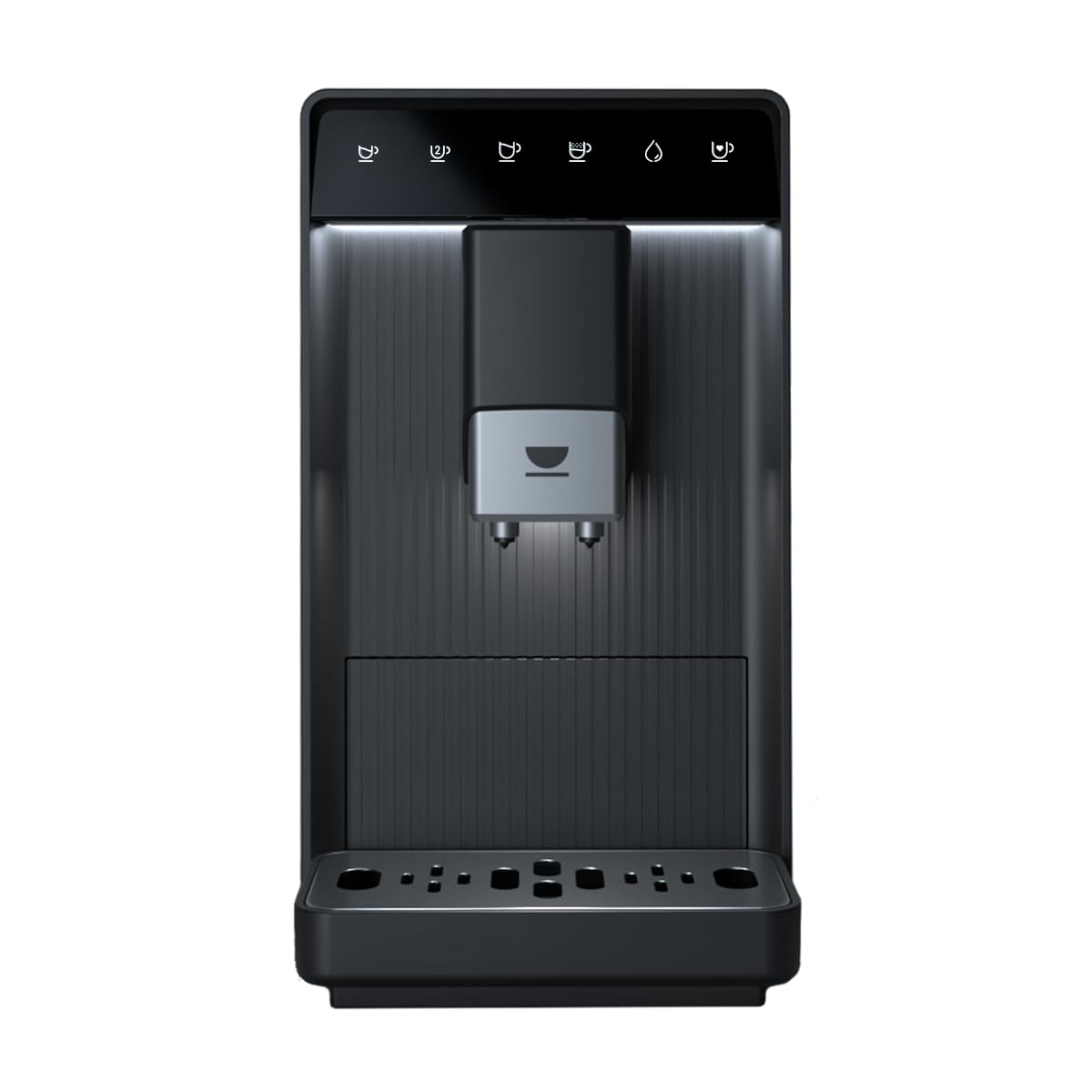
Figuur 3.1: Voorzijde view of the Incapto Aura coffee machine.
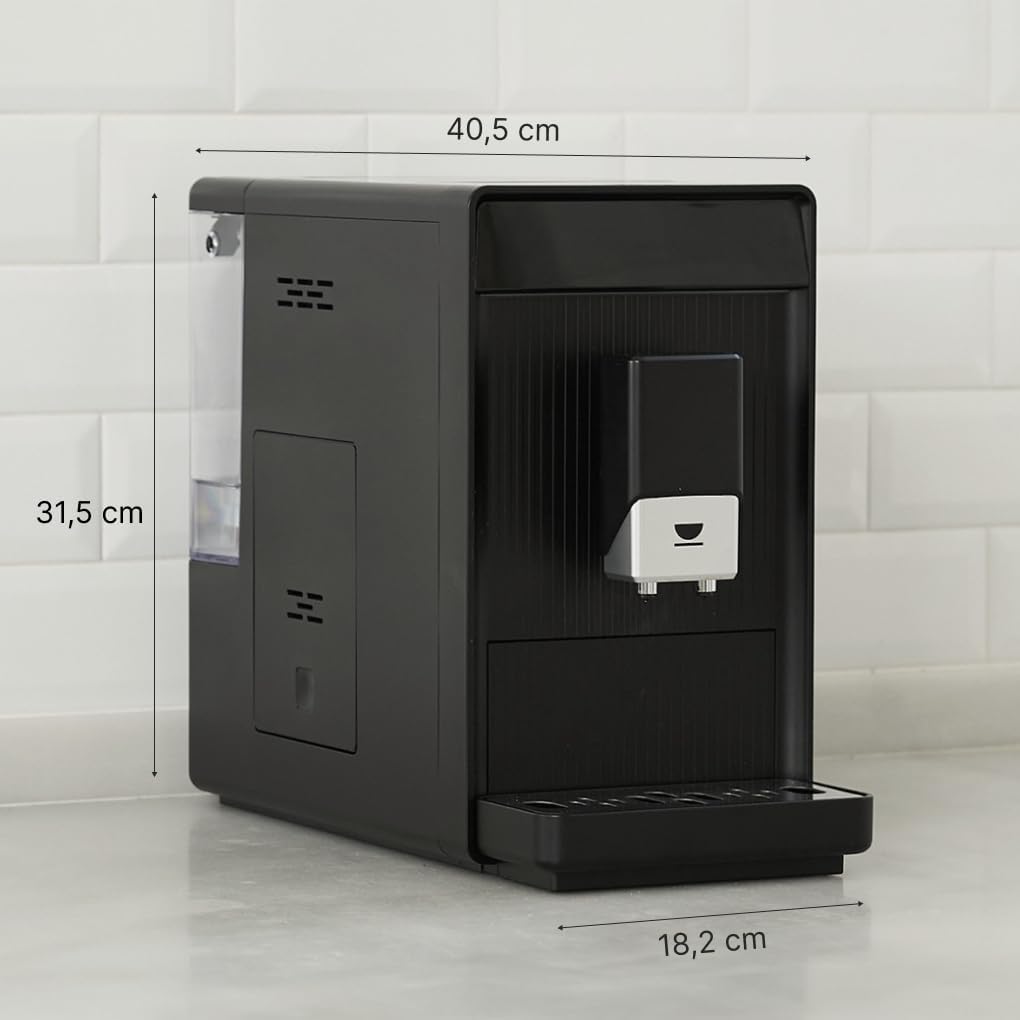
Figure 3.2: Dimensions of the Incapto Aura coffee machine (40.5 cm depth x 18.5 cm width x 31.5 cm height).
4. Instellen
4.1 Eerste gebruik
- Pak de machine uit en verwijder al het verpakkingsmateriaal.
- Plaats de machine op een stabiele, vlakke ondergrond.
- Clean the water tank, bean hopper, and drip tray with warm water and mild detergent. Rinse thoroughly.
- Vul de watertank met vers, koud water.
- Fill the bean hopper with whole coffee beans.
- Sluit het apparaat aan op een geaard stopcontact.
- The machine will perform an initial rinse cycle. Follow on-screen prompts or indicator lights.
4.2 Het waterreservoir vullen
The water tank is located on the side of the machine and is easily removable for filling.

Figure 4.1: A hand pouring water into the transparent water tank of the Incapto Aura coffee machine.
4.3 Het vullen van de bonencontainer
Open the lid on top of the machine to access the bean hopper. Ensure only whole coffee beans are added.

Figure 4.2: A hand pouring whole coffee beans from a bag into the bean hopper of the Incapto Aura coffee machine.
5. Gebruiksaanwijzing
The Incapto Aura features a touch-sensitive control panel for easy operation.

Figure 5.1: A finger interacting with the touch control panel of the Incapto Aura coffee machine.

Figure 5.2: Close-up of the control panel showing icons for various coffee selections: Short Coffee, Long Coffee, Double Espresso, Americano, Hot Water, and Favorite Coffee.
5.1 Making a Single Coffee
- Plaats een kopje onder de koffiedispenser.
- Select your desired coffee type (e.g., Espresso, Long Coffee, Americano) from the touch panel.
- De machine maalt de bonen automatisch en zet uw koffie.
5.2 Making Two Coffees Simultaneously
The Incapto Aura can brew two cups at once using the double espresso function.

Figure 5.3: The Incapto Aura coffee machine dispensing two espressos into two glass cups simultaneously.
- Place two cups under the coffee dispenser.
- Select the Double Espresso icon on the touch panel.
- The machine will brew two espressos simultaneously.
5.3 Warmwaterafgifte
For tea or other hot beverages, the machine can dispense hot water.
- Plaats een kopje onder de koffiedispenser.
- Select the Hot Water icon on the touch panel.
- Het apparaat levert warm water.
5.4 Customization and Favorite Coffee
You can customize the grind settings and save your preferred coffee settings using the 'Favorite Coffee' option on the touch panel.
6. Onderhoud
Regular maintenance ensures optimal performance and longevity of your Incapto Aura.
6.1 Automatic Cleaning Program
The machine features an automatic cleaning program. Follow the LED alerts for maintenance actions.
6.2 Verwijderbare onderdelen
The brewing unit, drip tray, and coffee grounds container are easily removable for cleaning.
- Lekbakje en koffiedikbakje: Empty and rinse daily or when indicated by the machine.
- Brouweenheid: Remove and rinse under running water weekly. Allow to air dry before reinserting.
6.3 Ontkalken
The machine will indicate when descaling is required. Use the provided descaling powder sachets or a suitable descaling solution according to the instructions on the descaler packaging and the machine's prompts.
6.4 Meegeleverde accessoires
Your Incapto Aura comes with a brush for cleaning the grinder and brewing group, a cloth, and 3 sachets of descaling powder for proper maintenance.
7. Probleemoplossing
Raadpleeg dit gedeelte voor veelvoorkomende problemen en hun oplossingen.
| Probleem | Mogelijke oorzaak | Oplossing |
|---|---|---|
| Er wordt geen koffie geschonken. | Waterreservoir leeg; koffiebonen leeg; zetgroep geblokkeerd. | Vul het waterreservoir bij; vul het bonenreservoir bij; reinig het zetapparaat. |
| De koffie is te slap/te sterk. | Maalstand onjuist; instelling van de hoeveelheid koffie onjuist. | Adjust grind setting; adjust coffee strength setting. |
| Machine lekt. | Drip tray full; water tank not properly inserted. | Empty drip tray; ensure water tank is correctly seated. |
| Descaling alert. | Apparaat moet ontkalkt worden. | Voer de ontkalkingsprocedure uit volgens de handleiding. |
If the problem persists after attempting these solutions, please contact Incapto customer support.
8. Specificaties
| Functie | Detail |
|---|---|
| Merk | Incapto |
| Modelnummer | Aura |
| Kleur | Zwart |
| Afmetingen (L x B x H) | 40.5x18.5x31.5cm |
| Gewicht | 9 kilogram |
| Capaciteit (bonen) | 150 gram |
| Druk | 19 maten |
| Stroom | 1690 Watt |
| Deeltage | 240 Volt |
| Materiaal | Plastic |
| Speciale kenmerken | Water filter, Automatic cleaning, Integrated coffee grinder, Programmable, Removable tank |
9. Officiële productvideo
Video 9.1: Een overview of the Incapto Aura coffee machine, demonstrating its compact design, ease of use, and various coffee preparation functions, including filling beans and water, and brewing different coffee types.
10. Garantie en ondersteuning
Your Incapto Aura coffee machine comes with a standard manufacturer's warranty. For detailed warranty information, please refer to the warranty card included in your product packaging or visit the official Incapto webplaats.
For technical support, spare parts, or any inquiries, please contact Incapto customer service through their official channels. Information regarding spare parts availability is currently unavailable.