
Invoering
This manual provides instructions for the Ceybo 3026000066 Remote Control, designed for use with Onn Roku Smart TVs. This remote offers an intuitive layout and simple button configuration for ease of use. It is a direct replacement and requires no programming.

Voorkant view of the Ceybo 3026000066 remote control, showing its ergonomic design and button layout.
Instellen
Batterij installatie
The Ceybo 3026000066 remote control requires two AAA batteries (not included) for operation. Follow these steps to install the batteries:
- Zoek het deksel van het batterijcompartiment aan de achterkant van de afstandsbediening.
- Druk op het lipje en schuif het deksel naar beneden om het vak te openen.
- Plaats twee nieuwe AAA-batterijen en zorg ervoor dat de positieve (+) en negatieve (-) polen correct zijn uitgelijnd met de markeringen in het batterijcompartiment.
- Schuif het batterijklepje terug totdat het goed vastklikt.
Opmerking: This remote control does not require any programming or pairing. Once batteries are installed, it is ready for use with compatible Onn Roku Smart TVs.
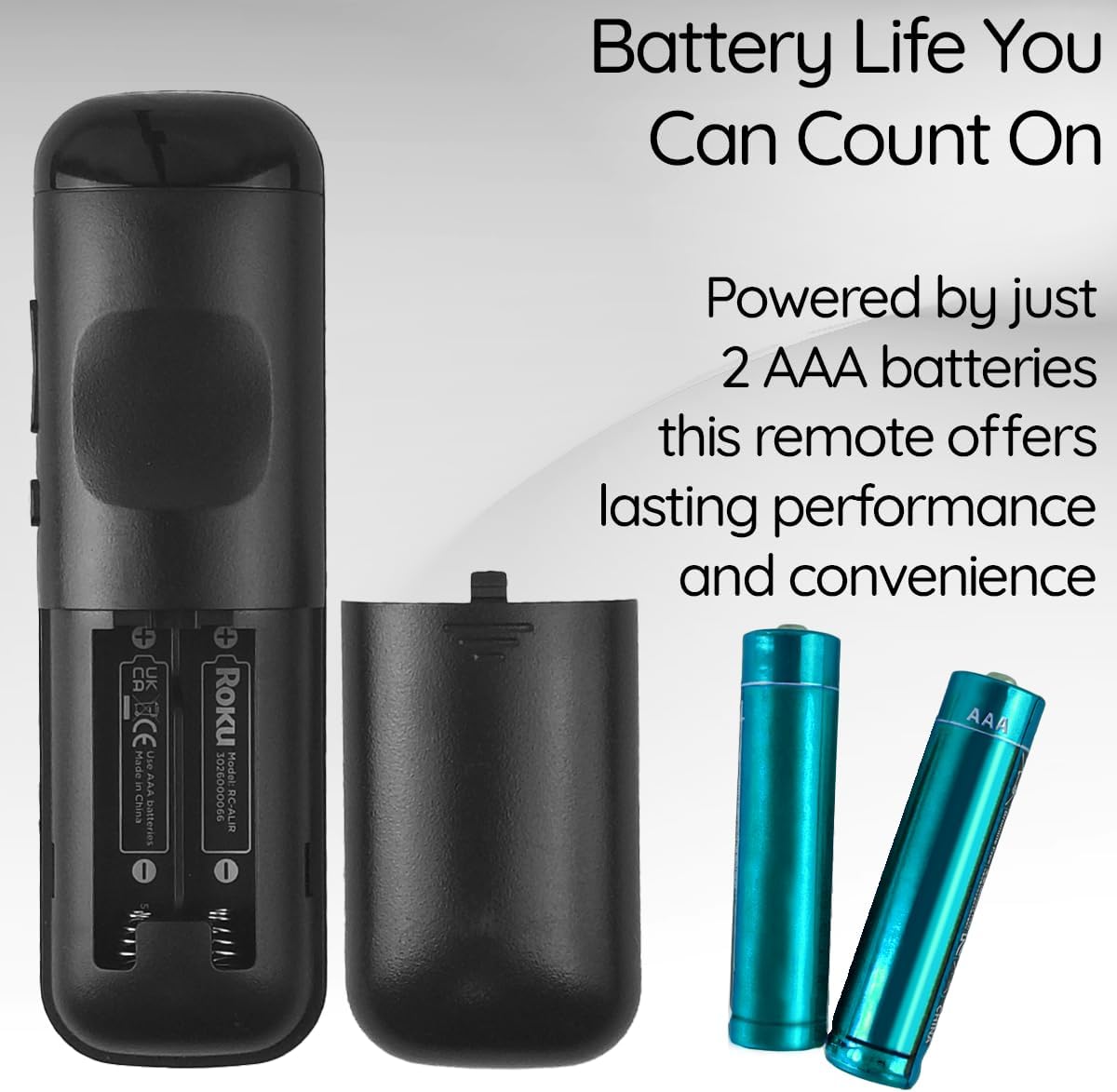
View of the remote control's battery compartment, indicating the use of two AAA batteries.
Gebruiksaanwijzing
The Ceybo 3026000066 remote control features a user-friendly design with clearly labeled buttons for easy navigation and quick access to your entertainment options.
Belangrijkste functies:
- Aan/uit-knop: Hiermee zet u de televisie aan of uit.
- Directional Pad (Up, Down, Left, Right) & OK Button: Navigeert door menu's en selecteert opties.
- Terugknop: Keert terug naar het vorige scherm of menu.
- Thuis knop: Keert terug naar het Roku-startscherm.
- Volume omhoog/omlaag: Past het tv-volume aan.
- Stilteknop: Dempt of heft het geluid van de tv op.
- Afspelen/Pauze, Snel vooruitspoelen, Terugspoelen: Regelt het afspelen van media.
- Sterknop (*): Accesses options within certain apps or menus.
Speciale sneltoetsen:
This remote includes dedicated shortcut buttons for popular streaming services, allowing for instant access with a single press:
- Netflix
- Paramount+
- Apple-tv
- HBOMax

Van dichtbij view of the remote control highlighting the dedicated shortcut buttons for Netflix, Paramount+, Apple TV, and HBOMax.
Verenigbaarheid
The Ceybo 3026000066 Remote Control is compatible with the following Onn Roku Smart TV models:
- 100005843
- 100007147
- 100012586
- 100005397
- 100018971
- 100005844
- 100024699
- 100012587
- 100021261
- 100012588
- 100012590
- 100012589
- 100005395
- 100005842
- 100068372
- 100018254
- 100012584
- 100012585
- 100021258
- 100005396
Belangrijk: Deze afstandsbediening is niet compatibel with Roku Box or Roku Stick devices.

Image illustrating the Ceybo remote control alongside various Onn Roku Smart TV models, indicating broad compatibility.
Onderhoud
To ensure optimal performance and longevity of your remote control, consider the following maintenance tips:
- Batterij vervangen: Replace both AAA batteries when the remote's responsiveness decreases or it stops functioning. Always replace both batteries at the same time with new ones.
- Schoonmaak: Gebruik een zachte, droge doek om het oppervlak van de afstandsbediening schoon te maken. Vermijd het gebruik van vloeibare reinigingsmiddelen of schurende materialen, aangezien deze de afstandsbediening kunnen beschadigen.
- Opslag: Store the remote in a dry place away from extreme temperatures and direct sunlight. If the remote will not be used for an extended period, remove the batteries to prevent leakage.
Probleemoplossing
If you encounter issues with your Ceybo 3026000066 remote control, try the following troubleshooting steps:
- Afstandsbediening reageert niet:
- Controleer of de batterijen correct zijn geplaatst, met de juiste polariteit (+/-).
- Replace the batteries with new AAA batteries. Weak or dead batteries are a common cause of remote control issues.
- Zorg ervoor dat er een vrije zichtlijn is tussen de afstandsbediening en de infraroodontvanger van de tv. Obstakels kunnen het signaal blokkeren.
- Knoppen werken niet:
- If only specific buttons are not working, try cleaning the remote's surface around those buttons.
- Replace the batteries, as low power can sometimes affect individual button responsiveness.
- Remote Works Intermittently:
- Dit duidt vaak op een bijna lege batterij. Vervang de batterijen.
- Ensure you are within the maximum operating range of 30 feet from the TV.
Als deze stappen het probleem niet oplossen, raadpleeg dan het gedeelte Garantie en ondersteuning.
Specificaties
| Merk | Ceybo |
| Modelnaam/nummer | 3026000066 |
| Speciale functie | Ergonomic, Lightweight, No Programming Required |
| Kleur | Zwart |
| Max aantal ondersteunde apparaten | 1 |
| Compatibele apparaten | Television (Onn Roku Smart TVs) |
| Connectiviteitstechnologie | Infrarood |
| Aantal knoppen | 15 |
| Controller-type | Knopbediening |
| Maximaal bereik | 30 voet |
| Batterijtype | AAA-batterijen (2 stuks nodig, niet inbegrepen) |
| UPC | 689176329575 |
Garantie en ondersteuning
This Ceybo remote control comes with a 1 jaar fabrieksgarantie.
For technical support, warranty claims, or further assistance, please contact Ceybo customer service. Refer to the product packaging or the Ceybo official webwebsite voor contactgegevens.