
SuperFire X60-T
SuperFire X60-T Flashlight User Manual
Model: X60-T | Brand: SuperFire
1. Inleiding
This manual provides comprehensive instructions for the safe and effective use of your SuperFire X60-T High Lumens Rechargeable LED Flashlight. Please read this manual thoroughly before operating the device and retain it for future reference.
2. Producteigenschappen
- High Powered Illumination: Equipped with upgraded super bright LED chips (36W), delivering a maximum of 10000 lumens in turbo mode with a maximum beam distance of 350 meters (1148 feet).
- Veelzijdige verlichtingsmodi: Features 5 distinct lighting modes: High, Medium, Strobe, SOS, and Turbo, allowing adaptation to various lighting requirements.
- Zoombare focus: The flashlight offers a telescopic focusing design; zoom in for a wide floodlight covering 56 square meters, or zoom out for a narrow spotlight capable of illuminating over 350 meters.
- Durable & Waterproof Construction: Constructed from aviation-grade aluminum, ensuring heavy-duty performance and resistance to extreme conditions. It boasts an IP44 waterproof rating, suitable for use in heavy rain and snow.
- Type-C oplaadbaar: Utilizes an upgraded high-capacity battery, providing approximately 6 hours of operation in high mode and 15 hours in low mode. Fast-charging via a Type-C port takes 4-6 hours for a full charge, compatible with laptops, power banks, and adapters.
- Draagbaar ontwerp: Compact size (15.8 cm / 6.22 in L x 4.1 cm / 1.61 in W) with an integrated clip for easy storage and carrying in pockets or backpacks.
- Powerbank-functionaliteit: Can function as a portable power bank to charge smartphones or tablets in emergency situations.
3. Inhoud van het pakket
Controleer bij het openen van het pakket of alle artikelen aanwezig zijn en in goede staat zijn:
- SuperFire X60-T Flashlight
- USB-C-oplaadkabel
- Belt Clip (pre-attached or included separately)
- Gebruikershandleiding (dit document)
4. Instellen
4.1 Eerste keer opladen
Before first use, fully charge the flashlight. The charging port is a Type-C port located on the side of the flashlight, typically protected by a rubber cover.
- Zoek de USB Type-C-oplaadpoort op de zaklamp.
- Til voorzichtig de rubberen afdekking op om de poort bloot te leggen.
- Sluit de meegeleverde USB-C-oplaadkabel aan op de poort van de zaklamp.
- Sluit het andere uiteinde van de USB-C-kabel aan op een compatibele USB-voedingsbron (bijvoorbeeld een wandadapter, een USB-poort van een computer of een powerbank).
- The indicator light on the flashlight will show charging status. It typically glows red while charging and turns blue when fully charged.
- Charging usually takes 4-6 hours for a full charge.
- Zodra het toestel volledig is opgeladen, koppelt u de kabel los en sluit u het rubberen klepje zorgvuldig om de waterbestendigheid te behouden.
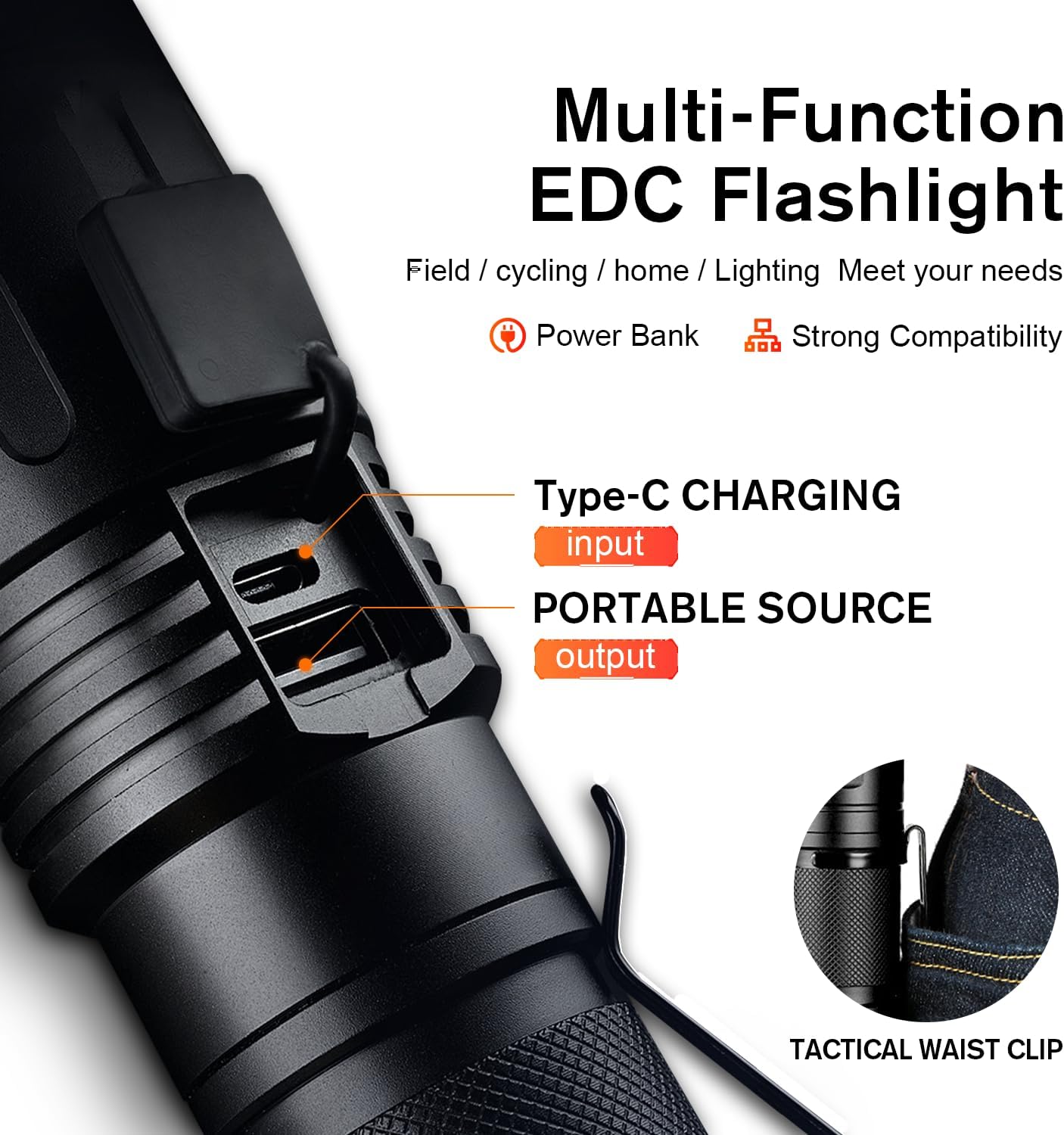
Figure 1: Type-C Charging Port and Tactical Waist Clip. The image displays a close-up of the flashlight's body, highlighting the Type-C input and USB output ports, along with a visual of the tactical waist clip.
5. Gebruiksaanwijzing
5.1 In-/uitschakelen
Druk op de aan/uit-knop aan de zijkant van de zaklamp om deze in of uit te schakelen.
5.2 Verlichtingsmodi wijzigen
With the flashlight powered on, short press the power button repeatedly to cycle through the 5 lighting modes:
- Hoog: Maximum brightness for general illumination.
- Medium: Moderate brightness for extended battery life.
- Laag: Minimal brightness for close-range tasks or preserving night vision.
- strobe: Rapid flashing light for signaling or disorientation.
- SOS: International Morse code signal for emergencies (three short, three long, three short flashes).
- Turbo: (If applicable, usually a double-click from off or on) Provides the absolute maximum lumen output for a short burst. Refer to product specifications for activation.

Figure 2: Five Lighting Modes. This image illustrates the different light output levels and special modes (Strobe, SOS) of the flashlight in various outdoor scenarios.
5.3 Zoomfunctionaliteit
The SuperFire X60-T features a telescopic focusing design to adjust the beam from a wide floodlight to a narrow spotlight.
- To adjust the beam, gently slide the head of the flashlight forward or backward.
- Sliding the head forward will narrow the beam, creating a focused spotlight for long-distance illumination.
- Sliding the head backward will widen the beam, creating a broad floodlight for illuminating a larger area.

Figure 3: Telescopic Focusing. The image shows the flashlight's zoomable design, illustrating the wide beam (floodlight) and narrow beam (spotlight) capabilities.
5.4 Gebruik als powerbank
The flashlight can serve as a portable power bank to charge other devices.
- Locate the USB output port, usually next to the Type-C input port, under the same rubber cover.
- Connect your device's charging cable (e.g., smartphone, tablet) to the USB output port on the flashlight.
- De zaklamp begint met het opladen van uw apparaat. Houd de oplaadindicator van uw apparaat in de gaten.
- Koppel de zaklamp los zodra het opladen is voltooid of wanneer de batterij bijna leeg is.
6. Onderhoud
- Schoonmaak: Veeg de zaklamp schoon met een zachte, damp doek. Gebruik geen schurende reinigingsmiddelen of oplosmiddelen.
- Opslag: Store the flashlight in a cool, dry place away from direct sunlight and extreme temperatures. If storing for extended periods, charge the battery every 3-6 months to maintain its lifespan.
- Waterbestendigheid: Ensure the rubber cover for the charging ports is always securely closed to maintain the IP44 water resistance rating. Avoid submerging the flashlight in water.
- batterij zorg: Use only the provided charging cable or a compatible Type-C cable. Do not attempt to replace the internal battery.
7. Probleemoplossing
| Probleem | Mogelijke oorzaak | Oplossing |
|---|---|---|
| Zaklamp gaat niet aan. | Batterij is leeg. | Charge the flashlight fully using the provided Type-C cable. |
| De lichtopbrengst is gering. | Low battery or incorrect mode. | Charge the battery. Cycle through modes to ensure High or Turbo mode is selected. |
| De zaklamp laadt niet op. | Cable or adapter issue; port not connected properly. | Ensure the Type-C cable is securely connected to both the flashlight and the power source. Try a different USB port or adapter. |
| De zoomfunctie is stroef. | Stof of vuil in het mechanisme. | Gently clean the sliding mechanism. Avoid forcing the zoom. |
8. Specificaties
| Functie | Detail |
|---|---|
| Model | X60-T |
| Merk | SuperFire |
| Lichtbrontype | LED |
| Helderheid (maximaal) | 10000 Lumens (Turbo Mode) / 2100 Lumens (Standard) |
| Straalafstand (Max) | 350 meter (1148 voet) |
| Energiebron | Werkt op batterijen (1 lithium-ionbatterij meegeleverd) |
| Oplaadpoort | Type-C |
| Oplaadtijd | 4-6 uur |
| Looptijd (hoge modus) | 6 uur |
| Runtime (lage modus) | 15 uur |
| Materiaal | Aluminium van luchtvaartkwaliteit |
| Waterbestendigheidsniveau | IP44 (waterdicht) |
| Productafmetingen | 2.1"D x 2.1"W x 6.7"H (15.8 cm L x 4.1 cm W) |
| Artikelgewicht | 1.01 pond |
| Speciale kenmerken | Adjustable Focus, Durable, High Power, Portable, Weatherproof, Power Bank Functionality |

Figure 4: Size and Performance Comparison. This image provides a visual comparison of the X60-T's size relative to a smartphone and another model (X60), along with a table detailing their respective runtimes and lumen outputs.
9. Garantie en ondersteuning
For warranty information, technical support, or any inquiries regarding your SuperFire X60-T flashlight, please refer to the contact information provided on the product packaging or visit the official SuperFire webwebsite. Bewaar uw aankoopbewijs als aankoopbewijs voor garantieclaims.
Ask a question about this manual
Ask about setup, troubleshooting, compatibility, parts, safety, or missing instructions. Manuals+ will review the question and use this page’s manual context to help answer it.