
1. Inleiding
This manual provides detailed instructions for the operation and maintenance of your SWOFY M4 MP3 Player. Please read this manual thoroughly before using the device to ensure proper functionality and to maximize your user experience.
2. Product voorbijview
The SWOFY M4 is a versatile digital audio player featuring Bluetooth 5.3 connectivity, a 2.4-inch touch screen, and a range of functions including FM radio, e-book reader, video playback, and voice recording. It comes with 64GB of built-in storage, expandable up to 128GB with a Micro SD card.
2.1 Pakketinhoud
- 1x SWOFY 64GB Bluetooth MP3 Player
- 1x Bedrade oordopjes
- 1x USB Type-C-kabel
- 1x Silicone Protective Case
- 1x Gebruiksaanwijzing
2.2 Apparaatindeling
Familiarize yourself with the physical components of your SWOFY M4 MP3 Player.
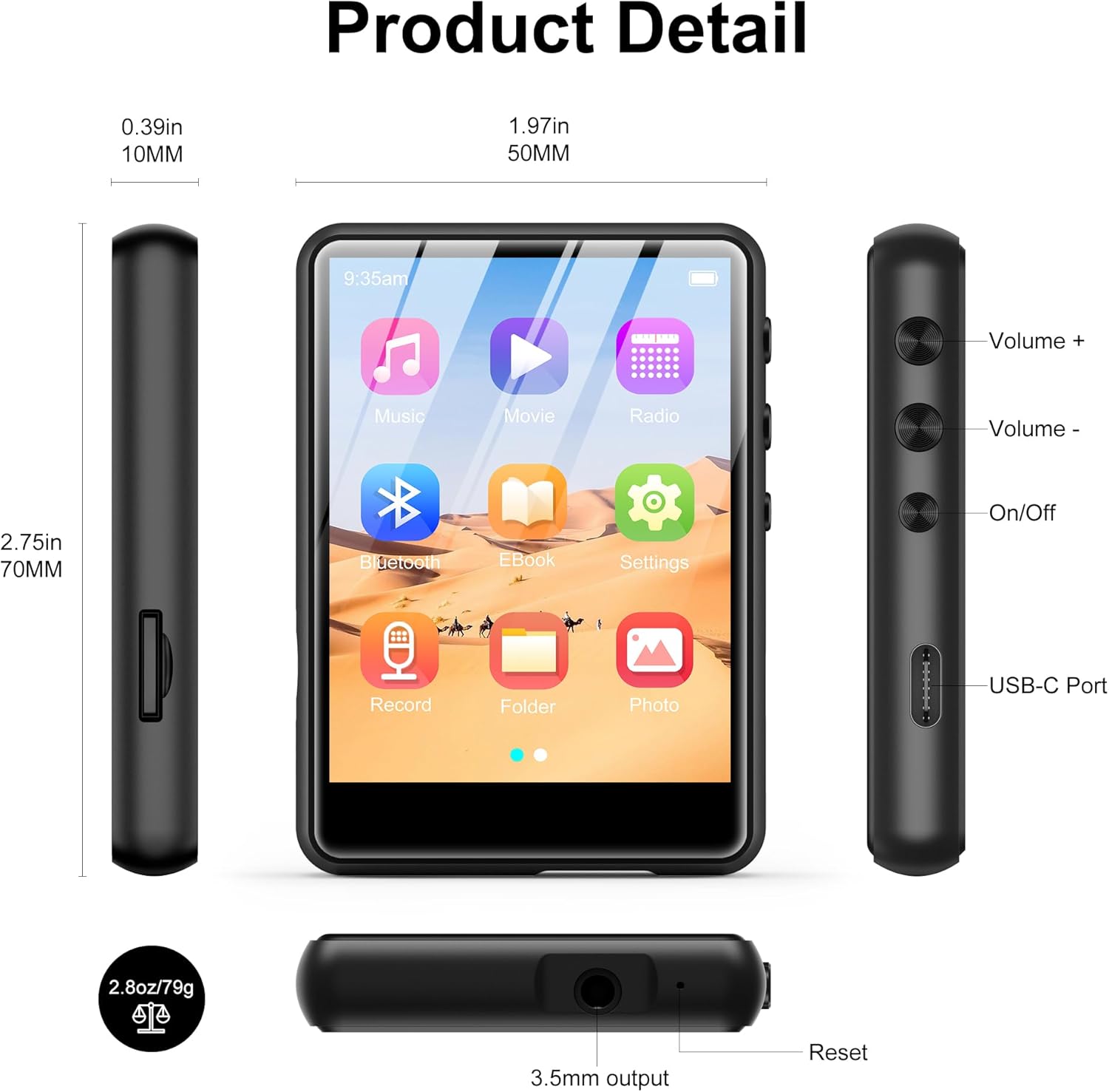
Afbeelding 2.2.1: Front, side, and top views of the SWOFY M4 MP3 Player, highlighting the 2.4-inch screen, Volume +/-, On/Off buttons, USB-C Port, 3.5mm output, Reset button, and Micro SD card slot.
- 2.4-inch IPS-touchscreen: For navigation and display.
- Volume +/- knoppen: Pas het audio-uitvoerniveau aan.
- Aan/uit-knop: Schakel het apparaat in of uit.
- USB-C-poort: Voor opladen en gegevensoverdracht.
- 3.5 mm stereo-aansluiting: Sluit een bedrade hoofdtelefoon of externe luidsprekers aan.
- Micro SD-kaartsleuf: Voor opslaguitbreiding tot 128 GB.
- Resetknop: To restart the device if it becomes unresponsive.
- HD-luidspreker: Geïntegreerde luidspreker voor audioweergave.
3. Instellen
3.1 Het apparaat opladen
Before first use, fully charge the MP3 player. Connect the provided USB Type-C cable to the device's USB-C port and the other end to a USB power adapter (not included) or a computer's USB port. The battery indicator on the screen will show charging status.

Afbeelding 3.1.1: The SWOFY M4 MP3 Player connected via USB Type-C cable, illustrating its 300mAh battery capacity for long playback.
3.2 In-/uitschakelen
- Inschakelen: Press and hold the On/Off button located on the side of the device until the screen illuminates.
- Uitschakelen: Press and hold the On/Off button until a power-off prompt appears on the screen. Select "Power Off" or continue holding until the screen turns off.
3.3 Muziek laden en Files
Overdragen files naar je MP3-speler:
- Sluit de MP3-speler aan op uw computer met behulp van de meegeleverde USB Type-C-kabel.
- Het apparaat zal op uw computer als een verwisselbare schijf verschijnen.
- Drag and drop your music, video, image, or e-book files into the appropriate folders on the MP3 player.
- Verwijder het apparaat veilig van uw computer voordat u de kabel loskoppelt.

Afbeelding 3.3.1: Muziek overzetten files (MP3, WMA, APE, FLAC, WAV, OGG, DRM, ACELP) from a computer to the SWOFY M4 MP3 Player via USB-C.
The device supports various audio formats including MP3, WMA, APE, FLAC, WAV, OGG, DRM, and ACELP. For video and image files, ensure they are in compatible formats to avoid "unsupported format" errors.
3.4 Opslagruimte uitbreiden
The SWOFY M4 has 64GB of internal storage. You can expand this by inserting a Micro SD card (up to 128GB) into the dedicated slot on the side of the device.
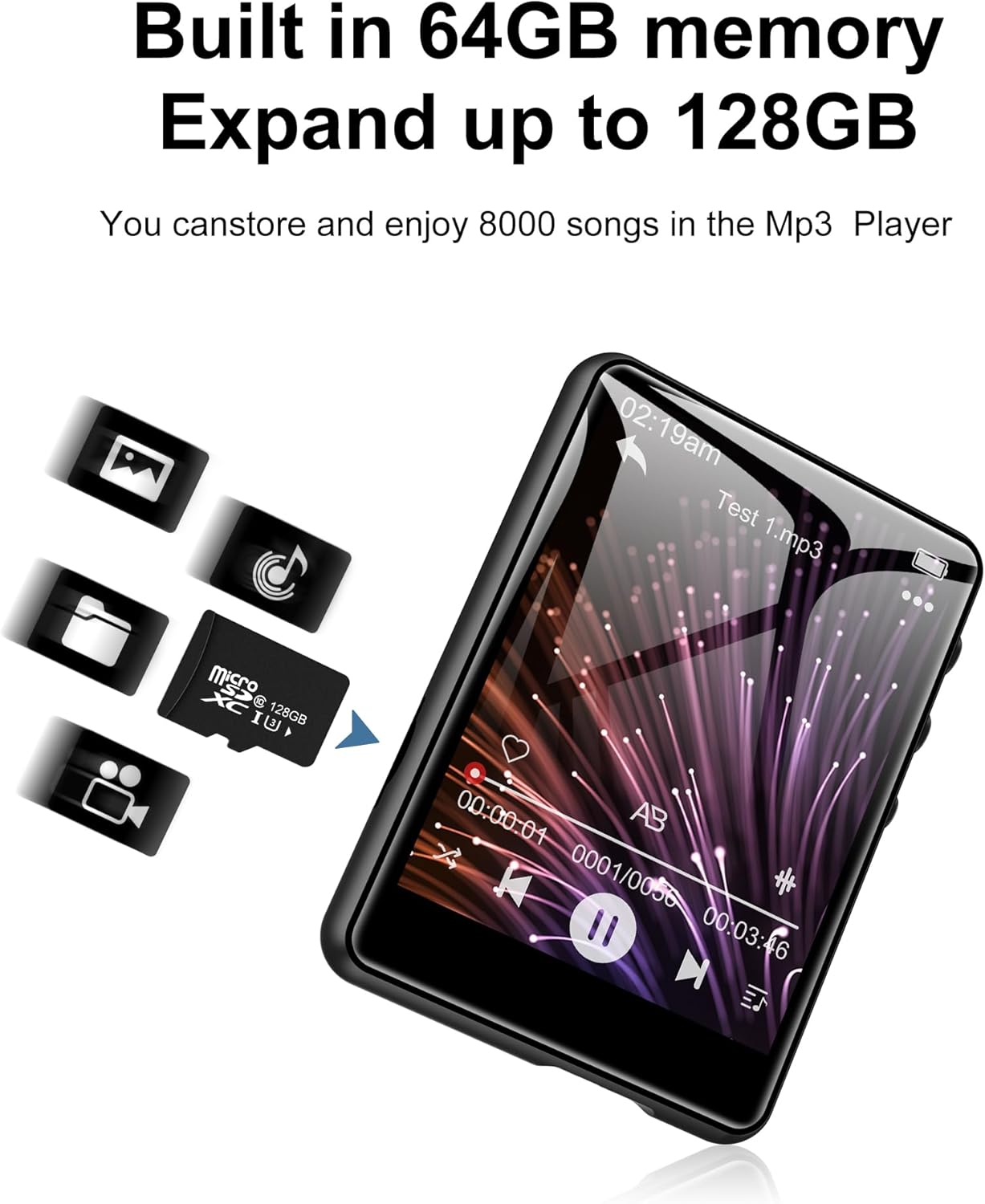
Afbeelding 3.4.1: The SWOFY M4 MP3 Player with a Micro SD card, illustrating the expandable storage capability up to 128GB.
4. Gebruiksaanwijzing
4.1 Navigeren op het touchscreen
The 2.4-inch touch screen allows for intuitive navigation. Tap icons to open applications, swipe to scroll, and use the back arrow icon to return to the previous screen.

Afbeelding 4.1.1: A finger interacting with the 2.4-inch IPS touch screen of the SWOFY M4 MP3 Player, demonstrating its convenient operation.
4.2 Muziek afspelen
- Tik in het hoofdmenu op het pictogram 'Muziek'.
- Blader door je muziekbibliotheek op artiest, album, genre of map.
- Tik op een nummer om het afspelen te starten.
- Use the on-screen controls (play/pause, skip, volume) or physical volume buttons to manage playback.
- Access equalizer settings and playback modes (repeat, shuffle) from the music playback screen.

Afbeelding 4.2.1: The music playback interface of the SWOFY M4, showing options for AB Repeat, 8-speed playback, two playback modes, and equalizer settings.
4.3 Bluetooth-connectiviteit
The SWOFY M4 features Bluetooth 5.3 for wireless audio streaming.
- From the main menu, tap the "Bluetooth" icon or go to "Settings" and select "Bluetooth".
- Schakel Bluetooth in. Het apparaat scant vervolgens naar beschikbare Bluetooth-apparaten.
- Zorg ervoor dat uw Bluetooth-hoofdtelefoon of -luidspreker in de koppelingsmodus staat.
- Select your device from the list to pair. Once paired, audio will stream wirelessly.

Afbeelding 4.3.1: The SWOFY M4 MP3 Player demonstrating Bluetooth 5.3 connectivity with both Bluetooth earbuds and a Bluetooth speaker for wireless audio.
4.4 FM-radio
Om de FM-radiofunctie te gebruiken:
- Connect wired headphones to the 3.5mm jack; they act as the antenna.
- Tik in het hoofdmenu op het "Radio"-pictogram.
- Perform an auto-scan to find available stations or manually tune to a frequency.

Afbeelding 4.4.1: The SWOFY M4 MP3 Player showing the FM radio interface with wired headphones connected, which are necessary for antenna reception.
4.5 E-boeklezer
To read e-books:
- Transfer compatible e-book files to the device (e.g., TXT format).
- Tap the "E-Book" icon from the main menu.
- Select an e-book to open it. Use the touch screen to turn pages.

Afbeelding 4.5.1: The SWOFY M4 MP3 Player displaying an e-book, with a hand demonstrating page-turning via the touch screen.
4.6 Video afspelen
The device supports video playback. Ensure video files are in a compatible format for optimal performance.
- Video overzetten die compatibel is met de overdracht files naar het apparaat.
- Tap the "Movie" icon from the main menu.
- Selecteer een video om af te spelen.

Afbeelding 4.6.1: The SWOFY M4 MP3 Player displaying a video in full-screen mode, demonstrating its video playback capability.
4.7 Spraakrecorder
Om audio op te nemen:
- Tap the "Record" icon from the main menu.
- Tik op de opnameknop om de opname te starten.
- Tap again to pause/resume, and tap the stop button to end and save the recording.

Afbeelding 4.7.1: The SWOFY M4 MP3 Player showing the voice recorder interface, indicating active recording with sound wave visualization.
4.8 Foto Viewer
Naar view foto's:
- Transfer compatible image files (e.g., JPEG) to the device.
- Tap the "Photo" icon from the main menu.
- Selecteer een afbeelding view. Swipe left or right to navigate through photos.

Afbeelding 4.8.1: The SWOFY M4 MP3 Player displaying images, with a hand demonstrating swiping gestures to browse through photos.
5. Onderhoud
- Schoonmaak: Gebruik een zachte, droge doek om het apparaat schoon te maken. Vermijd vloeibare reinigingsmiddelen of schurende materialen.
- Opslag: Bewaar de MP3-speler op een koele, droge plaats, uit de buurt van direct zonlicht en extreme temperaturen.
- batterij zorg: Om de levensduur van de batterij te verlengen, dient u te voorkomen dat u de batterij regelmatig volledig ontlaadt. Laad het apparaat regelmatig op, zelfs als u het langere tijd niet gebruikt.
- Bescherming: Use the provided silicone protective case to guard against scratches and minor impacts.
6. Probleemoplossing
- Apparaat gaat niet aan:
- Ensure the device is fully charged. If the issue persists, try pressing the reset button with a thin object (like a paperclip) and then attempt to power on again.
- "Unsupported format" error for files:
- Controleer of uw files (music, video, image) are in compatible formats. For music, MP3, WMA, APE, FLAC, WAV, OGG, DRM, ACELP are supported. For videos and images, specific formats may be required; refer to the product specifications or try converting files to common formats like JPEG for images or MP4 for videos.
- Kan geen verbinding maken met de computer:
- Ensure the USB Type-C cable is securely connected to both the device and the computer. Try a different USB port or cable. Restart both the MP3 player and the computer. Ensure the device is powered on when connecting.
- Bluetooth-apparaat kan niet worden gekoppeld:
- Ensure Bluetooth is enabled on both the MP3 player and the target device (headphones/speaker). Make sure the target device is in pairing mode and within range. Try turning Bluetooth off and on again on both devices.
- Slechte geluidskwaliteit:
- Controleer het geluid file quality. Ensure headphones or speakers are properly connected and functioning. Adjust equalizer settings on the device. For wired connections, ensure the 3.5mm jack is fully inserted.
7. Specificaties
| Functie | Detail |
|---|---|
| Modelnummer | M4 |
| Afmetingen | 2.75 x 1.97 x 0.4 inch |
| Artikelgewicht | 7.4 ons |
| Schermgrootte | 2.4 inch |
| Interne opslag | 64GB |
| Uitbreidbare opslag | Up to 128GB (Micro SD card) |
| Bluetooth-versie | 5.3 |
| Connectiviteit | Bluetooth, USB Type-C |
| Batterij | 300mAh lithium-polymeer (meegeleverd) |
| Playback Time (wired earbuds) | Tot 50 uur |
| FM Radio Recording Time | Ongeveer 7.5 uur |
| Ondersteunde audioformaten | MP3, WMA, FLAC, APE, OGG, DRM, ACELP, WAV |
| Speciale kenmerken | Equalizer, FM Radio, Touch Screen, Video Playback, Voice Recorder |
8. Officiële productvideo
8.1.1 video: An official product video from SWOFY Direct showcasing the features and design of the SWOFY M4 MP3 Player. This video demonstrates the device's multi-colored options, package contents, 2.4-inch touch screen, various ports, Bluetooth 5.3, and overall functionality.
9. Garantie en ondersteuning
For warranty information and technical support, please refer to the contact details provided on the product packaging or visit the official SWOFY website. Bewaar uw aankoopbon voor garantieclaims.