
1. Product voorbijview
The BlackVue DR970X Box-2CH Plus is a dual-channel dash cam system designed for comprehensive vehicle surveillance. It features a separate recording unit for enhanced security and discreet camera placement. The system records in 4K Ultra High Definition for the front camera and Full HD for the rear camera, utilizing STARVIS 2 and STARVIS sensors for superior low-light performance.
1 video: BlackVue DR970X Box Plus Series OverviewDeze video geeft een algemeen overzichtview of the BlackVue DR970X Box Plus series, highlighting its key features and design.
Wat is inbegrepen
Het pakket bevat alle benodigde onderdelen voor installatie en gebruik:
Afbeelding 1: Included Components. This image displays all items found in the BlackVue DR970X Box-2CH Plus package, such as the main unit, front and rear cameras, SOS button, external GPS, power cables, camera connection cables, microSD card, card reader, and installation tools.
- 1 x Hoofdeenheid
- 1 x Camera aan de voorzijde
- 1 x Achtercamera
- 1 x SOS-knop
- 1 x Externe GPS-module
- 1 x Voedingskabel voor sigarettenaansteker van het hoofdapparaat
- 2 x Camera-aansluitkabels
- 1 x voedingskabel voor de hoofdeenheid
- 1 x microSD card (128 GB)
- 1 x microSD-kaartlezer
- 1 x Snelstartgids
- 1 x klittenbandstrip
- 1 x Wriktool
- 1 x Sleutel voor het hoofdapparaat
- 1 x inbussleutel
- Spare mount sticky pads and screws
- 8 x kabelklemmen
2. Installatie en installatie
2.1. Fysieke installatie
The DR970X Box-2CH Plus features a modular design, allowing for discreet placement of the main recording unit and compact cameras.
- Plaatsing van de hoofdeenheid: The main recording unit, which houses the microSD card, should be installed in a secure and hidden location, such as under a seat or in the glove compartment. This design helps prevent overheating and enhances security.
- Installatie camera aan de voorzijde: Mount the front camera on the windshield, typically behind the rearview spiegel, om een onbelemmerd zicht te garanderen view of the road ahead. Use the provided adhesive pads for secure attachment.
- Installatie van de achteruitrijcamera: Monteer de achteruitrijcamera op de achterruit en zorg ervoor dat deze een duidelijk beeld vastlegt. view of the vehicle's rear. Connect it to the main unit using the provided camera connection cable.

Afbeelding 2: Stealth Recording with Secure Box Design. This image illustrates the modular design, showing the main unit hidden in the glove compartment and the compact front camera mounted discreetly on the windshield.
2.2. Stroomaansluiting
The dash cam can be powered via the cigarette lighter adapter or hardwired for Parking Mode functionality.
- Vermogen van de sigarettenaansteker: For basic operation, connect the main unit using the cigarette lighter power cable to your vehicle's 12V auxiliary power socket.
- Hardwiring for Parking Mode: To enable Parking Mode, use the hardwiring cable to connect the dash cam to your vehicle's fuse panel. This allows the dash cam to continue monitoring your vehicle when the ignition is off, with built-in battery protection to prevent draining the vehicle's battery.
2.3. MicroSD-kaart plaatsen
Insert the provided microSD card into the designated slot on the main recording unit. Ensure the card is inserted correctly until it clicks into place.
2.4. Initial Setup with BlackVue App
The BlackVue App is essential for initial setup, managing settings, and accessing recordings.
- Download de app: Download the free BlackVue App from the Google Play Store or Apple App Store.
- Inschakelen: Turn on your vehicle's ignition to power the dash cam. Ensure the Wi-Fi LED on the dash cam is active.
- Verbinden via wifi: On your smartphone, go to Wi-Fi settings and connect to your BlackVue dash cam's Wi-Fi network. The Wi-Fi password is typically printed on a sticker on the dash cam or its packaging.
- Apparaat registreren: Open the BlackVue App, create an account, and register your dash cam by scanning the QR code found on the product box or under the dash cam's mount.

Afbeelding 3: Seamless Pairing with the BlackVue App. This image demonstrates connecting the dash cam to the BlackVue app on a smartphone for easy setup and control.
2 video: BlackVue Dash Cameras - Wi-Fi Tutorial. This video guides users through connecting their BlackVue dash cam to Wi-Fi, managing video files, and updating firmware via the BlackVue App.
3. Gebruiksaanwijzing
3.1. Opnamemodi
The DR970X Box-2CH Plus supports various recording modes to ensure comprehensive coverage:
- Normale opname: Continue opname terwijl het voertuig in beweging is.
- Gebeurtenisopname: Triggered by impacts or sudden changes in speed detected by the G-sensor. These videos are saved separately to prevent overwriting.
- Handmatige opname: Initiated by pressing the SOS button, allowing you to manually record important events.
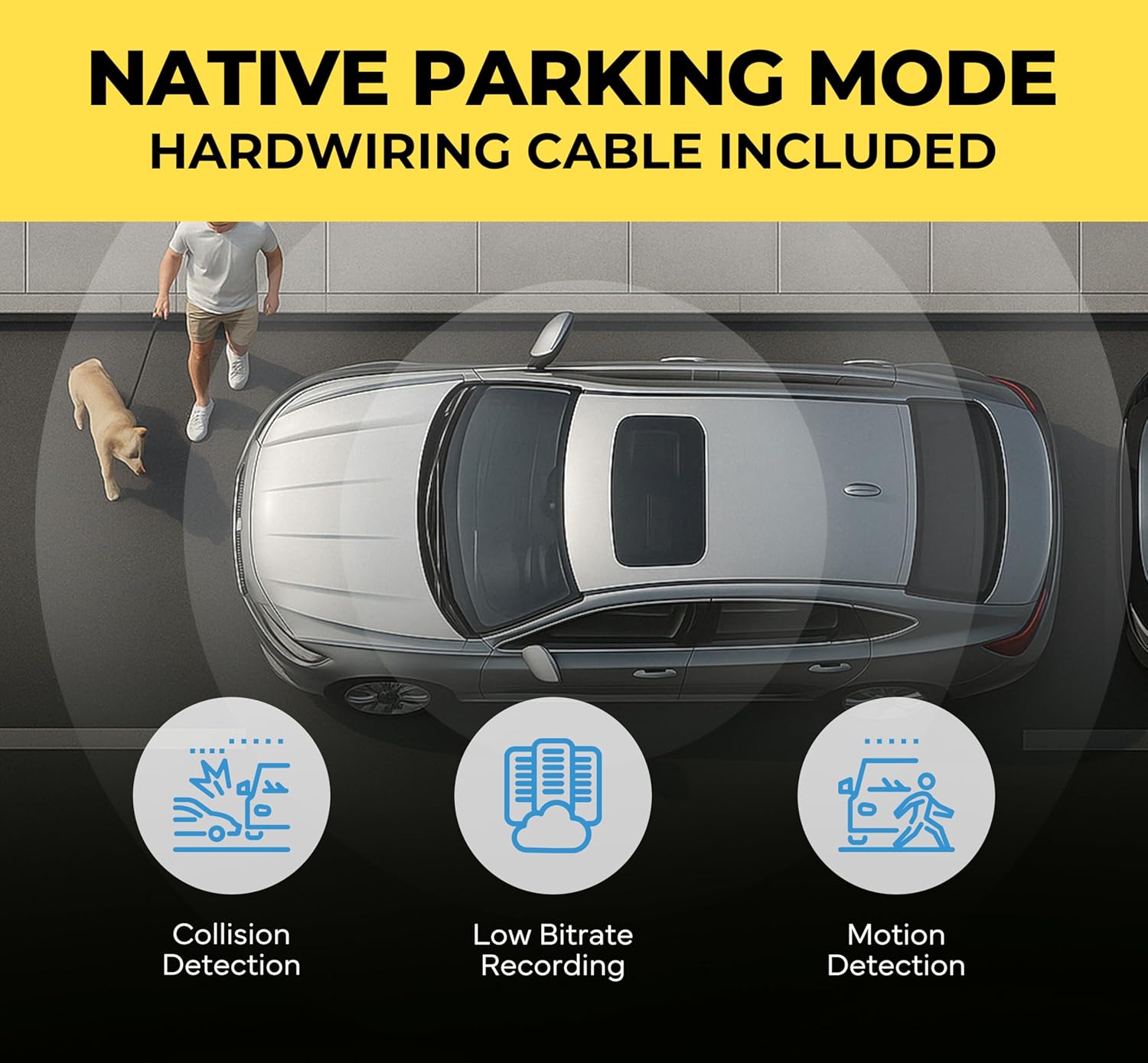
- Parkeermodus: Automatically activated when the vehicle's ignition is turned off (requires hardwiring). It records motion and impact events while parked.

Afbeelding 4: Crash Detection with Pre-Buffer. This image highlights the dash cam's ability to record 10 seconds before and 1 minute after an impact, ensuring no critical moments are missed.
3.2. Parking Mode with Battery Protection
When hardwired, the dash cam automatically switches to Parking Mode. It continuously monitors your vehicle's battery voltage and automatically shuts down if the voltage drops below a set threshold, preventing battery drain. Voltage cutoff and timer values can be configured via the BlackVue App.

Afbeelding 5: Native Parking Mode. This image explains the Native Parking Mode feature, including hardwiring for continuous monitoring and battery protection.
3.3. Cloud Features
The BlackVue DR970X Box-2CH Plus is Cloud compatible via a Wi-Fi hotspot or an optional CM100G LTE module, offering advanced remote functionalities:
- Live op afstand View: Access a real-time view through your dash cam from anywhere.
- Pushmeldingen: Receive instant alerts on your smartphone for detected impacts or events in Parking Mode.
- Live-evenement uploaden (automatische back-up): Event videos are automatically uploaded to the Cloud for secure storage.
- Real-time Location Tracking: Houd de locatie van uw voertuig in de gaten.
- Tweerichtingscommunicatie: Communicate through the dash cam (if supported by accessories).

Afbeelding 6: Cloud Dashcam, Always On! This image illustrates the various cloud functionalities available through the BlackVue app, including live view, instant alerts, and cloud backup.
3 video: BlackVue Cloud Promo Video. This video demonstrates the benefits and setup process for BlackVue Cloud features, including remote access and notifications.
4. Onderhoud
4.1. MicroSD-kaartbeheer
Regular maintenance of the microSD card is crucial for optimal performance:
- Opmaak: Periodically format the microSD card using the BlackVue App to ensure stable recording and prevent data corruption.
- Vervanging: MicroSD cards have a limited lifespan. Replace the card if you experience frequent errors or recording issues.
4.2. Firmware-updates
Keep your dash cam's firmware updated to ensure the latest features and bug fixes. Firmware updates can be performed via the BlackVue App (Firmware Over-The-Air - FOTA) or by manually loading the firmware onto the microSD card.
4.3. Schoonmaken
Gently clean the camera lenses and the main unit with a soft, dry cloth. Avoid using harsh chemicals that could damage the device.
5. Probleemoplossing
If you encounter issues with your BlackVue DR970X Box-2CH Plus, consider the following common solutions:
- Geen stroom: Ensure all power cables are securely connected. If hardwired, check the fuse connection.
- Problemen met de opname: Format the microSD card. If issues persist, try a new BlackVue-approved microSD card.
- Problemen met de wifi-verbinding: Verify the Wi-Fi password and ensure the dash cam's Wi-Fi is enabled. Try restarting both the dash cam and your smartphone.
- Problemen met cloudverbinding: Ensure your dash cam has a stable internet connection (via Wi-Fi hotspot or LTE module). Check your BlackVue Cloud account status in the app.
- Audio Buzzing: Some users have reported audio buzzing. Ensure all cables are properly routed and not interfering with other vehicle electronics. If the issue persists, contact customer support.
- Oververhitting: The modular design helps mitigate overheating. Ensure the main unit is placed in a well-ventilated, cooler location within the vehicle.
6. Specificaties
Key technical specifications for the BlackVue DR970X Box-2CH Plus:
| Functie | Specificatie |
|---|---|
| Resolutie van de camera aan de voorkant | 4K Ultra HD (3840x2160) @ 30FPS |
| Resolutie van de achteruitrijcamera | Full HD (1920x1080) @ 30FPS |
| Voorste sensor | STARVIS 2 CMOS sensor |
| Achtersensor | STARVIS CMOS sensor |
| Veld van View (Voorkant) | 146 graden |
| Veld van View (Achterkant) | 131 graden |
| Connectiviteit | Built-in Wi-Fi (5GHz), Optional LTE via CM100G LTE module |
| GPS | External GPS included |
| Opslag | Micro SD Card (up to 512GB supported, 128GB included) |
| Speciale kenmerken | Separate Secure Recording Box, Native Parking Mode with Battery Protection, Cloud Features, Heat Resistant Design |

Afbeelding 7: 4K STARVIS 2 Sensor. This image demonstrates the superior low-light performance of the STARVIS 2 sensor for the front camera and the wide field of view voor zowel de camera aan de voor- als achterkant.
7. Garantie en ondersteuning
7.1. Garantie-informatie
De BlackVue DR970X Box-2CH Plus wordt geleverd met een 2 jaar fabrieksgarantie, providing extended confidence in your purchase.
7.2. Klantenservice
For further assistance, detailed FAQs, or to contact customer support, please visit the official BlackVue website. You can also refer to the quick start guide included in your package for immediate assistance.