
1. Inleiding
Thank you for choosing the COMFEE' MDDPE-50DEN7 Dehumidifier. This powerful appliance is designed to efficiently remove excess moisture from your indoor environment, preventing mold, mildew, and improving overall air quality. With a dehumidification capacity of up to 50 liters per day and a large 6-liter water tank, it is ideal for large rooms, cellars, and basements up to 116 square meters. Please read this manual thoroughly before operation to ensure safe and optimal performance.

The Comfee dehumidifier effectively eliminates humidity and dries clothes, contributing to a healthier indoor environment.
2. Veiligheidsinformatie
Volg altijd de basisveiligheidsmaatregelen bij het gebruik van elektrische apparaten om het risico op brand, elektrische schokken en letsel te beperken.
- Zorg ervoor dat de voeding overeenkomt met de voltagzoals aangegeven op het typeplaatje van het apparaat.
- Gebruik de luchtontvochtiger niet als het snoer of de stekker beschadigd is.
- Houd het apparaat uit de buurt van water en andere vloeistoffen. Dompel het apparaat niet onder in water.
- Blokkeer de luchtinlaten of -uitlaten niet. Houd minimaal 20 cm ruimte rondom het apparaat vrij.
- Haal de stekker van het apparaat uit het stopcontact voordat u het reinigt of onderhoud uitvoert.
- Dit apparaat gebruikt R290-koelmiddel. Prik niet in het koelmiddelcircuit.
- Houd kinderen en huisdieren uit de buurt van het apparaat als het in werking is.
3. Product voorbijview
3.1 Componenten

The Comfee MDDPE-50DEN7 Dehumidifier, showcasing its sleek white design and integrated water tank.
- Bedieningspaneel
- Air Outlet
- Air Inlet (with washable filter)
- Watertank (inhoud 6 liter)
- Casters for mobility
- Handgrepen aan de zijkant
- Drainage Port (for continuous drainage)
- Pump Drainage Port (if applicable)
3.2 Belangrijkste kenmerken
Een overview of the dehumidifier's main features, including its capacity for large spaces, comfort mode, mobility, timer, safety features, tank size, filter, and eco-friendly refrigerant.
- Efficiënte ontvochtiging: Absorbs up to 50 liters of moisture per day, suitable for areas up to 116㎡.
- Meerdere bedrijfsmodi: Normal, Continuous, Drying (Laundry), and Smart modes for versatile use.
- Flexible Drainage Options: Choose between the 6-liter water tank, continuous drainage via a hose (not included), or integrated pump drainage.
- Gebruiksvriendelijke functies: Includes a 24-hour timer and an automatic shut-off feature when the water tank is full, preventing overflow.
- Verbeterde mobiliteit: Equipped with side handles and smooth-rolling casters for easy relocation.
- Verbeterde luchtkwaliteit: Helps reduce pollutants, mold, and musty odors, contributing to a healthier living environment.
4. Instellen
4.1 Uitpakken en plaatsen
- Haal de luchtontvochtiger voorzichtig uit de verpakking.
- Place the unit upright on a flat, stable surface. Allow it to stand upright for at least 24 hours before plugging it in, especially if it was transported on its side. This allows the refrigerant to settle.
- Zorg ervoor dat er aan alle kanten van het apparaat minstens 20 cm (8 inch) vrije ruimte is voor een goede luchtcirculatie.
- Position the unit away from heat sources, direct sunlight, and sources of excessive moisture.
4.2 Drainage-opties

The dehumidifier offers three convenient drainage options: using the removable water tank, continuous drainage with a hose, or pump drainage for elevated discharge.
- Watertankdrainage: The unit will collect water in the integrated 6-liter tank. When the tank is full, the unit will automatically shut off and an indicator light will illuminate. Carefully remove and empty the tank, then reinsert it securely.
- Continue drainage: For extended operation without emptying the tank, connect a standard garden hose (not included) to the continuous drainage port at the back of the unit. Ensure the hose is sloped downwards to allow gravity drainage into a floor drain or suitable receptacle.
- Pomp drainage: (If applicable to your model) For situations where water needs to be drained upwards or over a longer distance, connect a suitable hose to the pump drainage port. Refer to the specific instructions for pump operation in the full manual.

The dehumidifier is equipped with practical casters, allowing for easy movement and positioning within your home.
5. Gebruiksaanwijzing
5.1 Configuratiescherm voorbijview

The control panel provides intuitive access to all dehumidifier functions, including mode selection, timer, and humidity settings.
- Pump Function Button: Activates or deactivates the integrated pump for drainage.
- Comfort Mode Button: Sets the humidity level automatically between 45% and 55% for optimal comfort.
- Filterindicator resetten: Resets the filter cleaning reminder.
- Continuous Dehumidification Button: Activates continuous operation regardless of humidity level.
- Two-Speed Fan (Turbo) Button: Adjusts fan speed between low and high (Turbo).
- Timer Control Button: Stelt de aan/uit-timer van 24 uur in.
- Humidity Adjustment Buttons: Verhoogt of verlaagt het gewenste vochtigheidsniveau.
- Aan/uit-knop: Hiermee schakelt u het apparaat in of uit.
- Digitaal beeld: Shows current humidity, set humidity, timer settings, and error codes.
5.2-bedrijfsmodi

The dehumidifier offers various modes to suit different needs, from standard operation to specialized drying and intelligent humidity control.
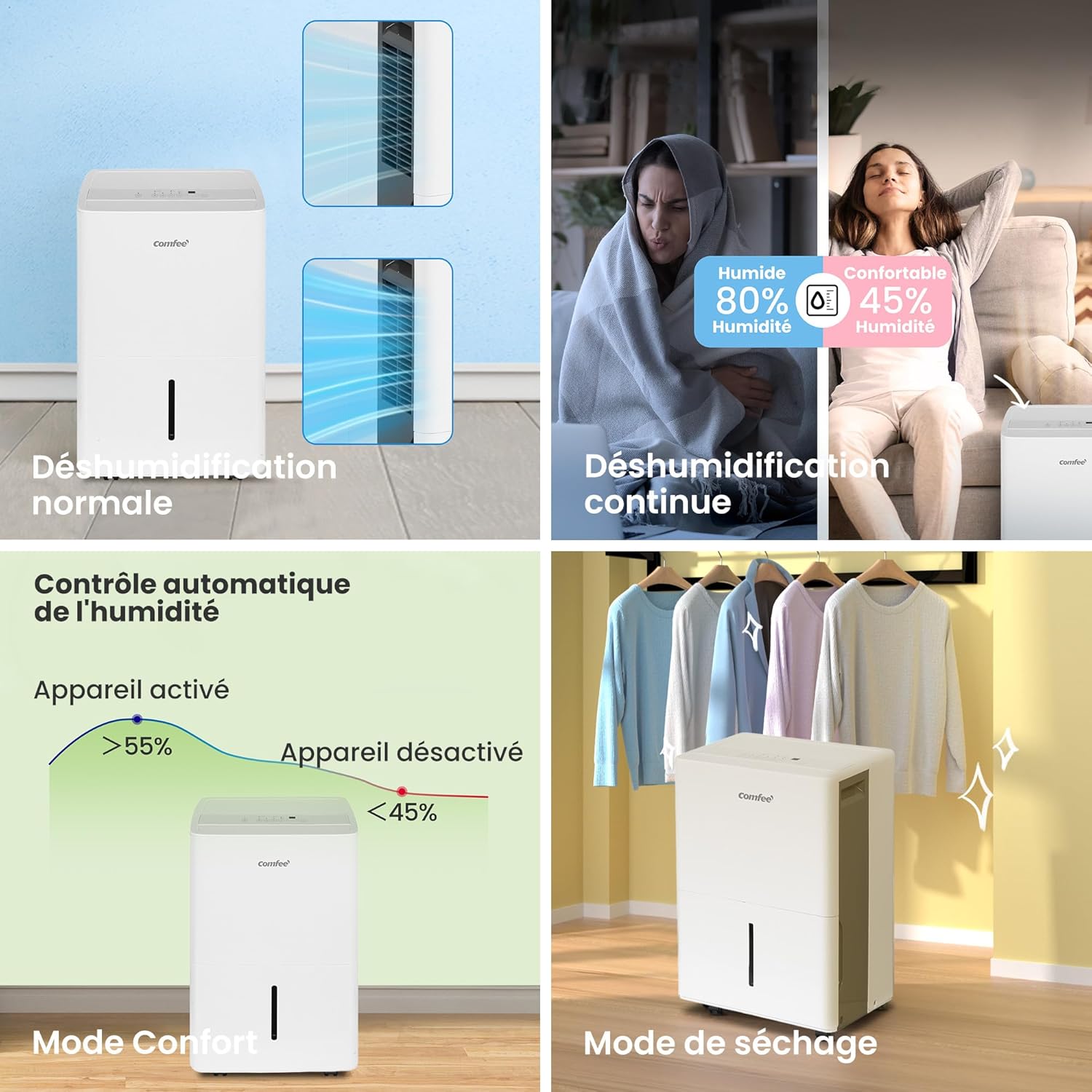
- Normale modus: The unit operates to reach and maintain the user-set humidity level.
- Continue modus: The unit runs continuously, regardless of the humidity level, for maximum moisture removal. Ideal for very damp voorwaarden.
- Drying Mode (Laundry): Designed to quickly dry clothes. The unit operates at high fan speed and continuous dehumidification.
- Smart Mode (Comfort Mode): Automatically adjusts operation to maintain indoor humidity between 45% and 55%, providing an optimal comfort level.
6. Onderhoud
Regelmatig onderhoud zorgt ervoor dat uw luchtontvochtiger lang meegaat en efficiënt werkt.
6.1 Het luchtfilter reinigen
Het luchtfilter moet elke twee weken worden schoongemaakt, of vaker afhankelijk van het gebruik en de luchtkwaliteit. Een vuil filter kan de efficiëntie verminderen en ervoor zorgen dat het apparaat harder moet werken.
- Schakel het apparaat uit en haal de stekker uit het stopcontact.
- Verwijder het luchtfilter aan de achterkant van het apparaat.
- Was het filter met warm zeepsop. Spoel het grondig af.
- Laat het filter volledig aan de lucht drogen voordat u het terugplaatst.
- Once reinserted, press the "Filter" button on the control panel to reset the filter cleaning reminder.
6.2 De watertank reinigen
Leeg en reinig de watertank regelmatig om schimmelvorming te voorkomen.
- Schakel het apparaat uit en haal de stekker uit het stopcontact.
- Verwijder voorzichtig het waterreservoir.
- Giet al het verzamelde water weg.
- Reinig de tank met een mild reinigingsmiddel en water. Spoel grondig na.
- Dry the tank completely before placing it back into the unit.
6.3 Opslag
Als u de luchtontvochtiger voor een langere periode opbergt:
- Leeg en reinig het waterreservoir.
- Maak het luchtfilter schoon.
- Wikkel het netsnoer netjes op.
- Bewaar het apparaat rechtop op een koele, droge plaats, uit de buurt van direct zonlicht en extreme temperaturen.
7. Probleemoplossing
Voordat u contact opneemt met de klantenservice, kunt u de volgende handleiding voor probleemoplossing raadplegen voor veelvoorkomende problemen.
| Probleem | Mogelijke oorzaak | Oplossing |
|---|---|---|
| Het apparaat gaat niet aan. | Geen stroom; watertank vol of niet goed geplaatst. | Controleer de stroomaansluiting; leeg het waterreservoir en plaats het stevig terug. |
| Er is geen water verzameld. | Te lage luchtvochtigheid; Luchtfilter verstopt; Kamertemperatuur te laag. | Increase target humidity or select Continuous mode; Clean air filter; Ensure room temperature is above 5°C (41°F). |
| Eenheid maakt lawaai. | Apparaat staat niet op een vlakke ondergrond. Luchtfilter verstopt. | Plaats het op een vlak oppervlak; reinig het luchtfilter. |
| IJsvorming op de koelspiralen. | Kamertemperatuur te laag. | The unit has an automatic defrost function. If frost persists, increase room temperature. |
8. Specificaties

Key dimensions and certifications for the Comfee dehumidifier, including its use of R290 refrigerant.
| Attribuut | Waarde |
|---|---|
| Modelnummer | MDDPE-50DEN7 |
| Ontvochtigingscapaciteit | 50 liter/dag |
| Watertankvolume | 6 liter |
| Aanbevolen kamergrootte | 101-116 m² |
| Luchtstroomcapaciteit | 353 m³/uur |
| Stroomverbruik | 1060 Watt |
| Afmetingen (L x B x H) | 28.2x39.2x61.6cm |
| Gewicht | 23.3 kg |
| Koelmiddel | R290 (Natural) |
| Aantal ventilatorsnelheden | 2 |
| Speciale kenmerken | Continuous Draining, Automatic Defrost, Digital Display, Anti-overflow, Automatic Shut-off |
9. Garantie en ondersteuning
For warranty information and customer support, please refer to the warranty card included with your product or visit the official Comfee webwebsite. Bewaar uw aankoopbewijs als bewijs van aankoop voor eventuele garantieclaims.
Fabrikant: Midea Europe
For further assistance, you may contact Comfee customer service through their official channels.