1. Inleiding
Thank you for choosing the Hiwill HW210 Soundbar with Subwoofer. This 2.1 channel surround sound system is designed to enhance your audio experience for televisions, PCs, gaming consoles, and other compatible devices. This manual provides detailed instructions for setup, operation, and maintenance to ensure optimal performance and longevity of your product. Please read this manual thoroughly before use and retain it for future reference.

Image 1.1: The Hiwill HW210 Soundbar and Subwoofer system, shown with a television for illustrative purposes.
2. Veiligheidsinformatie
Om het risico op een elektrische schok, brand of schade aan het apparaat te verminderen, dient u de volgende veiligheidsmaatregelen in acht te nemen:
- Stel dit apparaat niet bloot aan regen of vocht.
- Plaats geen met vloeistof gevulde voorwerpen, zoals vazen, op het apparaat.
- Zorg voor goede ventilatie. Blokkeer geen ventilatieopeningen.
- Installeer het apparaat niet in de buurt van warmtebronnen zoals radiatoren, warmteroosters, kachels of andere apparaten (inclusief ampwarmtebronnen) die warmte produceren.
- Zorg ervoor dat er niet op het netsnoer gelopen kan worden en dat het niet bekneld kan raken, vooral bij stekkers, stopcontacten en het punt waar ze het apparaat verlaten.
- Gebruik uitsluitend de door de fabrikant gespecificeerde hulpstukken/accessoires.
- Haal de stekker van dit apparaat uit het stopcontact tijdens onweer of wanneer u het apparaat gedurende langere tijd niet gebruikt.
- Laat alle servicewerkzaamheden over aan gekwalificeerd servicepersoneel. Service is vereist wanneer het apparaat op enigerlei wijze is beschadigd, zoals wanneer het netsnoer of de stekker is beschadigd, er vloeistof is gemorst of er voorwerpen in het apparaat zijn gevallen, het apparaat is blootgesteld aan regen of vocht, niet normaal werkt of is gevallen.
3. Inhoud van het pakket
Controleer of alle items aanwezig zijn en in goede staat zijn:
- Hiwill Soundbar
- Bekabelde subwoofer
- Afstandsbediening
- Stroomadapter
- Optical Cable (may vary by region)
- AUX Cable (may vary by region)
- Wandmontageset (schroeven, pluggen)
- Gebruikershandleiding (dit document)
4. Product voorbijview
4.1 Kenmerken van de soundbar
- Ultra-slim design (3.8 cm height)
- Integrated orbital aluminum diaphragm speakers
- Built-in HiFi and DSP technology for immersive 3D surround sound
- Maximum output power: 120 Watts
- Geluidsdrukniveau: 106 dB
- Bluetooth 5.3 for wireless streaming
- Multiple input options: HDMI ARC, Optical, AUX, USB
- 3 adjustable EQ modes: Game, Movie, Music
- Adjustable bass and treble levels
4.2 Subwoofer Features
- 9-liter capacity for deep, resonant bass
- Wired connection to the soundbar for stable audio transmission
4.3 Bedieningselementen en indicatoren
The soundbar features an integrated display and control buttons, typically located on the top or front panel. The remote control provides full functionality.
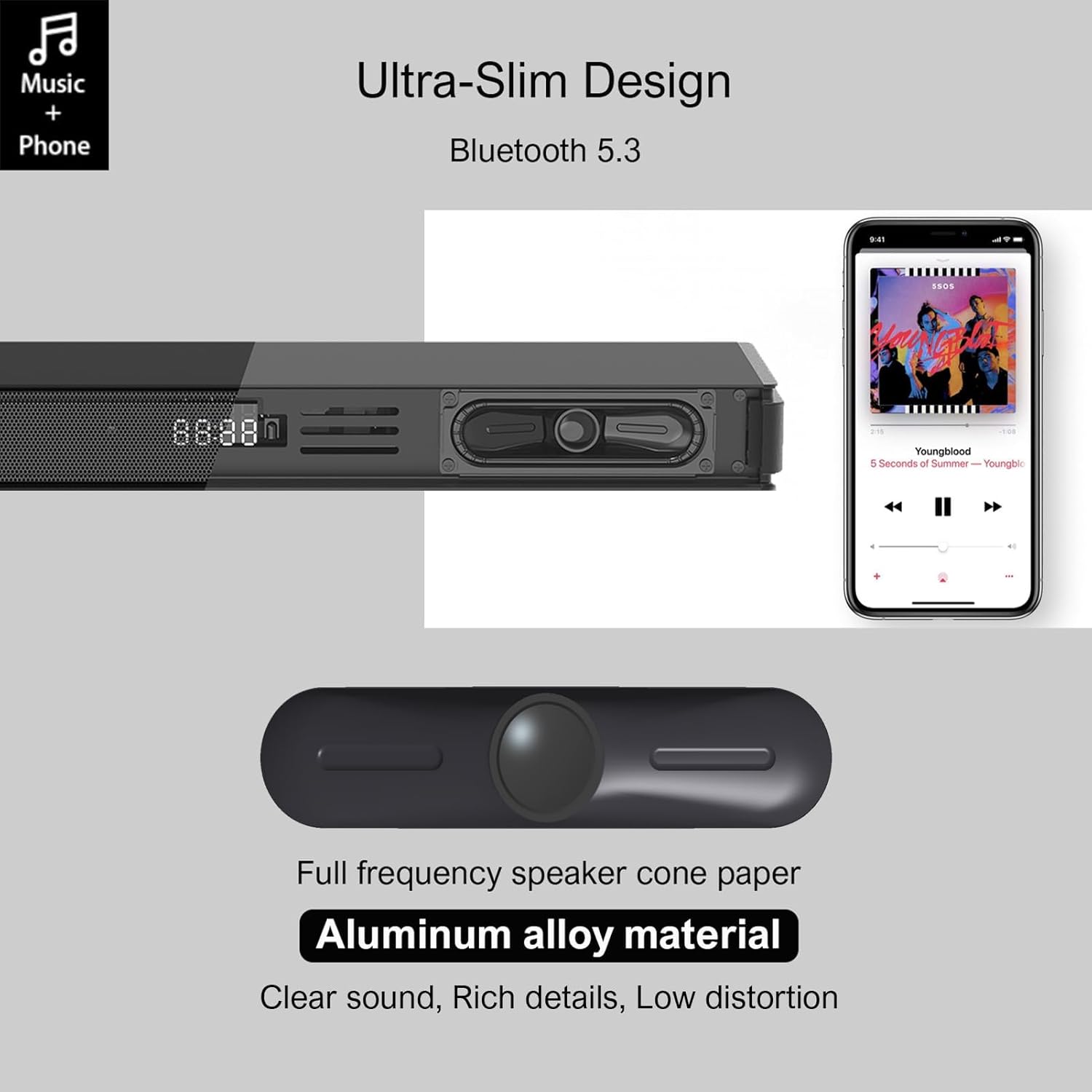
Image 4.1: Detail of the soundbar's ultra-slim design, showing the front display and integrated speakers.
4.4 Aansluitingen op het achterpaneel
The rear panel of the soundbar provides various ports for connecting to your audio sources and power.

Afbeelding 4.2: Achterkant view of the soundbar showing input ports: AUX, HDMI ARC, USB, Optical, Subwoofer Out, and DC In.
- AUX (3.5 mm): Voor het aansluiten van apparaten met een 3.5 mm audio-uitgang.
- ARC (HDMI): For connecting to a TV's HDMI ARC port. Supports CEC for unified control.
- USB-poort: Voor het afspelen van audio files van een USB-station.
- OPTISCH: For connecting to a TV or other device with an optical audio output.
- SUB UIT: Voor het aansluiten van de bedrade subwoofer.
- DC IN: Voor het aansluiten van de stroomadapter.
5. Instellen
5.1 Plaatsingsopties
The Hiwill HW210 soundbar offers flexible placement options to suit your home entertainment setup.

Image 5.1: Illustrates placing the soundbar on a tabletop in front of the TV or mounting it on the wall below the TV.
- Tafelblad plaatsing: Plaats de soundbar op een stabiele, vlakke ondergrond recht voor uw tv. Zorg ervoor dat deze de sensor voor de afstandsbediening van de tv niet blokkeert.
- Wandmontage: The soundbar can be mounted on the wall below your TV. Use the provided wall mounting kit and follow these steps:
- Mark the desired mounting positions on the wall, ensuring the soundbar is centered with your TV.
- Boor geleidegaten op de gemarkeerde plaatsen.
- Insert wall anchors (if necessary for your wall type).
- Secure the mounting brackets (if separate) or the soundbar directly using screws.
- Subwooferplaatsing: Place the subwoofer on the floor near the soundbar. Experiment with placement to find the best bass response for your room.
5.2 Aansluiten op stroom
- Connect the power adapter to the DC IN port on the soundbar's rear panel.
- Steek het andere uiteinde van de voedingsadapter in een stopcontact.
- Connect the wired subwoofer cable to the SUB OUT port on the soundbar.
5.3 Aansluiten op audiobronnen
Kies een van de volgende verbindingsmethoden, afhankelijk van uw apparaat:
- HDMI ARC (aanbevolen voor tv's):
- Connect one end of an HDMI cable (not included) to the ARC port on the soundbar.
- Sluit het andere uiteinde aan op de HDMI ARC-poort van uw tv.
- Ensure HDMI CEC is enabled in your TV's settings for unified control.
- Optisch:
- Connect the optical cable (included) to the OPTICAL port on the soundbar.
- Connect the other end to the optical audio output port on your TV or other device.
- Ensure your TV's audio output is set to "PCM" if you experience no sound.
- AUX (3.5 mm):
- Connect the 3.5mm AUX cable (included) to the AUX port on the soundbar.
- Sluit het andere uiteinde aan op de hoofdtelefoonaansluiting of de AUX-uitgang van uw apparaat.
- USB-poort:
- Plaats een USB-stick met audio files in de USB-poort op de soundbar.
6. Gebruiksaanwijzing
6.1 In-/uitschakelen
- Druk op de Stroom Met deze knop op de soundbar of de afstandsbediening kunt u het apparaat in- of uitschakelen.
6.2 Invoerbron selecteren
- Druk op de Invoer button on the remote control or the soundbar to cycle through available input sources (ARC, OPT, AUX, USB, BT). The selected input will be displayed on the soundbar's screen.
6.3 Bluetooth-koppeling
- Turn on the soundbar and select the "BT" input source. The soundbar will enter pairing mode, indicated by a flashing "BT" on the display.
- Schakel Bluetooth in op uw mobiele apparaat en zoek naar beschikbare apparaten.
- Select "Hiwill HW210" (or similar name) from the list of devices.
- Once paired, the soundbar will emit a confirmation tone, and "BT" will stop flashing.
- To disconnect, turn off Bluetooth on your device or select a different input source on the soundbar.
6.4 Volumeregeling
- Gebruik de Volume omhoog (+) En Volume verminderen (-) Met de knoppen op de soundbar of de afstandsbediening kunt u het hoofdvolume aanpassen.
- Druk op de Stom Gebruik de knop op de afstandsbediening om het geluid te dempen of het dempen op te heffen.
6.5 EQ Modes and Tone Adjustment
The soundbar features three preset equalizer modes and adjustable bass/treble settings.

Image 6.1: Visual representation of the three equalizer modes: Game, Movie, and Music, optimized for different audio content.
- Druk op de EQ button on the remote control to cycle through the preset modes: Spel, Film, En Muziek.
- Gebruik de Bas +/- buttons on the remote control to adjust the bass level.
- Gebruik de Hoge tonen +/- buttons on the remote control to adjust the treble level.
7. Onderhoud
- Schoonmaak: Gebruik een zachte, droge doek om het oppervlak van de soundbar en subwoofer schoon te maken. Gebruik geen vloeibare reinigingsmiddelen of schurende materialen.
- Opslag: Als u het apparaat voor een langere periode opbergt, haal dan de stekker uit het stopcontact en bewaar het op een koele, droge plaats.
- Vermijd obstakels: Ensure that the speaker grilles and ventilation openings are not blocked by dust or other objects.
8. Probleemoplossing
| Probleem | Mogelijke oorzaak | Oplossing |
|---|---|---|
| Geen stroom | Stroomkabel niet aangesloten; Stopcontact niet actief | Zorg ervoor dat het netsnoer goed is aangesloten; probeer een ander stopcontact. |
| Geen geluid | Onjuiste ingangsbron geselecteerd; Volume te laag; Kabels niet goed aangesloten; Audio-uitvoerinstellingen tv onjuist. | Select the correct input source; Increase volume; Check all audio cables are securely connected; For Optical/ARC, ensure TV audio output is set to PCM. |
| Bluetooth-koppeling mislukt | Soundbar staat niet in koppelingsmodus; Apparaat te ver weg; Storing. | Ensure soundbar is in BT mode and flashing; Move device closer; Turn off other Bluetooth devices. |
| Afstandsbediening werkt niet | Batterijen leeg. Obstructie tussen afstandsbediening en soundbar. | Replace remote control batteries; Ensure clear line of sight to the soundbar's sensor. |
| Slechte geluidskwaliteit | Incorrect EQ mode; Source audio quality; Cable issues. | Adjust EQ modes and bass/treble settings; Try a different audio source; Check/replace audio cables. |
9. Specificaties
| Modelnaam | Hiwill HW210 Soundbar |
| Luidsprekertype | Soundbar met bedrade subwoofer |
| Surround Sound-configuratie | 2.1 Kanaal |
| Maximaal luidsprekeruitgangsvermogen | 120 Watt |
| Connectiviteitstechnologie | Bluetooth 5.3, HDMI ARC, AUX (3.5mm), USB, Optical |
| Audio-uitvoermodus | Omringen |
| Speciale kenmerken | High-resolution audio support, 3 EQ modes, Adjustable Bass/Treble, Wall-mountable |
| Aanbevolen toepassingen | TV, Gaming Consoles, Computers, Smartphones, Tablets, Music Players, DVD Players, Home Theater |
10. Garantie en ondersteuning
Hiwill products are designed and manufactured to the highest quality standards. For detailed warranty information, please refer to the warranty card included in your package or visit the official Hiwill website. If you encounter any issues or require technical assistance, please contact Hiwill customer support through the contact information provided on the product packaging or webplaats.
Please have your model number (HW210) and purchase date ready when contacting support.