1. Product voorbijview
The DIYmalls ESP32-2432S024C is a compact development board integrating an ESP-WROOM-32 module with a 2.4-inch capacitive touch TFT LCD screen. This module is designed for various embedded projects, offering Wi-Fi and Bluetooth connectivity, and is programmable using environments like the Arduino IDE.
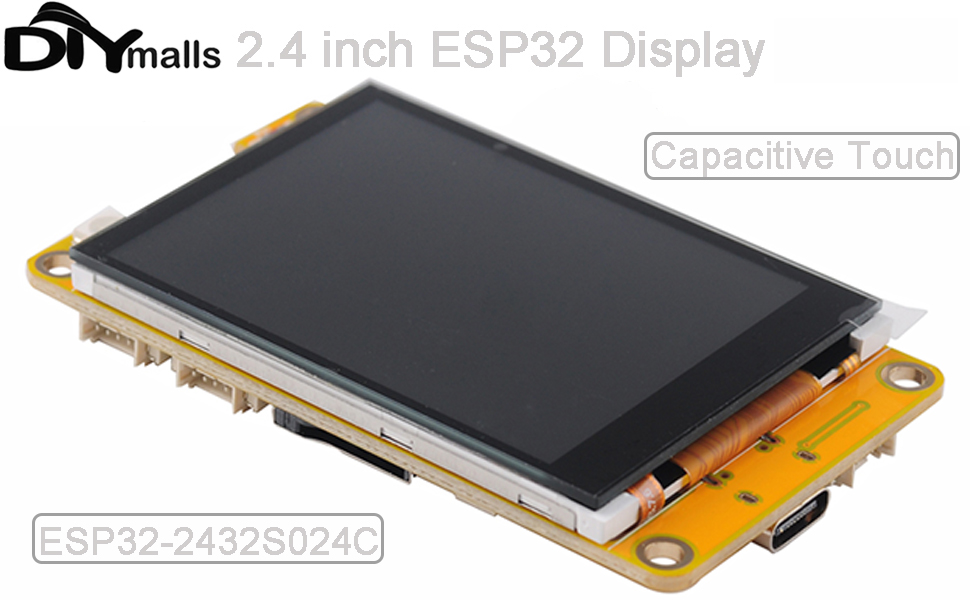
Figuur 1: Overview of the ESP32-2432S024C development board, highlighting key components such as the ESP-32 module, TF card slot, Type-C USB port, and various connectors for power, battery, speaker, and external I/O.
2. Inhoud van het pakket
Controleer of alle artikelen in het pakket aanwezig zijn:
- 1 x ESP32-2432S024C 2.4-inch Capacitive Touch Screen Module
- 1 x Dupont female to 1.25mm wire
- 1 x 2-pin 1.25mm cable (for speaker or battery interface)
Video 1: Unboxing and package contents of the DIYmalls ESP32-2432S024C module, showing the main board and included cables.
3. Installatie-instructies
3.1 De printplaat van stroom voorzien
Connect the ESP32-2432S024C board to a power source using the Type-C USB port. It is recommended to use a USB-A to USB-C cable for reliable power delivery. Alternatively, a 5V power supply can be connected to the P1 connector located near the USB-C port.
3.2 Code uploaden
The board supports code upload via the Arduino IDE or an ESP32 flash tool. Ensure the correct board definition and port are selected in your development environment.

Figure 2: Illustration of the code upload process using Arduino IDE and an ESP32 flash tool, demonstrating how to program the display module.
3.3 Externe aansluitingen
- TF-kaart: Insert a TF card (microSD card) into the designated slot. The board supports cards up to 32GB.
- Sensoren: The P3 connector (4-pin, 1.25mm) is suitable for connecting sensors such as the DHT11 temperature and humidity sensor. The CN1 IO connector also uses a 4-pin, 1.25mm type.
- Speaker/Battery: The 2-pin 1.25mm cable can be used for connecting a speaker to P4 or a battery to P5.
4. Gebruiksaanwijzing
4.1 inch capacitief touchscreen
The 2.4-inch display features a capacitive touch screen, allowing for multi-touch gestures and precise interaction. Ensure your software application is configured to utilize the touch input capabilities.
Video 2: Demonstration of the capacitive touch screen functionality on the ESP32-2432S024C, showing responsive interaction with a graphical user interface.
4.2 Display Functionality
The TFT LCD module provides a 240x320 resolution display. Program your ESP32 to output graphics, text, and user interfaces to the screen. The display supports various color modes and font sizes depending on your programming library (e.g., Adafruit GFX, TFT_eSPI).
Video 3: A test of the 2.4-inch ESP32-2432S024C display, showcasing color gradients and text rendering capabilities.
5. Onderhoud
To ensure the longevity and optimal performance of your ESP32-2432S024C module:
- Houd het bord schoon en vrij van stof en vuil.
- Vermijd blootstelling van de module aan extreme temperaturen of vochtigheid.
- Behandel de printplaat voorzichtig om fysieke schade aan componenten of connectoren te voorkomen.
- When not in use, store the module in its original packaging or an anti-static bag.
6. Probleemoplossing
- Board does not power on via USB-C: Some units may require a USB-A to USB-C cable for proper power delivery. Ensure your cable is compatible and provides sufficient power. Alternatively, provide 5V directly to the P1 connector.
- Backlight is off: The backlight control pin may need to be explicitly set high in your code, as it might not have an internal pull-up resistor for automatic activation. Consult the board's pinout documentation for the specific backlight control pin.
- Limited GPIOs: The ESP32-2432S024C has a limited number of available GPIO pins due to the integrated display and other components. Review the schematic or pinout diagram to identify available pins for your specific application. GPIO36 is input-only.
- I2C bus issues: If experiencing problems with the I2C bus, note that GPIO21 is often used by the capacitive display. If you need GPIO21 for other I2C peripherals, you might need to modify the board (e.g., remove a 0-ohm resistor at R25 if applicable) or adjust your software configuration.
- Code upload failures: Verify that the correct COM port is selected in your IDE/flash tool and that the board is in programming mode (usually by holding the BOOT button while connecting or resetting). Ensure all necessary libraries are installed.
7. Specificaties
| Functie | Detail |
|---|---|
| Weergaveformaat | 2.4 inch |
| Weergavetype | TFT LCD with ILI9341 controller |
| Oplossing | 240x320 pixels |
| Aanraakscherm | Capacitief |
| Microcontrollers | ESP32 (ESP-WROOM-32 module) |
| Connectiviteit | Wi-Fi, Bluetooth |
| TF-kaartondersteuning | Tot 32 GB |
| Connectoren | Type-C USB, 4-pin 1.25mm (P3, CN1), 2-pin 1.25mm (P4 speaker, P5 battery) |
| Pakket afmetingen | 4.72 x 3.23 x 1.26 inch |
| Artikelgewicht | 3.17 ons |
8. Garantie en ondersteuning
This product is covered by a standard 30-day return policy for refunds or replacements. For technical support or further inquiries, please refer to the manufacturer's official website or contact their customer service directly. Detailed documentation and community forums for ESP32 development are also valuable resources.