
Invoering
Thank you for choosing the PETLIBRO 5L Automatic Pet Feeder with 1080P Camera. This device is designed to provide convenient and reliable feeding for your pets, ensuring they receive their meals on schedule while allowing you to monitor and interact with them remotely. This manual provides essential information for setting up, operating, and maintaining your feeder.

The PETLIBRO 5L Automatic Pet Feeder offers a range of features including a 1080p HD camera, night vision, two-way audio, remote feeding, in-app monitoring, and easy cleanup.
Veiligheidsinstructies
- Lees alle instructies zorgvuldig door voordat u de voederautomaat gebruikt.
- Dit apparaat is uitsluitend bestemd voor gebruik binnenshuis.
- Dompel de hoofdeenheid niet onder in water of andere vloeistoffen.
- Keep the feeder away from direct sunlight and heat sources.
- Ensure the power cord is not damaged and is placed where pets cannot chew on it.
- Gebruik uitsluitend de originele voedingsadapter die bij de voederautomaat is meegeleverd.
- Always supervise children around the feeder.
- Gebruik alleen droogvoer met een diameter tussen 2 en 15 mm.
Inhoud van het pakket
Controleer of alle componenten in het pakket aanwezig zijn:
- PETLIBRO Automatic Pet Feeder (Main Unit)
- Roestvrijstalen voerbak
- Stroomadapter
- Gebruiksaanwijzing
- Desiccant Bag (may be pre-installed)
Product voorbijview
Familiarize yourself with the different parts of your PETLIBRO Automatic Pet Feeder.

The main unit of the feeder, featuring the food hopper, dispensing mechanism, 1080P camera, and control panel. A cat is shown eating from the stainless steel bowl, with a smartphone displaying the live camera feed.
- Voedselhopper: Bewaar droog dierenvoer.
- Lid with Twist-Lock: Secures the food hopper and keeps food fresh.
- Configuratiescherm: Buttons for manual feeding and settings.
- 1080P HD-camera: Voor live monitoring en opname.
- Infrarood sensor: Detects low food levels and blockages.
- Luidspreker en microfoon: Voor tweerichtingsaudiocommunicatie.
- Voedselverkooppunt: Waar het voedsel in de kom wordt gedaan.
- Roestvrijstalen kom: Verwijderbaar voor eenvoudige reiniging.
- Voedingspoort: Voor het aansluiten van de AC-adapter.
- Batterijcompartiment: For backup batteries (not included).
Instellen
1. Uitpakken en monteren
- Haal alle onderdelen uit de verpakking.
- Plaats de hoofdvoederunit op een vlakke, stabiele ondergrond.
- Plaats de roestvrijstalen kom in de daarvoor bestemde gleuf aan de onderkant van de voederautomaat.
2. Voeding
- Sluit de voedingsadapter aan op de voedingspoort van de voederautomaat en steek de stekker in een stopcontact.
- voor stroomuitvaltage protection, install 3 D-cell alkaline batteries (not included) into the battery compartment at the bottom of the feeder. This ensures continuous operation during power interruptions.
3. Het vullen van de voerbak
- Open the Twist-Lock lid on top of the feeder.
- Pour dry pet food into the hopper. Ensure the food size is between 2-15mm.
- Close the lid securely by twisting it until it locks.
4. App-installatie en wifi-verbinding
- Download de PETLIBRO-app via de App Store (iOS) of de Google Play Store (Android).
- Maak een account aan en log in.
- Follow the in-app instructions to add your feeder. Ensure your smartphone is connected to a 2.4GHz or 5GHz Wi-Fi network. The feeder supports both for a more stable connection.
- The app will guide you through connecting the feeder to your home Wi-Fi network.
5. Camera-instelling
- Once connected to Wi-Fi, the 1080P camera will automatically activate.
- For video recording, insert a Micro SD card (up to 256GB, not included) into the designated slot, usually located near the camera or at the bottom of the unit.
Gebruiksaanwijzing
1. Handmatige invoer
- Press the manual feed button on the feeder's control panel to dispense one portion of food instantly.
- Alternatively, use the 'Feed Now' option in the PETLIBRO app for immediate dispensing.
2. Maaltijden plannen via de app
The PETLIBRO app allows you to customize your pet's feeding schedule.

The PETLIBRO app provides an intuitive interface to set custom feeding times and amounts, and to review feeding logs.
- Open the PETLIBRO app and select your feeder.
- Navigate to the 'Feeding Schedule' section.
- Set up to 10 meals per day. For each meal, specify the time and the number of portions (1-50 portions per meal).
- Sla je schema op. De voederautomaat geeft automatisch voer af op de geprogrammeerde tijden.
- Je kan view feeding logs within the app to track your pet's meal history.
3. Two-Way Audio & Voice Recording
Communicate with your pet remotely using the two-way audio feature.

The feeder allows two-way audio communication, enabling you to speak to your pet and hear their responses through the app.
- Live communicatie: In the app's live view, tap the microphone icon to speak to your pet. Your voice will be played through the feeder's speaker.
- Stem opname: Record a personalized voice message (up to 10 seconds) in the app. This message can be set to play at meal times (0-5 times per meal). A new recording will overwrite any previous one.
4. Monitoring with 1080P Camera and Night Vision
The integrated camera allows you to keep an eye on your pet at all times.

The 1080P camera provides clear vision, even at night, allowing you to monitor your pet's meals with high-definition infrared night vision.
- Access the live camera feed through the PETLIBRO app to view uw huisdier in real-time.
- De 145° groothoeklens biedt een breed gezichtsveld. view van het voedergebied.
- Infrared night vision ensures clear visibility even in dark conditions.
- Videos can be stored on a Micro SD card (up to 256GB, not included).
5. Smart Alerts and Notifications
- Bewegings- en geluidsdetectie: The feeder automatically records pet activity and saves video clips (SD card required). You will receive notifications on your phone for detected motion or sounds.
- Low Food Level Alert: The infrared sensor monitors the food level in the hopper. You will receive an alert on your phone when the food supply is low, prompting you to refill.
- Blockage Detection: The sensor also detects potential food blockages in the dispensing mechanism and will send an alert if an issue occurs.
- Wi-Fi Disconnection Alert: If the feeder loses its Wi-Fi connection, you will be notified via the app.
Onderhoud
1. De voerbak schoonmaken
Regelmatig schoonmaken zorgt voor hygiëne en een goede werking van de voederautomaat.
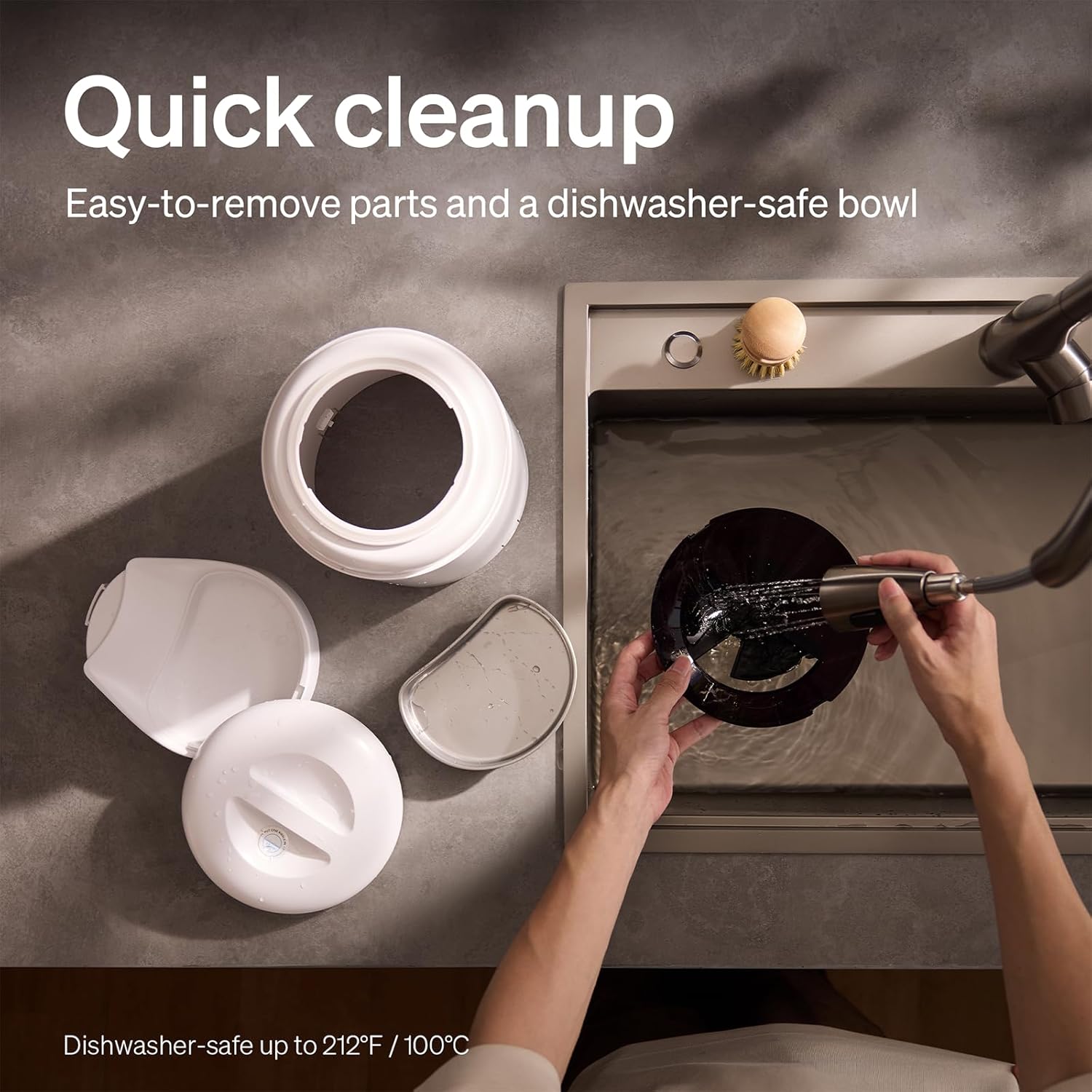
The feeder is designed for quick cleanup with easy-to-remove parts and a dishwasher-safe bowl.
- Stroom loskoppelen: Haal altijd de stekker van de voederautomaat uit het stopcontact voordat u deze schoonmaakt.
- Voedsel verwijderen: Leeg de trechter als er nog voer in zit.
- Demonteren: Remove the food bowl, lid, and food hopper.
- Wasbare onderdelen: The stainless steel bowl and food hopper are dishwasher-safe (up to 100°C / 212°F) or can be hand-washed with mild soap and water.
- Hoofdeenheid: Veeg het hoofdapparaat schoon met een zachte, damp lap. Dompel het niet onder in water.
- Grondig laten drogen: Zorg ervoor dat alle onderdelen volledig droog zijn voordat u ze weer in elkaar zet en vult met voedsel.
2. Vervanging van droogmiddel
- The desiccant bag helps keep the food fresh. It is recommended to replace it every 15 days.
- Locate the desiccant compartment, usually under the lid.
- Remove the old desiccant bag and insert a new one.
Probleemoplossing
| Probleem | Mogelijke oorzaak | Oplossing |
|---|---|---|
| Voederbak geeft geen voer. | Food blockage; empty hopper; dispensing mechanism issue. | Check for food blockages and clear them. Refill hopper if empty. Ensure food size is appropriate (2-15mm). |
| Wi-Fi-verbinding verbroken. | Weak Wi-Fi signal; router issues; incorrect password. | Ensure feeder is within Wi-Fi range. Restart your router. Reconnect the feeder to Wi-Fi via the app, verifying the password. |
| Camera not working or frequently disconnecting. | Poor Wi-Fi connection; app glitch; SD card issue. | Check Wi-Fi stability. Restart the feeder and the app. Ensure the SD card is properly inserted and not full. Consider a system reset if issues persist. |
| App shows "status unknown" or feeding errors. | Wi-Fi disconnection; app synchronization issue. | Verify Wi-Fi connection. Close and reopen the app. Restart the feeder. |
| Stemopname wordt niet afgespeeld. | No recording saved; volume too low; incorrect schedule. | Ensure a voice message is recorded and saved in the app. Check the playback settings for meal times. |
Specificaties
| Functie | Detail |
|---|---|
| Modelnummer | AF203 |
| Afmetingen (L x B x H) | 12x10x27cm |
| Gewicht | 2.15 kg |
| Materiaal | Roestvrij staal (kom) |
| Capaciteit | 5 liter |
| Doelsoorten | Kat hond |
| Aanbevolen toepassingen | Automatic indoor dog/cat feeding |
| Speciale kenmerken | 1080P Camera, Smart App, Two-way Audio |
| Kleur | Wit |
| Connectiviteitstechnologie | Wi-Fi (2.4 GHz en 5 GHz) |
| Werkingsmodus | Automatisch |
| Onderhoudsinstructies | Dishwasher safe (bowl) |
| Batterijen vereist | No (for primary operation), Yes (for backup, 3 D-cell, not included) |
Garantie en ondersteuning
PETLIBRO products come with a standard manufacturer's warranty. For detailed warranty information, please refer to the warranty card included in your package or visit the official PETLIBRO webplaats.
If you encounter any issues or have questions regarding your PETLIBRO Automatic Pet Feeder, please contact PETLIBRO customer support through the following channels:
- E-mailadres: Raadpleeg de productverpakking of de PETLIBRO-brochure. website for the latest support email address.
- Webwebsite: Bezoek de officiële PETLIBRO webWebsite met veelgestelde vragen, handleidingen voor probleemoplossing en contactformulieren.
- In-app-ondersteuning: The PETLIBRO app may offer a support section for direct assistance.
Please have your model number (AF203) and purchase information ready when contacting support.