
Invoering
This manual provides comprehensive instructions for the Silvergear XL Smartwatch. It covers setup, operation, maintenance, and troubleshooting to ensure you get the most out of your device. The Silvergear XL Smartwatch features a large 2.41-inch IPS display, integrated cameras, 4G connectivity, and extensive fitness tracking capabilities.
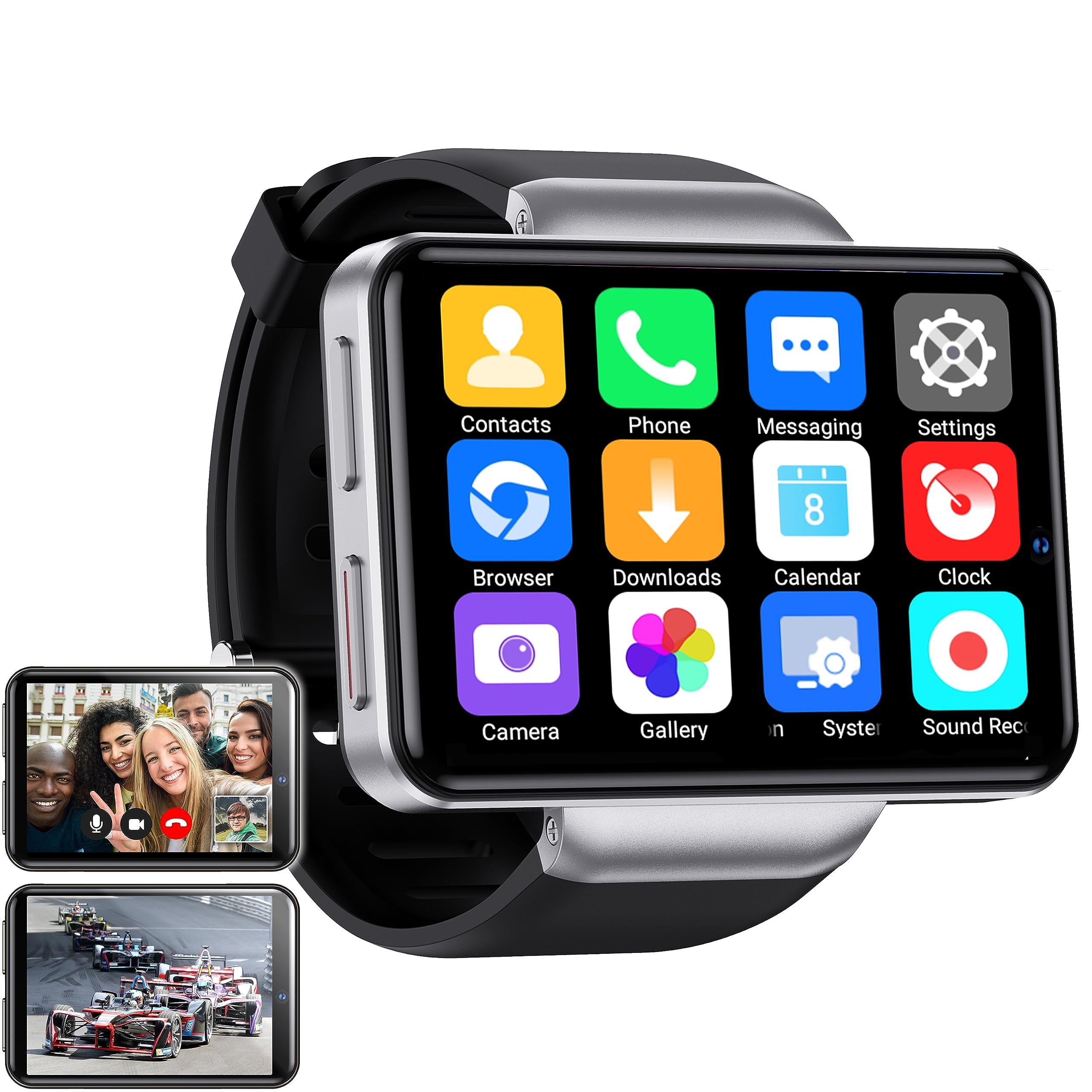
Figure 1: Silvergear XL Smartwatch overview.

Figure 2: The Silvergear XL Smartwatch offers a perfect balance of style, functionality, and advanced technology, including a 2.41-inch IPS display, live video streaming, app downloads, fitness tracking, and communication features.
1. Instellen
1.1 Uitpakken en verpakkingsinhoud
Carefully unpack your Silvergear XL Smartwatch and verify all contents.

Figure 3: Package contents including the Smartwatch XL, charging base, screen protector, and two screwdrivers. Dimensions are also shown: 4.5 cm height, 6.5 cm width, 1.5 cm thickness for the watch body, and strap lengths of 8.5 cm and 12 cm. The watch weighs 120 grams.
- Silvergear XL Smartwatch
- Oplaadbasis
- Schermbeschermer
- 2x schroevendraaiers (voor de simkaartlade)
- Gebruikershandleiding (dit document)
1.2 De smartwatch opladen
Laad de smartwatch volledig op voordat u hem voor de eerste keer gebruikt.
- Connect the charging base to a USB power adapter (not included) or a computer's USB port.
- Place the smartwatch onto the charging base, ensuring the charging pins align.
- Het display van het horloge geeft de laadstatus weer. Een volledige lading duurt ongeveer 2-3 uur.
1.3 Installatie simkaart
To enable 4G connectivity, calls, and internet access, install a Nano SIM card.

Figure 4: Illustration of how to insert a Nano SIM card into the smartwatch. The image also shows the watch's ability to download apps from the Play Store.
- Zoek de simkaartlade aan de zijkant van de smartwatch.
- Use the provided screwdriver to open the SIM card tray.
- Carefully insert a Nano SIM card into the tray, ensuring correct orientation.
- Close the SIM card tray securely with the screwdriver.
1.4 Eerste keer inschakelen en instellen
Press and hold the power button until the Silvergear logo appears. Follow the on-screen prompts to complete the initial setup, including language selection, time zone, and network connection.
2. De smartwatch bedienen
2.1 Basisnavigatie
- Aanraakscherm: Veeg naar links, rechts, omhoog of omlaag om door menu's en schermen te navigeren. Tik om items te selecteren.
- Aan/uit-knop: Druk om het scherm te activeren/in slaapstand te zetten. Houd ingedrukt om het scherm aan/uit te zetten of opnieuw op te starten.
- Back Button (if applicable): Some watches have a dedicated back button or gesture. Refer to on-screen prompts.
2.2 Communicatiefuncties
With a Nano SIM card installed, you can make and receive calls and messages directly from your smartwatch.
- Oproepen: Tap the "Phone" icon to access the dialer or contacts.
- Berichten: Tap the "Messaging" icon to send and receive text messages.
- Toepassingen: Download communication apps from the Play Store for additional functionality.
2.3 camerafunctionaliteit
The smartwatch is equipped with both front and side cameras for capturing photos and videos.

Figure 5: The smartwatch features a 5MP front camera and a 2MP side camera, allowing you to capture photos and videos directly from your wrist.
- Toegangscamera: Tap the "Camera" icon on the home screen or app drawer.
- Camera's wisselen: Use the on-screen icon to switch between the 5MP front camera and the 2MP side camera.
- Vastlegging: Tik op de ontspanknop om een foto te maken of een video-opname te starten of te stoppen.
2.4 Multimedia Entertainment
Enjoy videos, TV programs, series, and music directly on your smartwatch's extra-large screen.

Figure 6: The extra-large screen allows you to enjoy multimedia content such as sport competitions, TV programmes, series, videos, and music.
- Video/TV: Use pre-installed apps or download streaming services from the Play Store.
- Muziek: Play music stored on the device or stream from compatible apps.
2.5 Fitness- en gezondheidsregistratie
Monitor your physical activity and health metrics with the integrated sensors.

Figure 7: The smartwatch offers pedometer and fitness tracking for various activities including running, hiking, cycling, basketball, football, jumping rope, and badminton.
- Pedometer: Houdt uw dagelijkse stappen, afstand en verbrande calorieën bij.
- Hartslagmeter: Provides accurate heart rate readings.
- Trainingsmodi: Select from 9 pre-defined exercise types (e.g., running, walking, cycling, swimming) to track your performance.
- Slaap bijhouden: Monitors your sleep patterns (if supported by the device's software).
2.6 App Downloads
Expand your smartwatch's functionality by downloading applications from the Play Store.
- Ensure your smartwatch is connected to Wi-Fi or has an active 4G data connection.
- Tap the "Play Store" icon and browse or search for desired applications.
- Follow on-screen instructions to download and install apps.
3. Onderhoud
3.1 Reinigen
Om het uiterlijk en de functionaliteit van uw smartwatch te behouden:
- Veeg het scherm en de behuizing schoon met een zachte, pluisvrije doek.
- Voor hardnekkige vlekken, lichtjes dampMaak de doek schoon met water. Vermijd agressieve chemicaliën of schurende materialen.
- Zorg ervoor dat de oplaadcontacten schoon en droog zijn voordat u gaat opladen.
3.2 Water- en stofbestendigheid
The Silvergear XL Smartwatch is rated IP67 for water and dust resistance.

Figure 8: The smartwatch is IP67 water- and dustproof, designed to withstand various weather conditions. This includes IP67 splashproof and IP67 dustproof ratings.
- IP67-classificatie: This means the device is protected from dust ingress and can withstand immersion in water up to 1 meter for up to 30 minutes.
- It is suitable for splashes, rain, and incidental exposure to water.
- Avoid prolonged immersion, hot water, or high-pressure water jets.
- Ensure the SIM card tray is properly sealed to maintain water resistance.
3.3 Software-updates
Controleer regelmatig op software-updates om optimale prestaties en toegang tot nieuwe functies te garanderen.
- Connect your smartwatch to Wi-Fi.
- Navigate to "Settings" > "About Watch" > "Software Update" (or similar path).
- Volg de instructies op het scherm om beschikbare updates te downloaden en te installeren.
4. Probleemoplossing
| Probleem | Mogelijke oorzaak | Oplossing |
|---|---|---|
| De smartwatch gaat niet aan. | Batterij bijna leeg; apparaat vastgelopen. | Laad het apparaat minimaal 30 minuten op. Houd de aan/uit-knop 10-15 seconden ingedrukt om het apparaat geforceerd opnieuw op te starten. |
| Kan geen gesprekken voeren/ontvangen. | No SIM card; SIM card not properly inserted; no network signal; incorrect network settings. | Ensure SIM card is correctly installed and activated. Check network signal strength. Verify network settings in the smartwatch. |
| Het scherm reageert niet. | Softwarefout; interferentie door schermbeschermer. | Restart the smartwatch. Remove and reapply the screen protector if it's causing issues. |
| Fitness tracking data is inaccurate. | Improper fit; sensor obstruction; software calibration needed. | Ensure the watch is worn snugly on your wrist. Clean the sensor area. Check for software updates. |
| Kan geen verbinding maken met wifi. | Onjuist wachtwoord; buiten bereik; probleem met de router. | Verify Wi-Fi password. Move closer to the Wi-Fi router. Restart the router. |
Als u problemen ondervindt die hier niet worden vermeld, of als de voorgestelde oplossingen het probleem niet verhelpen, raadpleeg dan de ondersteuningspagina.
5. Specificaties
Below are the technical specifications for the Silvergear XL Smartwatch (Model: 8711568088660).

Figure 9: Key technical specifications of the Silvergear XL Smartwatch, including Android 7.1.1 OS, MT6739 Quad-Core CPU (1.5 GHz), 2.41-inch full screen, 640x480 resolution, and 4G & WiFi connectivity.
| Functie | Detail |
|---|---|
| Merk | Zilvergear |
| Modelnummer | 8711568088660 |
| Besturingssysteem | Android (version 7.1.1 from image) |
| Schermgrootte | 2.41 inch |
| Weergavetype | LCD (IPS from description) |
| Oplossing | 640x480 (from image) |
| Verwerker | MT6739 Quad-Core CPU, 1.5 GHz (from image) |
| Connectiviteit | 4G, wifi |
| Voorcamera | 5 Megapixels |
| Camera aan de zijkant | 2 Megapixels |
| Geheugenopslagcapaciteit | 500 MB |
| Water- en stofbestendigheid | IP67 |
| GPS | Geen GPS |
| Compatibele apparaten | Smartphone |
6. Garantie-informatie
The Silvergear XL Smartwatch comes with a manufacturer's warranty.
- Fabrieksgarantie: 2 jaar.
- Deze garantie dekt materiaal- en fabricagefouten bij normaal gebruik.
- It does not cover damage caused by misuse, accidents, unauthorized modifications, or normal wear and tear.
- Bewaar uw aankoopbewijs voor garantieclaims.
7. Ondersteuning
For further assistance, technical support, or warranty claims, please contact Silvergear customer service.
- Refer to the Silvergear official webwebsite voor contactgegevens.
- Have your product model number (8711568088660) and proof of purchase ready when contacting support.