
1. Inleiding
This manual provides essential information for setting up, operating, and maintaining your LILYGO T-SIM7600G-H development board. The T-SIM7600G-H is a versatile wireless networking module featuring Wi-Fi, Bluetooth, 4G LTE CAT4, and GPS capabilities. It integrates an 18650 battery holder and a solar charging interface, making it suitable for various portable and remote applications. The board also includes two Type-C interfaces for flexible connectivity and development.
2. Product voorbijview
2.1 Belangrijkste kenmerken
- Integrated Wi-Fi, Bluetooth, 4G LTE CAT4, and GPS for comprehensive wireless connectivity.
- Built-in 18650 battery holder for portable power solutions.
- Solar charging interface for sustainable power in remote deployments.
- Two T-type-c interfaces for versatile application scenarios.
- GPS power control for reduced power consumption, achieving as low as 300uA in sleep mode.
- Equipped with ESP32-WROVER and 16MB of memory.
2.2 Pakketinhoud

Figuur 1: The LILYGO T-SIM7600G-H development board kit includes the main board, two pin headers, a full-band LTE antenna, a GPS antenna, and a power cable.
2.3 Board Layout and Components

Figuur 2: Bovenkant view of the LILYGO T-SIM7600G-H board, showing the ESP32 module, SIM7600G module, dual USB-C ports, and Nano SIM slot.

Figuur 3: Detailed component labels on the LILYGO T-SIM7600G-H board, indicating the ESP32 programming download port, USB interfaces, reset button, SIM module power button, Nano SIM slot, power switch, and solar charging cable interface.

Figuur 4: Physical dimensions of the LILYGO T-SIM7600G-H development board: Length (L) 111mm, Width (W) 33mm, Height (H) 20mm.
3. Instellen
3.1 Batterij installatie
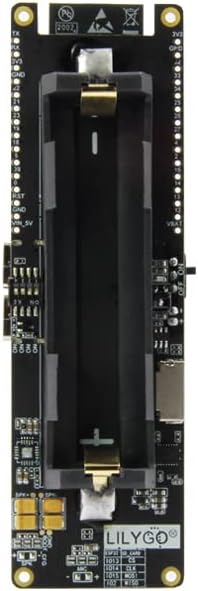
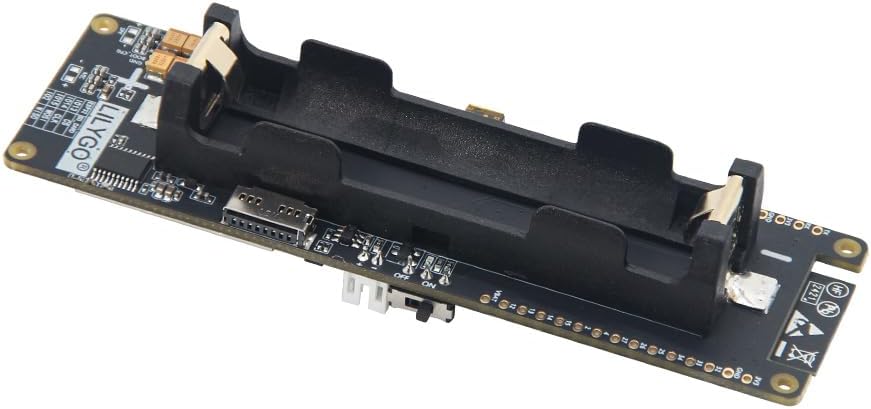
The board features an integrated 18650 battery holder. Insert a standard 18650 lithium-ion battery into the holder, ensuring correct polarity. The positive (+) end of the battery should align with the positive terminal in the holder, and the negative (-) end with the negative terminal.
Figuur 5: Bovenkant view of the LILYGO T-SIM7600G-H board, highlighting the 18650 battery holder. Ensure correct battery polarity during installation.
3.2 Installatie simkaart
The T-SIM7600G-H supports Nano SIM cards. Locate the Nano SIM slot on the board (refer to Figure 3). Gently insert your Nano SIM card into the slot until it clicks into place. Ensure the SIM card is oriented correctly as indicated on the board.
3.3 Antenneaansluiting
Connect the provided LTE and GPS antennas to their respective U.FL connectors on the board. Ensure a secure connection for optimal signal reception.

Figuur 6: Van dichtbij view showing the connection points for the GPS antenna and the SIM (LTE) antenna on the LILYGO T-SIM7600G-H board.
3.4 De printplaat van stroom voorzien
The board can be powered via the USB-C ports, the 18650 battery, or the solar charging interface. To use solar charging, connect a compatible solar panel to the designated solar charging cable interface.

Figuur 7: Illustration of connecting a solar panel to the LILYGO T-SIM7600G-H board via the power cable for solar charging.
4. Gebruiksaanwijzing
4.1 Programming the ESP32
The LILYGO T-SIM7600G-H can be programmed using various development environments, including the Arduino IDE or ESP-IDF. Connect the board to your computer using a USB-C cable. Ensure the necessary drivers and board support packages are installed in your chosen IDE.
4.2 Connectiviteit
The board supports Wi-Fi, Bluetooth, 4G LTE, and GPS. Specific libraries and code examples are required to utilize these features. Refer to the official LILYGO GitHub repository for detailed programming guides and examples for each connectivity option.
Figuur 8: A composite image displaying the pinout diagram for the T-SIM7600G-H R2, a solar charging setup, and an example of the Arduino IDE interface for programming.
4.3 Energiebeheer
Utilize the GPS power control feature to reduce overall power consumption, especially in battery-powered applications. The board can achieve very low power states when properly configured for sleep modes.
For detailed programming instructions and examples, please visit the official LILYGO GitHub repository: github.com/Xinyuan-LilyGO/T-SIM7600X.
5. Specificaties
| Functie | Detail |
|---|---|
| Merk | LELIEGO |
| Modelnaam | T-SIM7600G-H |
| Geïnstalleerde RAM-geheugengrootte | 16 MB |
| Geheugenopslagcapaciteit | 16 MB |
| Connectiviteitstechnologie | Bluetooth, Wi-Fi, 4G LTE, GPS |
| Besturingssysteem | FreeRTOS, Linux |
| Processormerk | Espressief |
| Draadloze compatibiliteit | Bluetooth, Wi-Fi, 4G LTE |
| Compatibele apparaten | Computers (PCs, laptops), smartphones, development tools |
| RAM-geheugentechnologie | LPDDR3, LPDDR4 |
| Aantal processoren | 2 |
| Totaal aantal USB-poorten | 2 (Type-C) |
| GTIN (UPC) | 16971336331797 |
6. Onderhoud
To ensure the longevity and optimal performance of your LILYGO T-SIM7600G-H development board, follow these maintenance guidelines:
- Schoonmaak: Use a soft, dry cloth to clean the board. Avoid using liquids or abrasive cleaners.
- Opslag: Store the board in a cool, dry environment, away from direct sunlight, extreme temperatures, and humidity. If not in use for extended periods, remove the 18650 battery.
- Behandeling: Handle the board by its edges to avoid touching sensitive components. Static electricity can damage electronic components, so use anti-static precautions when handling.
- batterij zorg: If using the 18650 battery, ensure it is charged and discharged within its specified voltage range. Do not overcharge or over-discharge.
7. Probleemoplossing
If you encounter issues with your LILYGO T-SIM7600G-H board, consider the following common troubleshooting steps:
- Board gaat niet aan:
- Controleer de batterij-installatie en het laadniveau.
- Ensure USB-C power source is functional.
- Controleer of de aan/uit-schakelaar op 'AAN' staat.
- Connectivity Issues (Wi-Fi/Bluetooth/4G/GPS):
- Zorg ervoor dat de antennes goed zijn aangesloten.
- Verify SIM card is correctly inserted and active with a data plan.
- Check your code for correct initialization and usage of connectivity modules.
- Ensure you are in an area with adequate network coverage for 4G/GPS.
- Programmeerfouten:
- Confirm correct board selection and port in your IDE.
- Install all necessary drivers and libraries.
- Refer to the LILYGO GitHub for up-to-date code examples and troubleshooting guides.
For more in-depth troubleshooting or specific technical support, please refer to the official LILYGO community forums or documentation available on their GitHub page.
8. Ondersteuning en garantie
For the latest documentation, code examples, and community support, please visit the official LILYGO GitHub repository: github.com/Xinyuan-LilyGO/T-SIM7600X.
Warranty information for the LILYGO T-SIM7600G-H development board is typically provided by the retailer or manufacturer at the time of purchase. Please retain your proof of purchase for any warranty claims. For specific warranty details, contact your vendor or LILYGO directly.