Invoering
This manual provides essential instructions for the setup, operation, and maintenance of your new Generic replacement remote control. This remote is designed to be compatible with the Insignia NS-S4000 iPod Dock Clock Radio. Please read this manual thoroughly to ensure proper use and to maximize your product experience.
Belangrijke opmerking: This remote control is an infrared (IR) replacement and does not require any programming or code setup. It is designed to function immediately upon battery installation, provided it is compatible with your specific Insignia NS-S4000 unit.
Instellen
1. Batterij installatie
De afstandsbediening werkt op twee (2) AAA-batterijen (niet meegeleverd). Volg deze stappen om ze te plaatsen:
- Zoek het batterijcompartiment aan de achterkant van de afstandsbediening.
- Press down on the tab and slide the battery compartment cover downwards to open it.
- Plaats twee AAA-batterijen en zorg ervoor dat de positieve (+) en negatieve (-) polen correct zijn uitgelijnd met de markeringen in het batterijvak.
- Schuif het batterijklepje terug totdat het goed vastklikt.

Afbeelding 1: Terug view van de afstandsbediening waarop het batterijcompartiment te zien is.
2. Eerste gebruik
Once batteries are installed, the remote control is ready for use. Point the remote directly at your Insignia NS-S4000 iPod Dock Clock Radio and press any function button to begin operation. No additional pairing or programming is required.
Gebruiksaanwijzing
The remote control provides access to various functions of your Insignia NS-S4000. Refer to the image below for button identification and their primary functions.
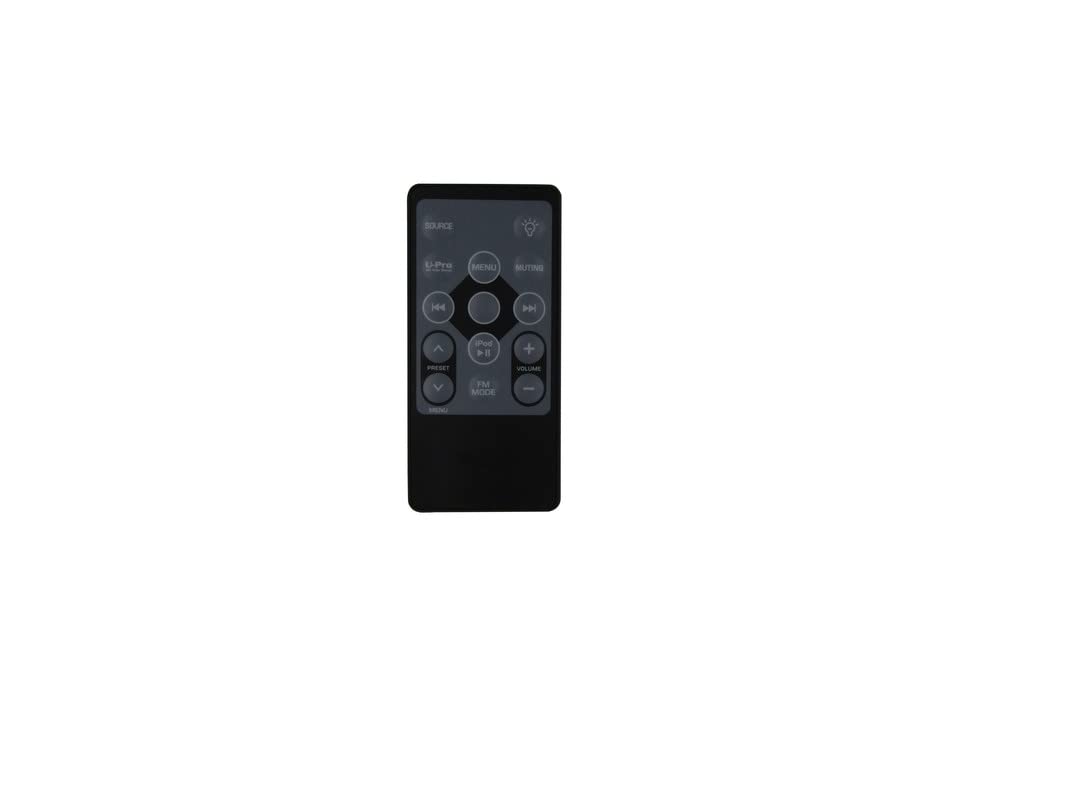
Figuur 2: Voorzijde view van de afstandsbediening met knoppenindeling.
Knopfuncties:
- BRON: Toggles between available input sources (e.g., iPod, FM Radio, AUX).
- MUTE: Schakelt het audio-uitvoersignaal in of uit.
- LICHT (bulb icon): Controls the display backlight or brightness settings.
- VOORINSTELLING (Up/Down arrows): Navigates through saved radio presets or menu options.
- MENU (Left side): Enters or exits the main menu system.
- MENU (Center button within navigation cluster): Confirms a selection within the menu.
- iPod Play/Pause: Starts or pauses playback for a docked iPod device.
- Vooruit springen (>>|): Skips to the next track on an iPod or tunes to the next radio station.
- Achteruit overslaan (|<<): Skips to the previous track on an iPod or tunes to the previous radio station.
- VOLUME+: Increases the audio volume.
- VOLUME -: Decreases the audio volume.
- FM-MODUS: Directly switches to FM radio mode.
- iPod: Directly switches to iPod dock mode.
Onderhoud
Batterij vervangen
Replace batteries when the remote control's range decreases or it stops responding. Always replace both batteries at the same time with new AAA batteries. Do not mix old and new batteries, or different types of batteries.
Schoonmaak
Veeg de afstandsbediening af met een zachte, droge doek. Gebruik geen vloeibare reinigingsmiddelen of schuurmiddelen, aangezien deze het oppervlak of de interne componenten kunnen beschadigen.
Opslag
Als u de afstandsbediening gedurende een langere periode niet gebruikt, verwijder dan de batterijen om lekkage en mogelijke schade te voorkomen.
Probleemoplossing
- Afstandsbediening reageert niet:
- Ensure the remote is pointed directly at the Insignia NS-S4000.
- Check if the batteries are installed correctly with the correct polarity (+/-).
- Vervang de batterijen door nieuwe AAA-batterijen.
- Ensure there are no obstructions between the remote and the Insignia unit.
- Beperkt bereik:
- Vervang de batterijen.
- Ensure you are within a reasonable distance and line of sight of the Insignia unit.
- Bepaalde functies werken niet:
- Verify that the function you are trying to use is supported by your Insignia NS-S4000 unit. Refer to your original Insignia NS-S4000 manual.
- Ensure the correct source (e.g., iPod, FM) is selected on the Insignia unit for the function to be active.
Specificaties
| Producttype | Vervangende afstandsbediening |
| Verenigbaarheid | Insignia NS-S4000 iPod Dock Clock Radio |
| Connectiviteitstechnologie | Infrarood (IR) |
| Batterijen vereist | 2 x AAA (niet inbegrepen) |
| Speciale functie | Ergonomic design, No setup or code needed |
| ASIN | B0BYJCLPPM |
Garantie-informatie
No specific manufacturer's warranty information is provided for this Generic replacement remote control. Please refer to the return policy of your retailer or seller for details regarding returns or exchanges.
Klantenservice
For further assistance or if you encounter issues not covered in this manual, please contact the seller from whom you purchased this remote control. They can provide specific support related to your purchase.


