
Technaxx TX-219
Technaxx TX-219 4-in-1 Multifunction Jump Starter, Air Compressor, Power Bank, and LED Light User Manual
Model: TX-219 | Merk: Technaxx
1. Inleiding
This manual provides detailed instructions for the safe and effective use of your Technaxx TX-219 4-in-1 Multifunction Device. This versatile unit combines a jump starter, an air compressor, a power bank, and an LED light, designed for automotive and portable power needs. Please read this manual thoroughly before operation and retain it for future reference.
2. Veiligheidsinstructies
Always observe the following safety precautions to prevent injury or damage to the device or vehicle:
- Lees alle instructies vóór gebruik.
- Buiten bereik van kinderen houden.
- Wear eye protection when operating the jump starter.
- Stel het apparaat niet bloot aan regen of vocht.
- Do not operate if the device or cables are damaged.
- Zorg voor goede ventilatie tijdens gebruik.
- Sluit de jumpstarter cl aanamps correctly: positive to positive, negative to negative. Avoid short-circuiting.
- Probeer een bevroren accu niet met startkabels te starten.
- Disconnect the jump starter from the vehicle battery within 30 seconds after the engine starts.
- Do not use the air compressor continuously for more than 10 minutes to prevent overheating. Allow it to cool down.
- Bewaar het apparaat op een koele, droge plaats wanneer het niet in gebruik is.
3. Inhoud van het pakket
Controleer of alle artikelen in het pakket aanwezig zijn:
- Technaxx Jump Starter TX-219 Unit
- Adapter Cable with Battery Clamps
- AC-adapter
- Persluchtslang
- USB-kabel
- Auto-adapterkabel
- Gebruiksaanwijzing

Figuur 3.1: Overview of the Technaxx TX-219 package contents, showing the main unit, battery clamps, various charging cables, and the air hose.
4. Product voorbijview
Familiarize yourself with the components of your Technaxx TX-219 device.

Figuur 4.1: Gehoekt view of the Technaxx TX-219 unit, showing the digital display, control buttons, USB ports, and LED light.
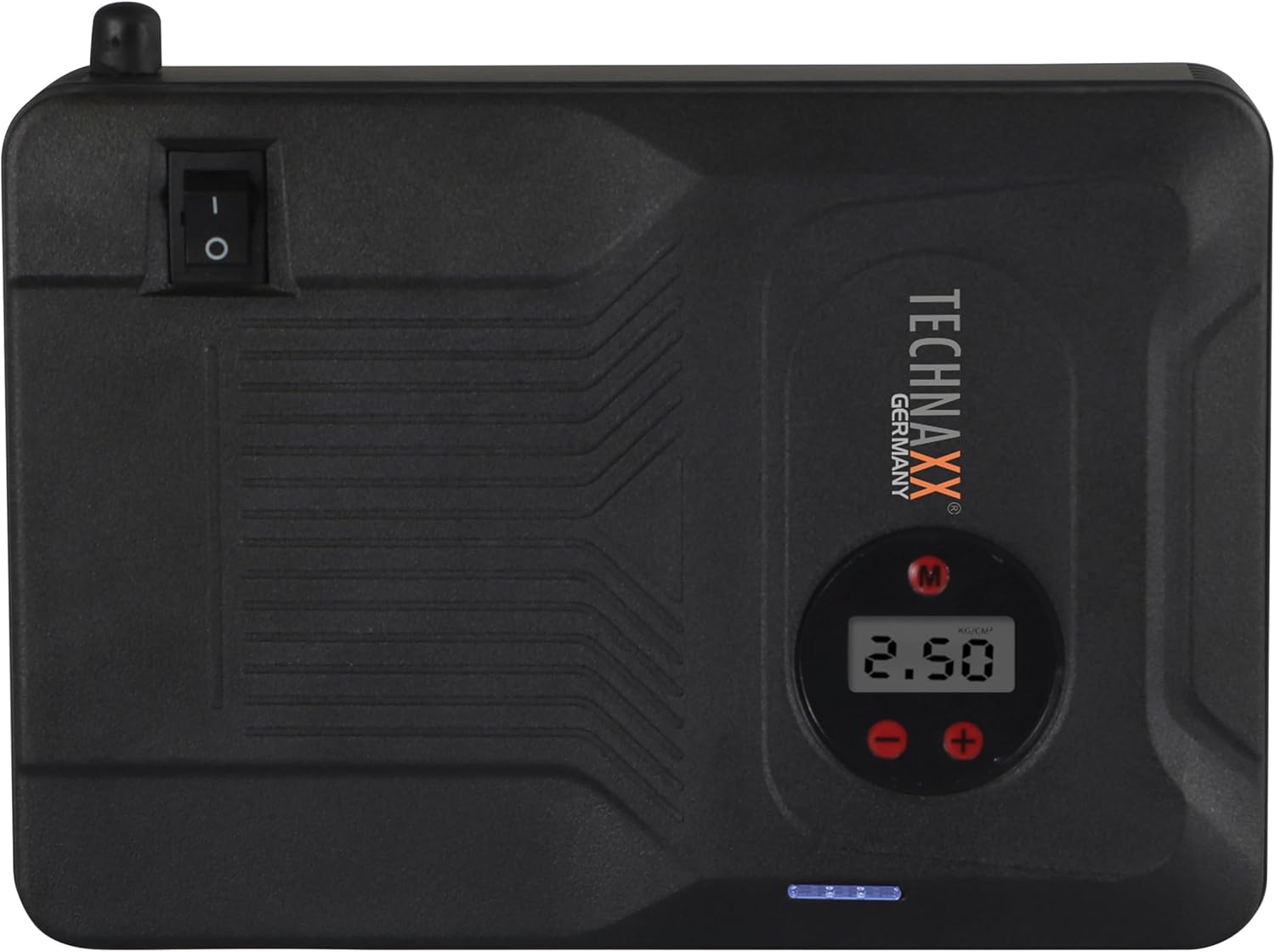
Figuur 4.2: Bovenkant view of the device, highlighting the power switch and the digital display for pressure readings.

Figuur 4.3: Voorkant view of the device, showing the digital display, pressure adjustment buttons, and the power indicator lights.
Belangrijkste componenten:
- Digitaal beeld: Shows air pressure for the compressor and battery status.
- Bedieningsknoppen: For adjusting pressure settings and operating the device.
- USB-A Output Ports (5V/1A, 5V/2A): Voor het opladen van externe elektronische apparaten.
- 15V/0.4A Input Port: For charging the internal battery of the TX-219.
- Jump Start Output Port: Connects to the battery clamp kabel.
- LED-lamp: Zorgt voor verlichting.
- Aan / uit schakelaar: Aan/uit-schakelaar voor het apparaat.
- Luchtslangaansluiting: For the air compressor function.
5. Setup and Charging the Device
Before first use, fully charge the Technaxx TX-219 unit. It is recommended to recharge the device every 3 months to maintain battery health.
- Connect the AC adapter to the 15V/0.4A input port on the TX-219.
- Sluit de netadapter aan op een standaard stopcontact.
- The battery indicator lights on the device will illuminate to show charging progress. All lights will be solid when fully charged.
- Alternatively, use the car adapter cable to charge the device from a vehicle's 12V accessory socket.

Figuur 5.1: The Technaxx TX-219 unit being charged or used as a power bank to charge a smartphone.
6. Gebruiksaanwijzing
6.1. Een voertuig starten met startkabels
The TX-219 can jump start gasoline engines up to 4.0L and diesel engines up to 3.0L.
- Ensure the TX-219 is sufficiently charged (at least 75% battery indicated).
- Schakel het contact en alle accessoires van het voertuig uit.
- Verbind de rode (+) clamp aan op de positieve (+) pool van de accu van het voertuig.
- Sluit de zwarte (-) cl . aanamp op een schoon, ongelakt metalen onderdeel van het motorblok of chassis van het voertuig, uit de buurt van de accu. Do not connect to the negative (-) battery terminal directly unless specified by vehicle manufacturer.
- Connect the adapter cable to the jump start output port on the TX-219.
- Start de motor van het voertuig. Als deze niet direct start, wacht dan 30 seconden voordat u het opnieuw probeert. Start de motor niet langer dan 3 seconden per poging.
- Once the engine starts, immediately disconnect the adapter cable from the TX-219.
- Then, disconnect the black (-) clamp, gevolgd door de rode (+) clamp van de voertuigaccu.

Figuur 6.1: The Technaxx TX-219 connected to a vehicle battery using the provided clamps for jump starting.

Figuur 6.2: A close-up of the jump starter connected to a car battery, illustrating the process of jump starting.
6.2. De luchtcompressor gebruiken
The integrated air compressor can inflate tires up to 3.5 Bar (approximately 50 PSI) and features an automatic shut-off.
- Connect the compressed air hose to the air hose connection port on the TX-219.
- Attach the other end of the hose to the tire valve.
- Turn on the TX-219. The digital display will show the current tire pressure.
- Use the '+' and '-' buttons to set the desired pressure. The display supports Bar, KPA, kg/cm², and PSI units.
- Press the compressor start button to begin inflation.
- De compressor stopt automatisch zodra de vooraf ingestelde druk is bereikt.
- Disconnect the air hose from the tire valve and the TX-219.

Figuur 6.3: The Technaxx TX-219 being used to inflate a car tire, demonstrating the air compressor function.

Figuur 6.4: A user inflating a tire with the TX-219, showing the digital display and the air hose connection.
6.3. Gebruiken als powerbank
The 14000 mAh battery can charge various USB-powered devices.
- Connect your device's USB charging cable to one of the USB-A output ports (5V/1A or 5V/2A) on the TX-219.
- The TX-219 will automatically begin charging your device.
- Monitor your device's charging status. Disconnect once fully charged.

Figuur 6.5: The Technaxx TX-219 connected to a smartphone via USB, illustrating its power bank functionality.

Figuur 6.6: The TX-219 acting as a portable power bank, charging a mobile device.
6.4. Het LED-licht gebruiken
The integrated LED light can be used for illumination in dark environments.
- Locate the LED light button on the device.
- Druk één keer op de knop om het LED-licht in te schakelen.
- Press again to cycle through different light modes (e.g., steady, strobe, SOS, if available).
- Houd de knop ingedrukt om het ledlampje uit te schakelen.

Figuur 6.7: The TX-219's LED light providing illumination in a vehicle's engine compartment.
7. Specificaties
| Functie | Specificatie |
|---|---|
| Model | TX-219 |
| Batterijtype | Lithium-ijzerfosfaat |
| Batterijcapaciteit | 14000mAh |
| Startstroom | 350 A (Max. 600 A) |
| Jumpstart voltage | 12 Volt |
| Engine Compatibility (Gasoline) | Tot 4.0 L |
| Motorcompatibiliteit (diesel) | Tot 3.0 L |
| USB-A-uitgang 1 | 5V, 2A |
| USB-A-uitgang 2 | 5V, 1A |
| Luchtcompressor | 12 V / 100 W, Max 3.5 Bar (approx. 50 PSI) |
| Laadingang | 15 V, 0.4 A (maximaal) |
| LED-licht | Meerdere functies |
| Afmetingen (L x B x H) | 19x13x5.5cm |
| Gewicht | 1.16 kg |
| Certificeringen | CE |
8. Onderhoud
- Schoonmaak: Veeg het apparaat af met een zachte, droge doek. Gebruik geen agressieve chemicaliën of schuurmiddelen.
- Opslag: Store the TX-219 in a cool, dry place, away from direct sunlight and extreme temperatures.
- Opladen: Recharge the unit every three months, even if not in use, to prolong battery life.
- Kabelinspectie: Controleer regelmatig alle kabels en klemmen.ampControleer op beschadigingen, slijtage of corrosie. Vervang indien nodig.
9. Probleemoplossing
| Probleem | Mogelijke oorzaak | Oplossing |
|---|---|---|
| Apparaat gaat niet aan. | Batterij is leeg. | Charge the TX-219 fully. |
| Voertuig start niet. | Onjuiste klamp connection; TX-219 battery too low; vehicle battery severely damaged. | Zorg ervoor dat clamps are connected correctly (+ to +, - to chassis). Recharge TX-219. Consult a mechanic if vehicle battery is faulty. |
| Luchtcompressor pompt niet op. | Hose not securely connected; desired pressure already reached; device battery low. | Check hose connections. Verify desired pressure setting. Recharge TX-219. |
| USB-opladen werkt niet. | USB cable faulty; device not compatible; TX-219 battery low. | Try a different USB cable. Ensure your device is compatible. Recharge TX-219. |
| LED-lampje werkt niet. | Battery depleted; light button not pressed correctly. | Recharge TX-219. Press the LED button firmly. |
10. Garantie en ondersteuning
For warranty information and technical support, please refer to the warranty card included with your product or visit the official Technaxx webwebsite. Bewaar uw aankoopbewijs als bewijs van aankoop.
Fabrikant: Technaxx
Modelnummer: 5031
Ask a question about this manual
Ask about setup, troubleshooting, compatibility, parts, safety, or missing instructions. Manuals+ will review the question and use this page’s manual context to help answer it.