
1. Inleiding
The Ulefone uSmart C01 Digital Microscope is designed to provide high-magnification viewing and recording capabilities when connected to compatible Ulefone Armor Series smartphones via the uSmart Expansion Connector. It features 50x to 1000x magnification, an HD camera, and integrated LED lighting for detailed observation of various objects.
2. Veiligheidsinformatie
- Do not disassemble or modify the microscope. Unauthorized modifications may void the warranty and pose safety risks.
- Avoid direct exposure of the microscope lens to strong light sources, as this may damage the sensor.
- Houd het apparaat uit de buurt van water, vocht en extreme temperaturen.
- Use only with compatible Ulefone Armor Series devices as specified.
- Ensure the microscope is securely attached to the smartphone or stand during use to prevent accidental drops.
3. Inhoud van het pakket
Controleer of alle artikelen in het pakket aanwezig zijn:
- Ulefone uSmart C01 Digital Microscope Unit
- Verstelbare standaard
- Micrometer Calibration Ruler
- Software-/stuurprogramma-cd
- Gebruikershandleiding (dit document)
4. Product voorbijview
The uSmart C01 Digital Microscope is an accessory designed for detailed visual inspection. Key features include:
- Vergroting: Adjustable from 50x to 1000x.
- Camera: 1 million HD pixels for clear image and video capture.
- Verlichting: 8 built-in dimmable LED lights for optimal illumination.
- Bediening: Physical SNAP button for image/video capture and ZOOM button for magnification adjustment.
- Verenigbaarheid: Designed for Ulefone Armor Series phones with the uSmart Expansion Connector.

Figure 4.1: Microscope unit with magnification dial (50x-1000x).

Figure 4.2: The 8 dimmable LED lights surrounding the microscope lens.
5. Instellen
- Installeer de software: Insert the provided CD into a computer to install any necessary drivers or software for your Ulefone Armor Series smartphone, if prompted. Alternatively, check the official Ulefone website for the latest application.
- Connect Microscope: Locate the uSmart Expansion Connector on your compatible Ulefone Armor Series smartphone. Align the microscope's connector with the phone's port and gently push to establish a secure connection. The microscope is designed for plug-and-play operation.
- Attach to Stand (Optional): For stable observation, attach the microscope unit to the adjustable stand. The stand allows for angle adjustments to suit various inspection needs.

Figure 5.1: Microscope connected to a compatible Ulefone smartphone.
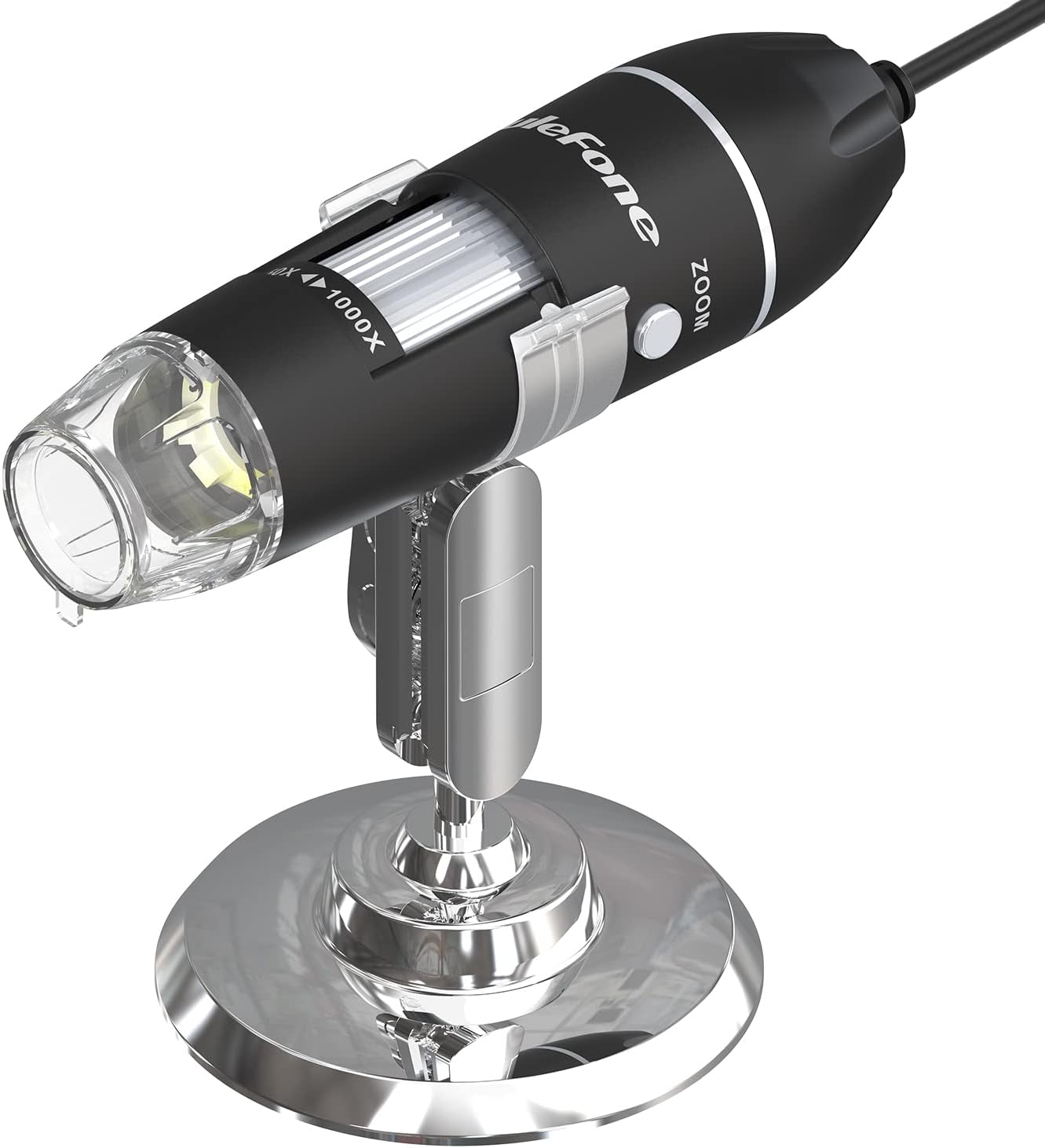
Figure 5.2: Microscope on its adjustable stand for stable viewind.
6. Gebruiksaanwijzing
- Applicatie starten: Once connected, open the dedicated microscope application on your Ulefone smartphone. The application should automatically detect the microscope.
- Vergroting aanpassen: Rotate the focusing tube on the microscope unit to adjust the magnification from 50x to 1000x. Fine-tune the focus for a clear image on your phone screen.
- Control LED Lights: Use the LED gear on the cable to adjust the brightness of the 8 built-in LED lights. This allows for optimal illumination of the subject and can be turned off if not needed.
- Afbeeldingen/video's vastleggen:
- Druk op de KNAP button on the microscope unit to capture still images or record videos directly.
- Gebruik de ZOOM button for quick magnification adjustments (e.g., 1.3X, 2X, 3X) during live viewind.
- Using the Micrometer Calibration Ruler: The included micrometer calibration ruler can be used to accurately measure objects under magnification. Place the ruler next to or on the object being observed and use the on-screen display to estimate dimensions.
Video 6.1: Demonstration of the Ulefone uSmart C01 Digital Microscope in use, showing connection, magnification, and image capture.

Figure 6.1: Micrometer Calibration Ruler for precise measurements.
7. Onderhoud
- De lens reinigen: Use a soft, lint-free cloth specifically designed for optical lenses to clean the microscope lens. Avoid abrasive materials or harsh chemicals.
- Algemene schoonmaak: Veeg de behuizing van de microscoop af met een droge of licht vochtige doek.amp lap. Dompel het apparaat niet onder in water.
- Opslag: Store the microscope in a clean, dry place away from direct sunlight and extreme temperatures when not in use.
8. Probleemoplossing
| Probleem | Mogelijke oorzaak | Oplossing |
|---|---|---|
| No image on phone screen | Microscope not properly connected; Application not launched; Software/drivers not installed. | Ensure the microscope is securely connected to the uSmart port. Launch the microscope application. Install necessary software/drivers from the provided CD or Ulefone webplaats. |
| Afbeelding is wazig | Incorrect focus; Object too far/close to the lens. | Rotate the focusing tube to adjust the focus. Adjust the distance between the microscope lens and the object. |
| LED-verlichting werkt niet | LED brightness set to minimum; Device malfunction. | Adjust the LED gear on the cable to increase brightness. If the issue persists, contact customer support. |
| Physical buttons (SNAP/ZOOM) unresponsive | Application not active; Device malfunction. | Ensure the microscope application is running and active. If buttons remain unresponsive, contact customer support. |
9. Specificaties
| Functie | Detail |
|---|---|
| Modelnaam | Ulefone uSmart C01 |
| Vergroting Maximaal | 1000x |
| Beeldsensor | 1 Million HD Pixels |
| Lichtbrontype | 8 Dimmable LEDs |
| Echte hoek van View | 60 graden |
| Objective Lens Description | Achromatisch |
| Compatibele apparaten | Ulefone Armor Series Smartphones (e.g., Armor 30/29/28/27/26/24/21/18/16/Pad Series) |
| Energiebron | Powered via uSmart Expansion Connector (from smartphone) |
| Deeltage | 5 Volt |
| Materiaal | Glas, Metaal |
| Kleur | Zwart |
| Fabrikant onderdeelnummer | us-c01-bk |
10. Garantie en ondersteuning
The Ulefone uSmart C01 Digital Microscope comes with a 1 jaar garantie vanaf de aankoopdatum. Deze garantie dekt fabricagefouten en storingen bij normaal gebruik.
For technical support, warranty claims, or further assistance, please contact Ulefone customer service through their official website or the retailer where the product was purchased. Please have your proof of purchase and product model number (uSmart C01) ready when contacting support.