
Invoering
This manual provides detailed instructions for the proper use and maintenance of your AlphaMed U80A Blood Pressure Monitor. Please read this manual thoroughly before using the device to ensure accurate measurements and safe operation. This device is designed for home use to measure blood pressure and pulse rate on the upper arm.
Wat zit er in de doos?

Figuur 1: Included components of the AlphaMed U80A Blood Pressure Monitor package.
- 1x AlphaMed Blood Pressure Monitor (Model: U80A)
- 1x Standard Upper Arm Cuff (fits arm circumference 9-17 inches)
- 1x Extra Large Upper Arm Cuff (fits arm circumference 13-21 inches)
- 4x AAA-batterijen
- 1x Nylon draagtas
- 1x Beknopte gebruikershandleiding
- 1x Gebruikershandleiding (dit document)
Product voorbijview

Figuur 2: The AlphaMed U80A Blood Pressure Monitor and its accompanying cuffs.
The AlphaMed U80A Blood Pressure Monitor features a large backlit LCD display for easy reading, oversized numbers, and simple operation. It is equipped with a high-accuracy algorithm for reliable measurements and adaptive pressure control technology for user comfort. The device supports two users with up to 500 memories each, totaling 1000 readings.
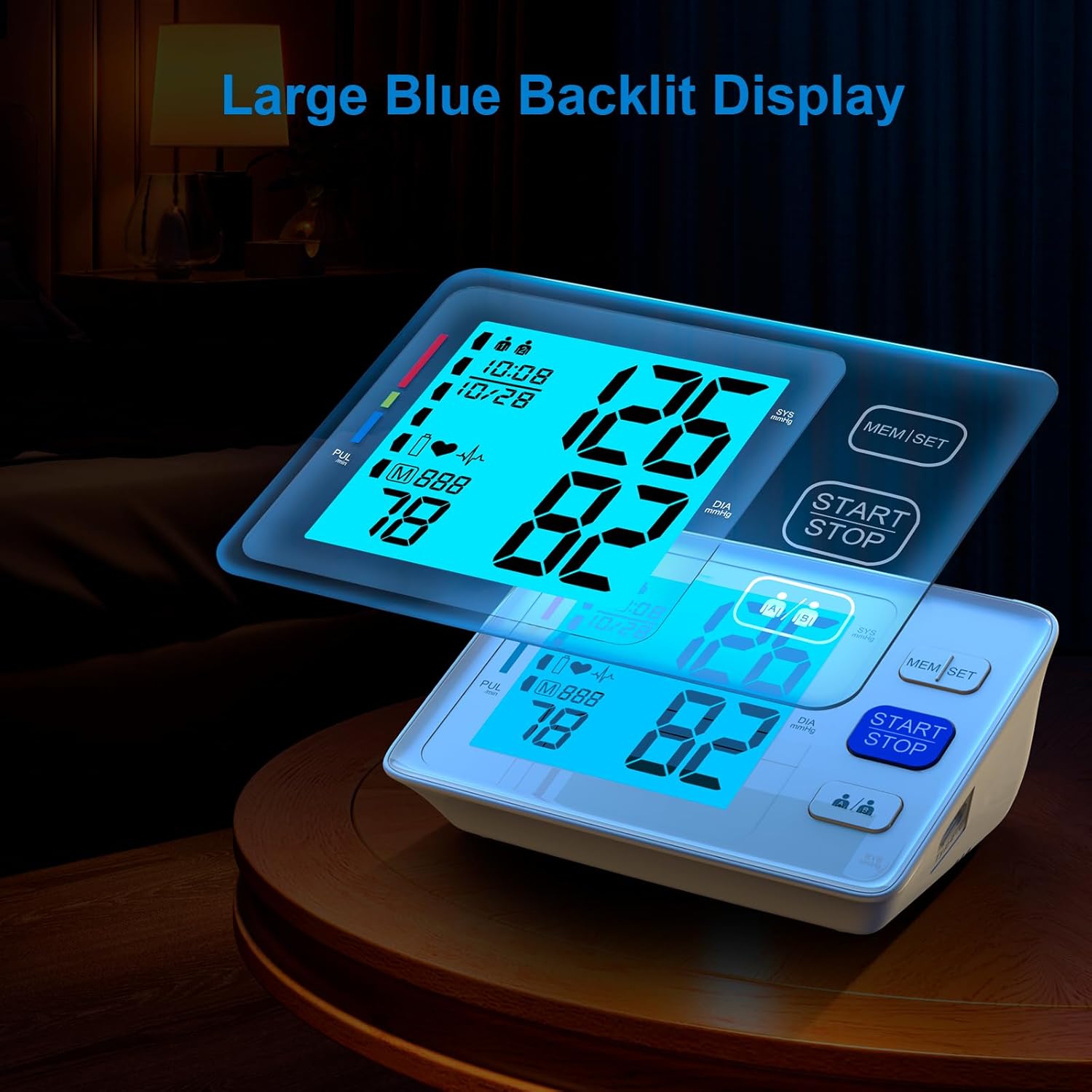
Figuur 3: The large, easy-to-read backlit LCD display.
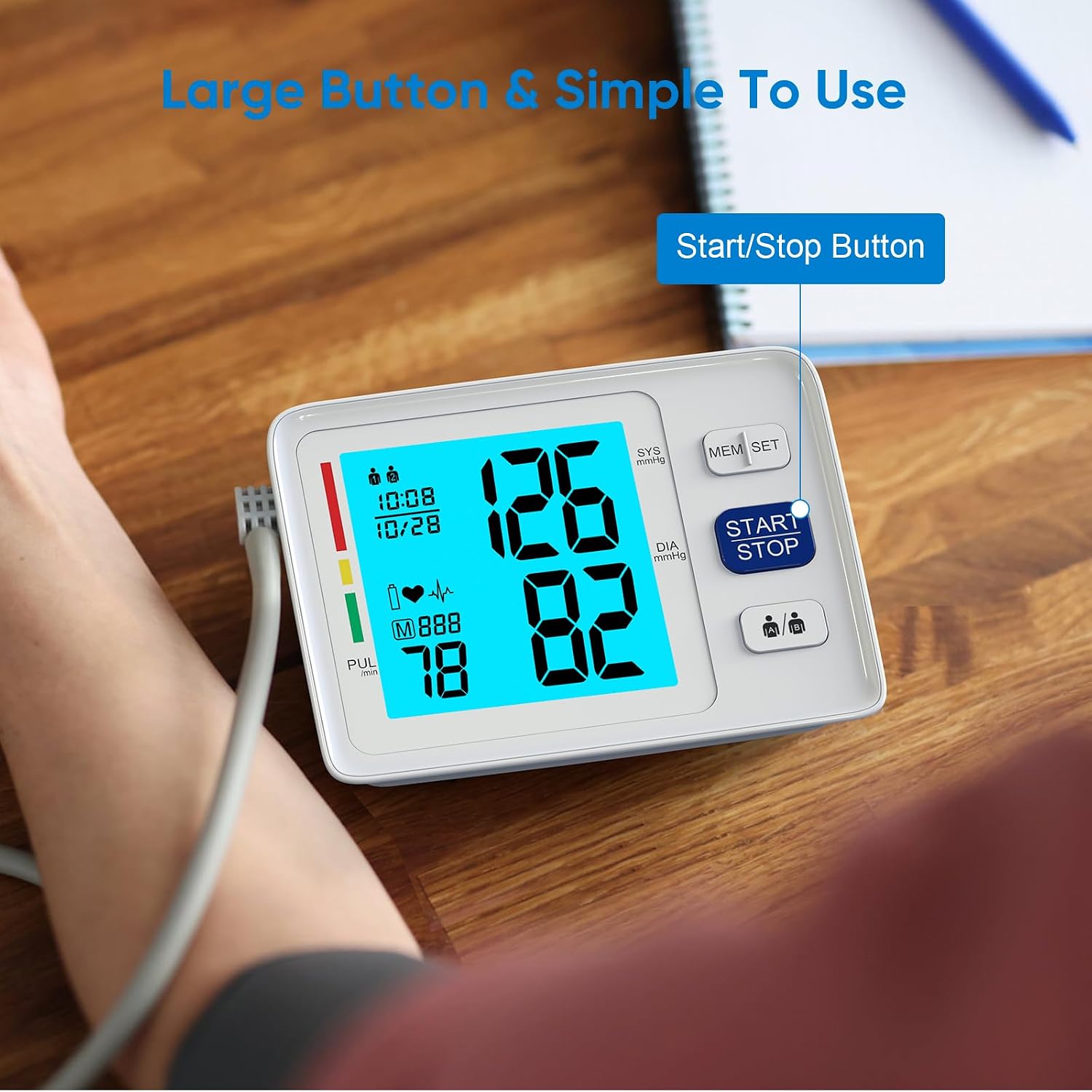
Figuur 4: Simplified operation with large buttons, including the Start/Stop button.
Instellen
Energieopties

Figuur 5: The monitor supports both battery and USB power.
- Batterijvermogen: Open the battery compartment on the bottom of the device. Insert four (4) AAA batteries, ensuring correct polarity (+/-). Close the battery cover securely.
- Usb vermogen: Connect a Micro USB cable (not included) to the USB port on the side of the monitor and plug the other end into a compatible USB power adapter (not included) or a computer USB port.
Note: Batteries are included for immediate use. The device features a low battery indicator and an auto shut-off function to conserve power.
Datum en tijd instellen
To ensure accurate record-keeping, set the current date and time:
- With the device off, press and hold the "MEM/SET" button for a few seconds until the year starts flashing on the display.
- Press the "MEM/SET" button repeatedly to adjust the year. Once the desired year is displayed, press the "START/STOP" button to confirm and move to the month setting.
- Repeat the process for setting the month, day, hour (in 24-hour format), and minutes.
- After setting the minutes, press "START/STOP" to save the settings and exit the setup mode.
De manchet bevestigen
Select the appropriate cuff size (Standard 9-17'' or Extra Large 13-21'') for your upper arm circumference. Connect the air tube from the cuff securely into the air jack located on the side of the monitor.

Figuur 6: Two adjustable cuff sizes are included to fit various arm circumferences.
Gebruiksaanwijzing
Plaatsing van de manchet
Proper cuff placement is crucial for accurate readings:
- Zit comfortabel met uw rug ondersteund en uw voeten plat op de vloer.
- Place the cuff on your bare upper arm, approximately 1-2 cm above the elbow joint. Ensure the air tube runs down the center of your arm.
- The bottom edge of the cuff should be about 1 inch (2-3 cm) above the elbow.
- Wrap the cuff snugly around your arm, but not too tightly. The index line on the cuff should fall within the range indicated on the cuff itself.
- Rest your arm on a table or flat surface with the palm facing upwards, ensuring the cuff is at heart level.
Een meting uitvoeren
- Ensure the cuff is correctly attached to the monitor and properly placed on your arm.
- Press the large "START/STOP" button. The cuff will begin to inflate automatically.
- Blijf stil en onbeweeglijk tijdens de meting. Vermijd praten of bewegen.
- Zodra de meting is voltooid, loopt de manchet leeg en worden uw systolische bloeddruk, diastolische bloeddruk en hartslag op het scherm weergegeven.
- De meetwaarde wordt automatisch opgeslagen in het geheugen van de geselecteerde gebruiker.
Dubbele gebruikersmodus

Figuur 7: The monitor supports two users, each with separate memory storage.
- Before taking a measurement, press the user selection button (usually indicated by two person icons) to toggle between User 1 and User 2.
- Ensure the correct user is selected before initiating a measurement to store readings in the appropriate profile.
Geheugenfunctie
opnieuwview eerdere metingen:
- Press the "MEM/SET" button when the device is off.
- The display will show the average of the last three readings.
- Press the "MEM/SET" button again to scroll through individual past readings, from most recent to oldest.
- To exit memory mode, press the "START/STOP" button or wait for the device to automatically shut off.
Onderhoud
- Schoonmaak: Veeg de monitor en de manchet af met een zachte, droge doek. Gebruik indien nodig een iets vochtigere doek.amp Maak het apparaat schoon met een doekje met milde zeep en veeg het vervolgens droog. Gebruik geen schurende reinigingsmiddelen en dompel het apparaat niet onder in water.
- Opslag: Bewaar het apparaat in de draagtas op een koele, droge plaats, uit de buurt van direct zonlicht en extreme temperaturen.
- Batterij vervangen: Vervang alle vier AAA-batterijen wanneer de batterij-indicator op het display verschijnt. Verwijder de batterijen als het apparaat gedurende langere tijd niet wordt gebruikt.
- Manchetverzorging: Ensure the cuff is clean and free from damage. Do not wash the cuff in a washing machine.
Probleemoplossing
| Probleem | Mogelijke oorzaak | Oplossing |
|---|---|---|
| Scherm gaat niet aan. | De batterijen zijn leeg of verkeerd geplaatst; de USB-kabel is niet aangesloten. | Check battery polarity, replace batteries, or ensure USB connection is secure. |
| Error message during measurement. | Cuff not properly applied; movement or talking during measurement; irregular heartbeat detected. | Reapply cuff correctly, remain still and silent, consult a healthcare professional if irregular heartbeat persists. |
| Inconsistente metingen. | Improper cuff placement; not resting before measurement; taking multiple readings too quickly. | Ensure correct cuff placement, rest for 5 minutes before measurement, wait 3-5 minutes between readings. |
Specificaties
- Modelnummer: U80A
- Merk: AlphaMed
- Productafmetingen: 1"L x 1"B x 1"D
- Gewicht: 1.52 pond
- Manchetmaten: 9-17 inches (Standard), 13-21 inches (Extra Large)
- Energiebron: 4x AAA Batteries (included) or USB Powered (adapter not included)
- Weergavetype: LCD met achtergrondverlichting
- Geheugen: 2 users x 500 memories each
- Meegeleverde componenten: Monitor, 2 Cuffs, 4 AAA Batteries, Carry Case, User Manual
- Fabrikant: Shenzhen Urion Technologie Co., Ltd.
Garantie en ondersteuning
For warranty information, technical support, or service inquiries, please refer to the contact details provided on the product packaging or visit the official AlphaMed webwebsite. Bewaar uw aankoopbewijs als aankoopbewijs voor garantieclaims.
Juridische disclaimer: Uitspraken over voedingssupplementen zijn niet geëvalueerd door de FDA en zijn niet bedoeld om een ziekte of gezondheidstoestand te diagnosticeren, behandelen, genezen of voorkomen.