
Invoering
This manual provides instructions for the HCDZ Replacement Remote Control, designed for use with GooDee YG-420, YG421, and YG600 series projectors. This remote control is an infrared (IR) replacement unit and requires no programming. Simply insert batteries, and it is ready for use.
Please Note: This remote control is not compatible with the GooDee YG600 Plus projector.
Instellen
Batterij installatie
De afstandsbediening werkt op twee (2) AAA-batterijen (niet meegeleverd). Volg deze stappen om de batterijen te plaatsen:
- Zoek het deksel van het batterijcompartiment aan de achterkant van de afstandsbediening.
- Slide the cover downwards or press the latch and lift to remove it.
- Plaats twee nieuwe AAA-batterijen en zorg ervoor dat de positieve (+) en negatieve (-) polen correct zijn uitgelijnd met de markeringen in het batterijcompartiment.
- Plaats het batterijklepje terug en schuif het terug totdat het goed vastklikt.
Once new batteries are inserted, the remote control will function immediately without any additional programming.
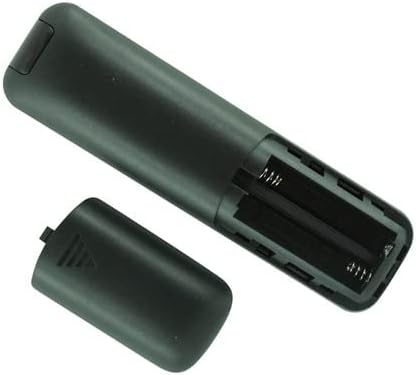
Afbeelding: Achterkant view of the HCDZ Replacement Remote Control with the battery cover removed, illustrating the two AAA battery slots.
Gebruiksaanwijzing
Basisbediening
This remote control operates via infrared (IR) technology. Ensure a clear line of sight between the remote control and the IR sensor on your GooDee projector for optimal performance.
- Geen programmering vereist: The remote is pre-programmed for compatible GooDee projectors.
- Verenigbaarheid: Designed for GooDee YG-420, YG421, and YG600 projectors.
- Single Device Control: This remote is intended to control one projector at a time.
- Knopbediening: Features a standard button layout for intuitive navigation and function control.

Afbeelding: Boven view of the HCDZ Replacement Remote Control, displaying its button layout.
Onderhoud
Goed onderhoud verlengt de levensduur van uw afstandsbediening:
- Omgevingsomstandigheden: Do not expose the remote control to extremely hot or humid environments. High temperatures or moisture can damage internal components.
- Blootstelling aan zonlicht: Avoid exposing the remote control's IR sensor to direct sunlight or strong artificial lighting, as this may cause malfunctions.
- Batterijgebruik: Always replace all batteries with new ones simultaneously. Do not mix new and old batteries, or different types of batteries, as this can lead to leakage or improper function.
- Lange termijn opslag: If the remote control will not be used for an extended period, remove the batteries to prevent potential damage from battery leakage and corrosion.
- Schoonmaak: Gebruik een zachte, droge doek om de afstandsbediening schoon te maken. Vermijd het gebruik van vloeibare reinigingsmiddelen of schurende materialen.
Probleemoplossing
Als u problemen ondervindt met uw afstandsbediening, raadpleeg dan de volgende veelvoorkomende oplossingen:
- Afstandsbediening reageert niet:
- Batterijen vervangen: The most common cause of remote control malfunction is depleted batteries. Replace both AAA batteries with fresh ones.
- Controleer de batterijpolen: Ensure the batteries are inserted correctly and the terminals are clean and making proper contact.
- Limited Range or Intermittent Function:
- Kom dichterbij: Ensure you are within a reasonable operating range of the projector.
- Obstructies verwijderen: Verify there are no objects blocking the line of sight between the remote control's IR emitter and the projector's IR sensor.
- Projector Not Responding to Commands:
- Projectorvermogen: Confirm that your projector is plugged in and powered on.
- Verenigbaarheid: Double-check that your projector model (YG-420, YG421, YG600) is compatible with this remote control. Remember, it does not work with YG600 Plus.
Specificaties
| Merk | HCDZ |
| Modelnummer | 0f780799-cc7b-4df7-b94e-5dfb42dfec0f |
| Connectiviteitstechnologie | Infrarood (IR) |
| Compatibele apparaten | GooDee YG-420, YG421, YG600 Projectors |
| Maximaal ondersteunde apparaten | 1 |
| Controller-type | Knopbediening |
| Batterijtype | 2 x AAA-batterijen (niet inbegrepen) |
| Speciale functie | Geen programmering nodig |
| Aantal knoppen | 3 |
Garantie-informatie
This HCDZ Replacement Remote Control comes with a 90 dagen garantie vanaf de aankoopdatum. Deze garantie dekt fabricagefouten bij normaal gebruik. Bewaar uw aankoopbewijs voor eventuele garantieclaims.
Steun
For further assistance or inquiries regarding your HCDZ Replacement Remote Control, please refer to the retailer where the product was purchased. Ensure you have your product model number (0f780799-cc7b-4df7-b94e-5dfb42dfec0f) and proof of purchase available.