
1. Inleiding
The WIWU P16 Max Wireless Speaker is designed to provide high-quality stereo sound for various occasions, including travel and parties. Engineered with premium components, it delivers powerful audio with 55 watts of output, ensuring clear sound without distortion even at maximum volume. Its impressive Bluetooth 5.0 connectivity offers a wireless range of up to 10 meters for uninterrupted music playback. The speaker also features IPX5 water resistance, making it suitable for outdoor use, such as beach trips or poolside gatherings. It includes an AUX input and memory card slots for versatile audio playback options.
2. Product voorbijview
Familiarize yourself with the components and design of your WIWU P16 Max speaker.

The WIWU P16 Max speaker features a robust design with a green and black finish. It includes a durable, adjustable strap for easy portability. The front grille is perforated, indicating the speaker output, and the top panel has control buttons.
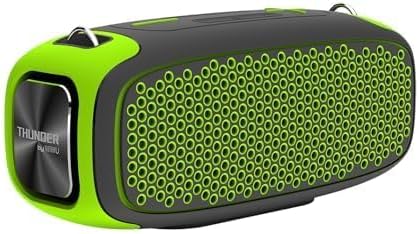
Een kant view of the WIWU P16 Max speaker, highlighting the 'THUNDER by WIWU' branding on the metallic end cap. The speaker's compact and ergonomic shape is visible.
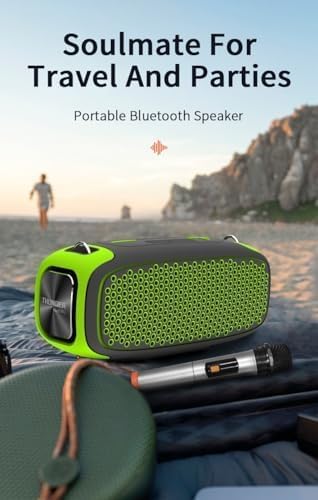
The WIWU P16 Max speaker shown in an outdoor setting, emphasizing its suitability for travel and parties. A wireless microphone is also visible, indicating its compatibility.
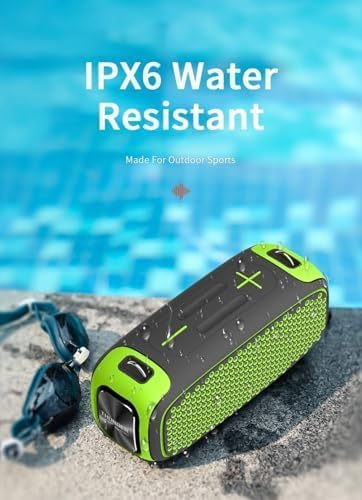
The WIWU P16 Max speaker positioned near a swimming pool, illustrating its IPX5 water-resistant capability, making it suitable for use in damp omgevingen.
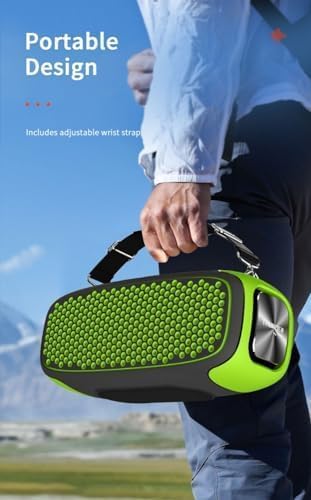
A person carrying the WIWU P16 Max speaker using its adjustable strap, showcasing its portable design for on-the-go use.
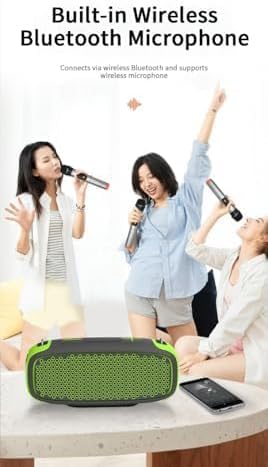
The WIWU P16 Max speaker with people singing using wireless microphones, demonstrating its built-in wireless Bluetooth microphone functionality for karaoke or public speaking.
3. Installatie-instructies
3.1 De luidspreker opladen
The speaker is battery-powered. Before first use, fully charge the speaker using the provided charging cable. The charging indicator light will show the charging status.
3.2 In-/uitschakelen
Press and hold the power button located on the top panel to turn the speaker on or off.
3.3 Bluetooth-koppeling
- Zorg ervoor dat de luidspreker is ingeschakeld.
- Activate Bluetooth on your device (smartphone, laptop).
- Zoeken naar 'WIWU P16 Max' in your device's Bluetooth settings.
- Selecteer de luidspreker die u wilt koppelen. Een bevestigingsgeluid geeft aan dat het koppelen is gelukt.
3.4 AUX-aansluiting
Connect an audio device to the speaker's AUX input using a 3.5mm audio cable. The speaker will automatically switch to AUX mode or you may need to select it manually using the Mode button.
3.5 Memory Card Playback
Insert a compatible memory card (e.g., microSD) into the designated slot. The speaker will automatically detect and play audio files van de kaart.
3.6 Draadloze microfooninstallatie
The speaker includes a wireless microphone. Power on the microphone; it should automatically connect to the speaker. Refer to the microphone's separate instructions for specific pairing details if needed.
4. Gebruiksaanwijzing
4.1 Volumeregeling
Use the '+' and '-' buttons on the speaker's top panel to adjust the volume. Alternatively, adjust the volume from your connected device.
4.2 Afspeelbediening
When playing audio via Bluetooth or memory card:
- Druk op de afspeel-/pauzeknop om het afspelen te pauzeren of te hervatten.
- Press the 'Next Track' button to skip to the next song.
- Press the 'Previous Track' button to go to the previous song.
4.3 Modus wisselen
Press the 'Mode' button to cycle through available input modes: Bluetooth, AUX, and Memory Card.
4.4 Oproepen beantwoorden
If connected to a smartphone via Bluetooth, press the Play/Pause button to answer an incoming call or end an ongoing call.
5. Onderhoud
5.1 Reinigen
Wipe the speaker with a soft, dry cloth. Do not use abrasive cleaners, solvents, or harsh chemicals, as these may damage the finish or internal components.
5.2 Waterbestendigheid
The speaker is IPX5 water-resistant, meaning it is protected against low-pressure water jets from any direction. This makes it suitable for splashes and light rain. Dompel de luidspreker niet onder in water.
5.3 Opslag
Store the speaker in a cool, dry place away from direct sunlight, high humidity, and extreme temperatures. Avoid placing heavy objects on top of the speaker.
5.4 Batterijonderhoud
Om de levensduur van de batterij te verlengen, moet u voorkomen dat de batterij vaak volledig leeg raakt. Laad de speaker regelmatig op, ook als u hem langere tijd niet gebruikt (bijvoorbeeld eens in de 3 maanden).
6. Probleemoplossing
- Geen stroom: Ensure the speaker is charged. Connect it to a power source using the provided cable and try again.
- Geen geluid: Check volume levels on both the speaker and the connected device. Ensure the correct input mode (Bluetooth, AUX, Memory Card) is selected.
- Bluetooth-verbinding verbroken: Ensure the speaker and your device are within the 10-meter wireless range. Disconnect and re-pair the Bluetooth connection. Clear previous Bluetooth pairings on your device if necessary.
- Microfoon werkt niet: Ensure the microphone is powered on and fully charged. Check if it's properly paired with the speaker. Refer to the microphone's manual for specific troubleshooting steps.
- Vervormd geluid: Reduce the volume on both the speaker and the connected device. Ensure the audio source is of good quality. Move away from potential sources of interference.
7. Specificaties
| Functie | Detail |
|---|---|
| Merknaam | WIWU |
| Artikelafmetingen | 16x19x6cm |
| Connectiviteitstechnologie | Bluetooth |
| Kleur | Groente |
| Compatibele apparaten | Laptops, Smartphones |
| Montagetype | Vloermontage |
| Energiebron | Op batterijen |
| Aansluitingstype | Hulp |
| Materialen | Kunststof, Metaal |
| Artikelgewicht | 250 gram |
| Audio-ingang | Hulp (3.5 mm) |
| Uitgangsvermogen | 55 Watt |
| Modelnummer | 6936686403900 |
| Aanbevolen toepassingen | Music parties, conferences, places of worship, outdoor events, parties, travel |
| Fabrikant | WIWU |
| Onderdeelnummer | 6936686403900 |
| Meegeleverde componenten | Spreker |
8. Garantie en ondersteuning
8.1 Garantie-informatie
Please note that this product is indicated to have Geen garantie. For any concerns regarding product defects upon receipt, please contact your point of purchase immediately.
8.2 Klantenservice
For product support, technical assistance, or general inquiries, please contact your retailer or visit the official WIWU webwebsite voor meer informatie.