
Alinco DJ-CRX-7
PNI Alinco DJ-CRX-7 VHF/UHF Portable Radio User Manual
Model: DJ-CRX-7
Invoering
This manual provides detailed instructions for the safe and efficient operation of your PNI Alinco DJ-CRX-7 VHF/UHF Portable Radio. Please read this manual thoroughly before using the device to ensure proper functionality and to prevent damage.
Wat zit er in de doos?
Controleer bij het uitpakken of de volgende items aanwezig zijn:
- PNI Alinco DJ-CRX-7 Portable Radio Unit
- Antenne
- Li-Ion 1800 mAh 7.4V Battery
- Bureaulader
- Wandladeradapter
- Polsbandje
- Gebruiksaanwijzing
Afbeelding: All components included with the PNI Alinco DJ-CRX-7 portable radio.
Instellen
1. De batterij installeren
- Zorg ervoor dat de radio is uitgeschakeld.
- Align the Li-Ion battery pack with the battery compartment on the back of the radio.
- Schuif de batterij op zijn plaats totdat deze stevig vastklikt.
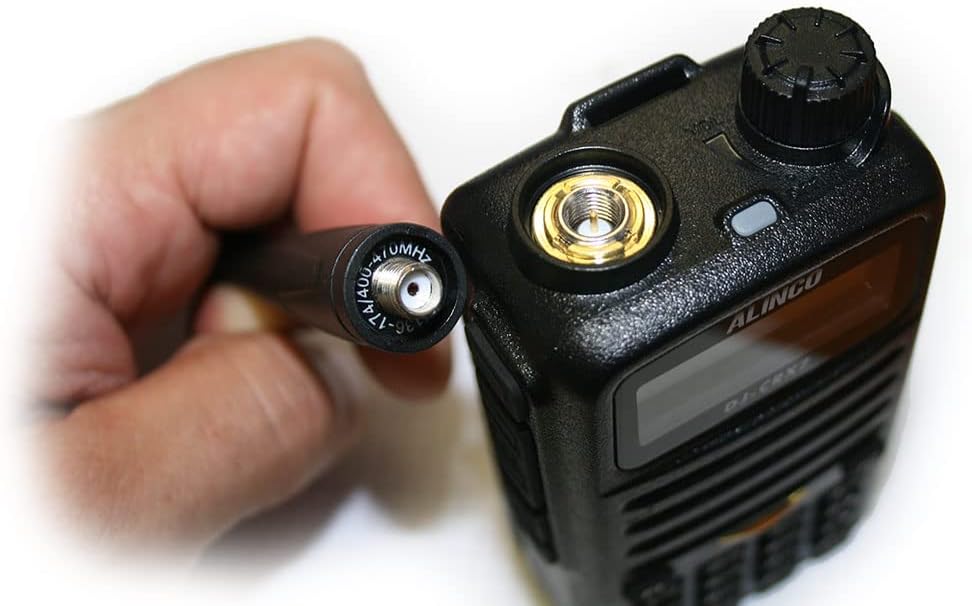
2. De antenne bevestigen
- Locate the SMA connector on the top of the radio.
- Screw the antenna clockwise onto the SMA connector until it is finger-tight. Do not overtighten.

Afbeelding: Proper connection of the antenna to the radio's SMA connector.
3. De batterij opladen
- Connect the wall charger adapter to the desktop charger.
- Sluit de wandlader aan op een standaard stopcontact.
- Plaats de radio (met de batterij erin) in de bureaulader. Het oplaadindicatielampje gaat branden.
- Charge the battery fully before first use. A full charge typically takes several hours.
Gebruiksaanwijzing
1. Basisbedieningen

Afbeelding: Voorkant view of the PNI Alinco DJ-CRX-7 radio, showing the display and keypad.
- Aan/uit: Draai de bovenste knop met de klok mee om het apparaat in te schakelen en tegen de klok in om het uit te schakelen.
- Volumeregeling: Adjust the same top knob to increase or decrease the volume.
- Kanaalselectie: Use the up/down arrow keys on the keypad or the rotary encoder (if present) to select channels. The radio supports 200 channels.
- Frequentiebanden: The radio operates on VHF (136-174 MHz) and UHF (400-470 MHz) bands.
- Instelbaar vermogen: The transmission power can be set to High, Medium, or Low (VHF: 5W/2W/1W; UHF: 4W/2W/1W). Refer to the menu for power adjustment.
2. Belangrijkste kenmerken
- FM-Radio: The device includes an FM radio function. Consult the manual for specific activation steps.
- Kanaalscan: Activate channel scan to automatically search for active frequencies.
- Slot: Use the key lock feature to prevent accidental button presses.
- Noodoproep: The radio is equipped with an emergency call function. Refer to the manual for programming and activation.
- Voice (VOX): Voice-activated transmission allows hands-free operation.
- Time-out timer (TOT): Prevents a channel from being occupied for too long by limiting transmission time.
- DTMF (Dual-Tone Multi-Frequency): Voor signalerings- en besturingsfuncties.
- scrambler: Versleutelt spraakoverdrachten voor privacy.
- Compander: Improves audio quality by compressing and expanding the dynamic range of the voice signal.
- Squelch: Eliminates background noise when no signal is received. Adjust the squelch level for optimal performance.
- Praat rond: Allows direct communication between two radios on a repeater output frequency, bypassing the repeater.
- BCL (Busy Channel Lockout): Voorkomt verzending via een reeds bezet kanaal.
- CTCSS/DCS (Continuous Tone-Coded Squelch System / Digital Coded Squelch): Sub-audible tones used to filter out unwanted communications and allow only specific groups to hear each other.
Onderhoud
1. Schoonmaken
- Veeg het oppervlak van de radio af met een zachte, damp lap. Gebruik geen agressieve chemicaliën of schurende schoonmaakmiddelen.
- Zorg ervoor dat de radio droog is voordat u hem gebruikt of oplaadt.
2. Batterijverzorging
- Vermijd het te vaak volledig ontladen van de batterij om de levensduur ervan te verlengen.
- Bewaar de batterij op een koele, droge plaats wanneer u deze gedurende langere tijd niet gebruikt.
- Stel de batterij niet bloot aan extreme temperaturen of direct zonlicht.
Probleemoplossing
Veelvoorkomende problemen en oplossingen
- De radio gaat niet aan: Controleer of de batterij goed is geplaatst en opgeladen. Zorg ervoor dat de aan/uit-/volumeknop met de klok mee is gedraaid.
- Geen geluid: Adjust the volume knob. Check the squelch level. Ensure the antenna is securely attached.
- Kan niet verzenden: Verify you are on an allowed frequency. Check if BCL (Busy Channel Lockout) is active. Ensure the battery has sufficient charge.
- Slechte ontvangst/transmissie: Check antenna connection. Ensure you are within range. Adjust squelch level.
Als u aanhoudende problemen ondervindt die hier niet worden behandeld, neem dan contact op met de klantenservice.
Specificaties
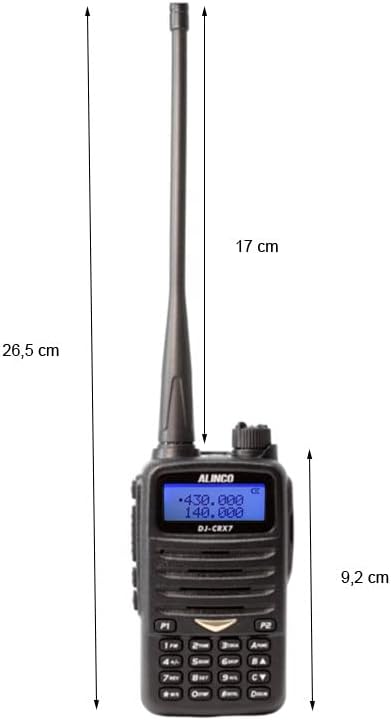
Afbeelding: Dimensions of the PNI Alinco DJ-CRX-7 portable radio.
| Functie | Detail |
|---|---|
| Modelnummer | DJ-CRX-7 |
| Frequentiebanden | VHF (136-174 MHz), UHF (400-470 MHz) |
| Kanalen | 200 |
| Transmissievermogen | VHF: 5W/2W/1W, UHF: 4W/2W/1W |
| Batterij | Li-ion 1800 mAh, 7.4V |
| Bedrijfstemperatuur | -26°C tot +80°C |
| Dimensions (P x L x H) | 5.7 x 26.3 x 3.4 cm (2.24 x 10.35 x 1.34 inch) |
| Gewicht (met batterij) | 213 gram (0.47 lbs) |
| Waterbestendigheid | IP67 rated (Dust tight and protected against temporary immersion up to 1m for 30 minutes). Note: While IP67 rated, the device is not designed for prolonged submersion. |
| Max bereik | 10 Miles (approximate, depends on terrain and conditions) |
| Compatibele apparaten | Other VHF/UHF radios (144-146 MHz / 430-440 MHz), standard headsets with 3.5/2.5 mm dual jack, external antennas with SMA connector. |
Garantie-informatie
The PNI Alinco DJ-CRX-7 portable radio comes with a 2 jaar garantie Deze garantie geldt vanaf de aankoopdatum. De garantie dekt fabricagefouten bij normaal gebruik. Schade veroorzaakt door verkeerd gebruik, ongelukken, ongeoorloofde aanpassingen of natuurrampen valt niet onder de garantie.
Bewaar uw aankoopbewijs voor garantieclaims.
Steun
For technical assistance, troubleshooting beyond this manual, or warranty inquiries, please contact your retailer or the manufacturer's customer service department.
Always refer to the official Alinco website for the latest support information and software updates.