
1. Belangrijke veiligheidsinstructies
Please read this manual carefully before operating your AireMax APH10CE Portable Air Conditioner. Keep these instructions for future reference. Failure to follow these instructions may result in electric shock, fire, or personal injury.
- Always connect the unit to a properly grounded 115V/60Hz electrical outlet.
- Gebruik het apparaat niet met een beschadigd snoer of stekker.
- Do not block air inlets or outlets. Ensure at least 12 inches (30 cm) of clearance around the unit for proper airflow.
- Steek geen vingers of andere voorwerpen in de ventilatieopeningen.
- Gebruik het apparaat niet in de buurt van ontvlambare gassen of brandbare materialen.
- Haal altijd de stekker van het apparaat uit het stopcontact voordat u het reinigt of onderhoud uitvoert.
- Dit apparaat is niet bedoeld voor gebruik door personen (inclusief kinderen) met beperkte fysieke, sensorische of mentale vermogens, of met een gebrek aan ervaring en kennis, tenzij zij onder toezicht staan of instructies hebben gekregen over het gebruik van het apparaat door een persoon die verantwoordelijk is voor hun veiligheid.
- Kinderen moeten onder toezicht staan om ervoor te zorgen dat ze niet met het apparaat spelen.
2. Product voorbijview
The AireMax APH10CE is a portable air conditioner designed to provide efficient cooling and dehumidification for spaces up to 600 square feet (approximately 55 m²). It features a self-evaporative system, three fan speeds, and a sleep function for enhanced comfort.
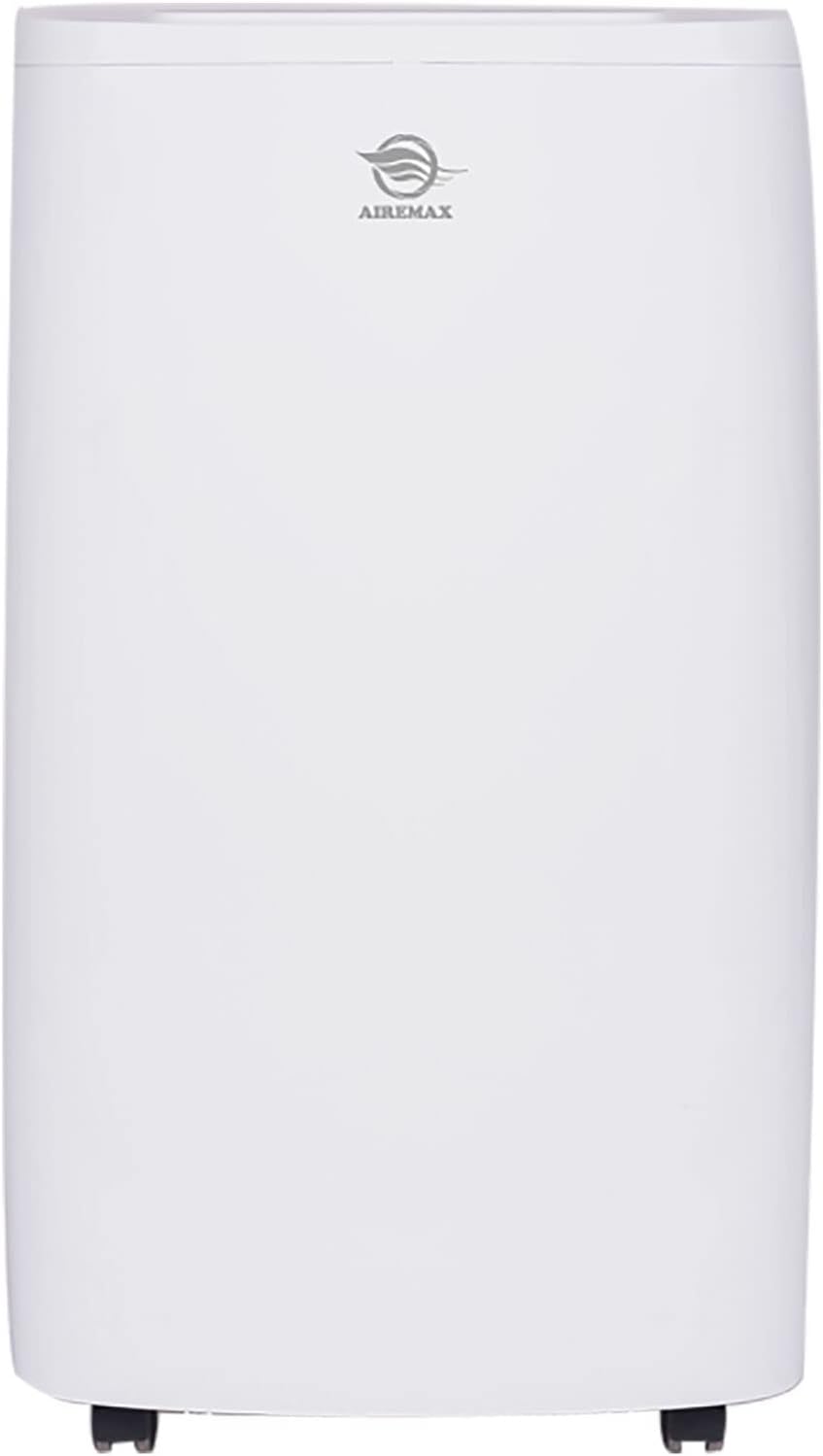
Figuur 2.1: Voorkant view of the AireMax APH10CE Portable Air Conditioner. This image shows the sleek, white design of the unit with the AireMax logo prominently displayed at the top.

Figuur 2.2: Gehoekt view of the AireMax APH10CE Portable Air Conditioner. This perspective highlights the side vents and the overall compact design, suitable for various room settings.
Bedieningspaneel

Figuur 2.3: Close-up of the AireMax APH10CE control panel. The panel features an LED display and touch buttons for various functions including Timer, Fan speed, Temperature Up/Down, Mode, and Power.
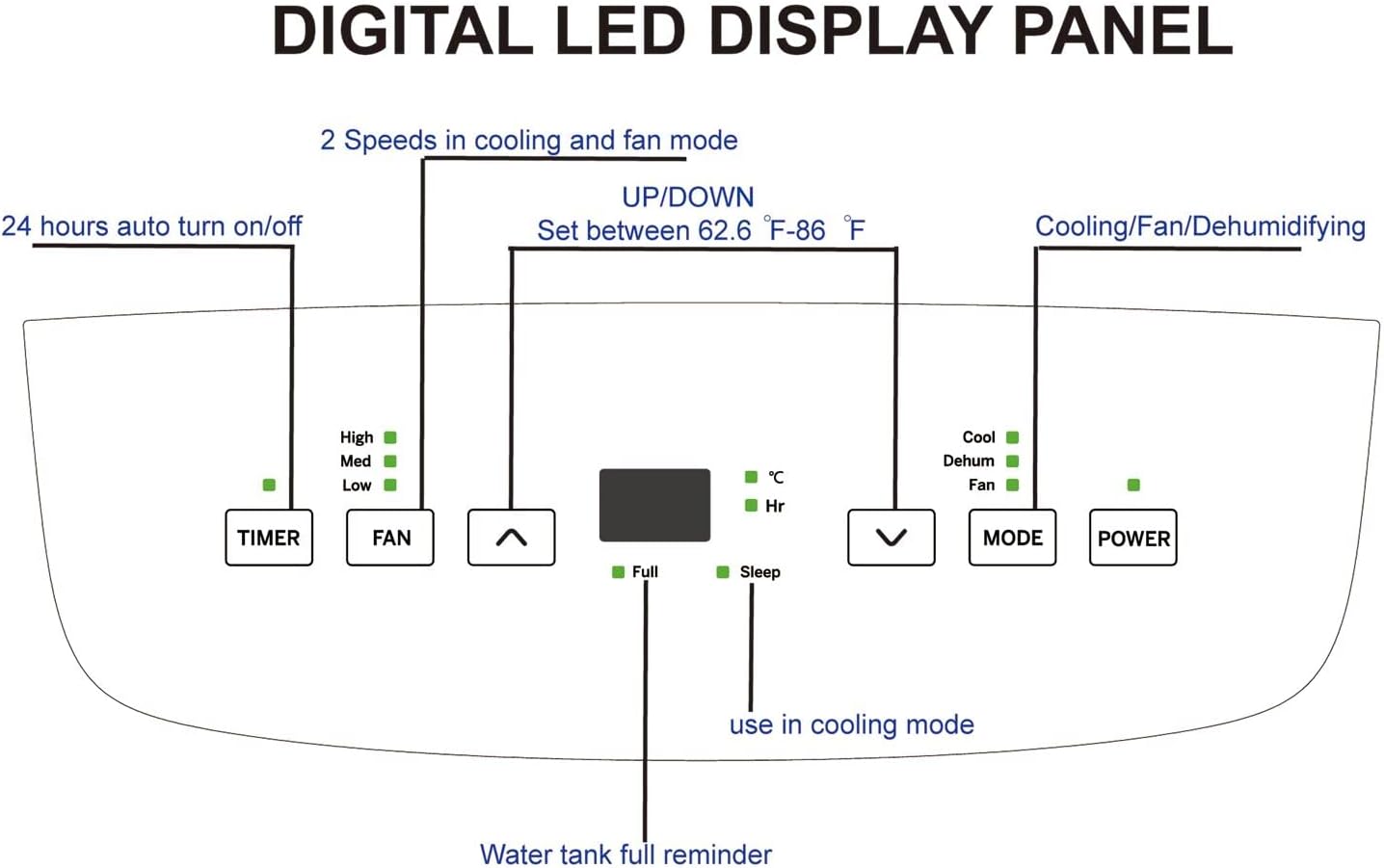
Figuur 2.4: Diagram illustrating the functions of the Digital LED Display Panel. It shows controls for Timer (24 hours auto on/off), Fan (High, Med, Low speeds), Up/Down buttons for temperature (62.6°F - 86°F), Mode (Cooling, Dehumidifying, Fan), and Power. Indicators for "Full" (water tank) and "Sleep" mode are also visible.
Achterkant View en componenten

Figuur 2.5: Achterkant view of the AireMax APH10CE with key components labeled. This includes the Filter Frame, Dust Removing Filter, Exhaust Connector, and Double Drainage Hoses, indicating options for water removal.

Figuur 2.6: Achterkant view of the AireMax APH10CE, providing a clearer look at the air vents and the integrated power cord storage area, designed for neat organization when not in use.
3. Meegeleverde componenten
Your AireMax APH10CE Portable Air Conditioner package should contain the following items:
- AireMax APH10CE Portable Air Conditioner Unit
- Afstandsbediening
- Batterij (voor afstandsbediening)
- Window Kit (for exhaust hose installation)
- Uitlaatslang
- Ronde connector
- Adapter
- Gebruikershandleiding (dit document)
- Garantie-informatie
If any components are missing or damaged, please contact AireMax customer support.
4. Installatie en installatie
Een goede installatie is cruciaal voor de efficiënte werking van uw mobiele airconditioner.
4.1 Eenheidsplaatsing
- Plaats het apparaat op een vlakke, stabiele ondergrond.
- Zorg ervoor dat er minimaal 30 cm ruimte rondom het apparaat is voor een goede luchtcirculatie.
- Plaats het apparaat in de buurt van een raam of schuifdeur voor de installatie van de afvoerslang.
- The unit is designed for rooms up to 600 sq ft (approx. 55 m²).
- The unit is equipped with 4-direction casters and side handles for easy transport within your home.
4.2 Installatie van de raamkit
The window kit allows you to vent the hot air outside, which is essential for effective cooling.
- Assemble the window kit components according to the diagrams provided in the separate window kit instructions (if applicable) or by connecting the adapter to the exhaust hose.
- Extend the window kit to fit your window opening. Secure it in place.
- Attach the exhaust hose to the unit's exhaust connector (refer to Figure 2.5).
- Connect the other end of the exhaust hose to the adapter in the window kit.
- Zorg ervoor dat alle aansluitingen goed vastzitten om te voorkomen dat warme lucht de kamer weer binnenkomt.
4.3 Afwateringsinstallatie
The AireMax APH10CE features a self-evaporative system, which typically means most condensed water is recycled for cooling and expelled with the exhaust air. However, in high humidity conditions, manual drainage may be required.
- For continuous drainage (especially in dehumidifier mode or high humidity), connect a drainage hose (not always included, check components list) to one of the double drainage hoses outlets at the rear of the unit (refer to Figure 2.5).
- Route the hose to a floor drain or a suitable collection container.
- Ensure the hose is sloped downwards to allow gravity drainage.
- The unit has a "Water tank full reminder" indicator on the control panel (Figure 2.4). When this illuminates, the unit will stop operating until the water tank is drained manually.
5. Gebruiksaanwijzing
Familiarize yourself with the control panel (Figure 2.3 and 2.4) and remote control for optimal operation.
5.1 In-/uitschakelen
- Druk op de STROOM knop op het bedieningspaneel of de afstandsbediening om het apparaat in of uit te schakelen.
5.2 Modusselectie
Druk op de MODUS Druk herhaaldelijk op de knop om door de beschikbare modi te schakelen:
- Koelmodus: For air conditioning. Set your desired temperature using the OMHOOG/OMLAAG buttons. The temperature range is 62.6°F (17°C) to 86°F (30°C).
- Ontvochtigingsmodus: For removing excess moisture from the air. The unit can remove up to 90 pints of moisture per day. Fan speed is typically fixed in this mode.
- Ventilator modus: For air circulation without cooling. You can adjust the fan speed.
5.3 Ventilatorsnelheid aanpassen
Druk in de koel- of ventilatormodus op de FAN button to select between High, Medium, or Low fan speeds.
5.4 Timerfunctie
The timer allows you to set the unit to automatically turn on or off after a specified period (up to 24 hours).
- Druk met het apparaat aan op de TIJDKLOK knop.
- Gebruik de OMHOOG/OMLAAG buttons to set the desired number of hours for the unit to turn off.
- Terwijl het apparaat uitgeschakeld is, drukt u op de TIJDKLOK knop.
- Gebruik de OMHOOG/OMLAAG buttons to set the desired number of hours for the unit to turn on.
5.5 Slaapfunctie
The Sleep function is designed for comfortable overnight operation in cooling mode. It gradually increases the set temperature by a few degrees over several hours to save energy and prevent overcooling.
- Activate the Sleep function by pressing the dedicated button on the remote control (if available) or by selecting it via the control panel (refer to Figure 2.4 for indicator).
5.6 Automatische herstart
The unit features an automatic restart function. In case of a power outage, zodra de stroomvoorziening is hersteld, hervat het apparaat automatisch de werking met de laatste instellingen.
6. Onderhoud
Regular maintenance ensures optimal performance and extends the lifespan of your AireMax APH10CE.
6.1 Het luchtfilter reinigen
The unit is equipped with removable mesh filters (refer to Figure 2.5). Clean them regularly, especially if the unit is used frequently.
- Haal de stekker van de airconditioner uit het stopcontact.
- Locate and remove the filter frame from the rear of the unit.
- Gently remove the mesh filter from the frame.
- Vacuum any loose dust from the filter.
- Wash the filter under warm, running water with a mild detergent if necessary.
- Spoel het filter grondig af en laat het volledig aan de lucht drogen voordat u het terugplaatst.
- Reinstall the filter into the frame and then back into the unit.
6.2 Afvoeren van opgehoopt water
While the unit has a self-evaporative system, manual drainage may be necessary if the "Water tank full reminder" indicator illuminates.
- Koppel de airconditioner los.
- Place a shallow pan or tray beneath the drainage outlet(s) at the rear of the unit.
- Remove the drain plug(s) to allow water to flow out.
- Once all water has drained, replace the drain plug(s) securely.
6.3 De buitenkant van het apparaat reinigen
- Veeg de buitenkant van het apparaat af met een zachte, damp lap.
- Gebruik geen agressieve chemicaliën, schuurmiddelen of oplosmiddelen.
6.4 Opslag
Als u het apparaat voor een langere periode opbergt:
- Drain all accumulated water completely.
- Maak het luchtfilter schoon.
- Store the power cord neatly in its designated storage area (Figure 2.6).
- Bewaar het apparaat op een koele, droge plaats, uit de buurt van direct zonlicht en extreme temperaturen.
7. Probleemoplossing
Voordat u contact opneemt met de klantenservice, raadpleegt u de volgende handleiding voor probleemoplossing voor veelvoorkomende problemen.
| Probleem | Mogelijke oorzaak | Oplossing |
|---|---|---|
| Het apparaat gaat niet aan. | No power supply; Power cord not plugged in; Circuit breaker tripped; Water tank full. | Ensure unit is plugged into a live 115V/60Hz outlet; Check circuit breaker; Drain water tank if "Full" indicator is on. |
| Het apparaat draait wel, maar koelt niet. | Air filter clogged; Exhaust hose not properly installed or blocked; Room too large; Doors/windows open; Temperature setting too high. | Clean air filter; Check exhaust hose for proper installation and obstructions; Close doors and windows; Lower temperature setting. |
| "Full" indicator is on. | Watertank is vol. | Drain the water tank as described in Section 6.2. |
| Eenheid maakt lawaai. | Unit not on a level surface; Fan speed too high; Obstruction in fan. | Place unit on a level surface; Reduce fan speed; Check for obstructions. (Note: Normal operating noise level is 64 dB). |
| Afstandsbediening werkt niet. | Lege of verkeerd geplaatste batterijen; obstakel tussen de afstandsbediening en het apparaat. | Replace batteries; Ensure line of sight to unit's receiver. |
8. Specificaties
Detailed technical specifications for the AireMax APH10CE Portable Air Conditioner.
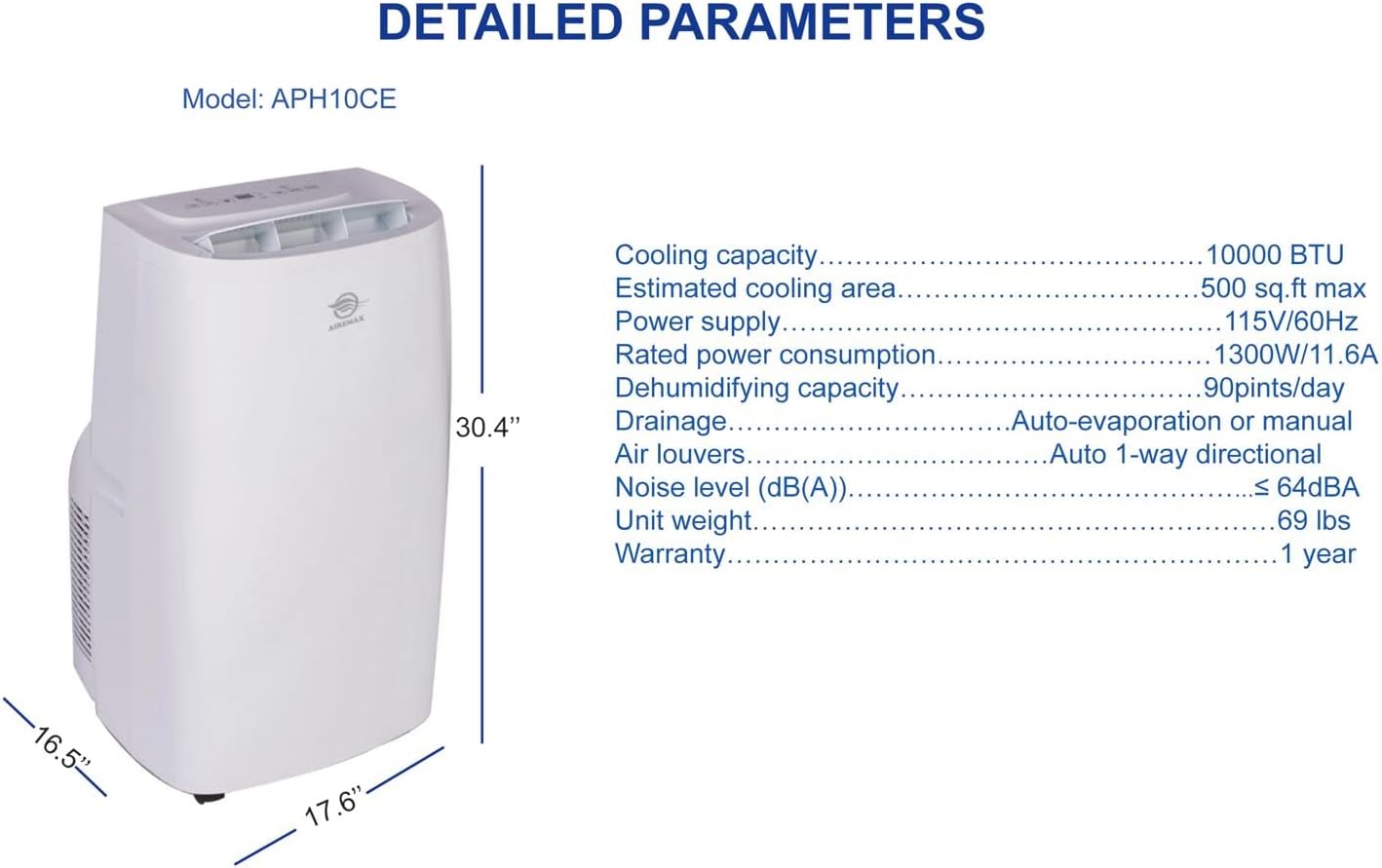
Figuur 8.1: Diagram showing detailed parameters and dimensions of the AireMax APH10CE. This includes cooling capacity, power supply, dehumidifying capacity, and physical dimensions.
| Parameter | Waarde |
|---|---|
| Modelnummer | APH10CE |
| Koelcapaciteit (SACC) | 10,000 BTU |
| Koelvermogen (ASHRAE) | 15,000 BTU |
| Geschat koeloppervlak | Up to 600 sq ft (approx. 55 m²) |
| Stroomvoorziening | 115V / 60Hz |
| Nominaal stroomverbruik | 1300W / 11.6A |
| Ontvochtigingscapaciteit | 90 pinten / dag |
| Geluidsniveau | 64dB |
| Afmetingen (L x B x H) | 16.54 x 17.64 x 30.39 cm (42.01 x 44.81 x 77.19 inch) |
| Eenheidsgewicht | 72.5 kg (32.89 lbs) |
| Speciale kenmerken | Dehumidifier, Rapid Cooling, Auto-evaporation, Auto restart after power failure |
| Luchtroosters | Auto 1-way directional |
| Afvoer | Auto-evaporation or manual |
9. Garantie en ondersteuning
Your AireMax APH10CE Portable Air Conditioner comes with a manufacturer's warranty. Please refer to the separate warranty information included in your package for details on coverage and terms.
For technical assistance, troubleshooting beyond this manual, or to inquire about replacement parts, please contact AireMax customer support. Contact information can typically be found on the product packaging, the official AireMax website, or the warranty document.
Please have your model number (APH10CE) and purchase date ready when contacting support.