
1. Inleiding en voorbijview
The Technical Pro TPRX4CH is a powerful 1600-watt, 4-channel Bluetooth receiver designed for home audio systems, home theaters, and karaoke setups. It offers versatile connectivity options including RCA, USB, SD Card, and AUX inputs, along with two microphone inputs. Featuring a fluorescent display and comprehensive playback controls, this receiver provides high-quality amplified audio for up to eight speakers.

Figure 1.1: Front Panel of the TPRX4CH Receiver
2. Belangrijkste kenmerken
- Piekvermogen van 1600 watt: Delivers 120W RMS for high-quality amplified audio, suitable for home theater and karaoke.
- 4-kanaals uitgang: Supports up to 8 speakers simultaneously with dedicated volume control for each channel.
- Bluetooth-connectiviteit: Wireless range of up to 30 feet, compatible with smartphones, tablets, and laptops.
- Meerdere ingangen: Includes RCA, USB, SD Card, and AUX inputs for diverse audio sources.
- Dubbele microfooningangen: Features 1/4" mic inputs with independent volume, echo, and delay controls, plus a Mic Priority switch.
- EQ-bedieningselementen: Rotary knobs for Treble, Bass, and Master Volume adjustments.
- Digitaal VFD-display: Built-in display with AM/FM radio tuner.
- Bedieningspaneel aan de voorzijde: Intuitive buttons and rotary controls with blue LED illumination for high visibility.
- Koptelefoon aansluiting: Dedicated headphone output with volume control.
- Beschermingsfuncties: Integrated over-current, short-circuit, and over-voltage bescherming.

Figuur 2.1: Belangrijkste kenmerken vanview
3. Inhoud van het pakket
Vink het vakje aan voor de volgende items:
- Technical Pro 1600W 4-Channel Bluetooth Receiver (TPRX4CH)
- Afstandsbediening
- FM-antenne
4. Installatie en verbindingen
4.1 Achterpaneel bovenview

Figure 4.1: Rear Panel of the TPRX4CH Receiver
4.2 Luidsprekers aansluiten
The TPRX4CH receiver supports up to 8 speakers across 4 channels (A, B, C, D). Connect your speakers to the corresponding speaker terminals on the rear panel. Ensure correct polarity (positive to positive, negative to negative) for optimal sound quality. Each channel (A, B, C, D) has dedicated terminals for two speakers (e.g., Speaker A+ and Speaker A-).
4.3 Audiobronnen aansluiten
- RCA Inputs (DVD/LINE): Use RCA cables to connect external audio devices such as DVD players, CD players, or other line-level audio sources to the 'INPUT' section on the rear panel.
- USB/SD-kaart: Insert a USB flash drive or SD card into the respective slots on the front panel for digital audio playback.
- AUX-ingang: Connect portable audio devices using a 3.5mm AUX cable to the 'AUX IN' jack on the front panel.
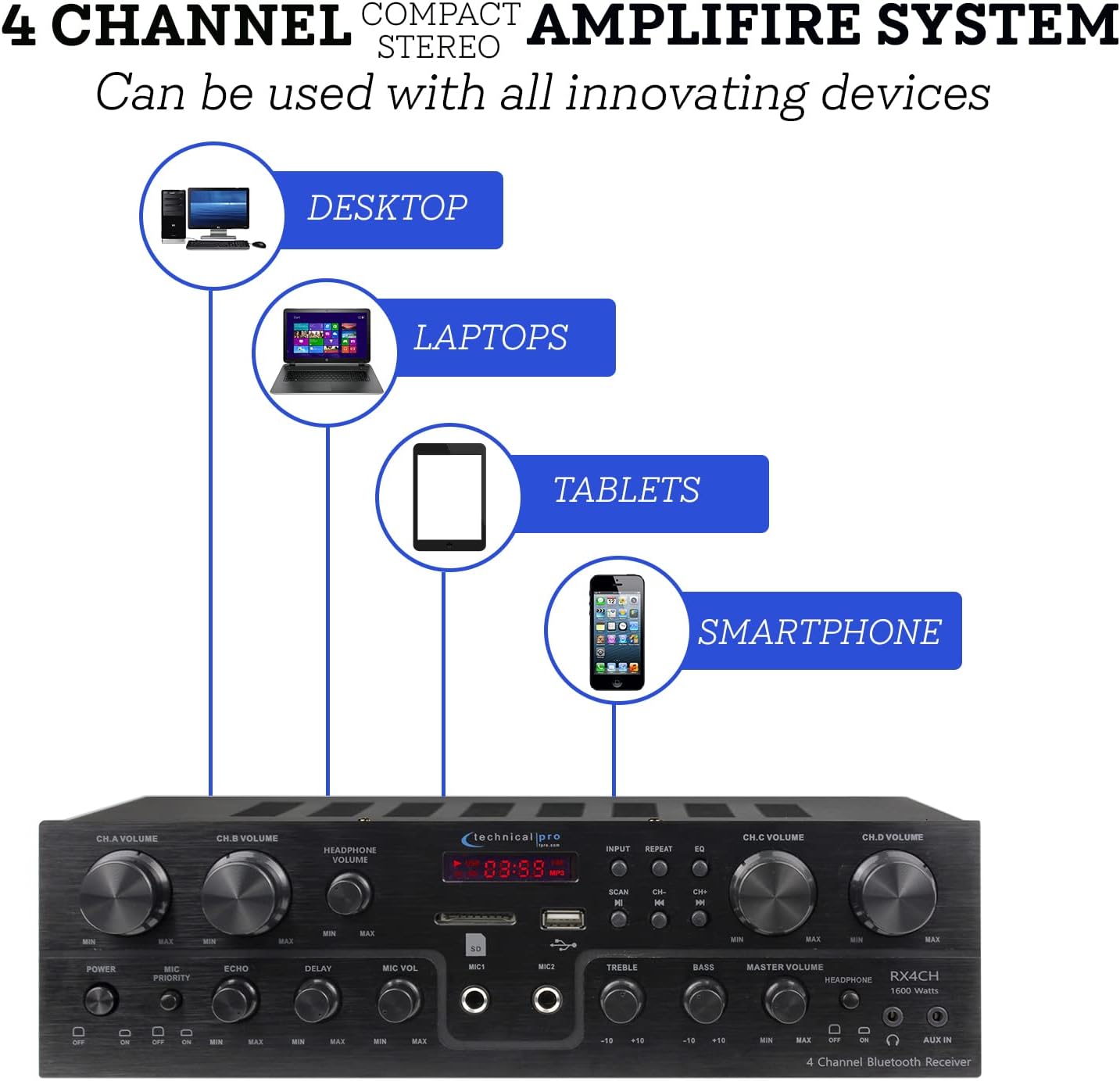
Figure 4.2: Device Connectivity Options
4.4 Microfoons aansluiten
Plug 1/4" microphone cables into the 'MIC1' or 'MIC2' jacks on the front panel.
4.5 Stroomaansluiting
Zorg ervoor dat de voltagDe volumeregelaar op het achterpaneel staat op het juiste volume.tage for your region (110V/60Hz or 230V/50Hz). Connect the power cord to the AC inlet on the rear panel and then to a suitable power outlet.
5. Gebruiksaanwijzing
5.1 In-/uitschakelen
Press the 'POWER' button on the front panel to turn the unit on or off. The fluorescent display will illuminate when the unit is powered on.
5.2 Ingangsselectie
Use the 'INPUT' button on the front panel to cycle through available audio sources: Bluetooth, USB, SD, AUX, and RCA (DVD/LINE).
5.3 Volume and EQ Controls
- Channel Volume (CH.A, CH.B, CH.C, CH.D): Adjust the individual volume for each speaker channel using the dedicated rotary knobs.
- Meester volume: Control the overall output volume of the system using the 'MASTER VOLUME' knob.
- Treble/Bas: Adjust the high and low frequency response using the 'TREBLE' and 'BASS' knobs to fine-tune your sound.
- Hoofdtelefoonvolume: Adjust the volume for connected headphones using the 'HEADPHONE VOLUME' knob.
5.4 Bluetooth-koppeling
Select 'Bluetooth' as the input source. On your mobile device (smartphone, tablet, laptop), search for available Bluetooth devices and select 'Technical Pro' or similar from the list. Once paired, you can stream audio wirelessly to the receiver.
5.5 USB/SD-kaartweergave
Insert a USB drive or SD card with audio files into the respective slot. The receiver will automatically switch to USB/SD mode. Use the 'PLAY/PAUSE', 'PREVIOUS', and 'NEXT' buttons to control playback.
5.6 Microfoonfuncties (Karaoke)
- Microfoonvolume: Adjust the volume of the connected microphones using the 'MIC VOL' knob.
- Echo/Vertraging: Use the 'ECHO' and 'DELAY' knobs to add effects to the microphone audio for a richer vocal performance.
- Microfoonprioriteit: Activate the 'MIC PRIORITY' switch to automatically lower the background music volume when a microphone is in use, ensuring vocals are clear and prominent.

Figure 5.1: Built-in Microphone Talk-Over Function
5.7 AM/FM-radio
Extend the FM antenna connected to the rear panel for better reception. Select 'Tuner' or 'Radio' as the input source. Use the 'SCAN' button to automatically search for and save radio stations. Use the 'CH-' and 'CH+' buttons to navigate through saved stations.
6. Onderhoud
- Schoonmaak: Gebruik een zachte, droge doek om de buitenkant van de ontvanger schoon te maken. Gebruik geen vloeibare reinigingsmiddelen of spuitbussen.
- Ventilatie: Ensure the receiver is placed in a well-ventilated area to prevent overheating. Do not block the ventilation openings.
- Opslag: Als u het apparaat voor een langere periode opbergt, koppelt u het los van de stroomvoorziening en bewaart u het op een koele, droge plaats.
7. Probleemoplossing
| Probleem | Mogelijke oorzaak | Oplossing |
|---|---|---|
| Geen stroom | Power cord not connected; Power outlet faulty; Unit fuse blown | Controleer de aansluiting van het netsnoer; probeer een ander stopcontact; neem contact op met de serviceafdeling voor het vervangen van de zekering. |
| Geen geluidsuitvoer | Onjuiste ingang geselecteerd; Luidsprekerkabels los/verkeerd aangesloten; Volume te laag; Dempen geactiveerd | Select correct input; Check speaker connections and polarity; Increase Master Volume; Deactivate mute if applicable |
| Zoemend geluid | Ground loop issue; Interference from other electronics; Faulty cable | Ensure proper grounding; Move unit away from other electronics; Try different audio cables |
| Bluetooth maakt geen verbinding | Device too far; Bluetooth not enabled on device; Receiver not in pairing mode | Move device closer to receiver; Enable Bluetooth on your device; Ensure receiver input is set to Bluetooth |
| Problemen met het afspelen van USB/SD | Niet ondersteund file formaat; beschadigd files; Drive/card not properly inserted | Ervoor zorgen files are in supported format (e.g., MP3); Reformat drive/card; Reinsert drive/card firmly |
8. Specificaties
| Functie | Specificatie |
|---|---|
| Modelnummer | TPRX4CH |
| Piekvermogen | 1600 Watt |
| RMS-uitgangsvermogen | 120 Watt |
| Kanalen | 4 Channel (supports 8 speakers) |
| Connectiviteitstechnologie | Bluetooth, RCA, USB 2.0, SD Card, AUX |
| Bluetooth-bereik | Tot 30 voet |
| Microfooningangen | 2 x 1/4" Jacks |
| Audio-uitvoermodus | Stereo |
| Speciale kenmerken | Equalizer, Fluorescent Display, Mic Priority |
| Productafmetingen | 13 x 7.3 x 3.5 inch |
| Artikelgewicht | 1.54 pond |
| Kleur | Zwart |
| Fabrikant | Technisch Pro |
| Eerste beschikbare datum | 16 juni 2022 |

Figuur 8.1: Productafmetingen
9. Garantie en ondersteuning
For warranty information and technical support, please refer to the documentation included with your purchase or visit the official Technical Pro website. You may also contact Technical Pro customer service directly for assistance with product setup, operation, or troubleshooting beyond the scope of this manual.
Technical Pro Store: Visit the Technical Pro Store on Amazon