
1. Inleiding
Thank you for choosing the WORKPRO 6-inch 1080W Dual Action Random Orbital Polisher. This manual provides essential information for the safe and effective operation, maintenance, and troubleshooting of your new polisher. Please read this manual thoroughly before first use and keep it for future reference. This tool is designed for various polishing and waxing applications, including car detailing, floor polishing, and metal polishing.
2. Veiligheidsinformatie
Volg altijd de basisveiligheidsmaatregelen bij het gebruik van elektrische apparaten om het risico op brand, elektrische schokken en persoonlijk letsel te beperken.
- Draag geschikte persoonlijke beschermingsmiddelen, zoals een veiligheidsbril en handschoenen.
- Zorg ervoor dat de werkplek schoon, goed verlicht en vrij van obstakels is.
- Gebruik de polijstmachine niet in damp of natte omstandigheden.
- Houd kinderen en omstanders uit de buurt tijdens het gebruik van het gereedschap.
- Unplug the polisher from the power source before making any adjustments, changing accessories, or performing maintenance.
- Do not force the tool; use the correct speed and pressure for the application.
- Inspecteer het netsnoer vóór elk gebruik op beschadigingen.
3. Inhoud van het pakket
Controleer of alle hieronder vermelde artikelen in uw pakket zitten. Als er artikelen ontbreken of beschadigd zijn, neem dan contact op met de klantenservice.
- 1 × Polisher Machine
- 1 × Auxiliary Handle
- 1 × Backing Pad
- 1 × Woolen Buffer Pad
- 6 × Foam Pads (various types for different applications)
- 2 × Replaceable Carbon Brushes
- 1 × Hex Key
- 3 × Hex Head Bolts
- 1 × Towel

Figuur 3.1: Meegeleverde componenten
4. Producteigenschappen
The WORKPRO Buffer Polisher is engineered for efficiency and user comfort.
- 6 Variable Speed Control: Adjust speeds from 1400-5000 RPM to match project requirements, allowing for precise control during waxing and polishing.

Figure 4.1: Polisher Components Overview
- Krachtige motor: Uitgerust met een 9 amp, 1080 watt motor and 15mm dual action orbital motion for powerful and efficient operation. Heat-resistant copper wire ensures longer working time.

Figure 4.2: High-Performance Motor
- Ergonomisch ontwerp: Features a comfortable grip hood and an auxiliary handle for non-slip control. The switch-locking mechanism reduces hand fatigue during extended use.

Figuur 4.3: Ergonomisch ontwerp
- Dual Action Orbital Motion: Provides high security and allows for polishing without glare, ensuring a smooth and even finish.

Figure 4.4: Dual Action Mechanism
5. Instellen
- Bevestig de hulphandgreep: Secure the auxiliary handle to the polisher using the provided hex head bolts and hex key. Ensure it is firmly tightened for safe operation.
- Install the Backing Pad: Align the backing pad with the spindle on the polisher and screw it on securely.
- Attach Polishing Pads: The foam pads and woolen buffer pad attach to the backing pad via hook-and-loop fasteners. Select the appropriate pad for your task (e.g., foam pads for compounding/polishing, woolen pad for buffing).
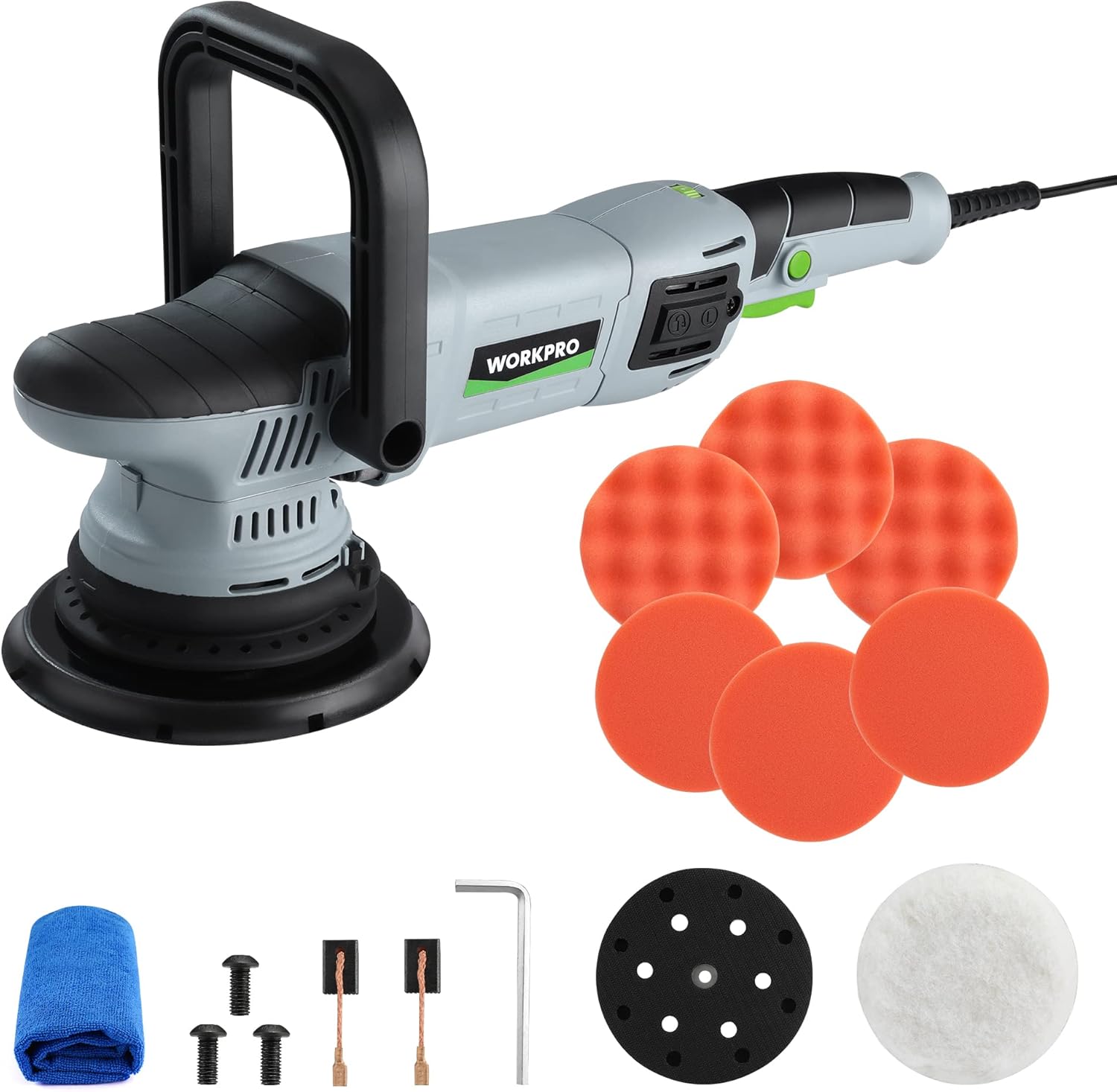
Figure 5.1: Polisher Setup
6. Gebruiksaanwijzing
This section details the proper use of your WORKPRO Buffer Polisher for various applications.
- Aan/uit: Plug the polisher into a suitable power outlet. Press the On/Off trigger to start the tool.
- Using the Switch Locking Mechanism: For continuous operation, press the lock button located near the trigger after starting the polisher. This will keep the tool running without needing to hold the trigger. Press the trigger again to release the lock and stop the tool.

Figure 6.1: Trigger and Lock Button
- Snelheid aanpassen: Use the 6-variable speed adjustor dial to select the desired RPM (1400-5000 RPM). Lower speeds are generally used for waxing and spreading compounds, while higher speeds are for polishing and buffing.

Figure 6.2: Speed Adjustor Dial
- Toepassingsmethoden: The polisher can be used with either the auxiliary handle for two-handed control or by gripping the main body for single-handed operation, depending on the task and user preference.

Figure 6.3: Multiple Control Methods
- Algemeen gebruik: Apply a small amount of compound or wax directly to the pad or the surface. Start the polisher at a low speed to spread the product, then increase speed as needed for polishing or buffing. Maintain even pressure and move the polisher in overlapping passes.

Figuur 6.4: Breed scala aan toepassingen
Video 6.1: WORKPRO Dual Action Buffer Polisher Kit in action, demonstrating variable speed control, switch locking mechanism, and various polishing applications on cars, tiles, and wood.
7. Onderhoud
Regelmatig onderhoud zorgt voor een lange levensduur en optimale prestaties van uw polijstmachine.
- Schoonmaak: After each use, wipe down the polisher with a clean, dry cloth. Remove any residue from the backing pad and ensure ventilation slots are clear.

Figure 7.1: Ventilation Slots
- Vervanging van koolborstels: The carbon brushes are wear items and will need periodic replacement. When the tool's performance decreases or it stops working, check the carbon brushes. To replace, unscrew the carbon brush covers on the side of the motor housing, remove the old brushes, and insert new ones. Ensure the brushes are seated correctly before replacing the covers.

Figure 7.2: Carbon Brush Replacement
- Verzorging van het maandverband: Clean polishing pads thoroughly after each use to remove product residue. This prolongs their life and maintains polishing effectiveness.
8. Probleemoplossing
| Probleem | Mogelijke oorzaak | Oplossing |
|---|---|---|
| De polijstmachine start niet. | Geen stroomvoorziening; beschadigd snoer; versleten koolborstels. | Controleer de stroomaansluiting; inspecteer het snoer op beschadigingen; vervang de koolborstels. |
| Reduced power or erratic operation. | Worn carbon brushes; motor overheating; excessive pressure. | Replace carbon brushes; allow tool to cool; reduce pressure. |
| Overmatige trillingen of lawaai. | Loose backing pad; damaged pad; internal component issue. | Tighten backing pad; replace damaged pad; contact customer support. |
| Slechte polijstresultaten. | Incorrect pad type; insufficient product; improper technique. | Use appropriate pad; apply sufficient product; review Gebruiksaanwijzing. |
9. Specificaties
| Attribuut | Waarde |
|---|---|
| Modelnummer | W125163AE |
| Energiebron | Elektrische kabel |
| Deeltage | 12 Volt |
| Amptijdperk | 9 Amps |
| Wattage | 1080 Watt |
| Snelheid | 1400-5000 RPM (variabel) |
| Artikelgewicht | 7.41 pond (3.37 kilogram) |
| Pakket afmetingen | 16.97 x 7.6 x 6.69 inch |
| Materiaal | Metaal, kunststof |
| Kleur | Grijs, Zwart |
10. Garantie en ondersteuning
WORKPRO products are manufactured to high-quality standards. For specific warranty details, please refer to the warranty card included with your product or visit the official WORKPRO webplaats.
For technical support, replacement parts, or any inquiries regarding your WORKPRO Buffer Polisher, please contact WORKPRO customer service. Contact information can typically be found on the product packaging or the official WORKPRO webplaats.
You can also visit the WORKPRO Store on Amazon for more information and products: WORKPRO Amazon Store.