
Invoering
This manual provides detailed instructions for the safe installation, operation, and maintenance of your bimar Wi-Fi Ceiling Fan, Model 1 (Ø 132). Please read this manual thoroughly before using the product and retain it for future reference.
Beoogd gebruik: This high-performance ceiling fan is designed for ventilation in indoor domestic environments. Any other use is considered improper and potentially hazardous. The manufacturer cannot be held responsible for any damages resulting from improper use or repairs performed by unqualified personnel.
Belangrijke veiligheidsinstructies
Om het risico op brand, elektrische schokken of persoonlijk letsel te verminderen, dient u het volgende in acht te nemen:
- Lees alle instructies voordat u de ventilator installeert.
- De installatie moet worden uitgevoerd door een gekwalificeerde elektricien, in overeenstemming met alle plaatselijke en nationale elektrische voorschriften.
- Ensure the installation site can support the fan's weight (approximately 6.2 kg).
- Schakel vóór installatie- of onderhoudswerkzaamheden altijd de stroom uit bij de hoofdschakelaar.
- Gebruik de ventilator niet met een beschadigd netsnoer of een beschadigde stekker.
- Keep hands, hair, and clothing away from moving blades.
- Steek geen voorwerpen in de ventilatorbladen terwijl de ventilator in werking is.
- Dit apparaat is niet bedoeld voor gebruik door personen (inclusief kinderen) met beperkte fysieke, sensorische of mentale vermogens, of met een gebrek aan ervaring en kennis, tenzij zij onder toezicht staan of instructies hebben gekregen over het gebruik van het apparaat door een persoon die verantwoordelijk is voor hun veiligheid.
- Kinderen moeten onder toezicht staan om ervoor te zorgen dat ze niet met het apparaat spelen.
Wat zit er in de doos?
Your bimar Wi-Fi Ceiling Fan package includes the following components:
- bimar Wi-Fi Ceiling Fan unit (with 3 blades)
- Afstandsbediening
- Bevestigingsmateriaal (schroeven, beugels, enz.)
- Gebruiksaanwijzing (dit document)

Image: The bimar Wi-Fi Ceiling Fan, featuring three light-colored wooden blades and a brushed metal motor housing and downrod.
Instellen en installeren
1. Installatie van de ventilator
Professionele installatie door een gekwalificeerde elektricien wordt ten zeerste aanbevolen. Ensure the ceiling structure can safely support the fan's weight and that all wiring complies with local electrical codes.
- Bereid de montagelocatie voor: Schakel de stroom uit bij de stroomonderbreker. Bevestig de montagebeugel stevig aan een plafondbalk of een stopcontactdoos die geschikt is voor een ventilator.
- Monteer de downrod en de motor: Attach the downrod to the fan motor housing.
- Hang de ventilator op: Til de ventilatorunit voorzichtig op en hang hem aan de montagebeugel.
- Sluit de ventilator aan: Connect the electrical wires (live, neutral, ground) from the ceiling to the fan's wiring, following the wiring diagram provided in the separate installation guide (if applicable).
- Bevestig de messen: Securely fasten the three blades to the motor housing.
- Bevestig de luifel: Raise the canopy to cover the wiring and mounting bracket, securing it in place.

Afbeelding: Zijkant view of the bimar ceiling fan, illustrating the angle of the light wood blades and the connection to the downrod.
2. Wi-Fi- en app-verbinding
The bimar Wi-Fi Ceiling Fan is compatible with the Bimar Live Smart app for advanced control and scheduling.
- Download de app: Zoeken naar "Bimar Live Smart" in your smartphone's app store (iOS or Android) and install it.
- Maak een account aan: Open de app en volg de instructies op het scherm om een nieuw gebruikersaccount aan te maken of om in te loggen als u er al een hebt.
- Apparaat toevoegen: Power on the ceiling fan. In the Bimar Live Smart app, tap "Add Device" or the "+" icon. Select "Ceiling Fan" or the appropriate device type.
- Verbinden met wifi: Follow the app's instructions to put the fan into pairing mode (usually by pressing a button on the fan or remote for a few seconds). Connect the fan to your home 2.4GHz Wi-Fi network.
- Geef het apparaat een naam: Once connected, you can name your fan for easy identification within the app.

Image: A modern living room featuring the bimar ceiling fan installed, with a smartphone displaying the Bimar Live Smart app interface, indicating Wi-Fi and voice control capabilities.
Gebruiksaanwijzing
Your bimar Wi-Fi Ceiling Fan offers multiple control options for convenience.
1. Bediening op afstand
The included remote control allows direct access to all fan functions.
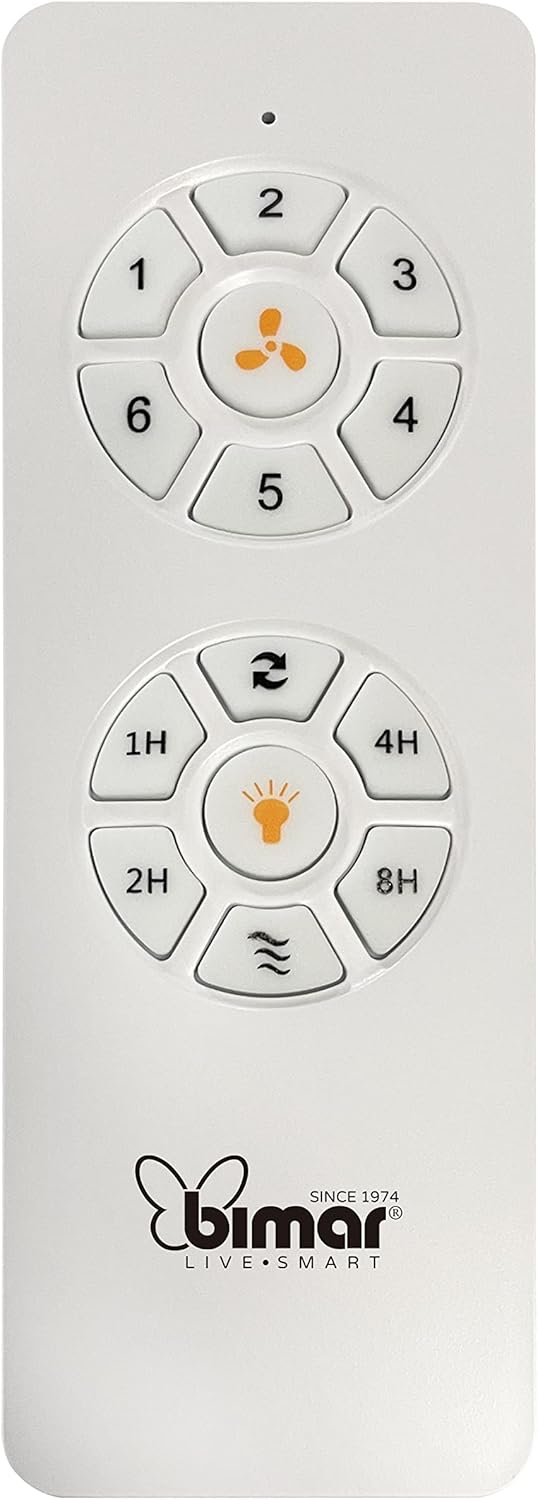
Image: The white remote control for the bimar ceiling fan, showing buttons for fan speed (1-6), fan on/off, timer (1H, 2H, 4H, 8H), mode selection, and reverse function.
- Aan/uit: Druk op de knop met het ventilatorpictogram om de ventilator aan of uit te zetten.
- Snelheidsaanpassing: Use buttons 1-6 to select one of the six available fan speeds.
- Timerfunctie: Press 1H, 2H, 4H, or 8H to set the fan to automatically turn off after the selected duration.
- Modusselectie: Use the mode button (often represented by waves or arrows) to cycle through Normal, Natural, Sleep, and Breeze modes.
- Zomer/Wintermodus: The reverse button (often two arrows forming a circle) changes the blade rotation direction.
2. App Control (Bimar Live Smart)
Once connected to the Bimar Live Smart app, you can access enhanced features:
- Bediening op afstand: Control all fan functions from anywhere with an internet connection.
- Planning: Program daily and weekly on/off times for automated operation.
- Tijdklok: Adjust the timer from 1 to 8 hours.
- Mode and Speed Selection: Easily switch between the 6 speeds and 4 operating modes.
3. Stembesturing
The bimar Wi-Fi Ceiling Fan is compatible with popular voice assistants like Amazon Alexa and Google Assistant. After connecting the fan to the Bimar Live Smart app, link your Bimar account to your voice assistant app (e.g., Alexa app or Google Home app).
Example Spraakopdrachten:
- "Alexa, turn on the ceiling fan."
- "Hey Google, set ceiling fan speed to 3."
- "Alexa, turn off the ceiling fan in 1 hour."
4. Operating Modes and Speeds
- 6 Ventilation Speeds: Adjust the airflow intensity to your preference.
- Normale modus: Consistent airflow at the selected speed.
- Natuurlijke modus: Simuleert natuurlijke briesjes door de ventilatorsnelheid te variëren.
- Slaapstand: Werkt op een lagere, stillere snelheid voor ongestoorde rust.
- Breeze-modus: Provides a gentle, intermittent airflow.
5. Summer/Winter Function
The reversible blade function allows for year-round use:
- Zomermodus (rotatie tegen de klok in): Creëert een neerwaartse luchtstroom, waardoor een verkoelend briesje ontstaat.
- Wintermodus (met de klok mee): Creates an upward airflow, circulating warm air trapped near the ceiling, improving heating efficiency.

Image: A diagram illustrating the airflow patterns for summer (indirect ventilation, pushing air upwards) and winter (direct ventilation, pulling air downwards) modes of a ceiling fan.
Onderhoud
Regelmatig onderhoud zorgt ervoor dat uw plafondventilator optimaal presteert en lang meegaat.
- Schoonmaak: Before cleaning, ensure the fan is turned off and power is disconnected at the circuit breaker. Use a soft, damp cloth to wipe down the blades and motor housing. Do not use abrasive cleaners or solvents.
- Bladinspectie: Periodically check the blades for any signs of damage or warping. Ensure all blade screws are tight.
- Motorsmering: The fan's DC motor is designed for maintenance-free operation and does not require lubrication.
- Bevestigingsmiddelen vastdraaien: Na verloop van tijd kunnen sommige bevestigingsmiddelen losraken. Controleer en draai alle schroeven en verbindingen jaarlijks vast.

Afbeelding: Een close-up view of the bimar ceiling fan's brushed metal motor housing and the attachment points for the light wood blades, highlighting areas for cleaning and inspection.
Probleemoplossing
| Probleem | Mogelijke oorzaak | Oplossing |
|---|---|---|
| Ventilator start niet | Geen stroomvoorziening; Batterij van de afstandsbediening bijna leeg; Onjuiste bedrading. | Check circuit breaker and wall switch. Replace remote batteries. Verify wiring connections (consult electrician). |
| Ventilator wiebelt | Loose blades or mounting hardware; Unbalanced blades. | Ensure all blade screws and mounting screws are tight. Use a balancing kit (not included) if necessary. |
| Afstandsbediening werkt niet | Low battery; Obstruction between remote and receiver; Remote not paired. | Replace remote batteries. Ensure clear line of sight. Refer to pairing instructions in the full manual. |
| Problemen met de wifi-verbinding | Incorrect Wi-Fi password; Router too far; 5GHz network selected. | Verify Wi-Fi password. Move router closer or use a Wi-Fi extender. Ensure you are connecting to a 2.4GHz network. Reset fan and re-attempt pairing. |
| Ventilator maakt lawaai | Loose screws; Blades hitting an obstruction; Motor issue. | Check and tighten all screws. Ensure nothing is obstructing the blades. If noise persists, contact customer support. |
Specificaties
| Functie | Detail |
|---|---|
| Merk | bimar |
| Modelnummer | 1 |
| Productafmetingen | 132 x 132 x 27.5 cm (Diameter x Diameter x Hoogte) |
| Gewicht | 6.2 kg |
| Aantal bladen | 3 |
| Materiaal | Hout |
| Kleur | Black (Note: Blades are light wood finish as shown in images) |
| Motortype | DC (Brushless, energy-saving) |
| Stroomverbruik | 35W |
| Controlemethoden | Remote Control, Bimar Live Smart App, Voice Control (Amazon Alexa, Google Assistant) |
| Ventilatorsnelheden | 6 |
| Bedrijfsmodi | Normal, Natural, Sleep, Breeze |
| Tijdklok | 1 tot 8 uur |
| Extra functies | Silent operation, Summer/Winter mode (reversible blades) |
| Energiebron | Elektrisch |
| Installatietype | Plafondmontage |

Image: The three light wood fan blades, detached and laid flat, showcasinhun ontwerp en textuur.


Afbeelding: Twee views of the bimar ceiling fan, illustrating different downrod lengths: one with a 25 cm downrod and another with a 13 cm downrod, affecting the overall height of the fan.
Garantie en ondersteuning
For warranty information, technical support, or service inquiries, please refer to the warranty card included with your product or visit the official bimar webwebsite. Bewaar uw aankoopbewijs voor garantieclaims.
Fabrikant: Bimar S.r.l.
Contact: Bezoek alstublieft the bimar store on Amazon or the official bimar webwebsite voor contactgegevens.