
1. Inleiding
This manual provides essential information for the safe and efficient use of your Konka 32 Inch HD Standard TV, model KE32MS314. Please read these instructions thoroughly before operating the television and retain them for future reference.
2. Veiligheidsinformatie
- Voeding: Zorg ervoor dat de televisie is aangesloten op een stopcontact van 100-240 V, 50/60 Hz.
- Ventilatie: Blokkeer de ventilatieopeningen niet. Zorg voor voldoende ruimte rondom de tv voor een goede luchtcirculatie.
- Water en vocht: Stel de tv niet bloot aan regen of vocht. Plaats geen met vloeistof gevulde voorwerpen, zoals vazen, op de tv.
- Warmtebronnen: Houd de tv uit de buurt van warmtebronnen zoals radiatoren, verwarmingsroosters, kachels of andere apparaten (inclusief ampwarmtebronnen) die warmte produceren.
- Schoonmaak: Haal de stekker van de tv uit het stopcontact voordat u hem schoonmaakt. Gebruik een zachte, droge doek. Gebruik geen vloeibare reinigingsmiddelen of spuitbussen.
- Bliksem: Haal de stekker van de televisie uit het stopcontact tijdens onweer of wanneer u de televisie gedurende langere tijd niet gebruikt.
- Onderhoud: Probeer dit product niet zelf te onderhouden. Laat al het onderhoud over aan gekwalificeerd onderhoudspersoneel.
3. Inhoud van het pakket
Controleer of alle artikelen in het pakket aanwezig zijn:
- Konka KE32MS314 32-Inch HD LED TV
- Afstandsbediening
- Stroomkabel
- Gebruikershandleiding (dit document)
- Desktop Stand (if included)
4. Instellen
4.1 Uitpakken
Carefully remove the TV and all accessories from the packaging. Keep the packaging materials for future transport or storage.
4.2 Standinstallatie (optioneel)
If you are using the desktop stand, attach it securely to the bottom of the TV using the provided screws. Ensure the stand is stable before placing the TV on a flat surface.
4.3 Wandmontage (optioneel)
If you plan to wall-mount the TV, refer to the instructions provided with your wall-mount bracket. Ensure the bracket is compatible with the TV's VESA mounting pattern and is installed by qualified personnel.
4.4 Apparaten aansluiten
The TV offers various connection ports for external devices. Refer to the image below for port identification and connect your devices accordingly.
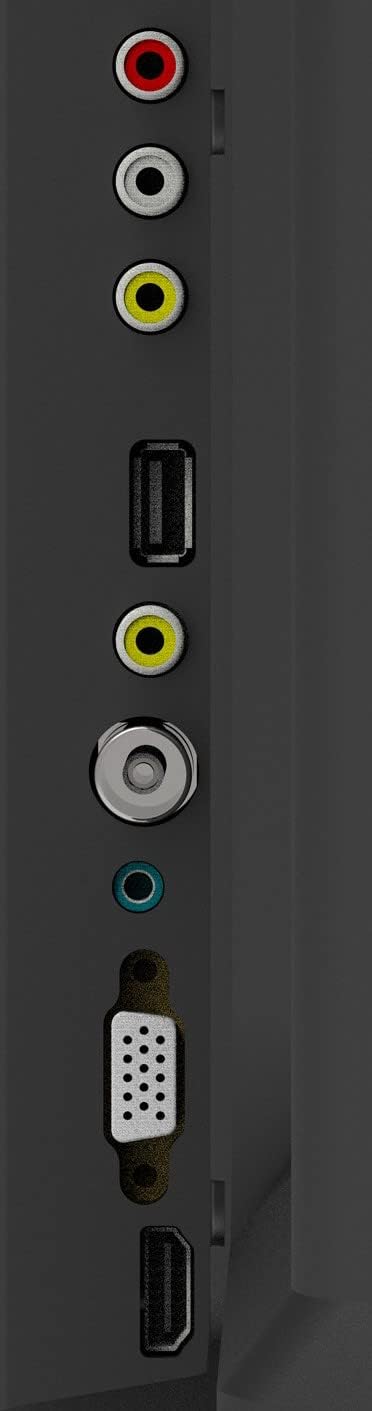
Afbeelding 1: TV-aansluitingen
- Antenne-ingang: Connect your aerial or cable TV signal to this port.
- HDMI-ingangen (2): Connect devices such as Blu-ray players, game consoles, or set-top boxes. One HDMI input supports Audio Return Channel (ARC).
- VGA-ingang: Sluit een computer aan om als monitor te gebruiken.
- Mini Component / AV Input: Connect older devices using component (YPbPr) or composite (AV) cables.
- USB Inputs (2): Sluit USB-opslagapparaten aan om media af te spelen.
- Koptelefoon aansluiting: Sluit een koptelefoon aan voor privé luisteren.
5. In bedrijf
5.1 afstandsbediening
The included remote control allows you to operate all functions of your TV. Insert two AAA batteries (not included) into the battery compartment, ensuring correct polarity.

Afbeelding 2: Indeling van de afstandsbediening
- STROOM: Hiermee zet u de televisie aan of uit.
- INVOER: Selects the input source (HDMI, AV, VGA, etc.).
- Cijfertoetsen (0-9): Selecteer rechtstreeks kanalen.
- VOL +/-: Past het volumeniveau aan.
- PROG +/-: Verandert kanalen.
- MENU: Geeft toegang tot het hoofdmenu.
- Navigatieknoppen (omhoog/omlaag/links/rechts): Navigeer door menu-opties.
- BINNENKOMEN: Bevestigt selecties.
- UITGANG: Verlaat het huidige menu of de huidige functie.
- INFORMATIE: Geeft kanaalinformatie weer.
- DEMPEN: Dempt of heft het geluid op.
5.2 Eerste installatie
Upon first power-on, the TV will guide you through an initial setup process. This typically includes selecting your language, country, and performing an automatic channel scan for available broadcasts.
5.3 Basisfuncties
- Aan/uit: Press the POWER button on the remote or the TV's control panel.
- Selectie ingangsbron: Press the INPUT button repeatedly to cycle through available input sources, or use the menu to select.
- Volume aanpassen: Gebruik de VOL +/- knoppen.
- Kanaalselectie: Use the PROG +/- buttons or the number buttons.
5.4 Menunavigatie
Press the MENU button to access the main menu. Use the navigation buttons to move between options and ENTER to select. Adjust settings such as picture mode, sound mode, and channel settings. Press EXIT to close the menu.
5.5 Audiomodi
The TV features 5 audio modes to optimize sound for different content types:
- Standaard
- Muziek
- Film
- Sport
- User (customizable settings)
6. Onderhoud
6.1 Het scherm schoonmaken
Veeg het scherm voorzichtig af met een zachte, pluisvrije doek. Voor hardnekkige vlekken, lichtjes afnemen.ampen the cloth with water or a specialized screen cleaner (ensure it's safe for LED screens) and wipe gently. Do not apply pressure or use abrasive materials.
6.2 De kast schoonmaken
Wipe the TV cabinet with a soft, dry cloth. Avoid using strong detergents or solvents, as they may damage the finish.
7. Probleemoplossing
Als u problemen ondervindt met uw tv, raadpleeg dan de volgende veelvoorkomende problemen en oplossingen:
| Probleem | Mogelijke oplossing |
|---|---|
| Geen stroom | Controleer of het netsnoer goed in de tv en het stopcontact zit. Zorg ervoor dat het stopcontact werkt. |
| Geen beeld, maar wel geluid | Controleer of de juiste invoerbron is geselecteerd. Controleer de kabelaansluitingen naar externe apparaten. |
| Geen geluid, maar wel beeld | Check the volume level and ensure the TV is not muted. Verify audio settings in the menu. |
| Afstandsbediening werkt niet | Vervang de batterijen. Zorg ervoor dat er geen obstakels zijn tussen de afstandsbediening en de IR-sensor van de tv. |
| Slechte beeldkwaliteit | Check antenna connection or source device cables. Adjust picture settings in the TV menu. |
8. Specificaties
Detailed specifications for the Konka KE32MS314 TV:
| Functie | Detail |
|---|---|
| Modelnummer | KE32MS314 |
| Schermgrootte | 32 inch |
| Weergavetechnologie | LED |
| Oplossing | 720p (HD) |
| Vernieuwingsfrequentie | 60Hz |
| Viewhoek: | 178 graden |
| Audiosysteem | 2 x 8W Stereophonic |
| Audiomodi | Standard, Music, Movie, Sport, User |
| Connectiviteit | 2 HDMI (including ARC), 2 USB, VGA, Mini Component/AV, Antenna Input, Headphone Jack, Ethernet |
| Speciale kenmerken | Flat Display, D3 Image Noise Reduction, Automatic Volume Level Maintenance |
| Ondersteunde internetdiensten | YouTube |
| Productafmetingen (met standaard) | 73.2B x 20.7D x 47.9H cm (ongeveer) |
| Productgewicht | 4.5 kg |
9. Garantie en ondersteuning
For warranty information and technical support, please refer to the warranty card included with your product or contact Konka customer service. Keep your purchase receipt as proof of purchase for warranty claims.