
ProForm 325 CSX
ProForm 325 CSX Exercise Bike User Manual
Model: 325 CSX
Invoering
This manual provides essential information for the safe and effective use, assembly, operation, and maintenance of your ProForm 325 CSX Exercise Bike. Please read this manual thoroughly before using the equipment and retain it for future reference.

Image: The ProForm 325 CSX Exercise Bike, showcasing its full design including the console, seat, and pedals.
Opstelling en montage
Before assembly, ensure all parts are present and undamaged. Assembly typically requires two people. Refer to the included assembly guide for detailed, step-by-step instructions and diagrams.
Uitpakken en plaatsen:
- Haal alle onderdelen voorzichtig uit de verpakking.
- Place the exercise bike on a level surface with adequate clearance around it for safe operation and maintenance.
- Ensure the area is free from obstructions and has proper ventilation.
Eerste montagestappen:
- Bevestig de voorste en achterste stabilisatoren aan het hoofdframe.
- Secure the seat post and seat assembly.
- Install the console mast and handlebars.
- Attach the pedals, ensuring they are tightened securely (left pedal is reverse-threaded).
- Connect any necessary wiring for the console.
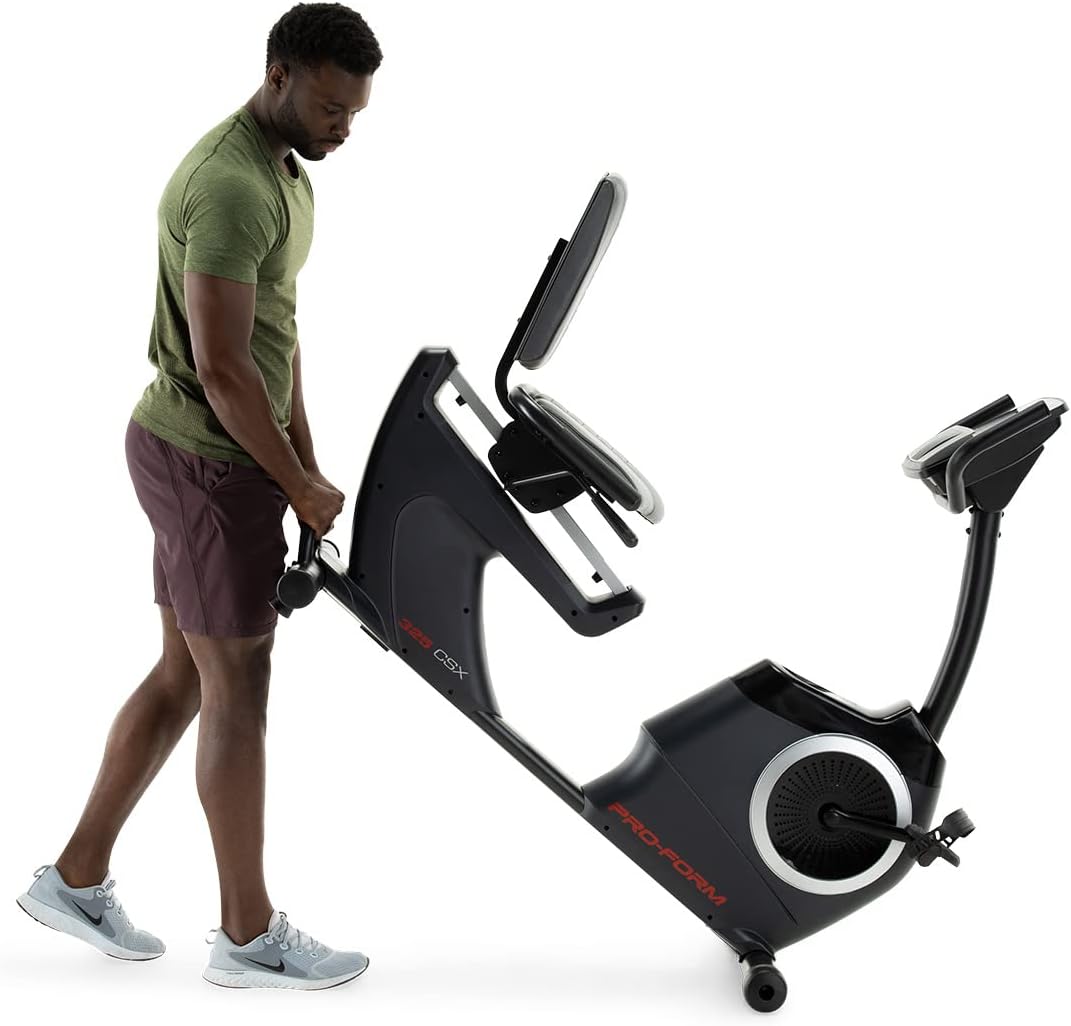
Image: Moving the exercise bike. The bike features transport wheels for easier relocation after assembly.
Gebruiksaanwijzing
De stoel afstellen:
The cushioned seat is adjustable to accommodate various user heights. To adjust, locate the adjustment lever beneath the seat. Pull the lever, slide the seat to the desired position, and release the lever to lock it in place. Ensure the seat is securely locked before use.

Image: A user demonstrating the correct riding position on the ProForm 325 CSX Exercise Bike, highlighting the adjustable seat.
Console Features and iFIT Connectivity:
The 5-inch high-contrast display provides real-time workout statistics. The bike features 22 digital resistance levels, allowing for precise intensity control. The console also supports iFIT connectivity for interactive workouts.
- Inschakelen: Press any button on the console or begin pedaling to activate the display.
- Weerstandsaanpassing: Use the '+' and '-' buttons on the console to increase or decrease resistance. Quick resistance buttons (2, 4, 6, etc.) are also available.
- Trainingsprogramma's: Select from 24 built-in workout programs. Refer to the console manual for navigation.
- iFIT Connection: Connect your own device (tablet/smartphone) via Bluetooth to access iFIT's global outdoor workouts and hands-free intensity adjustments. A 30-day iFIT membership is typically included with purchase.

Afbeelding: Gedetailleerd view of the console, showing the digital display, resistance controls, and integrated fan.

Image: A user engaging with the iFIT application on a tablet, demonstrating the bike's connectivity features.

Image: An illustration of the iFIT connection, highlighting how a personal device can enhance the workout experience.
Onderhoud
Regelmatig onderhoud zorgt ervoor dat uw hometrainer lang meegaat en optimaal presteert.
- Schoonmaak: Veeg de fiets na elk gebruik schoon met een reinigingsmiddel.amp Gebruik een doek om zweet en stof te verwijderen. Vermijd schurende schoonmaakmiddelen.
- Inspecties: Periodically check all bolts and nuts for tightness. Retighten as necessary.
- pedalen: Zorg ervoor dat de pedalen goed vastzitten en vrij kunnen draaien.
- Smering: The internal magnetic resistance system and belt drive are generally maintenance-free and do not require lubrication.
Probleemoplossing
| Probleem | Mogelijke oorzaak | Oplossing |
|---|---|---|
| De console geeft geen gegevens weer. | Loose wire connection; batteries low/dead (if applicable). | Check all console wire connections. Replace console batteries if battery-powered. |
| Weerstand verandert niet. | Loose connection to resistance motor; console malfunction. | Ensure all connections are secure. If using iFIT, ensure the app is properly connected and controlling the bike. |
| Ongebruikelijk geluid tijdens bedrijf. | Loose hardware; component friction. | Inspect all bolts and nuts and tighten any loose ones. Ensure no parts are rubbing. |
| De pedalen voelen los of wiebelig aan. | Pedals not tightened sufficiently. | Retighten pedals. Remember the left pedal is reverse-threaded. |
Specificaties
| Functie | Detail |
|---|---|
| Modelnaam | 325 CSX |
| Merk | ProForm |
| Kleur | Zwart |
| Weerstandsmechanisme | Magnetisch |
| Aantal weerstandsniveaus | 22 Digital Levels |
| Aandrijfsysteem | Riem |
| Maximaal gebruikersgewicht | 300 pond (ongeveer 136 kg) |
| Artikelgewicht | 50.8 kilogram (ongeveer 112 lbs) |
| Materiaal | Gelegeerd staal |
| Energiebron | Pedal-powered (non-electric for main operation, console may use batteries) |
| Aanbevolen gebruik | Binnen |
| Consoleweergave | 5-inch High-Contrast Display |
| Connectiviteit | iFIT (Bluetooth compatible) |
| UPC | 043619106961 |
| Fabrikant | iFIT Gezondheid & Fitness |
Garantie en ondersteuning
ProForm products are manufactured with high-quality materials and craftsmanship. For specific warranty details, please refer to the warranty card included with your product or visit the official ProForm website. Warranty coverage typically includes the frame, parts, and labor for a specified period from the date of purchase.
For technical assistance, replacement parts, or customer service inquiries, please contact ProForm customer support. Have your model number (325 CSX) and serial number ready when contacting support.
Je vindt mogelijk ook nuttige informatie en veelgestelde vragen op de website. ProForm Store on Amazon of de officiële vertegenwoordiger van de fabrikant webplaats.
Ask a question about this manual
Ask about setup, troubleshooting, compatibility, parts, safety, or missing instructions. Manuals+ will review the question and use this page’s manual context to help answer it.