
1. Inleiding
The Sunshine DT-17N Digital Multimeter is a versatile and reliable tool designed for accurate electrical measurements. It is particularly suitable for phone repair technicians and general electronics work, capable of measuring various electrical parameters including voltage, current, resistance, capacitance, and temperature. Its compact design and user-friendly features make it an essential tool for diagnosing and repairing electronic devices.

Figure 1: The Sunshine DT-17N Digital Multimeter, demonstrating its compact size for portability.
2. Veiligheidsinformatie
To ensure safe operation and prevent damage to the meter, please read and follow all safety instructions carefully. This multimeter features double insulation protection for enhanced user safety.
- Always ensure the test leads are in good condition and properly connected before taking measurements.
- Niet toepassen voltage or current that exceeds the maximum rated values for each range.
- Gebruik de multimeter nooit als deze beschadigd lijkt of als de meetsnoeren gerafeld zijn.
- Wees voorzichtig bij het werken met volume.tagboven 30V AC RMS, 42V piek of 60V DC, aangezien deze een schokgevaar opleveren.
- Schakel altijd de stroom naar het circuit uit en ontlaad hoogspanningsbatterijen.tage condensatoren voordat u weerstand, continuïteit of diodes meet.
- Vervang de batterij onmiddellijk wanneer de batterij-indicator verschijnt om nauwkeurige metingen te garanderen.
3. Product voorbijview
3.1. Onderdelen van een multimeter

Figuur 2: Voorzijde view of the DT-17N Multimeter, highlighting its main display and controls.
3.2. Weergavefuncties
The DT-17N features a large LCD display with a backlight, ensuring clear readability in various lighting conditions.

Figure 3: The multimeter's LCD display with its backlight feature, improving visibility in low-light environments.
- Groot LCD-scherm: Provides clear numerical readings.
- Achtergrondverlichting: Improves visibility in dark or low-light conditions. Activated by pressing and holding the HOLD button.
- Meet eenheid: Displays the appropriate unit (e.g., V, A, Ω, °C/°F).
- Batterijstatus: Geeft het huidige batterijniveau aan.
- Automatic Polarity Display: Shows positive or negative polarity automatically.
3.3. Controls and Input Ports
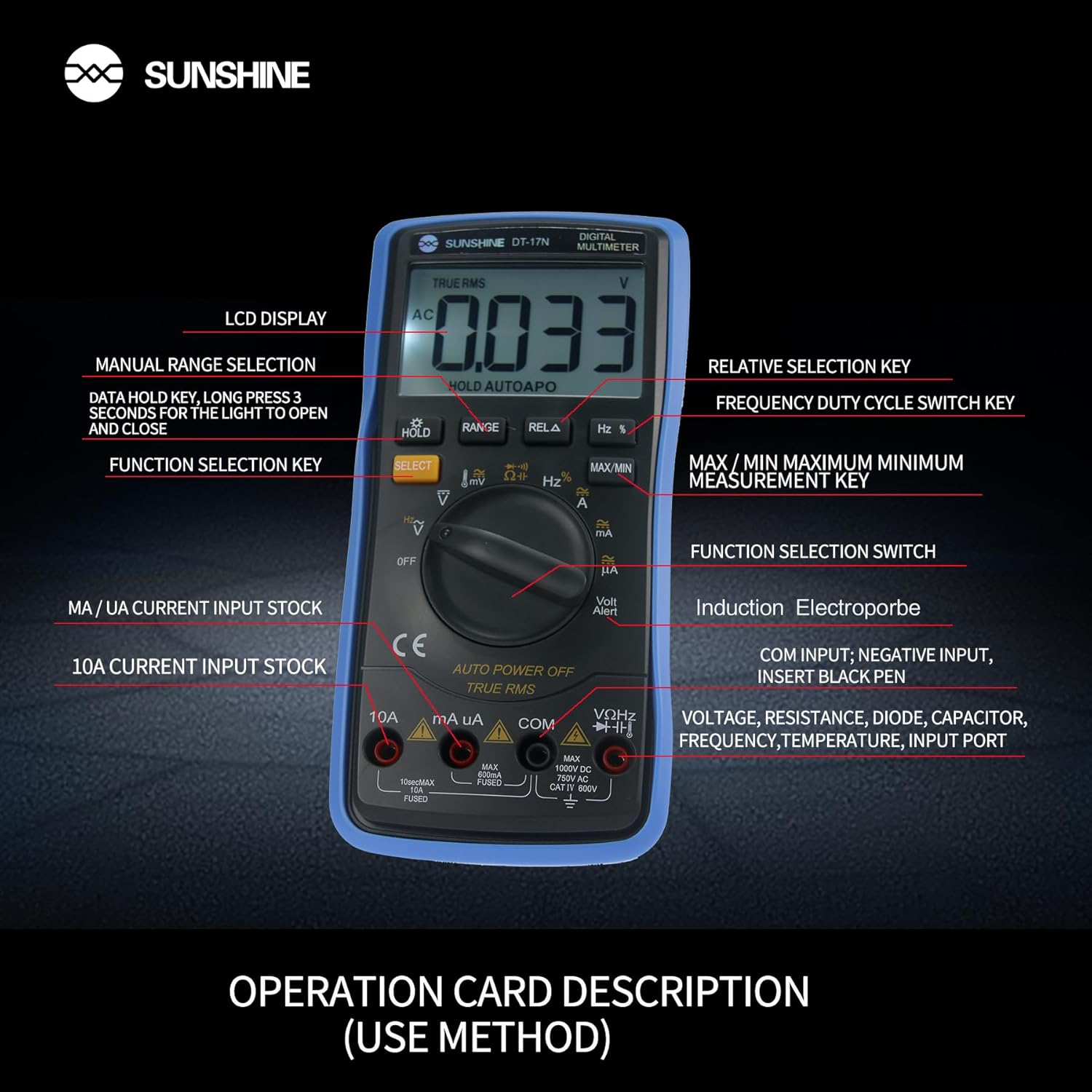
Afbeelding 4: Gedetailleerd view of the multimeter's controls and input ports with their respective functions.
- Draaifunctieschakelaar: Wordt gebruikt om de gewenste meetfunctie te selecteren (bijv. Vol).tage, Current, Resistance, Temperature).
- SELECT-knop: Toggles between different measurement modes within a single rotary switch position (e.g., AC/DC voltage, Diode/Continuïteit).
- Pauzeknop: Freezes the current reading on the display. Press and hold to activate/deactivate the backlight.
- RANGE-knop: Allows manual selection of measurement ranges, overriding the automatic ranging feature.
- RELA Button (Relative Selection Key): Meet het verschil tussen een opgeslagen referentiewaarde en de huidige meting.
- Hz % Button (Frequency Duty Cycle Switch Key): Schakelt tussen frequentie- en duty cycle-metingen.
- MAX/MIN-knop: Geeft de maximaal of minimaal gemeten waarde weer tijdens een meetsessie.
- VΩHz Input Port: Connect the red test lead for voltage, resistance, frequency, capacitance, diode, and temperature measurements.
- COM-ingangspoort: Sluit bij alle metingen de zwarte meetkabel (aarde) aan.
- mA/uA Input Port: Connect the red test lead for measuring small currents (milliamperes en microamper).
- 10A Input Port: Connect the red test lead for measuring large currents (up to 10 Amper).
- Volt Alert (NCV): Contactloos voltage detection feature.
4. Instellen
4.1. Batterij installatie
The DT-17N is battery-powered. To install or replace the battery:
- Zorg ervoor dat de multimeter is uitgeschakeld.
- Zoek het batterijklepje aan de achterkant van het apparaat.
- Draai de bevestigingsschroef/schroeven los en verwijder de afdekking.
- Insert the new battery, observing correct polarity (+ and -).
- Plaats het deksel van het batterijcompartiment terug en bevestig het met de schroef/schroeven.
4.2. Testkabels aansluiten
Always connect the black test lead to the COM input jack. Connect the red test lead to the appropriate input jack based on the measurement you intend to perform:
- voor Voltage, Resistance, Capacitance, Frequency, Diode, and Temperature measurements: Connect the red test lead to the VΩHz krik.
- For Current measurements (mA/uA): Connect the red test lead to the mA/uA krik.
- For High Current measurements (10A): Connect the red test lead to the 10A krik.
5. Gebruiksaanwijzing
The Sunshine DT-17N features automatic identification for most ranges, simplifying operation. Use the rotary switch to select the primary function and the SELECT button to toggle sub-functions.
5.1. Volume metentage (AC/DC)
- Draai de draaischakelaar naar de V positie.
- Druk indien nodig op de SELECT button to toggle between AC (~) and DC (—) voltage.
- Sluit het zwarte testsnoer aan op de COM Jack en de rode test leiden tot de VΩHz krik.
- Sluit de testprobes parallel aan op het circuit of het onderdeel dat u wilt meten.
- Lees het deeltage-waarde op het display.

Figure 5: The multimeter showing a DC millivolt measurement on its display.
5.2. Stroom meten (wisselstroom/gelijkstroom)
Voorzichtigheid: Never connect the multimeter in parallel when measuring current, as this can damage the meter and the circuit. Always connect in series.
- Draai de draaischakelaar naar de mA/uA or 10A positie, afhankelijk van de verwachte stroomsterkte.
- Druk indien nodig op de SELECT button to toggle between AC (~) and DC (—) current.
- Sluit het zwarte testsnoer aan op de COM jack. Sluit de rode testkabel aan op de mA/uA or 10A jack accordingly.
- Open the circuit and connect the test probes in series with the load.
- Lees de huidige waarde af op het display.
5.3. Weerstand meten
- Draai de draaischakelaar naar de Ω positie.
- Sluit het zwarte testsnoer aan op de COM Jack en de rode test leiden tot de VΩHz krik.
- Zorg ervoor dat het circuit spanningsloos is en dat alle condensatoren ontladen zijn.
- Sluit de testprobes aan op het onderdeel om de weerstand ervan te meten.
- Lees de weerstandswaarde af op het display.
5.4. Capaciteit meten
- Draai de draaischakelaar naar de Capaciteit symbol (often shared with diode/continuity).
- Druk op de SELECT button until the capacitance mode is active.
- Sluit het zwarte testsnoer aan op de COM Jack en de rode test leiden tot de VΩHz krik.
- Zorg ervoor dat de condensator volledig ontladen is voordat u de testprobes aansluit.
- Verbind de testsondes over de condensator.
- Lees de capaciteitswaarde af op het display.
5.5. Measuring Frequency / Duty Cycle
- Draai de draaischakelaar naar de Hz% positie.
- Druk op de Hz% button to toggle between frequency (Hz) and duty cycle (%).
- Sluit het zwarte testsnoer aan op de COM Jack en de rode test leiden tot de VΩHz krik.
- Sluit de testprobes parallel aan op de signaalbron.
- Lees de frequentie- of duty cycle-waarde af op het display.
5.6. Temperatuurmeting:
The DT-17N can measure temperature using a K-type thermocouple (not always included, check package contents).

Afbeelding 6: Example of temperature measurement using the DT-17N Multimeter with a thermocouple.
- Draai de draaischakelaar naar de ° C / ° F positie.
- Druk indien nodig op de SELECT button to choose between Celsius or Fahrenheit.
- Connect the K-type thermocouple to the VΩHz En COM aansluitingen, let op de polariteit.
- Place the thermocouple tip on or in the object whose temperature you wish to measure.
- Lees de temperatuurwaarde af op het display.
5.7. Diodetest en continuïteit
- Draai de draaischakelaar naar de Diode/Continuïteit symbool.
- Druk op de SELECT knop om te schakelen tussen Diodetest en Continuïteitstest.
- Sluit het zwarte testsnoer aan op de COM Jack en de rode test leiden tot de VΩHz krik.
- For Diode Test: Connect the probes across the diode. The display will show the forward voltage-drop. Draai de meetpennen om om te controleren op een onderbreking.
- For Continuity Test: Connect the probes across the circuit or component. A beep indicates continuity (low resistance).
5.8. Contactloos voltage (NCV) Detectie
De NCV-functie maakt detectie van wisselstroomvolume mogelijk.tage zonder direct contact met geleiders.
- Draai de draaischakelaar naar de NCV position (often indicated by a Volt Alert symbol).
- Move the top part of the multimeter near the conductor.
- De meter piept en/of er knippert een indicatielampje als het AC-volume daalt.tage wordt gedetecteerd.
5.9. Gegevens vasthouden en achtergrondverlichting
- Gegevensopslag: Druk op de UITSTEL Druk kort op de knop om de huidige waarde op het display vast te zetten. Druk nogmaals om de weergave te ontgrendelen.
- Achtergrondverlichting: Houd de UITSTEL button for approximately 3 seconds to turn the display backlight ON or OFF.
5.10. MAX/MIN Measurement
This function records the maximum and minimum values measured during a session.
- Selecteer de gewenste meetfunctie (bijv. Vol).tagen).
- Druk op de MAX/MIN button. The display will show 'MAX' and the maximum value recorded.
- Pers MAX/MIN again to cycle to 'MIN' and view the minimum value.
- Houd ingedrukt MAX/MIN om deze modus te verlaten.
6. Onderhoud
Goed onderhoud garandeert de levensduur en nauwkeurigheid van uw multimeter.
6.1. Schoonmaken
Veeg de behuizing af met advertentieamp Een doek en een mild reinigingsmiddel. Gebruik geen schuurmiddelen of oplosmiddelen. Zorg ervoor dat de meter volledig droog is voor gebruik.
6.2. Batterij vervangen
Refer to Section 4.1 for battery replacement instructions. Always use the specified battery type.
6.3. Holster Care
The multimeter is protected by a thick rubber shockproof holster, designed for durability and a non-slip grip. Keep the holster clean and free from debris.

Figure 7: The durable rubber holster provides protection and a comfortable grip for the multimeter.
7. Probleemoplossing
If you encounter issues with your DT-17N multimeter, refer to the table below for common problems and solutions.
| Probleem | Mogelijke oorzaak | Oplossing |
|---|---|---|
| Geen weergave of zwak display | Low or dead battery; Poor battery contact | Replace battery; Check battery contacts |
| Onjuiste metingen | Wrong function selected; Improper test lead connection; Damaged test leads; Out of range | Select correct function; Ensure leads are in correct jacks; Replace leads; Select higher range or check specifications |
| Geen continuïteitspiep | Circuit resistance too high; Continuity mode not selected | Ensure resistance is below threshold; Press SELECT to enter continuity mode |
| Fuse blown (for current measurements) | Overcurrent applied | Replace fuse with specified type and rating; Ensure correct current measurement procedure |
8. Specificaties
Technical specifications for the Sunshine DT-17N Digital Multimeter.
| Functie | Specificatie |
|---|---|
| Model | DT-17N |
| Meettype | Multimeter |
| Weergave | 5999 (5 5/6) counts, Automatic Polarity Display, Backlit LCD |
| Sampleng tarief | Ongeveer 3 keer per seconde |
| Energiebron | Op batterijen |
| Minimaal bedrijfsvolumetage | 3 Volt (DC) |
| Temperatuurmeetbereik | 0°C tot 1000°C (32°F tot 1832°F) |
| Induction Electroprobe Function | Yes (NCV) |
| Dubbele integrale A/D-conversie | Ja |
| Artikelafmetingen | 5.51 x 2.76 x 1.18 inch |
| Artikelgewicht | 0.55 kilogram |
| Kleur | Blauw |
9. Garantie en ondersteuning
9.1. Garantie-informatie
This product comes with a warranty of 3 maanden vanaf de aankoopdatumBewaar uw aankoopbewijs voor garantieclaims. De garantie dekt fabricagefouten bij normaal gebruik.
9.2. Klantenservice
For technical assistance or inquiries regarding your Sunshine DT-17N Digital Multimeter, please contact your retailer or the manufacturer's customer service department. Refer to your purchase documentation for specific contact details.