
Invoering
Thank you for choosing the Optex 990047 Indoor/Outdoor Wireless Digital Thermometer. This device provides accurate temperature readings for both your indoor environment and an outdoor location via a wireless sensor. Please read this manual carefully before use to ensure proper operation and to maximize the lifespan of your thermometer.
Inhoud van het pakket
- 1 x Optex 990047 Main Display Unit
- 1 x Draadloze buitensensor
- 1 x Gebruikershandleiding
- (Batteries not included, typically requires AAA or AA batteries for both units)
Product voorbijview
Familiarize yourself with the components of your Optex thermometer.
Main Display Unit (Front)

Afbeelding: Voorkant view of the Optex 990047 main display unit. The digital screen shows indoor and outdoor temperatures, along with high/low records and trend indicators. Below the screen are three buttons: 'CH', '°C/°F', and 'CLEAR'.
- Digitaal beeld: Shows indoor temperature (top) and outdoor temperature (bottom), along with HI/LO records and temperature trend arrows.
- CH-knop: Selects the wireless channel (if multiple sensors are used) or initiates sensor search.
- °C/°F-toets: Schakelt tussen de temperatuureenheden Celsius en Fahrenheit.
- CLEAR-knop: Clears the recorded HI/LO temperatures.
Main Display Unit (Back)

Afbeelding: Rug view of the Optex 990047 main display unit. It features a battery compartment cover and an integrated kickstand for tabletop placement, as well as a hanging hole.
- Batterijcompartiment: Houses the batteries for the main unit.
- Standaard: Hiermee kan het apparaat rechtop op een vlak oppervlak staan.
- Muurbevestigingsgat: For hanging the unit on a wall.
Draadloze buitensensor
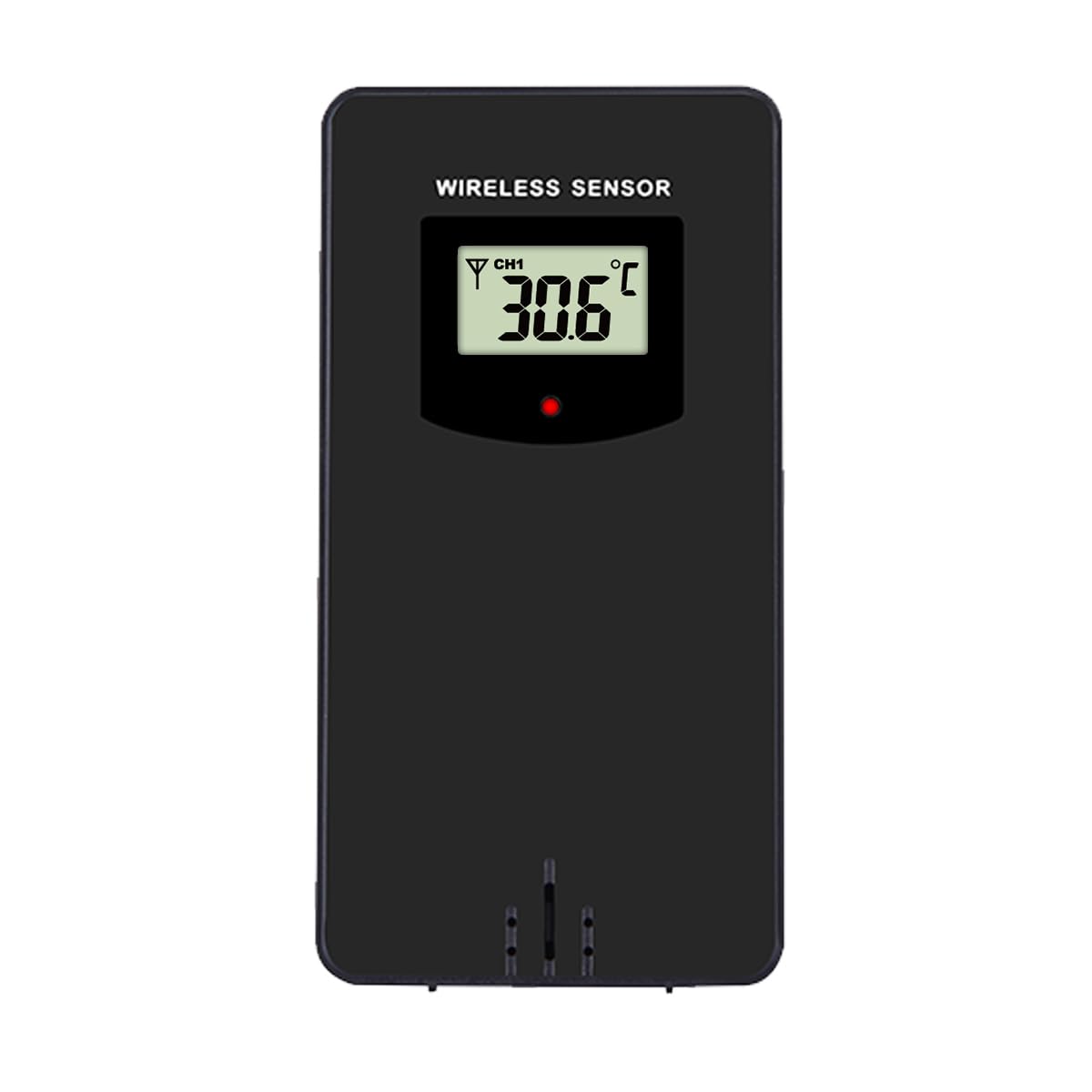
Afbeelding: Voorkant view of the Optex wireless outdoor temperature sensor. It has a small digital display showing the current temperature and channel, along with a red indicator light and a battery compartment on the back.
- Temperatuursensor: Measures the outdoor temperature.
- Transmissie-indicator: A small LED light that flashes when data is transmitted.
- Batterijcompartiment: Houses the batteries for the outdoor sensor.
- Kanaal wisselen: (Typically inside the battery compartment) Allows selection of a specific channel (1, 2, or 3) if using multiple sensors.
Instellen
- Plaats de batterijen in de buitensensor:
- Open het batterijvak aan de achterkant van de draadloze sensor.
- Plaats 2 AAA-batterijen (niet meegeleverd) volgens de polariteitsmarkeringen (+/-).
- Sluit het batterijvak.
- Note: If there is a channel switch inside the compartment, ensure it is set to Channel 1 for initial setup.
- Install Batteries in the Main Display Unit:
- Open het batterijvak aan de achterkant van het hoofddisplay.
- Plaats 2 AAA-batterijen (niet meegeleverd) volgens de polariteitsmarkeringen (+/-).
- Sluit het batterijvak.
- Het display licht op en begint te zoeken naar de buitensensor.
- De sensor koppelen:
- Place the outdoor sensor and the main display unit close to each other during the initial setup.
- The main unit should automatically detect and connect to the outdoor sensor within a few minutes. The outdoor temperature will appear on the display.
- If the outdoor temperature does not appear, press and hold the "CH" button on the main unit for 3 seconds to initiate a manual search for the sensor.
- Plaatsing van de buitensensor:
- Choose a shaded location for the outdoor sensor, away from direct sunlight and rain, to ensure accurate readings.
- Avoid placing it near heat sources (e.g., vents, appliances) or metal objects that could interfere with the wireless signal.
- The maximum wireless range is approximately 30 meters (100 feet) in open air. Walls and obstacles will reduce this range.
Bediening
Reading Temperatures
The main display unit shows the indoor temperature at the top and the outdoor temperature (from the wireless sensor) at the bottom. Both displays show the current temperature, along with the recorded high (HI) and low (LO) temperatures for the day, and a trend indicator.
Schakeltemperatuureenheden (°C/°F)
Druk op de ° C / ° F button once to switch between Celsius and Fahrenheit temperature units.
Clearing HI/LO Records
The thermometer automatically records the highest and lowest temperatures since the last reset. To clear these records and start new ones, press the DUIDELIJK button once. The HI/LO values will reset to the current temperature.
Kanaalselectie (voor meerdere sensoren)
If you are using multiple outdoor sensors (sold separately), you can switch between their readings by pressing the CH button. Each press will cycle through the available channels (e.g., CH1, CH2, CH3). Ensure each sensor is set to a unique channel via its internal switch.
Onderhoud
- Schoonmaak: Veeg de units af met een zachte, damp doek. Gebruik geen schurende reinigingsmiddelen of oplosmiddelen.
- Batterij vervangen: Replace batteries in both the main unit and the outdoor sensor when the low battery indicator appears on the display. Always replace all batteries at the same time with new ones of the same type.
- Opslag: If storing the thermometer for an extended period, remove all batteries to prevent leakage. Store in a cool, dry place.
Probleemoplossing
| Probleem | Oplossing |
|---|---|
| No outdoor temperature reading / "---" displayed. |
|
| Onnauwkeurige temperatuurmetingen. |
|
| Het scherm is donker of leeg. |
|
Specificaties
- Model: Optex 990047
- Weergavetype: Digitale LCD
- Binnentemperatuurbereik: -10°C tot 50°C (14°F tot 122°F) (Estimated, based on typical indoor thermometers)
- Buitentemperatuurbereik: -40°C tot 60°C (-40°F tot 140°F) (Estimated, based on typical outdoor sensors)
- Temperatuurnauwkeurigheid: +/- 1°C (+/- 2°F) (Geschatte)
- Draadloos bereik: Tot 30 meter (100 voet) in de open lucht (Geschatte)
- Stroombron (hoofdeenheid): 2 x AAA 1.5V batterijen (niet inbegrepen)
- Voedingsbron (buitensensor): 2 x AAA 1.5V batterijen (niet inbegrepen)
- Materiaal: Plastic
- Kleur: Zwart
Veiligheidsinformatie
- Stel het hoofdapparaat of de sensor niet bloot aan extreme temperaturen, direct zonlicht of overmatige vochtigheid.
- Do not immerse the units in water. The outdoor sensor is weather-resistant but not waterproof.
- Do not attempt to disassemble or repair the units. This will void the warranty.
- Gooi oude batterijen op een verantwoorde manier weg, volgens de plaatselijke voorschriften.
- Houd batterijen buiten bereik van kinderen.
Garantie en ondersteuning
Optex products are designed for reliability and performance. For warranty information or technical support, please refer to the contact details provided with your purchase or visit the official Optex website. Houd uw modelnummer (990047) bij de hand wanneer u contact opneemt met de ondersteuning.