
Invoering
This manual provides comprehensive instructions for the use and care of your new Remote brand compatible remote control. This remote is specifically designed to function seamlessly with Nordmende ND40S3000J SMART televisions, offering full functionality without the need for complex programming.
Please read this manual carefully to ensure proper setup and operation of your remote control.
Instellen
1. Batterij installatie
The remote control requires alkaline batteries (not included). Follow these steps to install them:
- Zoek het deksel van het batterijcompartiment aan de achterkant van de afstandsbediening.
- Schuif het deksel naar beneden of druk op de vergrendeling om het te openen.
- Plaats twee nieuwe alkalinebatterijen en zorg ervoor dat de positieve (+) en negatieve (-) polen overeenkomen met de schema's in het batterijcompartiment.
- Plaats het batterijklepje terug en schuif het terug totdat het goed vastklikt.
Belangrijk: Gebruik altijd nieuwe alkalinebatterijen voor optimale prestaties. Gebruik geen oude en nieuwe batterijen, of verschillende soorten batterijen door elkaar.
2. Eerste gebruik (geen programmering vereist)
This compatible remote control is pre-programmed for the Nordmende ND40S3000J SMART TV model. No additional programming or setup steps are required. Once batteries are installed, the remote is ready for immediate use with your television.
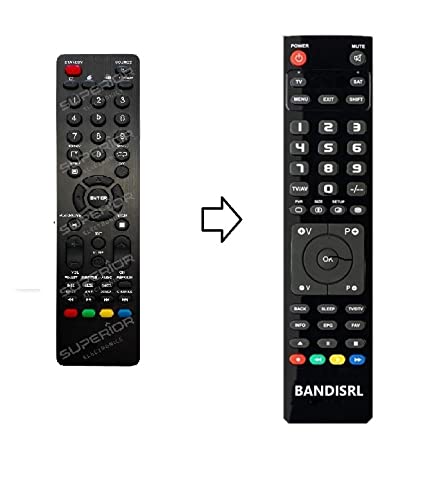
Figuur 1: The Remote compatible remote control. This image displays the layout of the buttons and the overall design of the remote, ready for use with your Nordmende TV.
Gebruiksaanwijzing
To operate your Nordmende ND40S3000J SMART TV with this remote control, point the remote directly at the television's infrared receiver. Ensure there are no obstructions between the remote and the TV.
- Aan/uit-knop: Druk op om de tv aan of uit te zetten.
- Volume omhoog/omlaag: Past het audiovolume aan.
- Kanaal omhoog/omlaag: Verandert sequentieel van tv-kanaal.
- Cijfertoetsen (0-9): Selecteer rechtstreeks tv-kanalen.
- Navigatieknoppen (pijltoetsen, OK): Navigeer door menu's en selecteer opties.
- Smart TV-knoppen: Access specific Smart TV functions or applications (e.g., Home, Apps, Netflix, YouTube, etc., depending on the remote's layout and TV's features).
- Stilteknop: Schakelt het geluid van de tv uit.
- Bron-/invoerknop: Schakelt tussen de beschikbare ingangsbronnen (HDMI, AV, enz.).
Refer to your Nordmende TV's original user manual for specific details on its menu structure and Smart TV functionalities.
Onderhoud
De afstandsbediening schoonmaken
Gebruik een zachte, droge doek om uw afstandsbediening schoon te maken. Voor hardnekkig vuil, lichtjesampen the cloth with water. Do not use abrasive cleaners, alcohol, or solvents, as these can damage the remote's surface and internal components.
Batterij vervangen
Replace batteries when the remote control's response becomes sluggish or stops working. Always replace both batteries simultaneously with new alkaline batteries. Dispose of used batteries according to local regulations.
Opslag
Bewaar de afstandsbediening op een koele, droge plaats, uit de buurt van direct zonlicht en extreme temperaturen. Als u de afstandsbediening langere tijd niet gebruikt, is het raadzaam de batterijen te verwijderen om lekkage te voorkomen.
Probleemoplossing
- De afstandsbediening werkt niet:
- Controleer of de batterijen correct zijn geplaatst, met de juiste polariteit (+/-).
- Replace the batteries with new alkaline batteries.
- Zorg ervoor dat er zich geen obstakels bevinden tussen de afstandsbediening en de infraroodontvanger van de tv.
- Zorg ervoor dat u de afstandsbediening rechtstreeks op de tv richt.
- Controleer of de tv aan staat.
- Some buttons are not responding:
- This remote is designed for the Nordmende ND40S3000J SMART TV. If you are using it with a different model, some advanced functions may not be compatible.
- Ensure the buttons are clean and free from debris.
- TV responds intermittently:
- De batterijen zijn mogelijk bijna leeg. Vervang ze.
- Ensure a clear line of sight to the TV's infrared sensor.
- Avoid strong light sources (like direct sunlight) that might interfere with the infrared signal.
Als de stappen voor probleemoplossing het probleem niet verhelpen, raadpleeg dan de sectie Ondersteuning.
Specificaties
| Merk: | Remote (Manufacturer: Bandisrl) |
| Compatibele apparaten: | Nordmende ND40S3000J SMART Television |
| Connectiviteitstechnologie: | Infrarood (IR) |
| Speciale eigenschap: | Geen programmering vereist |
| Batterijtype: | Alkalisch |
| Inclusief batterijen: | Nee |
| Kleur: | Zwart |
| Aantal knoppen: | 25 |
| Type controller: | Knopbediening |
Garantie en ondersteuning
Garantie-informatie
Specific warranty details for this compatible remote control are not provided in this manual. Please refer to the purchase documentation or contact the seller/manufacturer (Bandisrl) for information regarding warranty coverage and terms.
Klantenservice
For further assistance, technical support, or inquiries regarding compatibility with other TV models, please contact the manufacturer, Bandisrl. Contact information can typically be found on the product packaging or the seller's webplaats.
If you own a different TV model than the Nordmende ND40S3000J SMART, it is recommended to contact Bandisrl to confirm compatibility before purchase or use.