
1. Product voorbijview
De WORKPRO 6.5AMP 850W Corded Electric Jig Saw is a versatile power tool designed for precise cutting of various materials, including wood, metal, and plastic. It features a powerful motor, variable speed control, orbital settings, and a tool-free blade change system for enhanced efficiency and user convenience.

Figure 1: WORKPRO 6.5AMP 850W Corded Electric Jig Saw and included accessories.
2. Veiligheidsinformatie
Geef altijd prioriteit aan veiligheid bij het gebruik van elektrisch gereedschap. Lees en begrijp alle veiligheidswaarschuwingen, instructies, illustraties en specificaties die bij dit elektrische gereedschap worden geleverd. Het niet opvolgen van alle onderstaande instructies kan leiden tot een elektrische schok, brand en/of ernstig letsel.
- Veiligheid werkgebied: Houd uw werkgebied schoon en goed verlicht. Rommelige of donkere gebieden nodigen uit tot ongelukken.
- Elektrische veiligheid: Stekkers van elektrisch gereedschap moeten in het stopcontact passen. Wijzig de stekker nooit op enigerlei wijze. Vermijd lichamelijk contact met geaarde oppervlakken.
- Persoonlijke veiligheid: Always wear eye protection, dust mask, non-skid safety shoes, hard hat, or hearing protection as appropriate for the conditions.
- Gebruik en onderhoud van gereedschap: Forceer het elektrische gereedschap niet. Gebruik het juiste elektrische gereedschap voor uw toepassing. Haal de stekker uit het stopcontact voordat u aanpassingen uitvoert, accessoires verwisselt of elektrisch gereedschap opbergt.
- Onderhoud: Onderhoud elektrisch gereedschap en accessoires. Controleer op verkeerde uitlijning of vastlopen van bewegende onderdelen, breuk van onderdelen en andere omstandigheden die de werking van het elektrisch gereedschap kunnen beïnvloeden.
For detailed safety guidelines, refer to the complete user manual provided in the product packaging.
3. Inhoud van het pakket
Upon opening the package, ensure all items are present and in good condition. The WORKPRO 6.5AMP 850W Corded Electric Jig Saw kit includes:
- 1 × WORKPRO Jigsaw
- 7 × Replaceable T-shank blades (1 for metal, 6 for wood)
- 1 × Scale Ruler
- 1 × Dust Exhaust Pipe
- 1 × Gebruikershandleiding
- 1 × Allen Wrench
Video 1: Uitpakken en meerview of the WORKPRO 6.5AMP 850W Corded Electric Jig Saw and its included components.
4. Producteigenschappen
4.1 Hoogwaardige motor
The jigsaw is equipped with a powerful 6.5 amp motor, delivering a top speed of 3000 Strokes Per Minute (SPM). This high power allows for faster cutting and helps prevent material burn. The 4/5-inch stroke length ensures efficient material removal with each cut. It can cut iron plate up to 10mm and wood board up to 100mm.
4.2 Bevel Cutting & Orbital Settings
The adjustable bottom plate allows for bevel cuts up to ±45 degrees, providing flexibility for various cutting angles. Four orbital settings enable adjustment of cut aggressiveness, suitable for different materials and cutting speeds. Higher orbital settings are ideal for softer materials and faster cuts, while lower settings are for harder materials and slower, more precise cuts.

Figure 2: The adjustable base plate allows for precise ±45° bevel cutting.

Figure 3: Four-position orbital action for varied cutting needs across different materials.
4.3 Tool-less Blade Change & LED Light
Blade changes are quick and easy with the tool-less system; simply press the replacement button. The integrated LED light illuminates the cutting area, ensuring improved visibility and precise cuts, especially in dimly lit environments.

Figure 4: Easy and quick saw blade installation without the need for additional tools.

Figure 5: Built-in LED light provides enhanced visibility for precise cutting.
4.4 User-Friendly Design
The jigsaw includes a dust blower function to keep the cut line clear of debris, improving visibility. The blower switch allows for both blowing and vacuuming functions. A lock-on button is also provided to reduce user fatigue during extended cutting tasks.

Figure 6: Labeled components of the WORKPRO Jig Saw for easy identification.
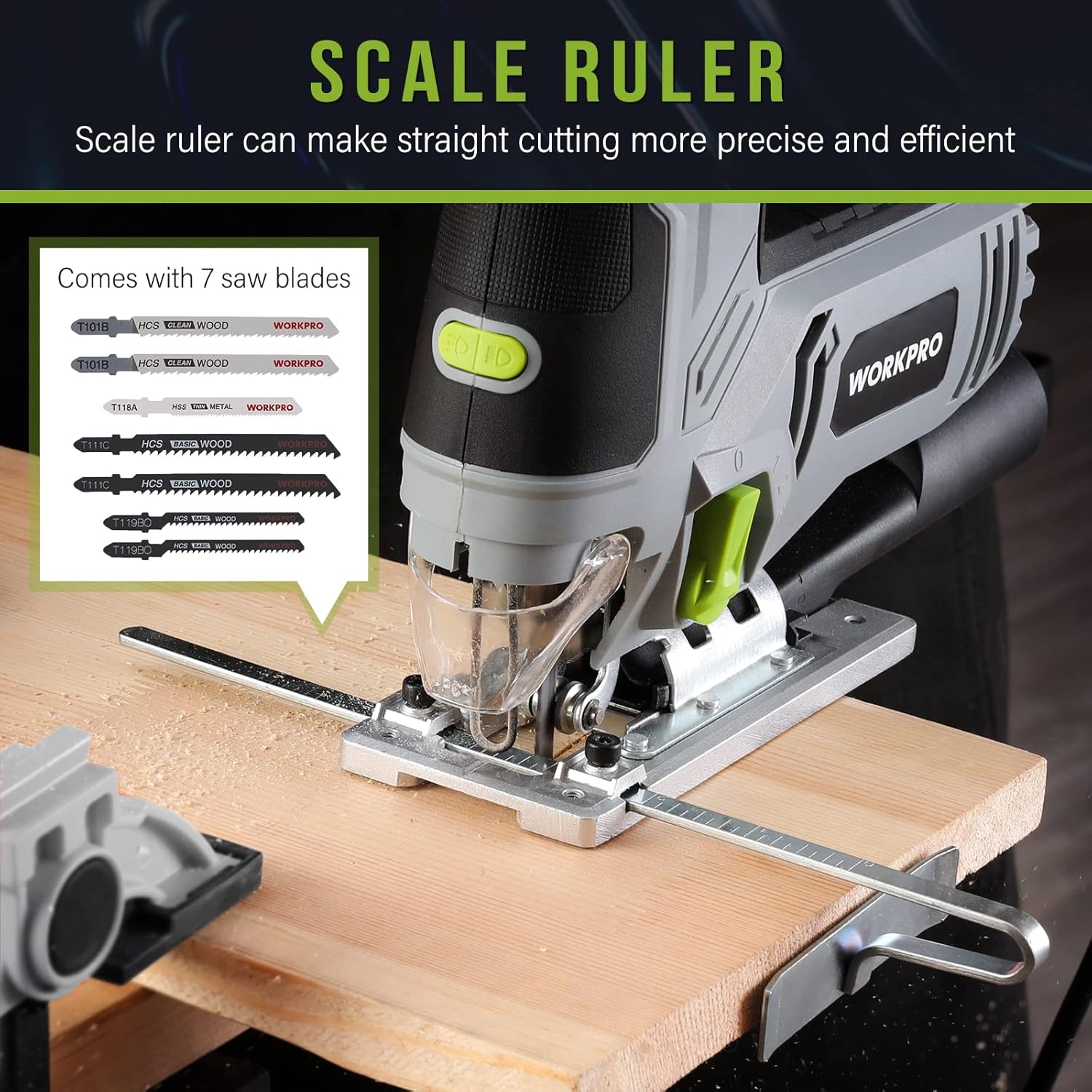
Figure 7: The included scale ruler assists in making straight and precise cuts.
5. Instellen
5.1 Installatie van het mes
- Zorg ervoor dat de decoupeerzaag niet is aangesloten op het stroomnet.
- Locate the tool-less blade change lever on the front of the saw.
- Push the lever to release the blade clamp.
- Insert the T-shank blade into the blade holder until it clicks securely into place.
- Release the lever to lock the blade. Gently pull on the blade to ensure it is firmly seated.
5.2 Bevestiging van de stofafzuigpijp
For dust collection, attach the dust exhaust pipe to the designated port at the rear of the saw. This allows connection to a vacuum system to keep your work area clean.
5.3 Adjusting Base for Bevel Cuts
- Using the included Allen wrench, loosen the screws on the base plate.
- Tilt the base plate to the desired angle (up to ±45 degrees). Use the angle markings on the base for accuracy.
- Tighten the screws firmly to secure the base plate in position.
5.4 Using the Scale Ruler (Edge Guide)
The scale ruler can be inserted into the slot on the base plate to guide straight cuts parallel to an edge. Adjust the ruler to the desired distance from the blade and tighten its locking mechanism.
6. Gebruiksaanwijzing
6.1 In-/uitschakelen
To turn the jig saw on, press the trigger switch. To turn it off, release the trigger. For continuous operation, press the lock-on button while the trigger is depressed. To release the lock, press the trigger again.
6.2 Variabele snelheidsregeling
Adjust the variable speed dial located on top of the tool to select the appropriate speed for your material. Speeds range from 1 (lowest) to 6 (highest). Use lower speeds for harder materials or intricate cuts, and higher speeds for softer materials or faster cuts.
6.3 Orbital Action Selection
The orbital action lever allows you to choose from four settings (0-3). Setting 0 provides no orbital action for fine, splinter-free cuts. Higher settings increase the orbital action for faster, more aggressive cuts in softer materials.
6.4 Het LED-licht gebruiken
The LED light can be turned on or off using the dedicated switch near the front of the tool. This feature is useful for illuminating the cutting line in low-light conditions.
6.5 Stofbeheer
Utilize the dust blower switch to direct air away from the cutting line, keeping it clear of sawdust. For more comprehensive dust collection, attach the dust exhaust pipe to a vacuum cleaner.
6.6 General Cutting Tips
- Bevestig uw werkstuk altijd met een klem.amps om beweging tijdens het snijden te voorkomen.
- Laat de zaag op volle snelheid komen voordat u het materiaal bewerkt.
- Apply steady, even pressure. Do not force the saw, as this can damage the blade or motor.
- For plunge cuts, tilt the saw forward on its base plate, start the cut, and slowly lower the blade into the material.
7. Onderhoud
Regular maintenance ensures the longevity and optimal performance of your WORKPRO Jig Saw.
- mes vervangen: Replace blades when they become dull or damaged to ensure clean and efficient cuts. Always use appropriate T-shank blades for the material being cut.
- Schoonmaak: After each use, unplug the tool and clean any sawdust or debris from the ventilation slots and the blade area. Use a soft brush or compressed air.
- Snoerinspectie: Controleer het netsnoer regelmatig op beschadigingen. Laat het snoer in geval van schade repareren door een gekwalificeerde professional.
- Opslag: Store the jig saw in a dry, secure location out of reach of children.
8. Probleemoplossing
If you encounter issues with your jig saw, refer to the following common problems and solutions:
| Probleem | Mogelijke oorzaak | Oplossing |
|---|---|---|
| Zaag start niet | Geen stroomtoevoer; defecte schakelaar. | Check power outlet and cord. If issue persists, contact service. |
| Het mes snijdt niet recht | Dull or bent blade; incorrect orbital setting; forcing the tool. | Replace blade. Adjust orbital setting. Apply less pressure. |
| Overmatige trillingen | Los mes; beschadigd mes; versleten interne onderdelen. | Ensure blade is securely installed. Replace blade. Contact service if vibration continues. |
| Oververhitting van de motor | Verstopte ventilatiesleuven; continu intensief gebruik. | Maak de ventilatiesleuven schoon. Laat het gereedschap afkoelen. Verminder de belasting. |
Als het probleem aanhoudt na het proberen van deze oplossingen, neem dan contact op met de klantenservice van WORKPRO.
9. Specificaties
| Functie | Detail |
|---|---|
| Merk | WERKPRO |
| Modelnummer | W124748A |
| Energiebron | Elektrische kabel |
| Huidige beoordeling | 6.5 Amps |
| Wattage | 850 watt |
| Deeltage | 120 Volt |
| Snelheid | 3000 SPM (slagen per minuut) |
| Schuine snijhoek | ±45 graden |
| Orbitale instellingen | 4 posities |
| Bladmateriaal | Metaal |
| Oppervlakte aanbeveling | Hout |
| Artikelgewicht | 5.44 pond |
| Productafmetingen | 8.86"L x 11.22"B x 3.15"H |
| Speciale functie | Tool-less Blade Change, LED Light, Dust Blower |
| UPC | 820909772569 |
10. Garantie en ondersteuning
De WORKPRO 6.5AMP 850W Corded Electric Jig Saw comes with a limited warranty. For specific warranty terms and conditions, please refer to the warranty card included in your product packaging or visit the official WORKPRO webplaats.
For technical support, replacement parts, or any inquiries regarding your product, please contact WORKPRO customer service. Contact information can typically be found in your user manual or on the WORKPRO brand webplaats.