
Invoering
Bedankt voor uw aankoopasing the Northpoint NP-TL LED Desk Lamp. This modern and versatile desk lamp is designed to provide optimal lighting for your workspace while offering convenient features such as QI wireless charging and an integrated display for time and temperature. Please read this manual carefully before use to ensure proper operation and to maximize the lifespan of your product.
Veiligheidsinstructies
- Ensure the power adapter is compatible with your local power supply before connecting.
- Demonteer, repareer of wijzig het apparaat niet.amp Neem zelf contact op met gekwalificeerd servicepersoneel voor hulp.
- Vermijd het plaatsen van de lamp in high-temperature, humid, or dusty environments.
- Houd de lamp away from water and other liquids.
- Do not look directly into the LED light source for extended periods to prevent eye strain.
- Trek de stekker uit het stopcontactamp from the power outlet before cleaning or when not in use for a long time.
- Dit product is uitsluitend bedoeld voor gebruik binnenshuis.
Inhoud van het pakket
Controleer het pakket op de volgende items:
- Northpoint NP-TL LED Desk Lamp
- 12V voedingsadapter
- Gebruiksaanwijzing
Product voorbijview
Familiarize yourself with the components of your Northpoint NP-TL LED Desk Lamp.

Afbeelding 1: Voorkant view of the Northpoint NP-TL LED Desk Lamp, showing the adjustable light head, flexible arm, integrated display, and QI wireless charging base with mood lighting.

Afbeelding 2: Zijkant view of the Northpoint NP-TL LED Desk Lamp, highlighting the flexible arm design and the integrated display on the lamp's lichaam.

Image 3: The Northpoint NP-TL LED Desk Lamp in a typical desk environment, demonstrating its compact size and ambient lighting capabilities.
- Adjustable LED Head: Provides directional lighting.
- Flexibele arm: Allows for easy positioning of the light.
- Geïntegreerd beeldscherm: Shows time, date, and ambient temperature.
- Touch-bedieningspaneel: For adjusting light settings and display functions.
- QI Wireless Charging Pad: Located on the base for compatible devices.
- Mood Light Base: Provides ambient RGB lighting.
Instellen
- Uitpakken: Haal alle onderdelen voorzichtig uit de verpakking.
- Positie: Plaats de lamp op een stabiele, vlakke ondergrond.
- Sluit stroom aan: Insert the DC plug of the 12V power adapter into the power input port on the back of the lamp base. Plug the adapter into a standard wall outlet.
- Initiële scherminstellingen: Upon first power-on, the display will illuminate. You may need to set the time and date using the touch controls (refer to "Operating Instructions - Display Settings").
Gebruiksaanwijzing
Lichtfuncties
- Aan/uit: Tik op de Aan/uit-knop (
 ) on the touch control panel to turn the lamp aan of uit.
 - Helderheidsaanpassing (dimbaar): terwijl de lamp is on, press and hold the Helderheidsknop (often represented by a sun icon or +/-) to smoothly adjust the light intensity. Release when the desired brightness is reached.
- Kleurtemperatuuraanpassing: Tik op de Mode/Color Temperature button (often represented by a 'M' or color spectrum icon) to cycle through different color temperatures: Warm White, Neutral White, and Cool White.
QI Draadloos opladen
- Place your QI-compatible smartphone or device directly onto the wireless charging pad located on the lamp's basis.
- Zorg ervoor dat het apparaat in het midden van het laadstation is geplaatst voor optimaal opladen.
- A charging indicator (if available on your device) will confirm that charging has begun.
- Remove any metallic objects or thick cases from your device that may interfere with wireless charging.
Integrated Display Settings (Time, Date, Temperature)
The integrated LCD displays time, date, and ambient temperature. Specific buttons for setting these functions are usually located near the display or on the touch panel.
- Tijd/datum instellen: Look for buttons labeled "SET", "MODE", or similar. Typically, you press "SET" to enter setting mode, then use arrow buttons or +/- to adjust values, and "SET" again to confirm and move to the next setting (e.g., hour, minute, year, month, day).
- Temperatuurweergave: De lamp automatically detects and displays the ambient temperature. No manual setting is required for this function.
Sfeerverlichting
- De lamp features an integrated mood light base. Look for a dedicated Mood Light-knop (often a color wheel or RGB icon).
- Tap the button to cycle through different static colors or activate a color-changing mode.
- Press and hold the button to turn the mood light off.
Onderhoud
- Schoonmaak: Schakel de stroom uit voordat u gaat schoonmaken. Gebruik een zachte, droge doek om het oppervlak af te vegen.amp. Do not use abrasive cleaners, solvents, or harsh chemicals.
- Opslag: Als u de lamp Als u het apparaat voor langere tijd niet gebruikt, haal dan de stekker uit het stopcontact en bewaar het op een koele, droge plaats.
- LED lichtbron: De LED-lichtbron is geïntegreerd en kan niet door de gebruiker worden vervangen.
Probleemoplossing
| Probleem | Mogelijke oorzaak | Oplossing |
|---|---|---|
| Lamp schakelt niet in. | Geen stroomaansluiting. Defecte voedingsadapter. | Zorg ervoor dat de stroomadapter stevig in beide l is gestokenamp en het stopcontact. Probeer een ander stopcontact. Als het probleem aanhoudt, neem dan contact op met de klantenservice. |
| Draadloos opladen werkt niet. | Device not QI-compatible. Apparaat niet goed uitgelijnd. Obstruction (e.g., thick case, metallic object). | Verify your device supports QI wireless charging. Reposition your device on the charging pad. Remove any cases or metallic objects. |
| Display shows incorrect time/date. | Time/date not set or reset after power interruption. | Refer to "Operating Instructions - Display Settings" to manually set the time and date. |
| Het licht flikkert of is instabiel. | Onstabiele stroomvoorziening. Probleem met interne component. | Probeer de lamp into a different power outlet. If the problem continues, discontinue use and contact customer support. |
Specificaties
| Merk | Noordpunt |
| Modelnummer | NP-TL |
| Productafmetingen (L x B x H) | 16.6x6x33.5cm |
| Materiaal | Kunstleer |
| Afwerkingstype | Leather look |
| Lichtbrontype | LED |
| Stroom | 18 Watt |
| Lichtstroom | 480 lm |
| Kleurweergave-index (CRI) | 80.00 |
| Speciale kenmerken | Dimmable, QI Wireless Charging, Temperature Display, Mood Lighting |
| Wissel van stijl | Aanraken |
| IP-classificatie | IP20 |
| Deeltage | 12 Volt |
| Meegeleverde componenten | QI Charging Station, 12V Power Adapter |

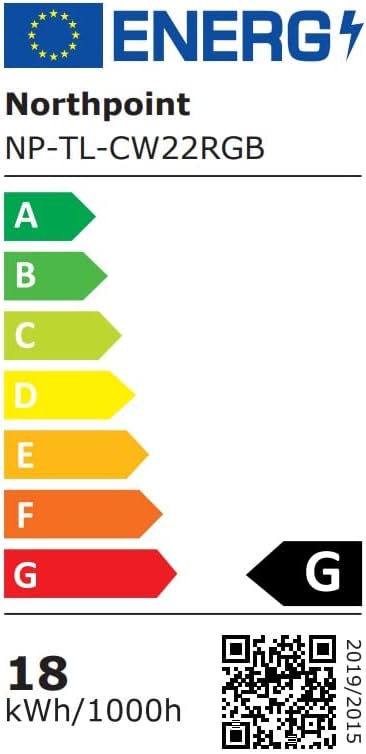
Image 4: Energy efficiency label for the Northpoint NP-TL LED Desk Lamp, indicating energy class G and 18 kWh/1000h consumption.
Garantie en ondersteuning
Northpoint products are manufactured to high-quality standards. For warranty information or technical support, please refer to the contact details provided with your purchase documentation or visit the official Northpoint webwebsite. Bewaar uw aankoopbewijs voor eventuele garantieclaims.
Note: Information regarding spare parts availability and software updates is not available at the time of printing.