
1. Inleiding
This manual provides essential information for the safe and efficient use of your Aligator A675 Senior Double SIM 2G Mobile Phone. Please read it carefully before using the device and keep it for future reference. The Aligator A675 is designed for ease of use, featuring large buttons and a clear display, making it ideal for senior users.
2. Inhoud van het pakket
Controleer of alle artikelen in het pakket aanwezig zijn:
- Aligator A675 Mobile Phone
- Batterij
- Oplader
- Gebruikershandleiding (dit document)
Als er artikelen ontbreken of beschadigd zijn, neem dan contact op met uw verkoper.
3. Apparaat voorbijview
Familiarize yourself with the key components of your Aligator A675 phone.

Afbeelding 3.1: Voor- en achterkant view of the Aligator A675 mobile phone. The front shows the display, keypad, and navigation buttons. The back features the speaker and camera module.
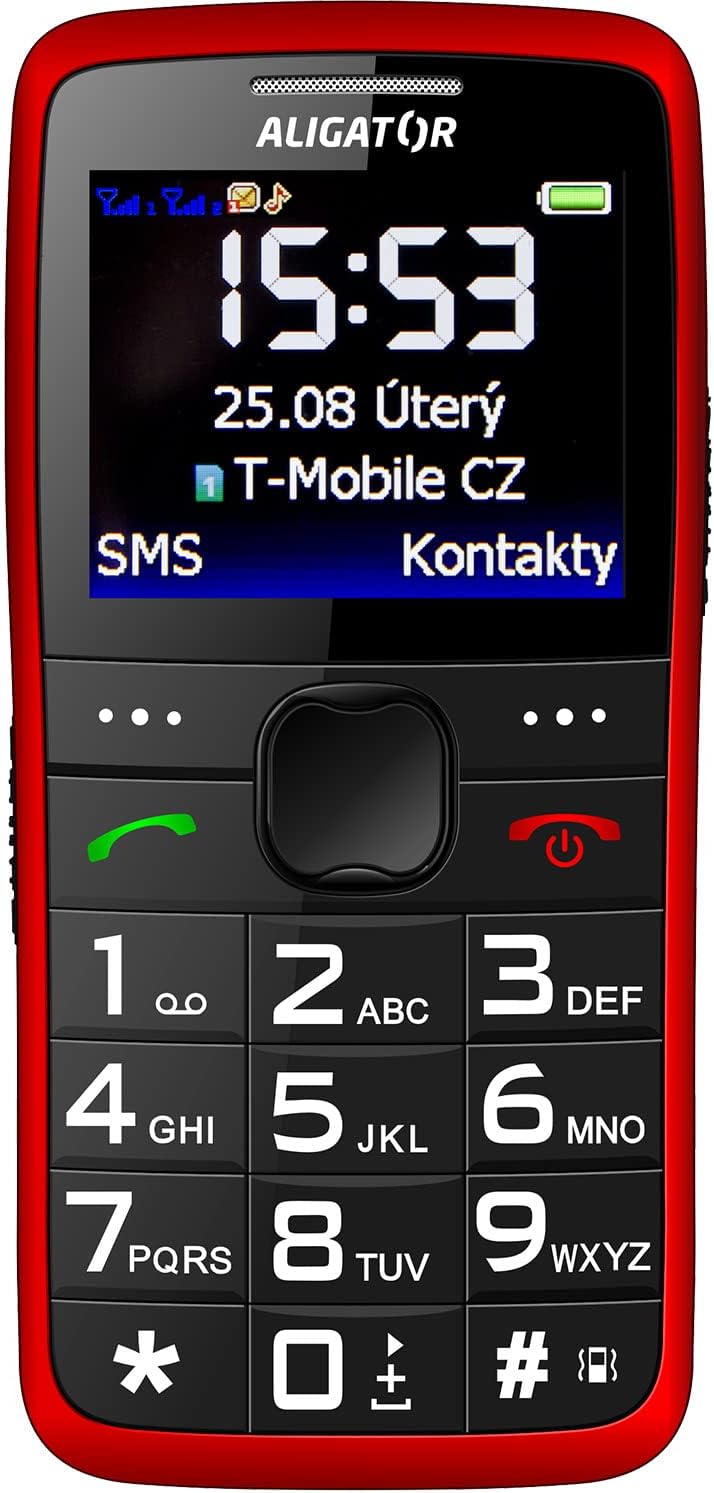
Afbeelding 3.2: Gedetailleerde voorkant view of the Aligator A675 mobile phone, highlighting the large display, clear numeric keypad, and dedicated call/end buttons.
3.1 voorzijde View
- Weergave: Shows time, date, network status, battery level, and menu options.
- Navigatietoets: Wordt gebruikt om door menu's en opties te scrollen.
- Oproepknop (groen): Initiates calls and answers incoming calls.
- Eind-/aan/uit-knop (rood): Ends calls, returns to the home screen, and powers the phone on/off.
- toetsenbord: Numeric keys (0-9), asterisk (*), and hash (#) for dialing and text input.
3.2 Terug View
- Luidspreker: For ringtones and hands-free calls.
- Camera: Voor eenvoudige foto-opnames.
- SOS-knop: A dedicated button for emergency calls/SMS (refer to section 5.4 for setup).
4. Instellen
Follow these steps to prepare your phone for first use.
4.1 SIM-kaarten plaatsen
- Verwijder de achterkant van de telefoon door deze voorzichtig open te wrikken bij de inkeping.
- Als er een batterij in zit, verwijder deze dan.
- Locate the SIM card slots. The Aligator A675 supports two SIM cards (Dual SIM).
- Carefully insert your 2G GSM SIM card(s) into the designated slot(s) with the gold contacts facing down, ensuring they are correctly oriented.
- Ensure the SIM cards are securely in place.
4.2 De batterij plaatsen
- Lijn de contactpunten van de batterij uit met de contactpunten in het batterijcompartiment van de telefoon.
- Gently press the battery into place until it fits snugly.
- Plaats de achterklep terug en zorg ervoor dat deze vastklikt.
4.3 De telefoon opladen
- Connect the charger cable to the charging port on the phone (usually located at the bottom).
- Sluit de oplader aan op een stopcontact.
- Het batterijpictogram op het display geeft de laadstatus aan.
- Allow the phone to charge completely before first use. This typically takes a few hours.
5. De telefoon bedienen
Basic functions and features of your Aligator A675.
5.1 In-/uitschakelen
- Inschakelen: Houd de End/Power Button (red button) until the screen lights up.
- Uitschakelen: Houd de End/Power Button until the power-off options appear, then confirm.
5.2 Bellen en gebeld worden
- Om te bellen: Voer het telefoonnummer in met het toetsenbord en druk op de knop. Belknop (groene knop).
- Een oproep beantwoorden: Druk op de Belknop als de telefoon gaat.
- Een gesprek beëindigen: Druk op de End/Power Button.
5.3 SMS verzenden en ontvangen
- Navigate to the 'Messages' menu using the navigation key.
- Selecteer 'Bericht schrijven' om een nieuw sms-bericht op te stellen.
- Voer het nummer van de ontvanger in of selecteer een nummer uit uw contacten.
- Type your message using the keypad. Press the appropriate key multiple times for different letters (e.g., '2' for A, B, C).
- Selecteer 'Verzenden'.
- Inkomende berichten worden op het scherm weergegeven en opgeslagen in de 'Inbox'.
5.4 SOS-functie
Met de SOS-functie kunt u snel contact opnemen met vooraf ingestelde noodnummers.
- SOS-nummers instellen: Go to 'Settings' > 'SOS Settings'. Add up to 5 emergency contact numbers.
- SOS activeren: Houd de SOS-knop on the back of the phone for a few seconds.
- The phone will automatically send an emergency SMS to the pre-set numbers and then start dialing them one by one until a call is answered.
5.5 Contacten
- Een contactpersoon toevoegen: Go to 'Contacts' > 'Add New'. Enter the name and phone number, then save.
- Een contactpersoon zoeken: Go to 'Contacts' and use the navigation key to scroll or type the first letters of the name.
6. Onderhoud en verzorging
Proper care ensures the longevity of your Aligator A675 phone.
- Schoonmaak: Gebruik een zachte, droge doek om het oppervlak van de telefoon schoon te maken. Vermijd vloeibare reinigingsmiddelen of schurende materialen.
- batterij zorg: Stel de batterij niet bloot aan extreme temperaturen. Vermijd het regelmatig volledig ontladen van de batterij.
- Opslag: Bewaar de telefoon op een koele, droge plaats, uit de buurt van direct zonlicht en vocht.
- Waterbestendigheid: Deze telefoon is niet waterbestendig. Vermijd contact met vloeistoffen.
7. Probleemoplossing
Veelvoorkomende problemen en hun oplossingen.
| Probleem | Mogelijke oorzaak | Oplossing |
|---|---|---|
| Telefoon gaat niet aan | Batterij bijna leeg; batterij niet correct geplaatst | Laad de batterij op; plaats de batterij correct terug. |
| Kan geen oproepen maken/ontvangen | No network signal; SIM card not inserted; SIM card not activated | Move to an area with better signal; Reinsert SIM card; Contact your network provider |
| Geen geluid tijdens gesprekken | Volume too low; Speaker blocked | Increase call volume; Check if speaker is obstructed |
| De SOS-functie werkt niet. | SOS-nummers niet ingesteld; geen netwerksignaal | Set up SOS numbers in settings; Ensure network coverage |
Als het probleem zich blijft voordoen, neem dan contact op met de klantenservice.
8. Specificaties
Key technical details of the Aligator A675.
- Merk: ALIGATOR
- Model: A675
- Draadloze provider: Ontgrendeld
- Draadloze netwerktechnologie: GSM-netwerk (2G)
- Schermgrootte: 3 inch
- Menselijke interface-invoer: Toetsenbord
- SIM-ondersteuning: Dubbele simkaart
9. Garantie en ondersteuning
Your Aligator A675 phone is covered by a standard manufacturer's warranty. Please refer to the warranty card included in your package for specific terms and conditions, including the warranty period and coverage details.
For technical support, service, or warranty claims, please contact your retailer or the official Aligator customer service. Contact information can typically be found on the manufacturer's webwebsite of op de verpakking.
Bewaar uw aankoopbewijs (bon of factuur). U heeft dit nodig voor eventuele service onder de garantie.