
Invoering
This manual provides detailed instructions for the setup, operation, and maintenance of your DT96 Smartwatch. Please read this guide thoroughly to ensure proper use and to maximize the features of your device.
Inhoud van het pakket
Upon opening your DT96 Smartwatch package, please verify that all the following items are included:
- DT96 Smartwatch Unit
- Roestvrijstalen band
- Siliconen band
- Oplaadkabel
- Gebruikershandleiding (dit document)

Image: The DT96 Smartwatch unit shown with both the included stainless steel mesh strap and an additional black silicone strap.
Instellen
1. De smartwatch opladen
Before first use, fully charge your DT96 Smartwatch. Connect the charging cable to the charging port on the back of the watch and plug the other end into a USB power adapter (not included) or a computer's USB port.
- Oplaadtijd: Ongeveer 2 uur voor een volledige lading.
- Levensduur batterij: Up to 7-9 days in standby mode.
2. Installing the Straps
Your DT96 Smartwatch comes with two interchangeable straps: one stainless steel and one silicone. To install a strap:
- Locate the quick-release pins on the strap.
- Insert one end of the pin into the lug hole on the watch casing.
- Slide the quick-release lever to retract the other end of the pin, align it with the opposite lug hole, and release the lever.
- Trek voorzichtig aan de riem om te controleren of deze goed vastzit.
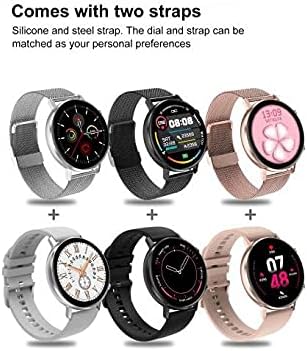
Afbeelding: Examples of the DT96 Smartwatch fitted with different strap types, including silicone and steel, demonstrating customization options.
3. App-installatie en koppeling
To unlock the full functionality of your DT96 Smartwatch, you need to install the companion application on your smartphone and pair the devices via Bluetooth.
- Download de app: Scan the QR code in the quick start guide (if provided) or search for the official DT96 companion app in your smartphone's app store (e.g., Apple App Store or Google Play Store).
- Bluetooth inschakelen: Zorg ervoor dat Bluetooth is ingeschakeld op uw smartphone.
- Open de app: Launch the DT96 app and follow the on-screen instructions to create an account or log in.
- Koppel het apparaat: Within the app, navigate to the device pairing section. The app will search for available devices. Select "DT96" from the list.
- Koppeling bevestigen: Er kan een koppelingsverzoek verschijnen op zowel je telefoon als de smartwatch. Bevestig de koppeling op beide apparaten.
- Taalinstellingen: The smartwatch supports multiple languages including Chinese, English, Russian, German, Spanish, Portuguese, French, Japanese, Italian, and Polish. Language settings are typically managed through the companion app.
Gebruiksaanwijzing
The DT96 Smartwatch features a touch-sensitive display and physical buttons for navigation and control.
1. Basisnavigatie
- Touchscreen: Veeg naar links, rechts, omhoog of omlaag om door menu's en functies te navigeren. Tik om een optie te selecteren.
- Zijknoppen: Use the physical buttons on the side of the watch to return to the home screen, power on/off, or access specific functions as defined in the app.
2. Belangrijkste kenmerken
The DT96 Smartwatch offers a range of features to enhance your daily life:
- Activiteitentracker: Monitors steps, distance, and calories burned. Access daily activity summaries through the watch or the companion app.
- Meldingen: Receive alerts for calls, messages, and app notifications directly on your wrist. Ensure notification permissions are granted in the companion app.
- Tijdweergave: Digital time display with customizable watch faces.
- Hartslagmeter: Tracks your heart rate throughout the day. Consult the app for detailed heart rate data and trends.
- Slaapmonitor: Analyseert uw slaappatroon, inclusief diepe slaap, lichte slaap en wakkertijden.
- SpO2-monitor: Meet het zuurstofgehalte in het bloed.
- Bediening van muziekspeler: Bedien de muziekweergave op uw verbonden smartphone.
- Weer: View current weather conditions (requires app connection and location permissions).
- Alarm, Calculator, Calendar, Stop Watch, Reminders: Access these utility functions directly from the watch.
3. Watchfaces aanpassen
Personalize your DT96 Smartwatch with various watch faces:
- The watch comes with 4 pre-installed watch face styles.
- Additional watch faces (over 14) can be downloaded and applied through the companion app.
- Open the app, navigate to the watch face section, select your preferred design, and sync it to your watch.
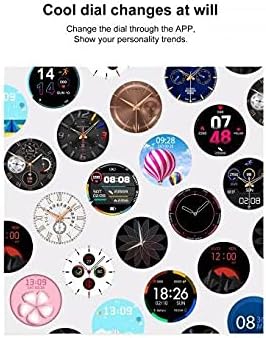
Image: A selection of diverse watch faces available for customization on the DT96 Smartwatch, demonstrating various styles and information displays.
Onderhoud
1. Uw smartwatch schoonmaken
To keep your DT96 Smartwatch in optimal condition:
- Veeg het scherm schoon en casinmet een zachte, pluisvrije doek.
- Voor hardnekkige vlekken, lichtjes dampMaak de doek schoon met water. Vermijd het gebruik van agressieve chemicaliën of schurende materialen.
- Maak de laadcontacten regelmatig schoon om efficiënt opladen te garanderen.
2. Waterbestendigheid
The DT96 Smartwatch is water-resistant. However, it is not suitable for diving, hot showers, or prolonged submersion. Avoid exposing the watch to hot water or steam, as this can damage the seals.
Probleemoplossing
If you encounter issues with your DT96 Smartwatch, refer to the following common solutions:
- Horloge gaat niet aan: Zorg ervoor dat het horloge volledig is opgeladen. Sluit het minstens 30 minuten aan op de oplader.
- Kan niet koppelen met smartphone:
- Zorg ervoor dat Bluetooth is ingeschakeld op uw telefoon en het horloge.
- Zorg ervoor dat het horloge zich binnen bereik van uw telefoon bevindt.
- Start zowel uw telefoon als uw smartwatch opnieuw op.
- Probeer het apparaat via de app te ontkoppelen en opnieuw te koppelen.
- Meldingen worden niet weergegeven:
- Check notification permissions in your phone's settings for the DT96 app.
- Ensure notifications are enabled within the DT96 companion app.
- Verify that the watch is properly connected to your phone via Bluetooth.
- Onnauwkeurige activiteitsgegevens: Ensure the watch is worn snugly on your wrist. Calibrate the app if there's an option.
- Scherm reageert niet: Probeer het horloge opnieuw op te starten door de zijknop ingedrukt te houden. Als het horloge niet reageert, laat de batterij dan volledig leeglopen en laad hem vervolgens weer op.
Specificaties
| Functie | Detail |
|---|---|
| Modelnaam | DT96 |
| Connectiviteitstechnologie | Bluetooth 5.0 |
| Weergavetype | Digital, Touch Screen |
| Weergaveresolutie | 240 x 240 pixels |
| Vorm | Ronde |
| Materiaal van de behuizing | Roestvrij staal |
| Bandmateriaal | Silicone, Stainless Steel (interchangeable) |
| Waterbestendigheidsniveau | Waterbestendig |
| Doelgroep | Unisex Volwassene |
| Compatibele apparaten | Smartphone |
| Ondersteunde applicaties | Alarm, Calculator, Calendar, Contacts, Email, Fitness Tracker, GPS (via phone), Heart Rate Monitor, Messages, Multisport Tracker, Music Player, Pedometer, Phone, Reminders, Sleep Monitor, SpO2 Monitor, Stop Watch, Voice Assistant, Weather |
| Oplaadtijd | Ongeveer 2 uur |
| Standby-tijd | 7-9 dagen |
| Ondersteunde talen | Chinese, English, Russian, German, Spanish, Portuguese, French, Japanese, Italian, Polish |

Image: Technical diagram illustrating the dimensions of the DT96 Smartwatch, including watch face diameter, thickness, strap width, and recommended wrist circumference.
Garantie en ondersteuning
For warranty information, please refer to the documentation provided at the time of purchase or contact your retailer. For technical support, please refer to the contact information provided by the manufacturer or retailer.
Always ensure you are using the latest version of the companion app for optimal performance and access to new features.